https://github.com/PixelsCommander/polymer-native
Develop completely native mobile apps with Web Components
https://github.com/PixelsCommander/polymer-native
Last synced: 12 months ago
JSON representation
Develop completely native mobile apps with Web Components
- Host: GitHub
- URL: https://github.com/PixelsCommander/polymer-native
- Owner: PixelsCommander
- Created: 2016-05-06T14:26:30.000Z (about 10 years ago)
- Default Branch: master
- Last Pushed: 2016-07-13T14:24:32.000Z (about 10 years ago)
- Last Synced: 2024-11-16T14:34:49.656Z (over 1 year ago)
- Language: JavaScript
- Homepage:
- Size: 3.82 MB
- Stars: 46
- Watchers: 7
- Forks: 7
- Open Issues: 10
-
Metadata Files:
- Readme: README.md
Awesome Lists containing this project
README

Native UI framework based on Web Components
===========================================
[](https://gitter.im/PixelsCommander/polymer-native?utm_source=badge&utm_medium=badge&utm_campaign=pr-badge&utm_content=badge)
Want to have superpowers of React Native without knowing all the React, Flux, Redux, Webpack? Here you go. Feel free to use HTML/CSS which you know so good and VanillaJS to develop completely native applications for mobile platforms. Also could be used with any JS framework.
Example app index.html
----------------------
```html
body {
margin: 20px;
}
#icon {
display: inline-block;
margin-bottom: 20px;
}
#submit-input {
width: 100%;
}
button {
margin-bottom: 10px;
width: 100%;
}

Alert input value
```
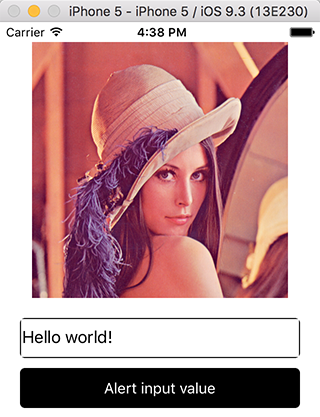
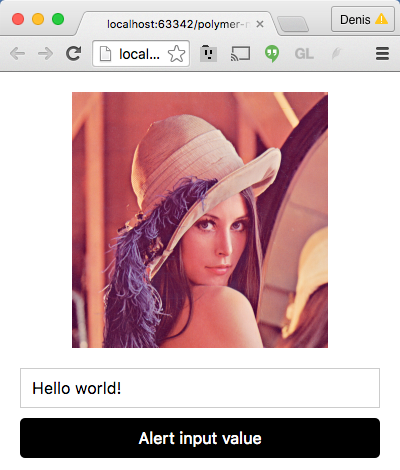
Will result in app looking in the same way in browser and on mobile device or emulator but the difference is that in browser all controls are web and on mobile UI is native which leads to higher user satisfaction without additional job done.
Result iOS (native app)
-------------
Result Chrome (web app)
-------------
Motivation
----------
Currently mobile devices are powerful enough to run mobile web applications at 60 FPS however controls behavior (buttons, sliders, form elements) is different between web and native platforms. Experienced user notice this difference immediately which results in lower user satisfaction for web based apps because they got used to consistent UI behavior on mobile platform of their choice. Creating native facades for web components results in better user experience without additional effort or knowledge needed.
How to
------
Installing via NPM
```bash
npm install polymer-native -g
```
Initializing new project
```bash
polymer-native init MyTestProject
```
Running project on iOS
Open project in x-code and run it with cmd+r
Contributor guide
-----------------
Fork, clone and run ```npm install``` in project folder.
Run ```gulp``` to start continous build with watchers which will run build every time you edit project files.
Test by opening ```./partials/www/index.html``` in browser.
After changes are made create PR into original repository.
License
-------
MIT: http://mit-license.org/
Copyright 2016 Denis Radin aka [PixelsCommander](http://pixelscommander.com)