https://github.com/ProjectPyRhO/PyRhO
A virtual optogenetics laboratory
https://github.com/ProjectPyRhO/PyRhO
brain brainweb brian2 computational-neuroscience jupyter-widget neuron neuroscience opsin optogenetics python
Last synced: 3 months ago
JSON representation
A virtual optogenetics laboratory
- Host: GitHub
- URL: https://github.com/ProjectPyRhO/PyRhO
- Owner: ProjectPyRhO
- License: bsd-3-clause
- Created: 2016-02-16T19:59:00.000Z (over 10 years ago)
- Default Branch: master
- Last Pushed: 2023-07-24T10:42:18.000Z (almost 3 years ago)
- Last Synced: 2026-03-08T07:16:41.293Z (4 months ago)
- Topics: brain, brainweb, brian2, computational-neuroscience, jupyter-widget, neuron, neuroscience, opsin, optogenetics, python
- Language: Python
- Size: 3.8 MB
- Stars: 40
- Watchers: 1
- Forks: 9
- Open Issues: 1
-
Metadata Files:
- Readme: README.md
- License: LICENSE
- Citation: citation.cff
Awesome Lists containing this project
- open-computational-neuroscience-resources - PyRhO - Virtual laboratory for optogenetic simulation. Integrates with NEURON and Brian2 models.
README

*A Virtual Optogenetics Laboratory*
------------------------------------------------------------------------
PyRhO is a Python module to fit, characterise and simulate (rhod)opsin
photocurrents.
[](https://pypi.org/project/PyRhO/) [](https://github.com/ProjectPyRhO/PyRhO/blob/master/LICENSE) [](https://travis-ci.org/ProjectPyRhO/PyRhO) [](https://pypi.org/project/PyRhO/) [](https://github.com/ProjectPyRhO/PyRhO/stargazers)
Background
==========
Optogenetics has become a key tool for understanding the function of
neural circuits and controlling their behaviour. An array of directly
light driven opsins have been genetically isolated from several families
of organisms, with a wide range of temporal and spectral properties. In
order to characterize, understand and apply these rhodopsins, we present
an integrated suite of open-source, multi-scale computational tools
called PyRhO.
PyRhO enables users to:
1. Characterize new (and existing) rhodopsins by automatically fitting a minimal set of experimental data to three, four or six-state kinetic models,
2. Simulate these models at the channel, neuron & network levels and
3. Gain functional insights through model selection and virtual experiments *in silico*.
The module is written in Python with an additional IPython/[Jupyter](https://jupyter.org/)
notebook based GUI, allowing models to be fit, simulations to be run and
results to be shared through simply interacting with a webpage. The
seamless integration of model fitting algorithms with simulation
environments for these virtual opsins (including
[NEURON](http://www.neuron.yale.edu/neuron/) and
[Brian2](http://briansimulator.org/)) will enable (neuro)scientists to
gain a comprehensive understanding of their behaviour and rapidly
identify the most suitable variant for application in a particular
biological system. This process may thereby guide not only experimental
design and opsin choice but also alterations of the rhodopsin genetic
code in a neuro-engineering feed-back loop. In this way, we hope PyRhO
will help to significantly improve optogenetics as a tool for
transforming biological sciences.
Architecture
============
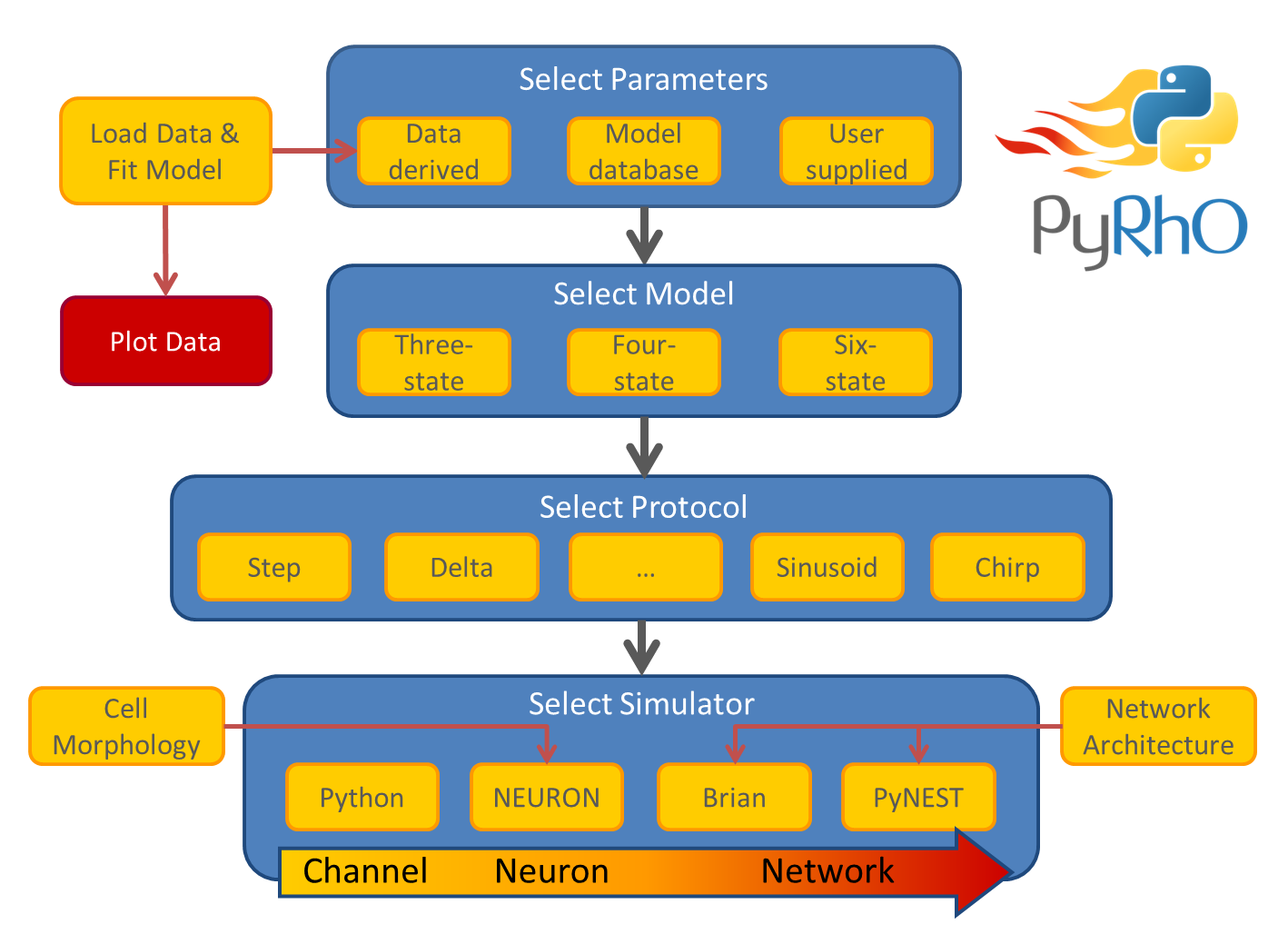
PyRhO is composed of several abstraction layers, including the Model
layer, Protocol layer and Simulator layer (shown in the architectural
schematic below). Choices in each layer are independent or one another,
giving a large number of possible combinations to suit many needs for _in
silico_ experiments. Additionally, parameters may be fit to each type of
kinetic model from experimental data or loaded from the default options
of popular opsins.
Prometheus
==========
If you would like to try PyRhO before installing it, go to
[try.projectpyrho.org](http://try.projectpyrho.org) to launch a fully
configured Jupyter notebook in your browser.
Docker
======
If you wish to use PyRhO in a [Docker](https://www.docker.com/) container, a Dockerfile is provided
in the accompanying Prometheus repository:
The Dockerfile will build a full installation including the NEURON and
Brian2 simulators and the Jupyter notebook GUI. See the repository\'s
README file for instructions.
Installation
============
To install PyRhO (including the GUI) from PyPI use the command: :
pip install pyrho[full]
Alternatively, to install the latest code from GitHub (including the
GUI) use the command: :
pip install git+https://github.com/ProjectPyRhO/PyRhO.git#egg=PyRhO[full]
To use PyRhO with the [NEURON
simulator](http://www.neuron.yale.edu/neuron/) in a Python 3
environment, NEURON must be compiled from its source code. An
installation script is provided for doing this on Mac OS X or Linux. The
resultant installation will also work with Python 2. If you only wish to
use PyRhO/NEURON with Python 2 however, a standard NEURON installation
should be sufficient. The shell script may be called after importing
PyRhO with the following function: :
from pyrho import *
setupNEURON('/installation/path/for/NEURON/')
This will attempt to compile NEURON from source, copy the supplied `mod`
and `hoc` files into place (the current working directory by default)
finally compiling the `mod` files describing the opsin models ready for
inclusion in simulations.
The [Brian simulator](http://briansimulator.org/) is included with the
PyRhO installation for modelling networks of optogenetically transfected
spiking neurons.
Further Information
===================
If you use PyRhO please cite our paper:
Evans, B. D., Jarvis, S., Schultz, S. R. & Nikolic K. (2016) \"PyRhO: A
Multiscale Optogenetics Simulation Platform\", *Frontiers in
Neuroinformatics, 10* (8).
[doi:10.3389/fninf.2016.00008](https://dx.doi.org/10.3389/fninf.2016.00008)
@ARTICLE{pyrho,
AUTHOR={Evans, Benjamin D. and Jarvis, Sarah and Schultz, Simon R. and Nikolic, Konstantin},
TITLE={PyRhO: A Multiscale Optogenetics Simulation Platform},
JOURNAL={Frontiers in Neuroinformatics},
VOLUME={10},
YEAR={2016},
NUMBER={8},
URL={http://journal.frontiersin.org/article/10.3389/fninf.2016.00008/full},
DOI={10.3389/fninf.2016.00008}
}
The PyRhO project website with additional documentation may be found
here:
[www.imperial.ac.uk/bio-modelling/pyrho](http://www.imperial.ac.uk/a-z-research/bio-modelling/pyrho)
Finally, don\'t forget to follow us on twitter for updates:
[\@ProjectPyRhO](https://twitter.com/ProjectPyRhO)!