https://github.com/PyDann/TinyBridge
Homebridge CLI Manager
https://github.com/PyDann/TinyBridge
command-line-tool homebridge homebridge-interface raspberrypi
Last synced: about 1 year ago
JSON representation
Homebridge CLI Manager
- Host: GitHub
- URL: https://github.com/PyDann/TinyBridge
- Owner: PyDann
- License: gpl-3.0
- Created: 2020-02-05T20:03:53.000Z (over 6 years ago)
- Default Branch: master
- Last Pushed: 2020-02-21T17:16:20.000Z (over 6 years ago)
- Last Synced: 2024-02-13T21:24:24.102Z (over 2 years ago)
- Topics: command-line-tool, homebridge, homebridge-interface, raspberrypi
- Language: Python
- Homepage:
- Size: 74.2 KB
- Stars: 2
- Watchers: 1
- Forks: 0
- Open Issues: 0
-
Metadata Files:
- Readme: README.md
- License: LICENSE
Awesome Lists containing this project
README
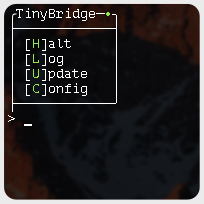
# TinyBridge
## A Homebridge CLI Manager
This project is for quick and easy management of Homebridge installed via the **systemd** method. Providing both interaction through a menu like system or using *options* (`HomeBridge.py -s`).
### *Pre Install READ*
Depending on your install, updating Homebridge and plugins may require `sudo`, or advanced permissions. This is always important to be aware of and understand. By default TinyBridge does not have this enabled. To change this, open TinyBridge.py and modify Line 10: `sudo_opt = True`.
## To Run
`./HomeBridge.py -option`
## Features
**Start Homebridge:** `'s', 'start'`
**Halt Homebridge:** `'h', 'halt', 'stop'`
**View Log** `'l', 'log'`
**Update Homebridge & Plugins:** `'u', 'update'`
**Edit Config.json:** `'c', 'config'`
**Quit/Exit Menu:** `'q', 'quit'`
## Future Updates
\- Update individual plugins
\- Uninstall individual plugins
\- Remote control via ssh
\- Manage Homebridge installed under any method
## Recent Changes
### 2/21
\- Users can change default editor on line 11