https://github.com/Ralex91/Razzia
A self-hosted, open-source quiz platform for smaller events.
https://github.com/Ralex91/Razzia
learning quizz reactjs self-hosted typescript
Last synced: 2 months ago
JSON representation
A self-hosted, open-source quiz platform for smaller events.
- Host: GitHub
- URL: https://github.com/Ralex91/Razzia
- Owner: Ralex91
- License: mit
- Created: 2024-01-31T19:06:59.000Z (over 2 years ago)
- Default Branch: main
- Last Pushed: 2026-05-09T19:03:01.000Z (2 months ago)
- Last Synced: 2026-05-09T20:38:23.928Z (2 months ago)
- Topics: learning, quizz, reactjs, self-hosted, typescript
- Language: TypeScript
- Homepage:
- Size: 13.6 MB
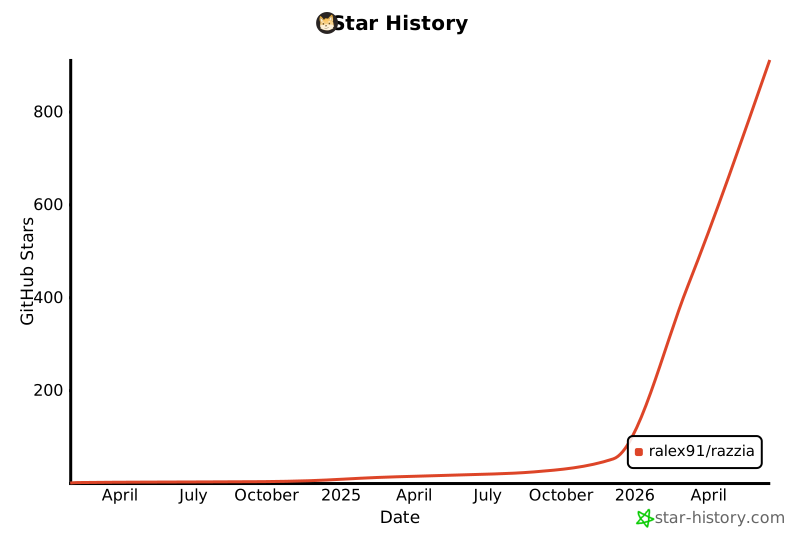
- Stars: 614
- Watchers: 6
- Forks: 0
- Open Issues: 13
-
Metadata Files:
- Readme: README.md
- Contributing: .github/CONTRIBUTING.md
- License: LICENSE
Awesome Lists containing this project
- awesome-selfhosted - Razzia - Quiz game platform, designed for smaller self-hosted events (alternative to Kahoot!). `MIT` `Nodejs/Docker` (Software / Games)
- awesome-selfhosted - Razzia - Quiz game platform, designed for smaller self-hosted events (alternative to Kahoot!). `MIT` `Nodejs/Docker` (Software / Games)
- fucking-awesome-selfhosted - Razzia - Quiz game platform, designed for smaller self-hosted events (alternative to Kahoot!). `MIT` `Nodejs/Docker` (Software / Games)
README


## 🧩 What is this project?
Razzia is a straightforward and open-source quiz platform, allowing users to host it on their own server for smaller events.
> **Disclaimer**: Razzia is an independent, open-source software project. It is not affiliated with, endorsed by, or sponsored by any third-party quiz platform or service. Any resemblance to other quiz platforms is purely incidental.


## ⚙️ Prerequisites
Choose one of the following deployment methods:
### Without Docker
- Node.js : version 22 or higher
- PNPM : version 10.16 or higher (learn more [here](https://pnpm.io/))
### With Docker
- Docker and Docker Compose
## 📖 Getting Started
Choose your deployment method:
### 🐳 Using Docker (Recommended)
Using Docker Compose (recommended):
You can find the docker compose configuration in the repository:
[docker-compose.yml](/compose.yml)
```bash
docker compose up -d
```
Or using Docker directly:
```bash
docker run -d \
-p 3000:3000 \
-v ./config:/app/config \
ralex91/razzia:latest
```
**Configuration Volume:**
The `-v ./config:/app/config` option mounts a local `config` folder to persist your game settings and quizzes. This allows you to:
- Edit your configuration files directly on your host machine
- Keep your settings when updating the container
- Easily backup your quizzes and game configuration
The folder will be created automatically on first run with an example quiz to get you started.
The application will be available at http://localhost:3000
### 🛠️ Without Docker
1. Clone the repository:
```bash
git clone https://github.com/Ralex91/Razzia.git
cd ./Razzia
```
2. Install dependencies:
```bash
pnpm install
```
3. Build and start the application:
```bash
# Development mode
pnpm run dev
# Production mode
pnpm run build
pnpm start
```
## ⚙️ Configuration
The configuration is split into two main parts:
### 1. Game Configuration (`config/game.json`)
Main game settings:
```json
{
"managerPassword": "PASSWORD"
}
```
Options:
- `managerPassword`: The master password for accessing the manager interface. **Must be changed from the default `"PASSWORD"` value**, otherwise manager access is blocked.
### 2. Quiz Configuration (`config/quizz/*.json`)
Quizzes can be created in two ways:
- **Via the Quiz Editor** — use the built-in editor available in the manager dashboard (recommended)
- **Via JSON files** — manually create files in the `config/quizz/` directory
You can have multiple quiz files and select which one to use when starting a game.
Example quiz configuration (`config/quizz/example.json`):
```json
{
"subject": "Example Quiz",
"questions": [
{
"question": "What is the correct answer?",
"answers": ["No", "Yes", "No", "No"],
"solutions": [1],
"cooldown": 5,
"time": 15
},
{
"question": "Which of these are primary colors?",
"answers": ["Red", "Green", "Blue", "Yellow"],
"solutions": [0, 2, 3],
"cooldown": 5,
"time": 20
},
{
"question": "What is the correct answer with an image?",
"answers": ["No", "Yes", "No", "No"],
"media": {
"type": "image",
"url": "https://placehold.co/600x400.png"
},
"solutions": [1],
"cooldown": 5,
"time": 20
}
]
}
```
Quiz Options:
- `subject`: Title/topic of the quiz
- `questions`: Array of question objects containing:
- `question`: The question text
- `answers`: Array of possible answers (2-4 options)
- `media`: Optional media object displayed with the question:
- `type`: `"image"`, `"video"`, or `"audio"`
- `url`: URL of the media
- `solutions`: Array of correct answer indices (0-based). Use multiple indices for multi-answer questions
- `cooldown`: Time in seconds before answers are revealed (3-15)
- `time`: Time in seconds allowed to answer (5-120)
## 🎮 How to Play
1. Access the manager interface at http://localhost:3000/manager
2. Enter the manager password (defined in `config/game.json`)
3. Share the game URL (http://localhost:3000) and room code with participants
4. Wait for players to join
5. Click the start button to begin the game
## 📝 Contributing
Contributions are welcome! Please read the [CONTRIBUTING.md](.github/CONTRIBUTING.md) guide before submitting a pull request.
For bug reports or feature requests, please [create an issue](https://github.com/Ralex91/Razzia/issues).
## ⭐ Star History
[](https://www.star-history.com/#Ralex91/Razzia&type=date&legend=bottom-right)