https://github.com/SixHq/Overture
Overture is an open-source, locally running web interface delivered as an MCP (Model Context Protocol) server that visually maps out the execution plan of any AI coding agent as an interactive flowchart/graph before the agent begins writing code.
https://github.com/SixHq/Overture
ai-agent ai-coding automation claude claude-code codex copilot cursor deepseek developer-tools gemini generative-ai gpt llm mcp mcp-server openclaw planning typescript vscode
Last synced: 2 months ago
JSON representation
Overture is an open-source, locally running web interface delivered as an MCP (Model Context Protocol) server that visually maps out the execution plan of any AI coding agent as an interactive flowchart/graph before the agent begins writing code.
- Host: GitHub
- URL: https://github.com/SixHq/Overture
- Owner: SixHq
- License: mit
- Created: 2026-02-17T01:46:15.000Z (5 months ago)
- Default Branch: main
- Last Pushed: 2026-03-08T01:51:05.000Z (4 months ago)
- Last Synced: 2026-03-12T01:29:50.050Z (4 months ago)
- Topics: ai-agent, ai-coding, automation, claude, claude-code, codex, copilot, cursor, deepseek, developer-tools, gemini, generative-ai, gpt, llm, mcp, mcp-server, openclaw, planning, typescript, vscode
- Language: TypeScript
- Homepage:
- Size: 179 MB
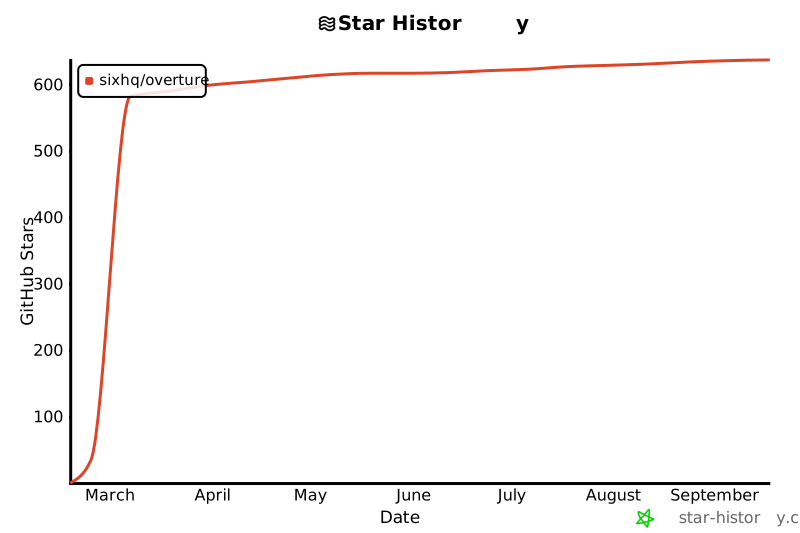
- Stars: 596
- Watchers: 5
- Forks: 57
- Open Issues: 3
-
Metadata Files:
- Readme: README.md
- Changelog: CHANGELOG.md
- Contributing: CONTRIBUTING.md
- Funding: .github/FUNDING.yml
- License: LICENSE
- Code of conduct: CODE_OF_CONDUCT.md
- Security: SECURITY.md
Awesome Lists containing this project
- awesome-openclaw-skills - SixHq/Overture - source, locally running web interface delivered as an MCP (Model Context Protoco... | 601 | (MCP Servers & Protocol)
README

See the plan before the code. Approve it. Then watch it execute.





Problem •
Solution •
Install •
Features •
Marketplace •
Config •
Discussions
https://github.com/user-attachments/assets/eeb9c4cb-c80d-42da-bf63-c0c4ecb1e5d6
---
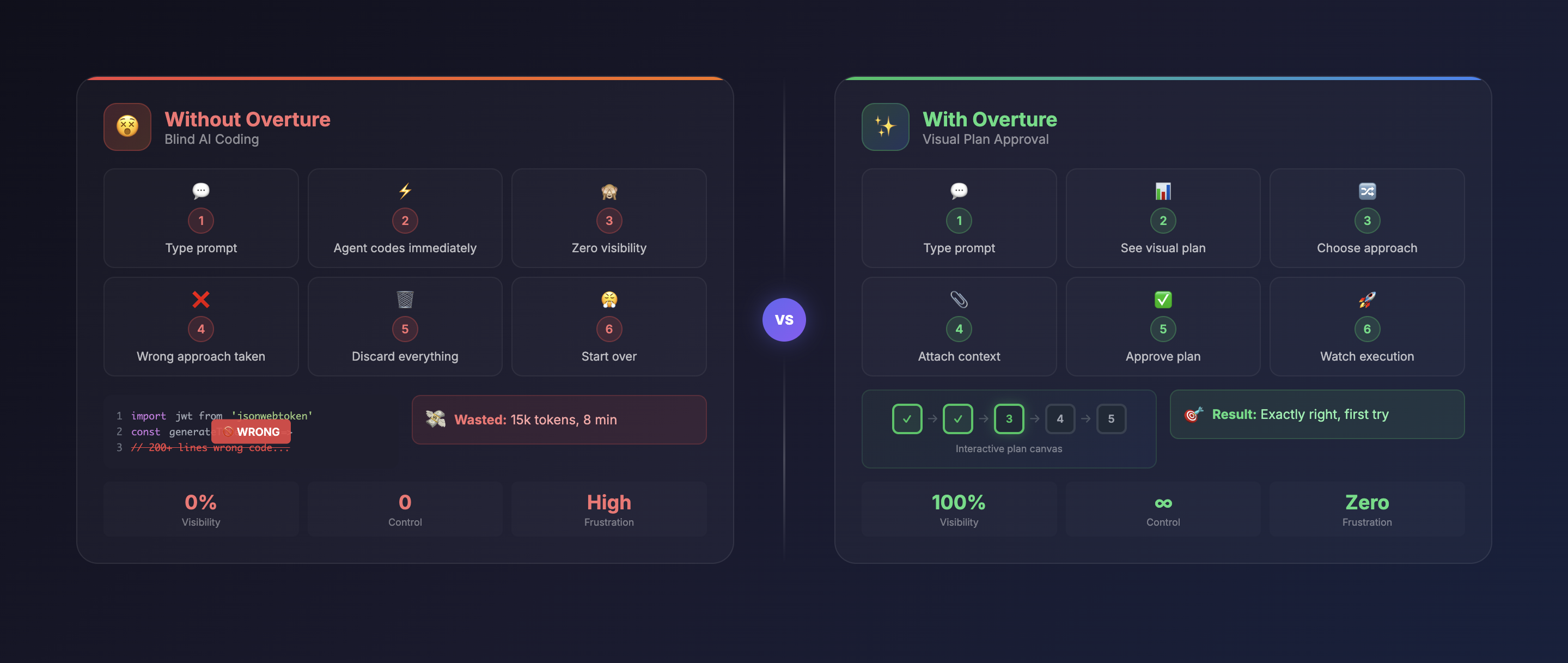
## 🔥 The Problem
Every AI coding agent today — **Cursor**, **Claude Code**, **Cline**, **Copilot** — works the same way:
### What Happens Now
1. You type a prompt
2. Agent **immediately starts writing code**
3. You have **zero visibility** into what it's doing
4. You realize it misunderstood your request
5. **Hundreds of lines of code** need to be discarded
6. You've wasted tokens, time, and patience
### Text Plans Don't Help
Some agents show plans as text in chat. But text fails to show:
- **Dependencies** — which tasks depend on what?
- **Branch points** — what alternative approaches exist?
- **Context requirements** — which files, APIs, or secrets are needed?
- **Complexity** — which steps are risky?
- **Progress** — what's done, what's next?
---
## ✨ The Solution
**Overture** intercepts your AI agent's planning phase and renders it as an **interactive visual flowchart** — before any code is written.
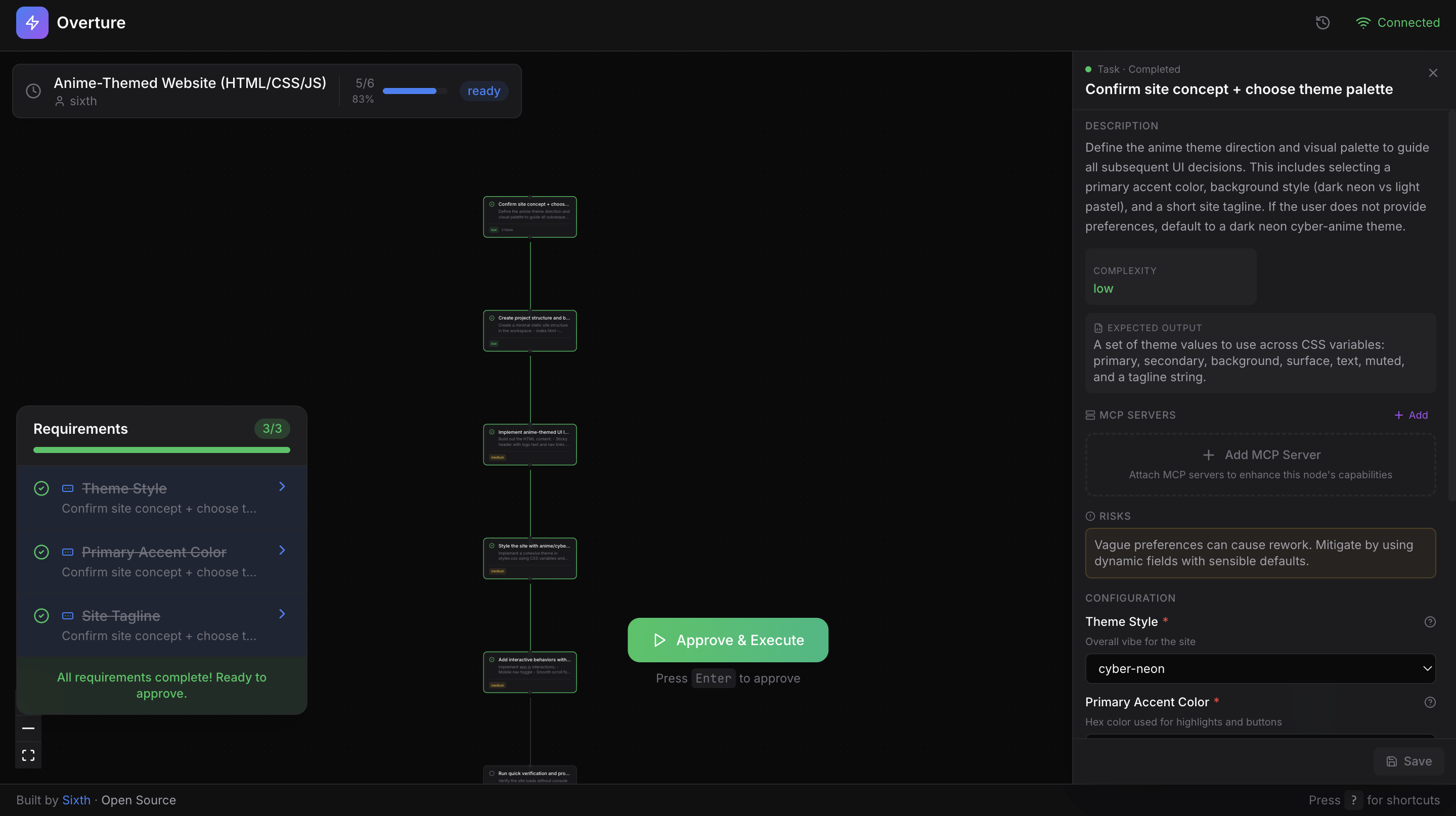
### The agent doesn't write a single line of code until you approve the plan.

Visual Plans
Interactive flowchart with pan, zoom, and click-through navigation

Attach Context
Files, API keys, instructions per step

Choose Approaches
Compare pros/cons of different paths

Real-time Execution
Watch nodes light up with progress

MCP Marketplace
Browse & attach tools per node
---
## 🚀 Installation
Overture is an MCP server that works with **any MCP-compatible AI coding agent**. One command to install.
### Claude Code
```bash
claude mcp add overture-mcp -- npx overture-mcp
```
### Cursor
Add to `~/.cursor/mcp.json`:
```json
{
"mcpServers": {
"overture": {
"command": "npx",
"args": ["overture-mcp"]
}
}
}
```
More Agents (Cline, Copilot, Sixth AI)
### Cline (VS Code Extension)
Open VS Code settings → search "Cline MCP" → add:
```json
{
"mcpServers": {
"overture": {
"command": "npx",
"args": ["overture-mcp"]
}
}
}
```
### GitHub Copilot
Create `.vscode/mcp.json` in your project root:
```json
{
"servers": {
"overture": {
"command": "npx",
"args": ["overture-mcp"]
}
}
}
```
> **Note:** GitHub Copilot MCP requires VS Code 1.99+ and uses `servers` instead of `mcpServers`.
### Sixth AI (VS Code Extension)
Add to your Sixth AI MCP settings file:
| Platform | Path |
|----------|------|
| macOS | `~/Library/Application Support/Code/User/globalStorage/sixth.sixth-ai/settings/sixth-mcp-settings.json` |
| Windows | `%APPDATA%\Code\User\globalStorage\sixth.sixth-ai\settings\sixth-mcp-settings.json` |
| Linux | `~/.config/Code/User/globalStorage/sixth.sixth-ai/settings/sixth-mcp-settings.json` |
```json
{
"mcpServers": {
"overture": {
"command": "npx",
"args": ["overture-mcp"],
"disabled": false
}
}
}
```
### Global Installation (Optional)
```bash
npm install -g overture-mcp
```
### Verify It Works
Give your agent any task. Overture automatically opens at `http://localhost:3031` with your plan ready for approval.
---
## 🎯 How It Works
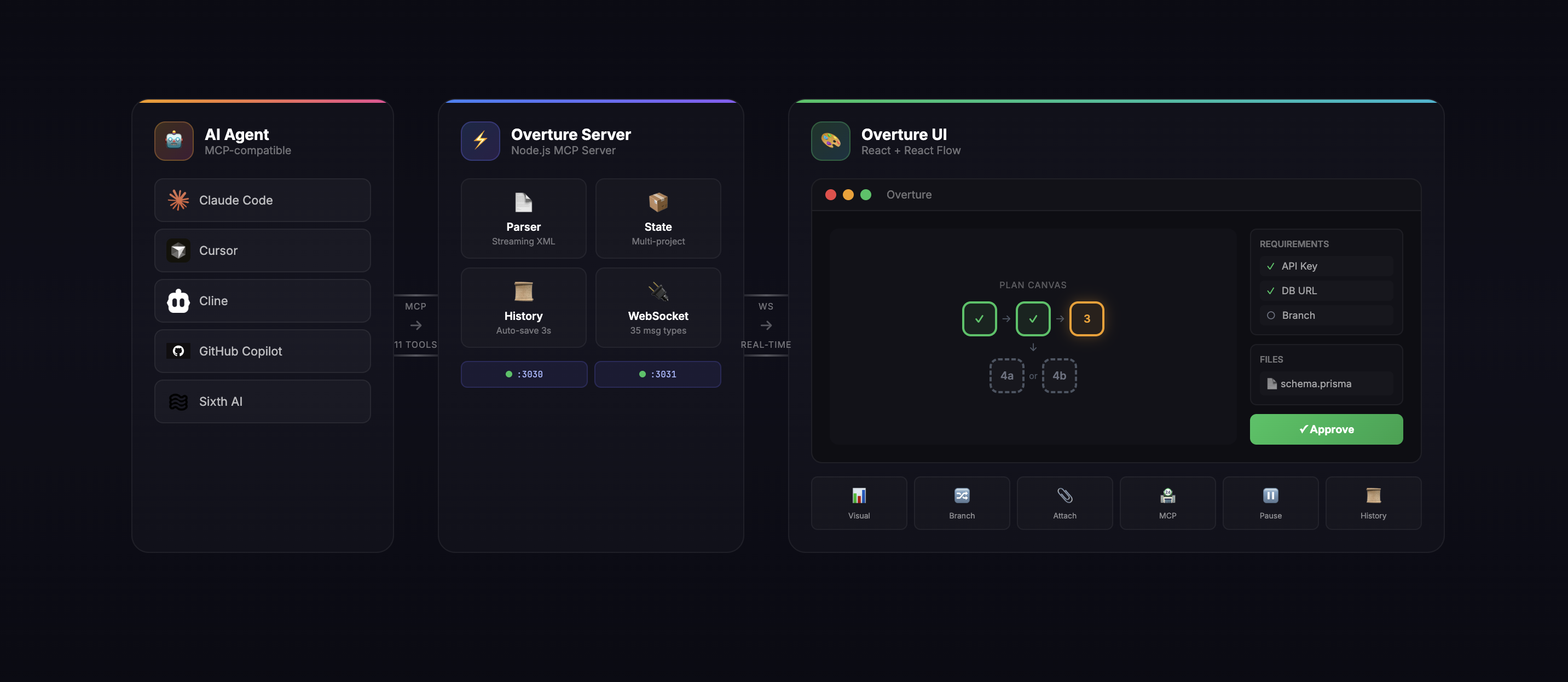
**The Flow:**
| Step | What Happens |
|------|--------------|
| **1. Prompt** | You give your agent a task: "Build a REST API with auth" |
| **2. Plan** | Agent generates a detailed plan with steps, branches, and requirements |
| **3. Visualize** | Overture renders the plan as an interactive graph |
| **4. Enrich** | You click nodes, attach files, select branches, fill in API keys |
| **5. Approve** | You click "Approve & Execute" (or press Enter) |
| **6. Execute** | Watch real-time as nodes pulse, complete, or fail |
| **7. Control** | Pause (Spacebar), resume, re-run nodes, or modify the plan mid-flight |
---
## 🛠 Features
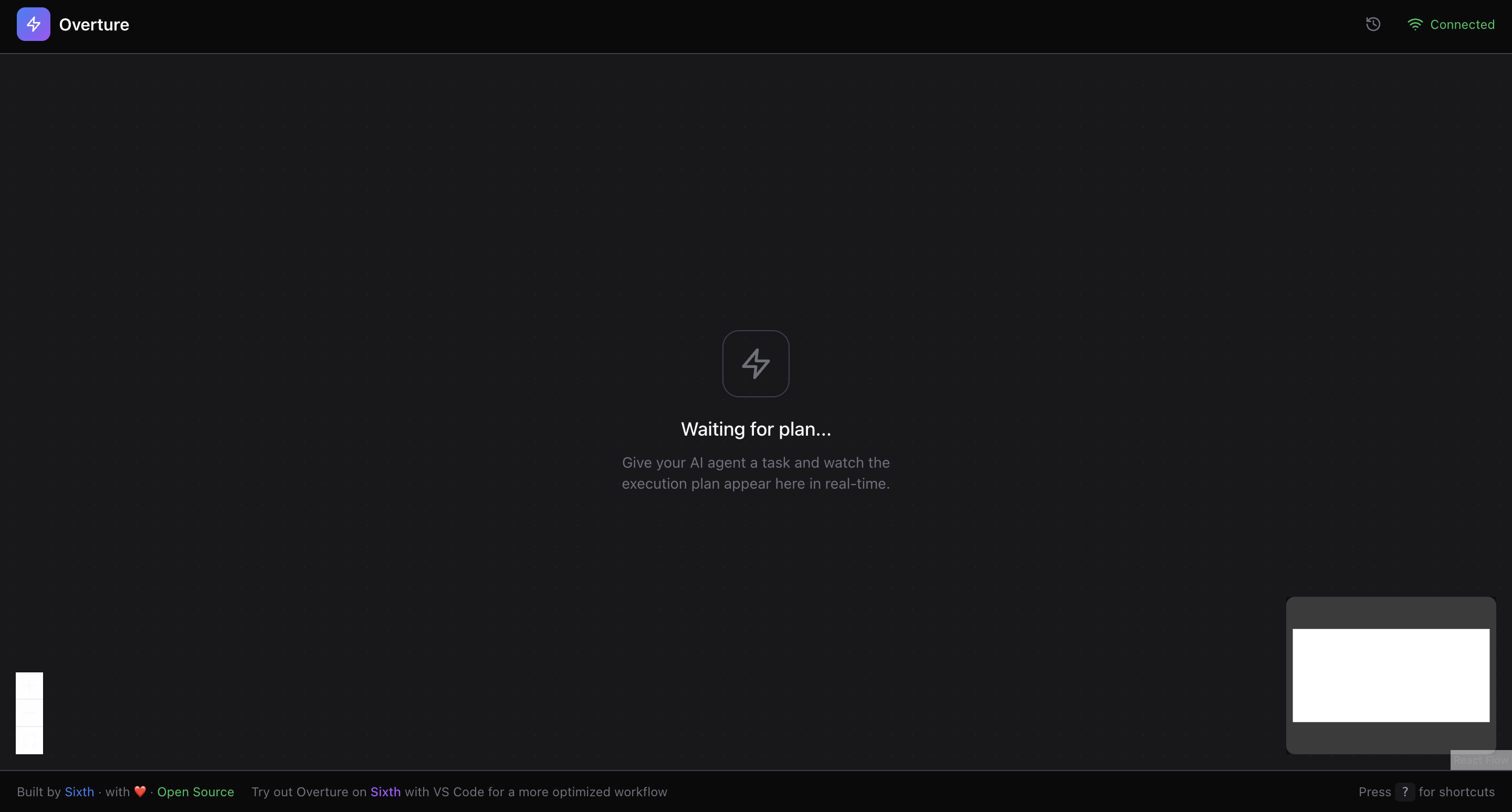
### Interactive Plan Canvas
| Feature | Description |
|---------|-------------|
| **React Flow Canvas** | Full pan, zoom, drag with smooth animations |
| **Streaming Parser** | Plan nodes appear in real-time as the agent generates them |
| **Dagre Auto-Layout** | Intelligent automatic positioning of nodes |
| **Visual Status** | Pending (gray) → Active (pulsing yellow) → Completed (green) / Failed (red) |
| **Next Node Indicator** | Blue pulse shows which node executes next |
| **Complexity Badges** | Low (green), Medium (yellow), High (red) at a glance |
| **Glow Effects** | Shadow glows highlight active and upcoming nodes |
| **Insertable Edges** | Hover over edges to insert new nodes mid-plan |
---
### Node Details Panel
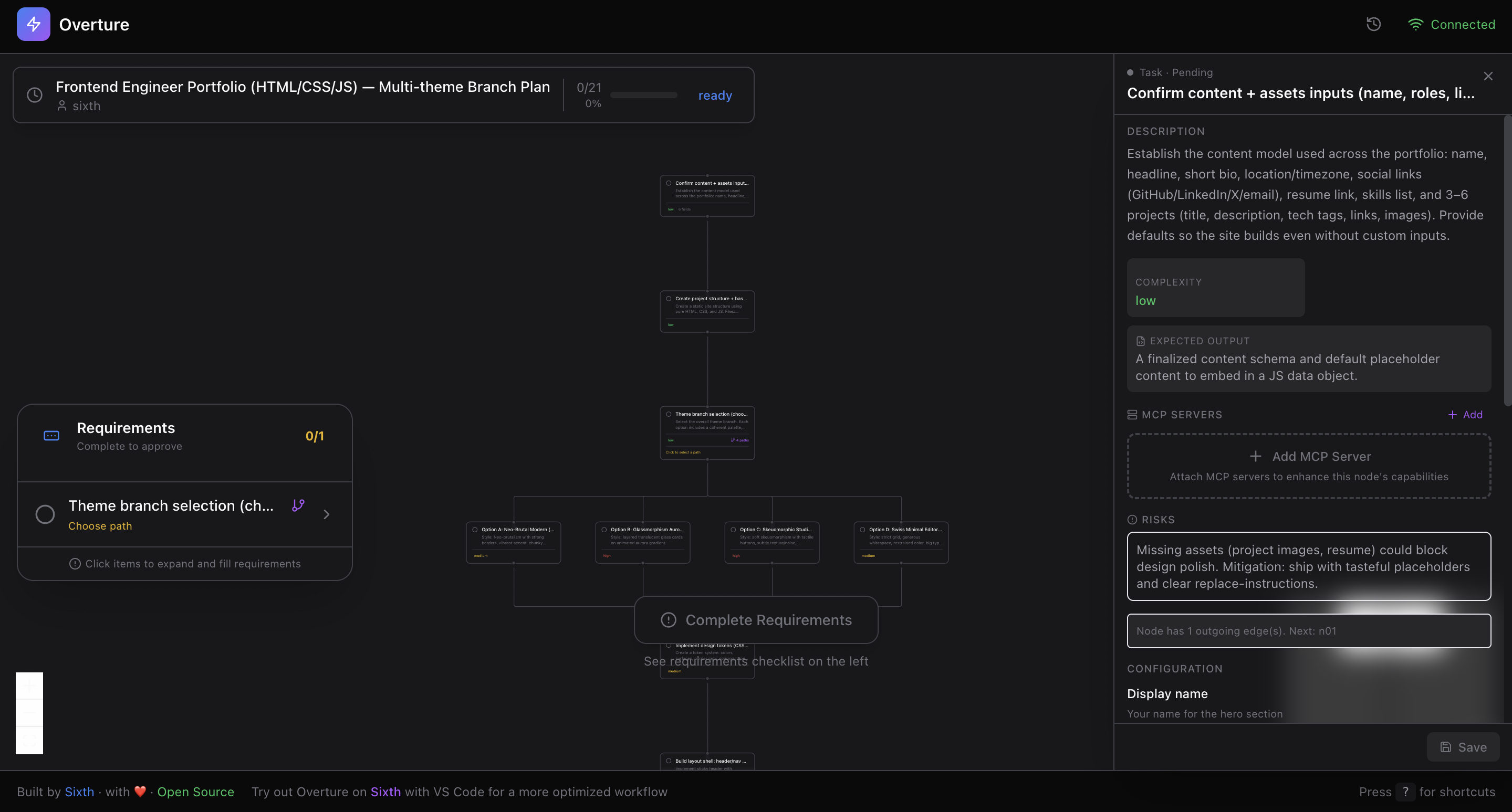
Click any node to reveal its full details:
| Info | What You See |
|------|--------------|
| **Title & Description** | Full context for what this step does |
| **Complexity Level** | Low / Medium / High with visual indicator |
| **Expected Output** | What the step should produce |
| **Risks & Edge Cases** | Potential issues to watch for |
| **Pros & Cons** | For branch options, compare trade-offs |
---
### Dynamic Fields (User Inputs)
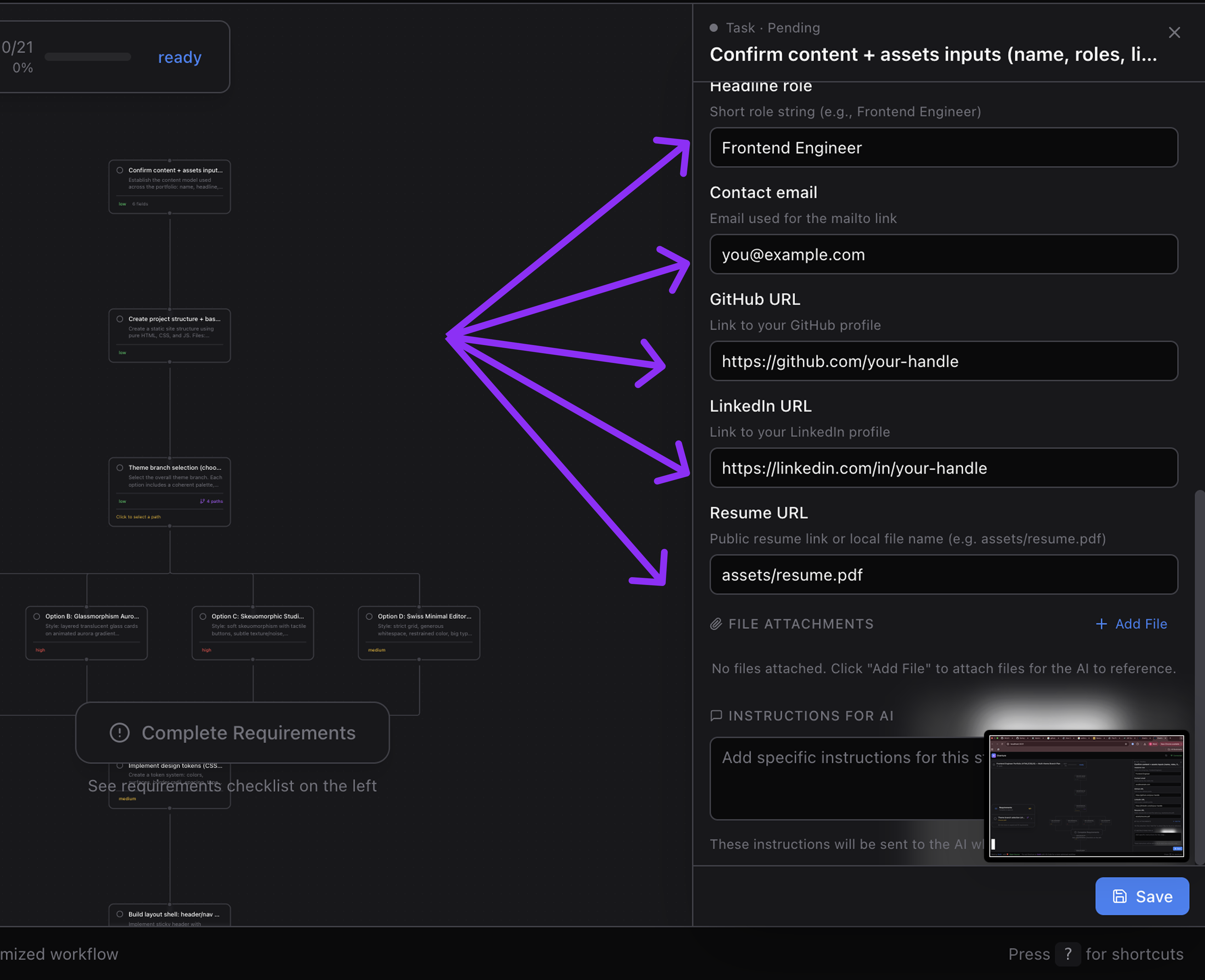
Nodes can request input from you before execution:
| Field Type | Use Case |
|------------|----------|
| **String** | Project names, URLs, custom values |
| **Number** | Port numbers, limits, counts |
| **Boolean** | Yes/No toggles for options |
| **Select** | Dropdown with predefined choices |
| **Secret** | API keys, tokens (masked input) |
| **File** | File paths to attach context |
Each field includes:
- Required/optional indicator
- Default values
- Help text & descriptions
- Setup instructions ("How to get an API key")
---
### File Attachments
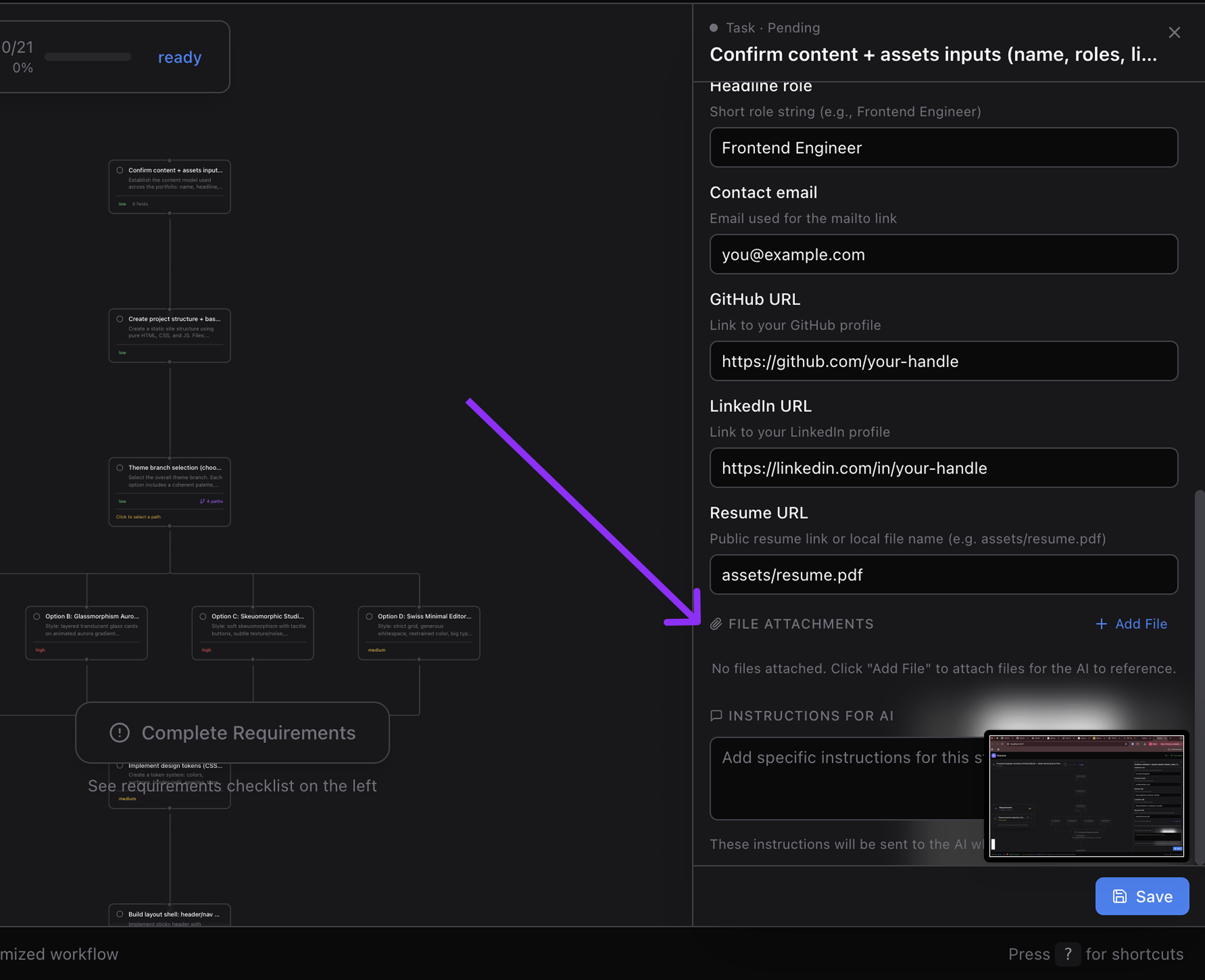
Attach context files to specific nodes:
- **Automatic type detection** — Image, code, document, or other
- **Visual icons** per file type
- **Descriptions** — add notes about why this file matters
- **Delete** — remove unwanted attachments
---
### Meta Instructions
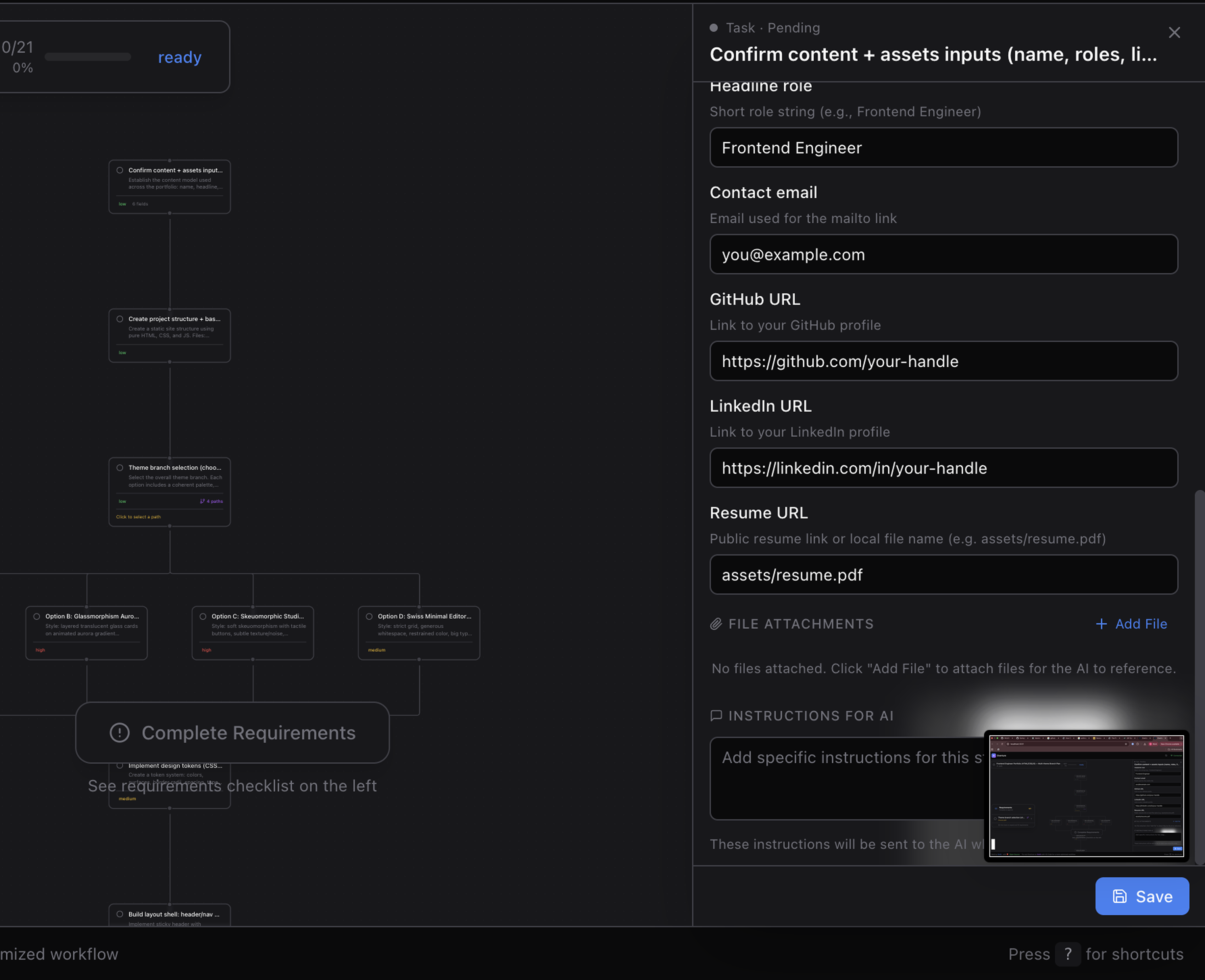
Add custom LLM instructions to any node:
> "Pay special attention to error handling here"
> "Use the existing auth pattern from src/auth.ts"
> "Make sure to add tests for edge cases"
Instructions are sent to the agent right before that node executes.
---
### Branch Detection & Selection

When the agent proposes multiple approaches:
| Feature | Description |
|---------|-------------|
| **Auto-Detection** | Branches detected from graph structure (no special markup) |
| **Branch Points** | Nodes with multiple outgoing edges become decision points |
| **Selection Modal** | Side-by-side comparison with pros/cons |
| **Complexity Comparison** | See difficulty level for each option |
| **Visual Indicator** | Selected branch highlighted on canvas |
| **Skip Unselected** | Only your chosen path executes |
---
### Requirements Checklist
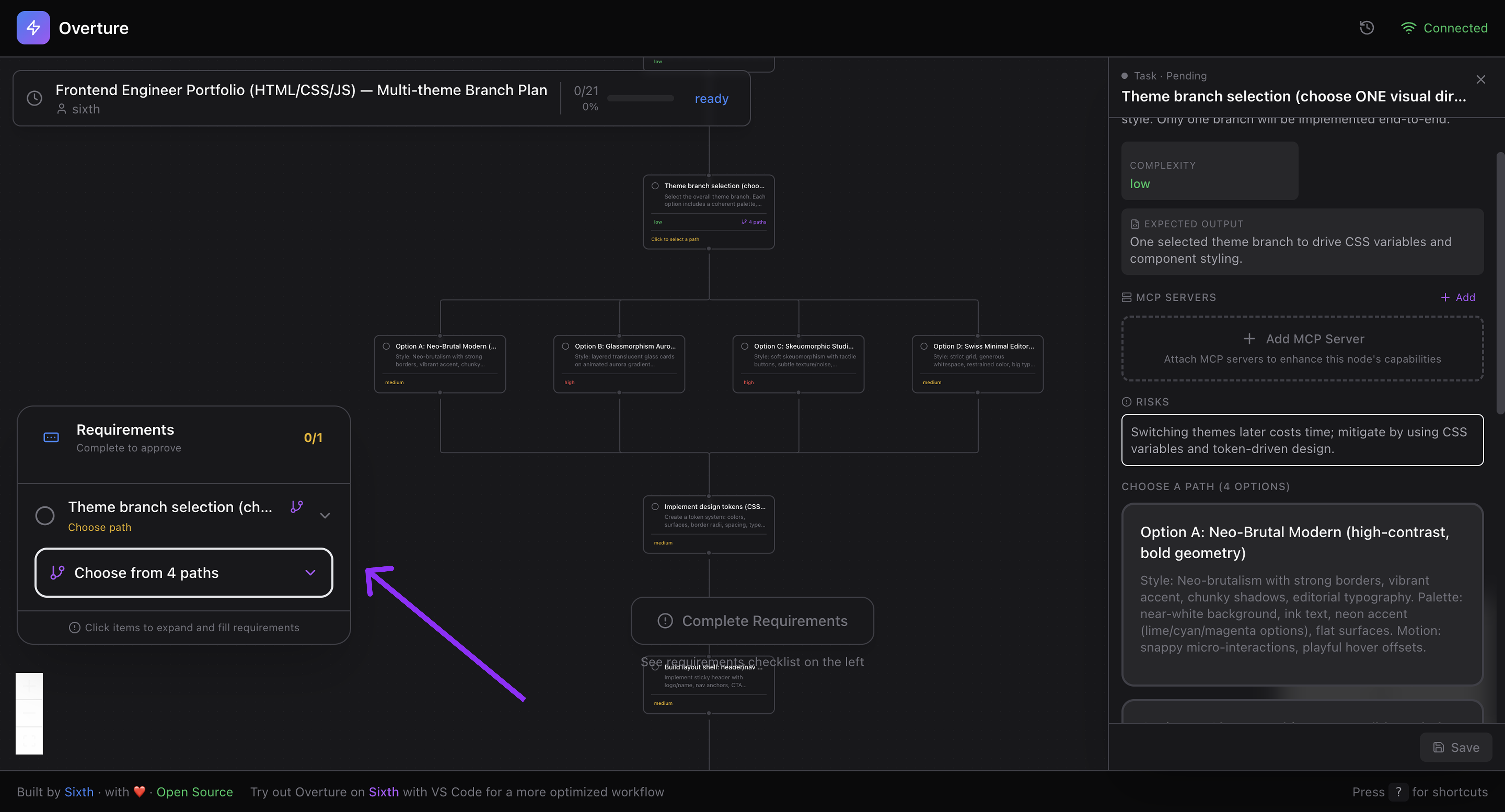
Before you can approve, Overture shows what's needed:
- **Empty required fields** — counted per node
- **Branch selections** — which decisions are pending
- **Progress indicator** — visual completion tracking
- **Expandable items** — click to see details
- **Color coding** — Green (done) / Orange (pending)
The Approve button stays disabled until all requirements are met.
---
### Execution Controls
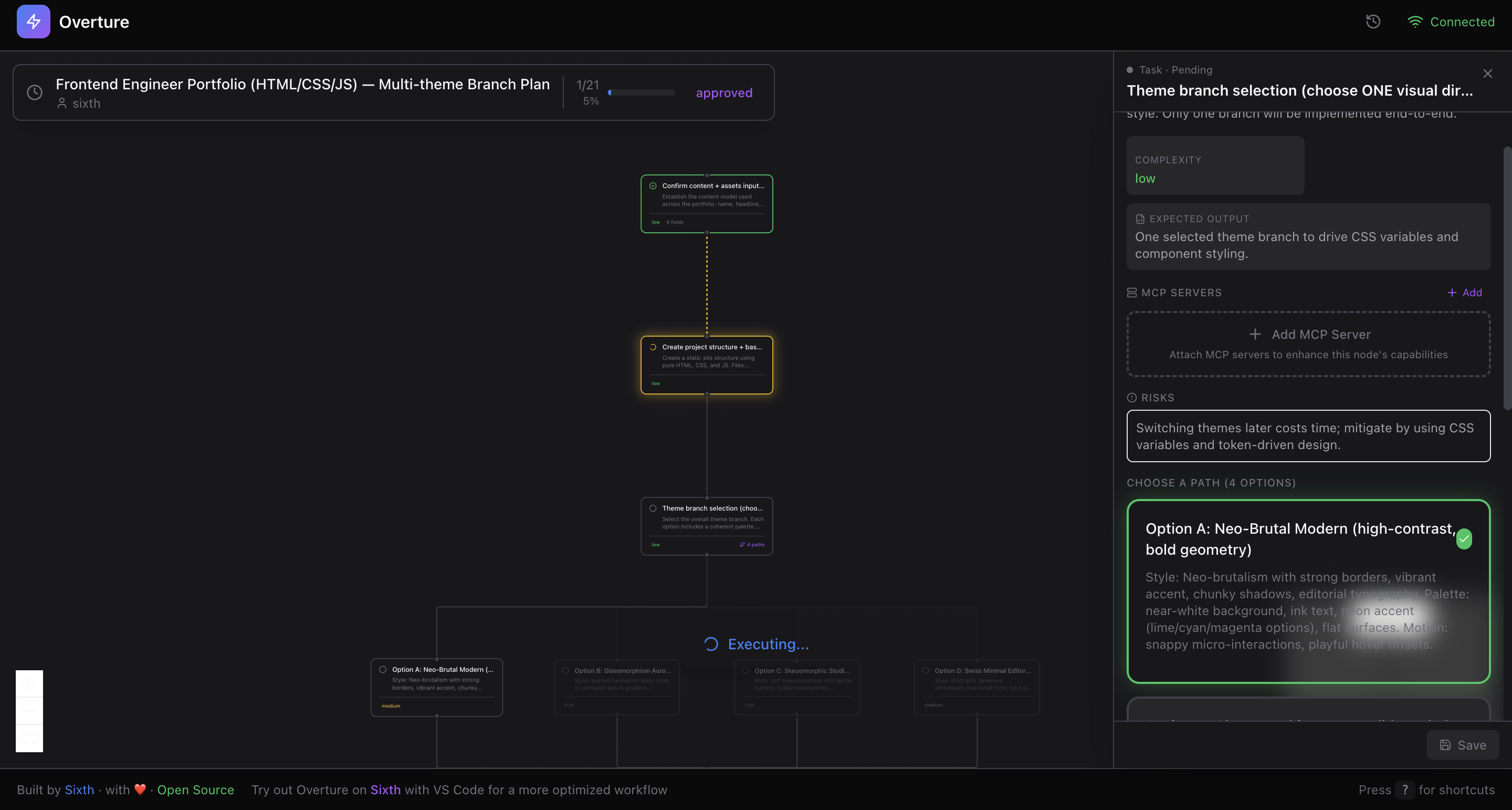
| Control | How |
|---------|-----|
| **Approve** | Click button or press `Enter` |
| **Pause** | Press `Spacebar` mid-execution |
| **Resume** | Press `Spacebar` again |
| **Re-run Node** | Click failed node → "Re-run" |
| **Re-run From Here** | Re-execute from any node to the end |
The approval button is smart:
- 🟢 **"Approve & Execute"** — plan ready, requirements met
- 🟠 **"Complete Requirements"** — conditions unmet
- 🔵 **"Executing..."** — running with spinner
- 🟢 **"Completed"** — all done
- 🔴 **"Failed"** — error occurred
---
### Structured Output
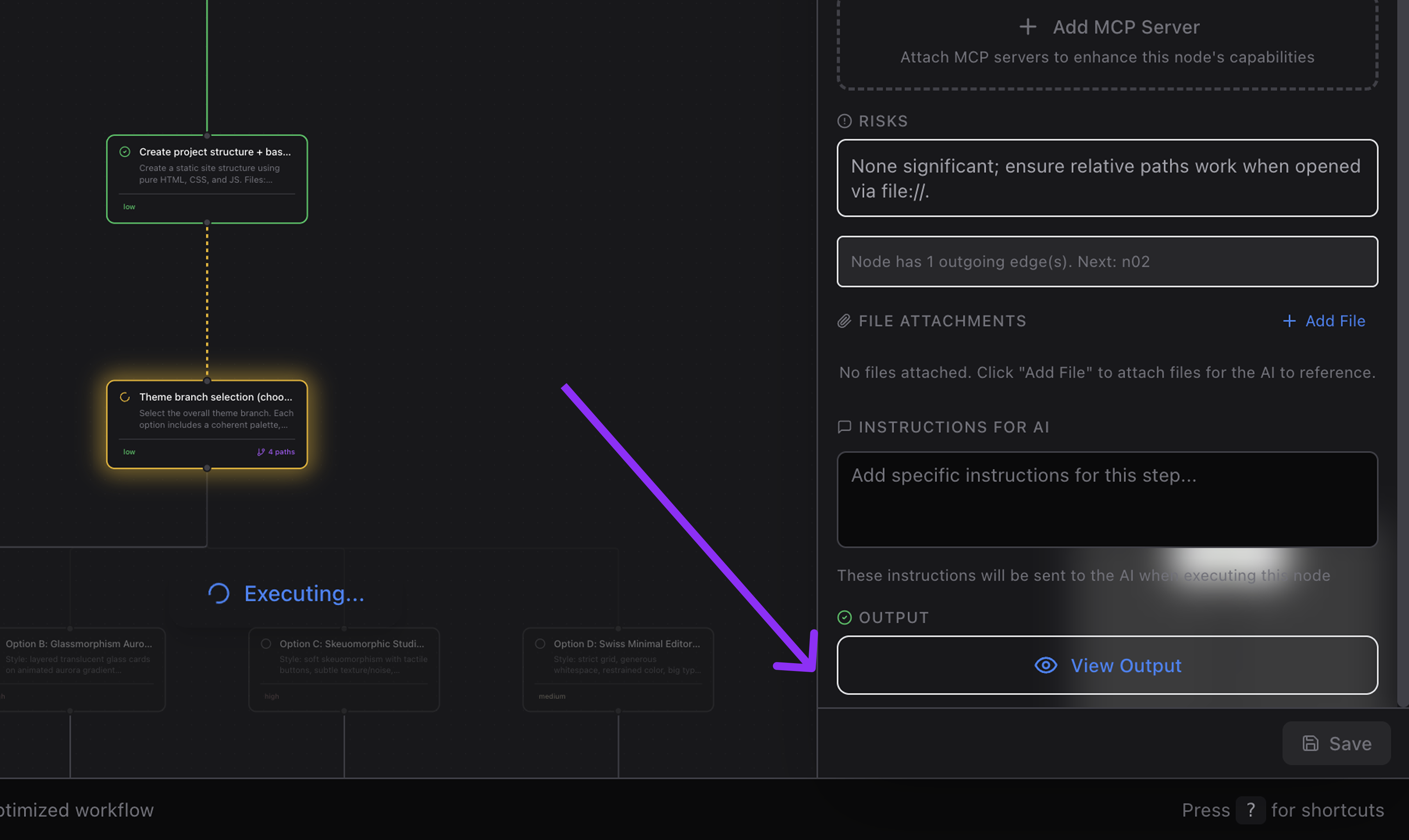
After each node executes, see rich structured output:
| Category | What It Shows |
|----------|---------------|
| **Overview** | Summary of what was accomplished |
| **Files Changed** | Paths, lines added/removed, diffs |
| **Files Created** | New files with line counts |
| **Files Deleted** | Removed files |
| **Packages Installed** | npm packages with versions |
| **MCP Servers Setup** | Installation status (installed/configured/failed) |
| **Web Searches** | Queries performed, results used |
| **Tool Calls** | Which tools were used and how often |
| **Preview URLs** | Links to deployed sites or previews |
| **Notes** | Info, warnings, errors |
Each category is **expandable** — drill in without visual overload.
---
### Output Modal
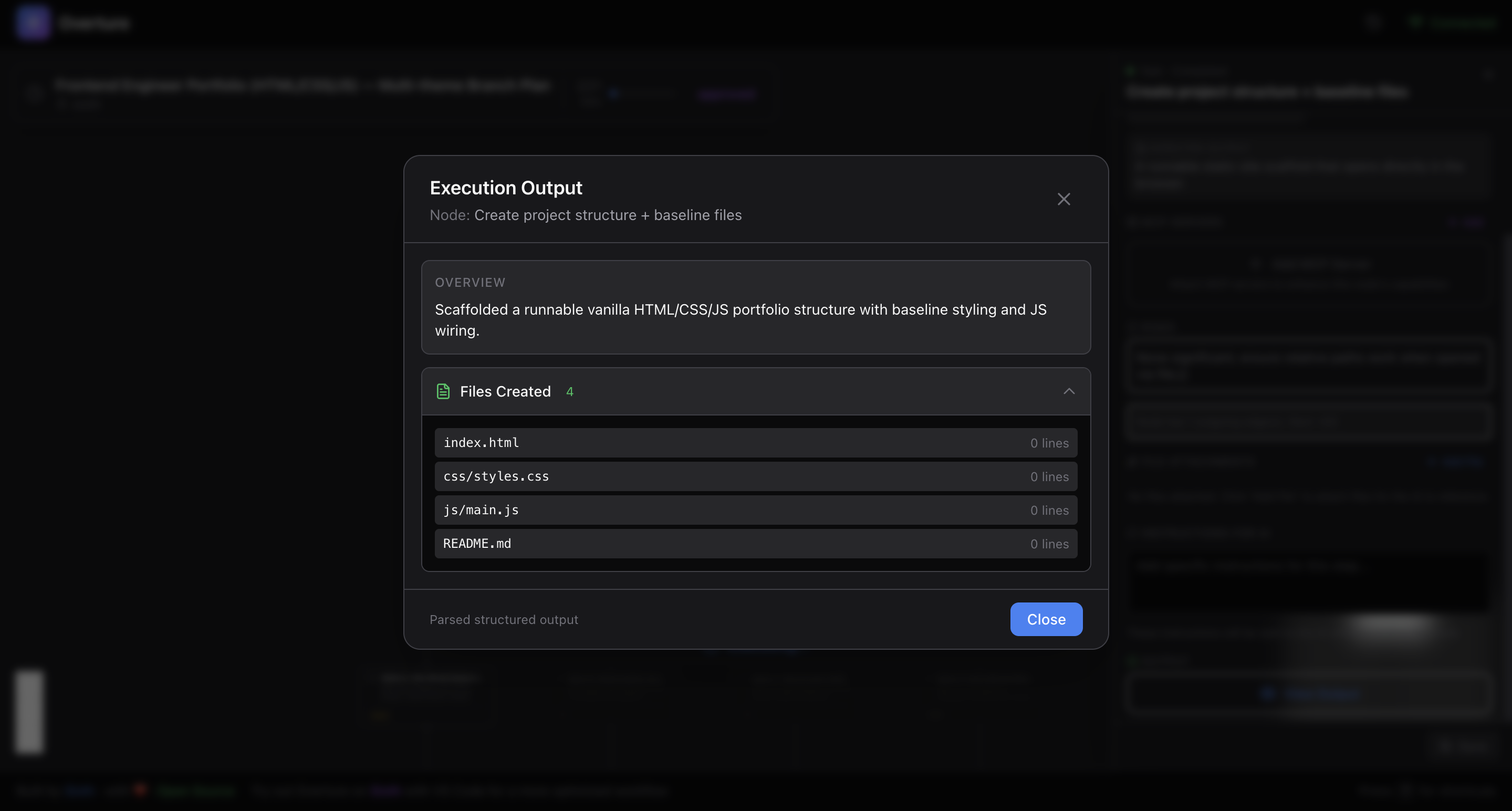
Click any completed node to see full output:
- **Scrollable** for long outputs
- **Syntax highlighted** code snippets
- **Close with Escape** or click outside
---
## 🏪 MCP Marketplace
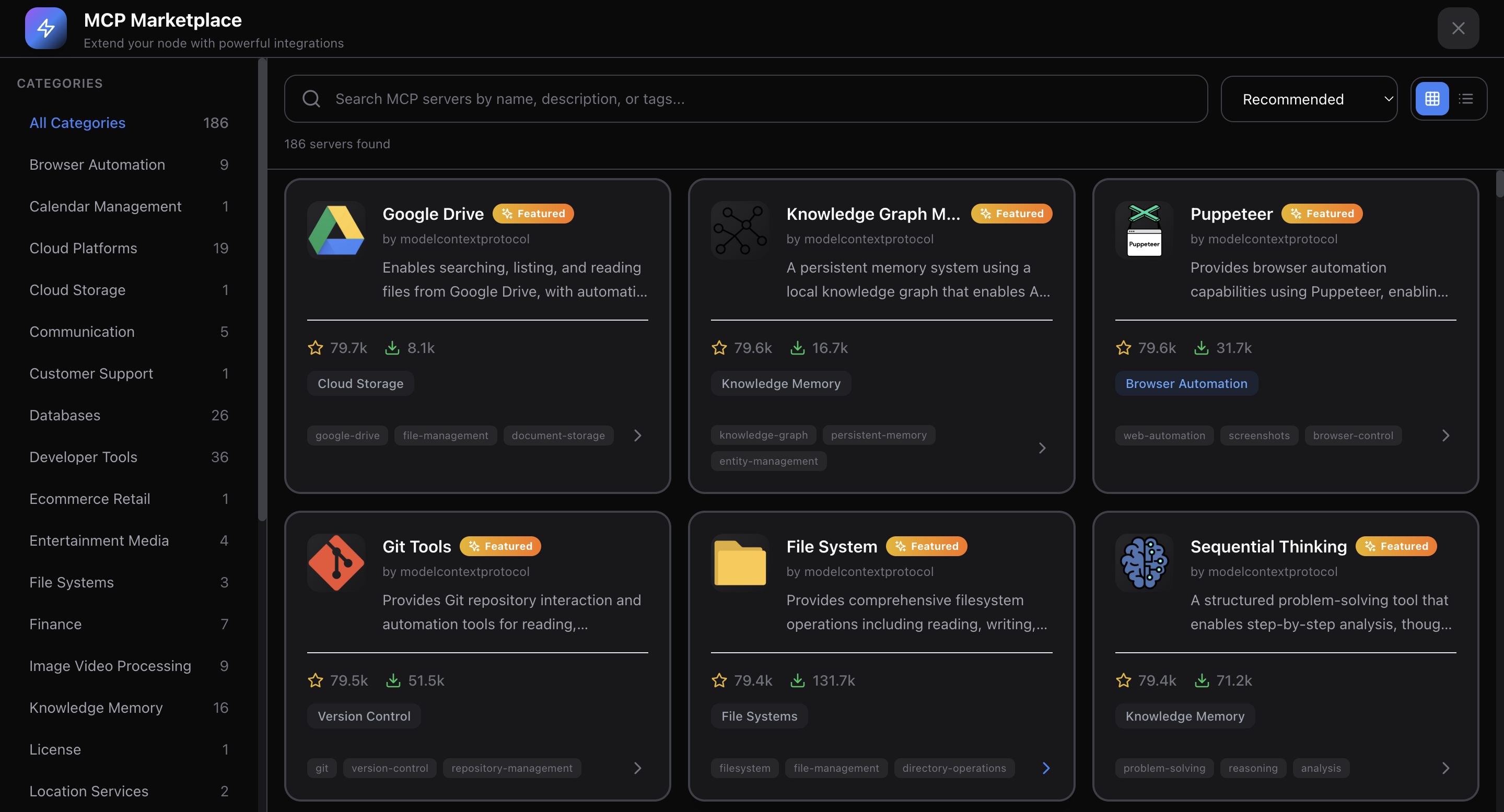
**Browse and attach MCP servers directly from the Overture UI.**
| Feature | Description |
|---------|-------------|
| **Built-in Marketplace** | Search and discover MCP servers |
| **Server Details** | Descriptions, authors, GitHub links, stars |
| **Category Browsing** | Filter by use case |
| **Per-Node Attachment** | Attach specific tools to specific steps |
| **Setup Instructions** | See how to configure each server |
| **Recommended Servers** | Curated list for common tasks |
When you attach an MCP server to a node, the agent gains access to those tools **only for that step**.
---
## 📂 Multi-Project Support
Work on multiple projects simultaneously:
| Feature | Description |
|---------|-------------|
| **Tab Navigation** | Switch between projects instantly |
| **Auto Registration** | Projects register on first agent contact |
| **Isolated State** | Each project has separate plans, nodes, configs |
| **Unread Badges** | Know when other projects have updates |
| **Project Context** | See project name, path, and agent type |
Single project? Tab bar hides automatically for a cleaner UI.
---
## 📜 Plan History & Persistence
Never lose your work:
| Feature | Description |
|---------|-------------|
| **Auto-Save** | Plans saved every 3 seconds |
| **Local Storage** | Stored in `~/.overture/history.json` |
| **History Browser** | Slide-in panel with all past plans |
| **Status Icons** | Completed, failed, executing, paused |
| **Progress Bars** | Visual completion percentage |
| **One-Click Resume** | Load and continue any past plan |
| **Full Context** | All field values, branch selections, attachments preserved |
### Resume Information
When resuming, you get complete context:
- **Current node** — where execution stopped
- **Completed nodes** — with their outputs
- **Pending nodes** — what's left to do
- **Failed nodes** — with error messages
- **All configurations** — field values, branches, attachments
- **Timestamps** — when created, when paused
---
## ✏️ Dynamic Plan Modification
Modify plans even during execution:
| Operation | Description |
|-----------|-------------|
| **Insert Nodes** | Add new steps mid-execution |
| **Remove Nodes** | Delete steps (edges auto-reconnect) |
| **Replace Content** | Update node title/description in-place |
| **Batch Operations** | Multiple changes in one request |
### Plan Diff View
When a plan changes, see exactly what's different:
- **Added nodes** — highlighted green
- **Removed nodes** — highlighted red
- **Modified nodes** — yellow with before/after comparison
- **Edge changes** — added/removed connections
---
## 🔌 MCP Tools (For Agent Developers)
Overture exposes 11 MCP tools for agents to interact with:
| Tool | Purpose |
|------|---------|
| `submit_plan` | Submit complete plan as XML |
| `get_approval` | Wait for user approval (blocks until approved) |
| `update_node_status` | Update node status + output during execution |
| `plan_completed` | Mark plan as successfully completed |
| `plan_failed` | Mark plan as failed with error message |
| `check_rerun` | Check if user requested a node re-run |
| `check_pause` | Check if user paused execution |
| `get_resume_info` | Get full context for resuming a paused plan |
| `request_plan_update` | Request incremental plan modifications |
| `create_new_plan` | Signal creation of a new plan |
| `get_usage_instructions` | Get agent-specific instructions |
---
## 🔄 Real-time WebSocket Communication
**19 server-to-client message types:**
`connected` • `plan_started` • `node_added` • `edge_added` • `plan_ready` • `plan_approved` • `node_status_updated` • `plan_completed` • `plan_failed` • `plan_paused` • `plan_resumed` • `nodes_inserted` • `node_removed` • `project_registered` • `projects_list` • `history_entries` • `plan_loaded` • `resume_plan_info` • `plan_updated`
**16 client-to-server message types:**
`approve_plan` • `cancel_plan` • `rerun_request` • `pause_execution` • `resume_execution` • `insert_nodes` • `remove_node` • `register_project` • `subscribe_project` • `unsubscribe_project` • `get_history` • `load_plan` • `get_resume_info` • `save_plan` • `request_plan_update` • `create_new_plan`
### Relay Mode
When the WebSocket port is already in use, Overture automatically operates as a **relay client**, forwarding messages through the existing server. Multiple agent instances can share a single UI.
---
## ⚙️ Configuration
| Variable | Default | Description |
|----------|---------|-------------|
| `OVERTURE_HTTP_PORT` | `3031` | Port for the web UI |
| `OVERTURE_WS_PORT` | `3030` | Port for WebSocket |
| `OVERTURE_AUTO_OPEN` | `true` | Auto-open browser on start |
### Setting Environment Variables
Claude Code
```bash
claude mcp add overture-mcp -e OVERTURE_HTTP_PORT=4000 -e OVERTURE_AUTO_OPEN=false -- npx overture-mcp
```
Cursor / Cline / Sixth AI
```json
{
"mcpServers": {
"overture": {
"command": "npx",
"args": ["overture-mcp"],
"env": {
"OVERTURE_HTTP_PORT": "4000",
"OVERTURE_WS_PORT": "4001",
"OVERTURE_AUTO_OPEN": "false"
}
}
}
}
```
GitHub Copilot
```json
{
"servers": {
"overture": {
"command": "npx",
"args": ["overture-mcp"],
"env": {
"OVERTURE_HTTP_PORT": "4000",
"OVERTURE_WS_PORT": "4001",
"OVERTURE_AUTO_OPEN": "false"
}
}
}
}
```
---
## ⌨️ Keyboard Shortcuts
| Key | Action |
|-----|--------|
| `Enter` | Approve plan (when ready) |
| `Space` | Pause / Resume execution |
| `Escape` | Deselect current node / Close modal |
---
## 🤝 Supported Agents
| Agent | Status | Notes |
|-------|--------|-------|
| **Claude Code** | ✅ Full | Native MCP support |
| **Cursor** | ✅ Full | Via mcp.json config |
| **Cline** | ✅ Full | Via VS Code settings |
| **GitHub Copilot** | ✅ Full | VS Code 1.99+ required |
| **Sixth AI** | ✅ Full | Built-in, zero config |
Each agent has **custom-tailored prompts** for optimal plan generation.
---
## 💪 Why Overture?
### For Users
- **Transparency** — See exactly what happens before code is written
- **Control** — Approve, reject, or modify any plan
- **Context** — Attach files and instructions to the right steps
- **Choice** — Compare approaches and pick your path
- **Visibility** — Real-time progress with rich output
- **Safety** — Pause, resume, or re-run at any time
- **History** — Resume any past plan instantly
- **Efficiency** — No wasted tokens on rejected approaches
### For AI Coding
- **Trust** — Makes agents predictable and controllable
- **Interpretability** — See AI reasoning before execution
- **Universal** — Works with any MCP-compatible agent
- **Extensible** — MCP Marketplace for tool discovery
- **Open Source** — MIT licensed, community-driven
- **Self-Contained** — No cloud dependencies
- **Works Offline** — Fully local execution
- **Multi-Project** — Manage multiple workspaces
---
## 🧑💻 Development
```bash
# Clone the repo
git clone https://github.com/SixHq/Overture.git
cd Overture
# Install dependencies
npm install
# Build all packages
npm run build
# Start MCP server (in one terminal)
cd packages/mcp-server && npm start
# Start UI dev server (in another terminal)
cd packages/ui && npm run dev
```
### Tech Stack
| Layer | Technologies |
|-------|--------------|
| **MCP Server** | Node.js, TypeScript, Express, WebSocket (ws), SAX XML Parser |
| **UI** | React 18, React Flow, Zustand, Framer Motion, Tailwind CSS, Vite |
| **Layout** | Dagre (automatic graph positioning) |
---
## 🤝 Contributing
Overture is open source and we welcome contributions!
- 🐛 **Report bugs** at [GitHub Issues](https://github.com/SixHq/Overture/issues)
- 💡 **Suggest features** at [GitHub Discussions](https://github.com/SixHq/Overture/discussions)
- 📖 **Improve docs** — PRs welcome
- 🔧 **Contribute code** — see [CONTRIBUTING.md](CONTRIBUTING.md)
All contributions are appreciated, no matter how small.
---
## 📄 License
MIT License - see [LICENSE](LICENSE) for details.
---

Built by Sixth
For the best experience, try Sixth for VS Code
Overture is built-in with zero configuration required.
Stop flying blind. See the plan. Approve it. Execute with confidence.
## Star History
[](https://www.star-history.com/#SixHq/Overture&type=date&legend=top-left)