https://github.com/StanKocken/SVG2Drawable
Use a jar executable to create a Drawable class to display a SVG on Android.
https://github.com/StanKocken/SVG2Drawable
Last synced: about 1 year ago
JSON representation
Use a jar executable to create a Drawable class to display a SVG on Android.
- Host: GitHub
- URL: https://github.com/StanKocken/SVG2Drawable
- Owner: StanKocken
- License: apache-2.0
- Created: 2014-12-26T20:05:22.000Z (over 11 years ago)
- Default Branch: master
- Last Pushed: 2015-11-23T16:09:35.000Z (over 10 years ago)
- Last Synced: 2024-11-03T02:33:00.873Z (over 1 year ago)
- Language: Java
- Size: 325 KB
- Stars: 200
- Watchers: 13
- Forks: 23
- Open Issues: 0
-
Metadata Files:
- Readme: README.md
- License: LICENSE
Awesome Lists containing this project
- awesome-android-ui - https://github.com/StanKocken/SVG2Drawable
- awesome-android-libraries - SVG2Drawable
README
SVG2Drawable
============
Use a jar executable to create a Drawable class to display a SVG on Android.
This is a standalone library, not a Runtime Android library. You need to use it BEFORE your Android compilation (and only once per SVG file).
## Why?
I want to use a scalable image format.
A SVG sounds really good but it's a bit long to load (mainly the time to parse the XML) and I didn't find any library that support the Hardware acceleration.
## How does it work?
My main goal is to have a [Drawable](http://developer.android.com/reference/android/graphics/drawable/Drawable.html) class:
* Made a fork of the [svg-android](https://code.google.com/p/svg-android/) library.
* Replaced any instructions to create a [Picture](http://developer.android.com/reference/android/graphics/Picture.html) to collect them into a Logger.
* Print this Logger.
* Save it to a Drawable java class.
## How to use it?
You can read the code but I'm not proud of it. I started to do a POC for a basic usage and now I need to transform the code to make it more readable and robust.
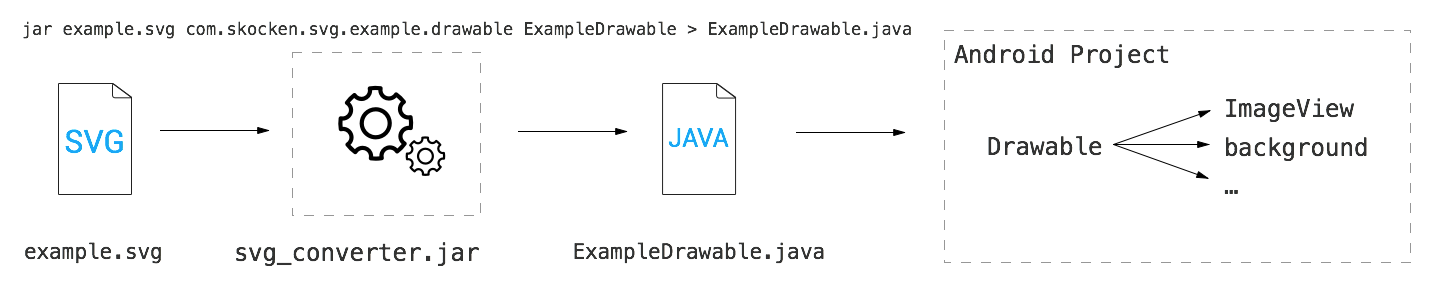
You can simply use the [jar provided into this repo](https://github.com/StanKocken/SVG2Drawable/blob/master/svg_converter.jar) by specify:
* the SVG file
* the package where you want to put the Drawable
* the drawable name
You can also specify the output of the script to create a file. By adding "> filename.java".
java -jar svg_converter.jar example.svg com.skocken.svg.example.drawable ExampleDrawable > ExampleDrawable.java
Now, copy this "ExampleDrawable.java" into your Android project, into the package "com.skocken.svg.example.drawable" (from this example), and add it to your ImageView into your code with:
imageview.setImageDrawable(new ExampleDrawable());
## License
* [Apache 2.0](http://www.apache.org/licenses/LICENSE-2.0.html)
## Contributing
If you found a SVG with a problem, you can open an issue. Please, if possible, let me know if this same SVG work with the library [svg-android](https://code.google.com/p/svg-android/).
Please fork this repository and contribute back using
[pull requests](https://github.com/StanKocken/SVG2Drawable/pulls).
Any contributions, large or small, major features, bug fixes, additional
language translations, unit/integration tests are welcomed and appreciated
but will be thoroughly reviewed and discussed.