https://github.com/SwiftBlocksUI/SwiftBlocksUI
Develop interactive Slack messages and modals using a SwiftUI like declarative style
https://github.com/SwiftBlocksUI/SwiftBlocksUI
blockkit slack swiftserver swiftui
Last synced: 7 months ago
JSON representation
Develop interactive Slack messages and modals using a SwiftUI like declarative style
- Host: GitHub
- URL: https://github.com/SwiftBlocksUI/SwiftBlocksUI
- Owner: SwiftBlocksUI
- License: apache-2.0
- Created: 2020-07-15T14:35:45.000Z (almost 6 years ago)
- Default Branch: develop
- Last Pushed: 2024-09-19T11:32:09.000Z (over 1 year ago)
- Last Synced: 2025-10-21T10:36:29.247Z (8 months ago)
- Topics: blockkit, slack, swiftserver, swiftui
- Language: Swift
- Homepage:
- Size: 440 KB
- Stars: 71
- Watchers: 1
- Forks: 3
- Open Issues: 2
-
Metadata Files:
- Readme: README.md
- Contributing: CONTRIBUTING.md
- License: LICENSE
Awesome Lists containing this project
- awesome-slack - SwiftBlocksUI - Interactive Slack messages and modals using a SwiftUI-like declarative style (:hammer_and_wrench: Libraries and SDKs / Swift)
README
SwiftBlocksUI

SwiftBlocksUI is a way to write interactive Slack messages and modal dialogs
(also known as Slack "applications")
using a SwiftUI like declarative style.
A blog article containing SwiftBlocksUI tutorials:
[Instant “SwiftUI” Flavoured Slack Apps](https://www.alwaysrightinstitute.com/swiftblocksui/).
[Documentation](Documentation/README.md), examples:
[SlashCows](https://github.com/SwiftBlocksUI/SlashCows),
[AvocadoToast](https://github.com/SwiftBlocksUI/AvocadoToast),
[ClipIt!](https://github.com/SwiftBlocksUI/ClipIt).
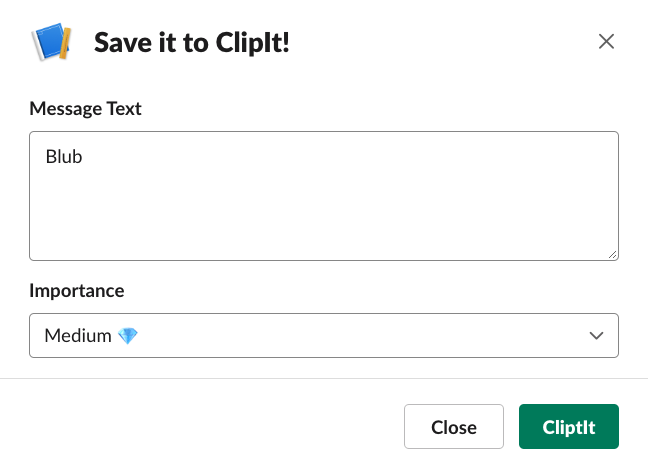
This is what a full application looks like:
```swift
#!/usr/bin/swift sh
import SwiftBlocksUI // @SwiftBlocksUI
dotenv.config()
struct ClipItView: Blocks {
@State(\.messageText) var messageText
@State var importance = "medium"
var body: some Blocks {
View("Save it to ClipIt!") {
TextEditor("Message Text", text: $messageText)
Picker("Importance", selection: $importance) {
"High 💎💎✨".tag("high")
"Medium 💎" .tag("medium")
"Low ⚪️" .tag("low")
}
Submit("CliptIt") {
console.log("Clip:", messageText, importance)
}
}
}
}
struct ClipIt: App {
var body: some Endpoints {
Use(logger("dev"), bodyParser.urlencoded(),
sslCheck(verifyToken(allowUnsetInDebug: true)))
MessageAction("clipit") {
ClipItView()
}
}
}
try ClipIt.main()
```
Looks like this:
## Documentation
There is a related blog entry going over SwiftBlocksUI:
[Instant “SwiftUI” Flavoured Slack Apps](https://www.alwaysrightinstitute.com/swiftblocksui/).
Block documentation and a lot more can be found within this repository:
[Documentation](Documentation/README.md).
Examples:
- [SlashCows](https://github.com/SwiftBlocksUI/SlashCows) - Slack slash command that produces ASCII Cows. Moo!
- [AvocadoToast](https://github.com/SwiftBlocksUI/AvocadoToast) - An Avocado Toast ordering solution.
- [ClipIt!](https://github.com/SwiftBlocksUI/ClipIt) - Working on Messages.
## Environment Variables
- `SLACK_ACCESS_TOKEN` (the token required to send requests to Slack)
- `SLACK_VERIFICATION_TOKEN` (shared secret with Slack to verify requests)
- `PORT` (the port the app is going to start on, defaults to 1337)
- `LOG_SLACK_CLIENT_POSTS` (set to `1` to log the JSON sent to Slack using SlackClient)
- `blocks.log.blocks` (`yes` to log the structure of outgoing API blocks)
- `blocks.log.blocks.json` (`yes` to log the raw JSON of outgoing blocks)
- `macro.core.numthreads`
- `macro.core.iothreads`
- `macro.core.retain.debug`
- `macro.concat.maxsize`
- `macro.streams.debug.rc`
- `macro.router.debug`
- `macro.router.matcher.debug`
## Requirements
On Linux this currently requires a Swift 5.3 environment
(swiftc crash, might be [SR-12543](https://bugs.swift.org/browse/SR-12543)).
On macOS it should work with Swift 5.2 (aka Xcode 11) and up,
though 5.3 has some additional conveniences.
### Links
- [Macro](https://github.com/Macro-swift/Macro/)
### Who
**SwiftBlocksUI** is brought to you by
[ZeeZide](http://zeezide.de).
We like
[feedback](https://twitter.com/ar_institute),
GitHub stars,
cool [contract work](http://zeezide.com/en/services/services.html),
presumably any form of praise you can think of.