https://github.com/TIGER-AI-Lab/OpenResearcher
OpenResearcher: A Fully Open Pipeline for Long-Horizon Deep Research Trajectory Synthesis
https://github.com/TIGER-AI-Lab/OpenResearcher
deep-research llm retrieval
Last synced: 5 months ago
JSON representation
OpenResearcher: A Fully Open Pipeline for Long-Horizon Deep Research Trajectory Synthesis
- Host: GitHub
- URL: https://github.com/TIGER-AI-Lab/OpenResearcher
- Owner: TIGER-AI-Lab
- Created: 2026-02-03T00:34:05.000Z (6 months ago)
- Default Branch: main
- Last Pushed: 2026-02-24T01:20:42.000Z (5 months ago)
- Last Synced: 2026-02-24T03:01:58.212Z (5 months ago)
- Topics: deep-research, llm, retrieval
- Language: Python
- Homepage: https://github.com/TIGER-AI-Lab/OpenResearcher
- Size: 7.96 MB
- Stars: 386
- Watchers: 1
- Forks: 41
- Open Issues: 0
-
Metadata Files:
- Readme: README.md
Awesome Lists containing this project
- awesome - TIGER-AI-Lab/OpenResearcher - OpenResearcher: A Fully Open Pipeline for Long-Horizon Deep Research Trajectory Synthesis (Python)
README









🤗 HuggingFace |
 Blog |
 Slack |
  WeChat
## 📣 News
+ **[2026.2.25]** 🔥 Honored to be among the **top 3 trending datasets** on 🤗 [Hugging Face](https://huggingface.co/datasets) — now **11K+** downloads! 🚀
+ **[2026.2.18]** 🧪 The OpenResearcher training [code](https://github.com/TIGER-AI-Lab/OpenResearcher?tab=readme-ov-file#-optional-train-your-own-openresearcher) is now available. Start training your own OpenResearcher!
+ **[2026.2.14]** 📸 Excited to have our OpenResearcher demo [video](https://x.com/zhuofengli96475/status/2021682952074097086). Dive in and unlock the power of Deep Research today!
+ **[2026.2.12]** 🔥 Excited to see **OpenResearcher** powering deep research trajectory generation in [**NVIDIA’s NeMo Data Designer**](https://nvidia-nemo.github.io/DataDesigner/latest/devnotes/deep-research-trajectories-with-nemo-data-designer-and-mcp-tool-use/)!
+ **[2026.2.10]** 🚀 Our X [post](https://x.com/DongfuJiang/status/2020946549422031040) received **1.2K+ likes**! Feel free to check out the post and join the discussion! 💬
## 💥 Introduction
**OpenResearcher** is a fully open agentic large language model (30B-A3B) designed for **long-horizon deep research** scenarios. It achieves an impressive **54.8%** accuracy on [BrowseComp-Plus](https://huggingface.co/spaces/Tevatron/BrowseComp-Plus), surpassing performance of `GPT-4.1`, `Claude-Opus-4`, `Gemini-2.5-Pro`, `DeepSeek-R1` and `Tongyi-DeepResearch`. We **fully open-source** the training and evaluation recipe—including data, model, training methodology, and evaluation framework for everyone to progress deep research.

## 🏆 Deep Research Benchmark Results

## ✨ Features
+ 🔑 **Fully Open-Source Recipe** — We fully open-source our 96K high-quality [DeepResearch trajectory dataset](https://huggingface.co/datasets/OpenResearcher/OpenResearcher-Dataset) with 100+ turns generated by GPT-OSS-120B with [native browser tools](https://docs.vllm.ai/projects/recipes/en/latest/OpenAI/GPT-OSS.html#usage:~:text=Limitation%20section%20below.-,Tool%20Use,-%C2%B6), the leading [30B-A3B model](https://huggingface.co/OpenResearcher/OpenResearcher-30B-A3B) trained on it, [distillation recipe](https://boiled-honeycup-4c7.notion.site/OpenResearcher-A-Fully-Open-Pipeline-for-Long-Horizon-Deep-Research-Trajectory-Synthesis-2f7e290627b5800cb3a0cd7e8d6ec0ea?source=copy_link), and a lightweight [DeepResearch evaluation framework](https://github.com/TIGER-AI-Lab/OpenResearcher) to progress deep research.
+ 💰 **Highly Scalable and Low-Cost** — We generate DeepResearch trajectories at massive scale using self-built retriever over a dedicated ~11B-token [corpus](https://huggingface.co/datasets/OpenResearcher/OpenResearcher-Corpus), eliminating the need for external Search APIs. This scalable retriever significantly reduces training costs.
+ 🚀 **Remarkable Performance on Deep Research Benchmarks** — OpenResearcher demonstrates leading performance across a range of deep research benchmarks, including BrowseComp-Plus, BrowseComp, GAIA, xbench-DeepSearch.
## 📋 Table of Contents
- [🛠 Environment Setup](#-environment-setup)
- [Installation](#installation)
- [Deep Research Benchmarks Preparation](#deep-research-benchmarks-preparation)
- [🔍 Configuration](#-configuration)
- [🚀 Quick Start](#-quick-start)
- [🔬 Benchmark OpenResearcher](#-benchmark-openresearcher)
- [Example 1: BrowseComp-Plus with Local Search Engine](#example-1-browsecomp-plus-with-local-search-engine)
- [Example 2: GAIA with Serper API (No Local Search Needed)](#example-2-gaia-with-serper-api-no-local-search-needed)
- [Evaluation](#evaluation)
- [Quick Commands](#quick-commands)
- [🧪 (Optional) Train Your Own OpenResearcher](#-optional-train-your-own-openresearcher)
- [🤝 Core Contributors](#-core-contributors)
- [🎓 Advisors](#-advisors)
- [🙏 Acknowledgements](#-acknowledgements)
- [✨ Contributing](#-contributing)
- [📚 Citation](#-citation)
## 🛠 Environment Setup
We run this repo on the following setup:
+ 8 * A100 80G Nvidia GPUs
+ Linux operating system
Other hardware setups can also work, but remember to modify the corresponding parameters.
### Installation
```bash
sudo apt update
sudo apt install -y openjdk-21-jdk
# install uv
curl -LsSf https://astral.sh/uv/install.sh | sh
uv venv --python 3.12
source .venv/bin/activate
# install tevatron for BrowseComp-plus
git clone https://github.com/texttron/tevatron.git
cd tevatron
uv pip install -e .
cd ..
# install all dependencies automatically
uv pip install -e .
```
### Deep Research Benchmarks Preparation
Run the setup script to automatically download the **[BrowseComp-Plus](https://arxiv.org/abs/2508.06600)** benchmark. Other benchmarks, including **[BrowseComp](https://arxiv.org/abs/2504.12516)**, **[GAIA](https://arxiv.org/abs/2311.12983)** and **[xbench-DeepResearch](https://github.com/THUDM/xbench)**, will be set up automatically when they are first used.
```bash
bash setup.sh
```
**This script will:**
- ✅ Verify Python 3.12 virtual environment and automatically install any missing dependencies
- ✅ Downlaod BrowseComp-Plus dataset from HuggingFace and set up the directory structure
For more info about these deep research benchmarks, see [benchmarks.md](assets/docs/benchmarks.md)
## 🔍 Configuration
Copy the template and configure your API keys:
```bash
cp .env.template .env
```
Edit `.env`:
```bash
# Serper API (for web search when using browser_backend=serper)
SERPER_API_KEY=your_key # Get from: https://serper.dev/
# OpenAI API (for evaluation scoring)
OPENAI_API_KEY=your_key # Get from: https://platform.openai.com/api-keys
```
## 🚀 Quick Start
**Prerequisites:** Install dependencies and configure API keys (see [Environment Setup](#-environment-setup) and [Configuration](#-configuration))
1. **Deploy OpenResearcher-30B-A3B**:
```bash
bash scripts/start_nemotron_servers.sh
```
The complete vLLM server logs can be found in the `logs` directory.
2. **Run your first task** (Before proceeding, check the logs in `logs` directory to ensure the vLLM server is deployed.)
```python
import asyncio
from deploy_agent import run_one, BrowserPool
from utils.openai_generator import OpenAIAsyncGenerator
async def main():
# Initialize generator and browser
generator = OpenAIAsyncGenerator(
base_url="http://localhost:8001/v1",
model_name="OpenResearcher/OpenResearcher-30B-A3B",
use_native_tools=True
)
browser_pool = BrowserPool(search_url=None, browser_backend="serper")
# Run deep research
await run_one(
question="What is the latest news about OpenAI?",
qid="quick_start",
generator=generator,
browser_pool=browser_pool,
)
browser_pool.cleanup("quick_start")
if __name__ == "__main__":
asyncio.run(main())
```
The deep research agent will automatically search the web, browse webpages, and extract relevant information. You'll see the final answer along with all intermediate reasoning steps.
## 🔬 Benchmark OpenResearcher
We benchmark our OpenResearcher-30B-A3B using below deep research benchmarks:
| Benchmark | Dataset Key | Size | Language | Search Backend | Description |
|-----------|-------------|------|----------|----------------|-------------|
| [BrowseComp-Plus](https://arxiv.org/abs/2508.06600) | `browsecomp_plus` | 830 | EN | local | Deep-research benchmark from BrowseComp isolating retriever and LLM agent effects |
| [BrowseComp](https://arxiv.org/abs/2504.12516) | `browsecomp` | 1,266 | EN | serper | A Simple Yet Challenging Benchmark for Browsing Agents |
| [GAIA-text](https://arxiv.org/abs/2311.12983) | `gaia` | 103 | EN | serper | Text-only subset of GAIA benchmark (dev split) |
| [xbench-DeepResearch](https://github.com/THUDM/xbench) | `xbench` | 100 | ZH | serper | DeepSearch benchmark with encrypted test cases |
For more info about these deep research benchmarks, see [benchmarks.md](assets/docs/benchmarks.md)
### Example 1: BrowseComp-Plus with Local Search Engine
Complete evaluation using local dense search with browsecomp-plus [corpus](https://huggingface.co/datasets/Tevatron/browsecomp-plus-corpus) and [embeddings](https://huggingface.co/datasets/Tevatron/browsecomp-plus-indexes/tree/main/qwen3-embedding-8b) (**note: only applicable for BrowseComp-Plus**):
```bash
# Terminal 1: Start local Dense search service on port 8000
# Embedding model (Qwen3-Embedding-8B) will be deployed on GPUs 7
bash scripts/start_search_service.sh dense 8000
# Terminal 2: Start vLLM servers (requires 4 GPUs)
# TP=2, deploy 2 servers starting from port 8001 on GPUs 0,1,2,3
bash scripts/start_nemotron_servers.sh 2 8001 0,1,2,3
# Terminal 3: Run agent
bash run_agent.sh results/browsecomp_plus/OpenResearcher_dense 8001 2 browsecomp_plus local OpenResearcher/OpenResearcher-30B-A3B
```
What this does:
- Deploys Dense retriever service on port 8000 as search engine
- Launches 2 vLLM servers (ports 8001, 8002) with TP=2 across 4 GPUs
- Runs deepresearch agent with load balancing across both servers
### Example 2: GAIA with Serper API (No Local Search Needed)
Run with Serper Google Search API (**note: applicable to all benchmarks except BrowseComp-Plus**):
```bash
# Terminal 1: Start vLLM servers (requires 4 GPUs)
bash scripts/start_nemotron_servers.sh 2 8001 0,1,2,3
# Terminal 2: Run agent with serper search backend
bash run_agent.sh results/gaia/OpenResearcher_serper 8001 2 gaia serper OpenResearcher/OpenResearcher-30B-A3B
```
**Browser Backend Options:**
- `local` - Use local BM25/Dense search service (for BrowseComp-Plus)
- `serper` - Use Serper Google Search API (for all other benchmarks)
For other parameters, refer to [parameter.md](assets/docs/parameter.md).
### Evaluation
After running experiments, evaluate results:
```bash
# eval on browsecomp_plus
python eval.py --input_dir results/browsecomp_plus_dense/OpenResearcher_dense
# eval on gaia
python eval.py --input_dir results/gaia/OpenResearcher_serper
```
### Quick Commands
| Scenario | Command |
|----------|---------|
| BrowseComp-Plus (BM25) | `bash scripts/start_search_service.sh bm25 8000` then `bash scripts/start_nemotron_servers.sh 2 8001 0,1,2,3` then `bash run_agent.sh results/browsecomp-plus/OpenResearcher_bm25 8001 2 browsecomp_plus local OpenResearcher/OpenResearcher-30B-A3B` |
| BrowseComp-Plus (Qwen3-8B Dense Embeddings) | `bash scripts/start_search_service.sh dense 8000` then `bash scripts/start_nemotron_servers.sh 2 8001 0,1,2,3` then `bash run_agent.sh results/browsecomp-plus/OpenResearcher_dense 8001 2 browsecomp-plus local OpenResearcher/OpenResearcher-30B-A3B` |
| BrowseComp | `bash scripts/start_nemotron_servers.sh 2 8001 0,1,2,3` then `bash run_agent.sh results/browsecomp 8001 2 browsecomp serper OpenResearcher/OpenResearcher-30B-A3B` |
| GAIA | `bash scripts/start_nemotron_servers.sh 2 8001 0,1,2,3` then `bash run_agent.sh results/gaia 8001 2 gaia serper OpenResearcher/OpenResearcher-30B-A3B` |
| xbench-DeepResearch | `bash scripts/start_nemotron_servers.sh 2 8001 0,1,2,3` then `bash run_agent.sh results/xbench 8001 2 xbench serper OpenResearcher/OpenResearcher-30B-A3B` |
For script parameter explanation, refer to [parameter.md](assets/docs/parameter.md).
**Note:** Don't forget to evaluate your results using:
```bash
python eval.py --input_dir [INPUT_DIR]
```
## 🧪 (Optional) Train Your Own OpenResearcher
Our [OpenResearcher-30B-A3B](https://huggingface.co/OpenResearcher/OpenResearcher-30B-A3B) is trained using [Megatron-LM](https://github.com/NVIDIA/Megatron-LM) on [openresearcher-dataset](https://huggingface.co/datasets/OpenResearcher/OpenResearcher-Dataset). To get started, clone the `openresearcher` branch of the Megatron-LM repository:
```
git clone -b openresearcher https://github.com/jdf-prog/Megatron-LM.git
```
Then, follow the training instructions [here](https://github.com/jdf-prog/Megatron-LM/tree/openresearcher/examples/openresearcher) to train your own OpenResearcher!
## 🤝 Core Contributors

Zhuofeng Li

Dongfu Jiang

Xueguang Ma

Haoxiang Zhang

Ping Nie
## 🎓 Advisors
## 🙏 Acknowledgements

## ✨ Contributing
We are truly looking forward to open-source contributions to OpenResearcher! If you’re interested in contributing, collaborating, or reporting issues, please feel free to open an issue or submit a pull request (PR). You can also reach us at [zhuofengli12345@gmail.com](mailto:zhuofengli12345@gmail.com).
We are also looking forward to your feedback and suggestions!
## 📚 Citation
```bibtex
@misc{li2025openresearcher,
title={OpenResearcher: A Fully Open Pipeline for Long-Horizon Deep Research Trajectory Synthesis},
author={Zhuofeng Li and Dongfu Jiang and Xueguang Ma and Haoxiang Zhang and Ping Nie and Yuyu Zhang and Kai Zou and Jianwen Xie and Yu Zhang and Wenhu Chen},
year={2025},
howpublished={\url{https://www.notion.so/OpenResearcher-A-Fully-Open-Pipeline-for-Long-Horizon-Deep-Research-Trajectory-Synthesis-2f7e290627b5800cb3a0cd7e8d6ec0ea}},
note={Notion Blog}
}
```
## ⭐ Star History
[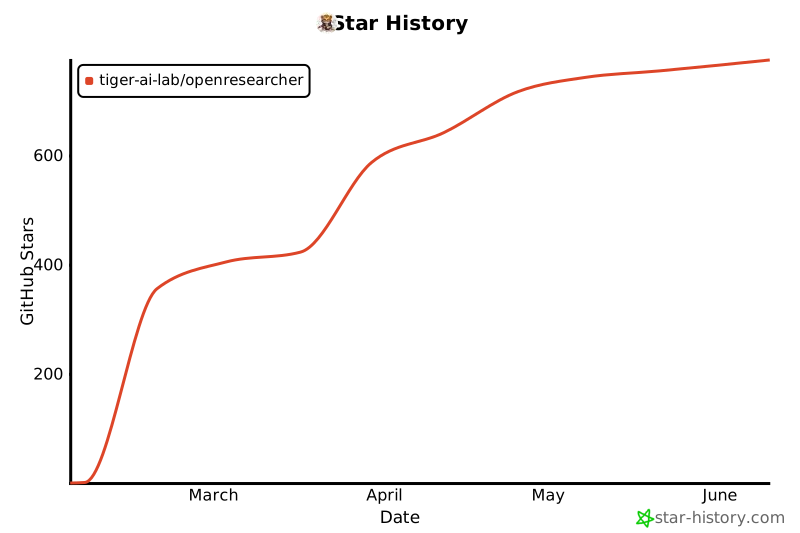](https://www.star-history.com/#TIGER-AI-Lab/OpenResearcher&type=date&legend=top-left)