https://github.com/Tetrax-10/Spicetify-Extensions
Spotify Extensions Developed by a Music Lover
https://github.com/Tetrax-10/Spicetify-Extensions
spicetify spicetify-cli spicetify-extensions spotify
Last synced: about 1 year ago
JSON representation
Spotify Extensions Developed by a Music Lover
- Host: GitHub
- URL: https://github.com/Tetrax-10/Spicetify-Extensions
- Owner: Tetrax-10
- License: mit
- Archived: true
- Created: 2022-05-22T08:27:58.000Z (about 4 years ago)
- Default Branch: master
- Last Pushed: 2023-07-22T15:27:40.000Z (almost 3 years ago)
- Last Synced: 2025-04-03T11:55:57.567Z (about 1 year ago)
- Topics: spicetify, spicetify-cli, spicetify-extensions, spotify
- Language: JavaScript
- Homepage:
- Size: 134 MB
- Stars: 169
- Watchers: 3
- Forks: 11
- Open Issues: 3
-
Metadata Files:
- Readme: README.md
- License: LICENSE
Awesome Lists containing this project
README
# 📦 Archiving this extensions repo due to time constraints. Feel free to fork and continue the development! 🍴
# Spicetify-Extensions
Some Use Full Extension Developed by a Music Lover.
Wanna discuss or having issues with my extensions? Ping `@Tetrax-10` on Discord

# 1. Sort By Play Count
Sort Playlists, All songs of a Artist, Albums by :
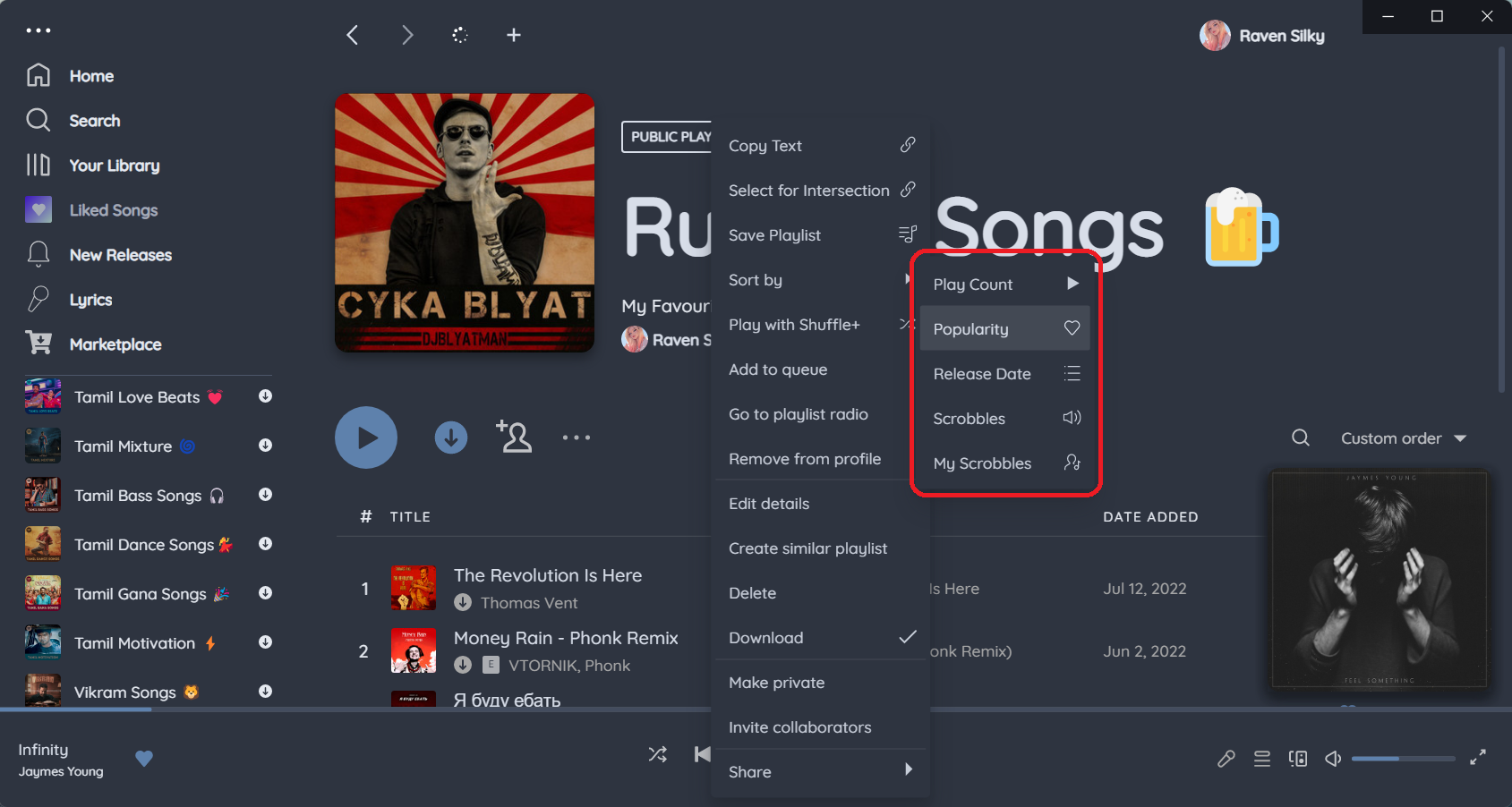
- Play Count (Spotify's Playcount)
- Popularity (Spotify's Popularity) (Trending)
- Release Date (Latest and Oldest Supported)
- Scrobbles - How many times every single listener has listened to that song (Last.FM)
- Personal Scrobbles - How many times you have listened to that song (Last.FM with Login)
- Play Count (lastFM's Playcount)
## Get it on [Spicetify Marketplace](https://github.com/spicetify/spicetify-marketplace) or [Manually](https://github.com/Tetrax-10/Spicetify-Extensions/tree/master/Sort-by-Play-count)
Search `Sort By Play Count` and Click Install Buttton.
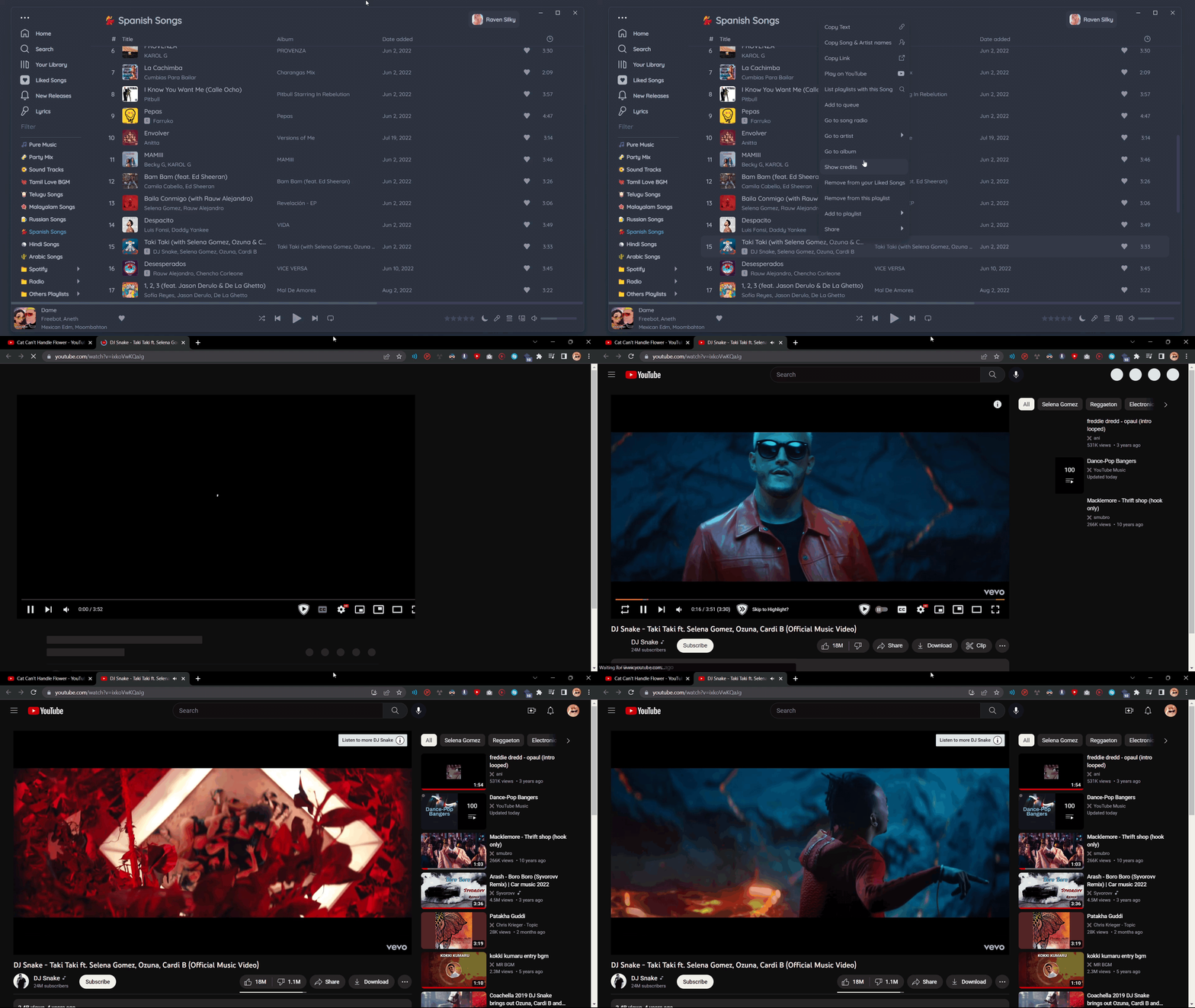
# 2. Play on YouTube
Plays the Video Song of a Track in YouTube
## Get it on [Spicetify Marketplace](https://github.com/spicetify/spicetify-marketplace) or [Manually](https://github.com/Tetrax-10/Spicetify-Extensions/tree/master/Play-on-YouTube)
Search `Play on YouTube` and Click Install Buttton.
# 3. Spotify Genres
See what Genres you are listening to with Spotify Genres Extension

## Get it on [Spicetify Marketplace](https://github.com/spicetify/spicetify-marketplace) or [Manually](https://github.com/Tetrax-10/Spicetify-Extensions/tree/master/Spotify-Genres)
Search `Spotify Genres` and Click Install Buttton.
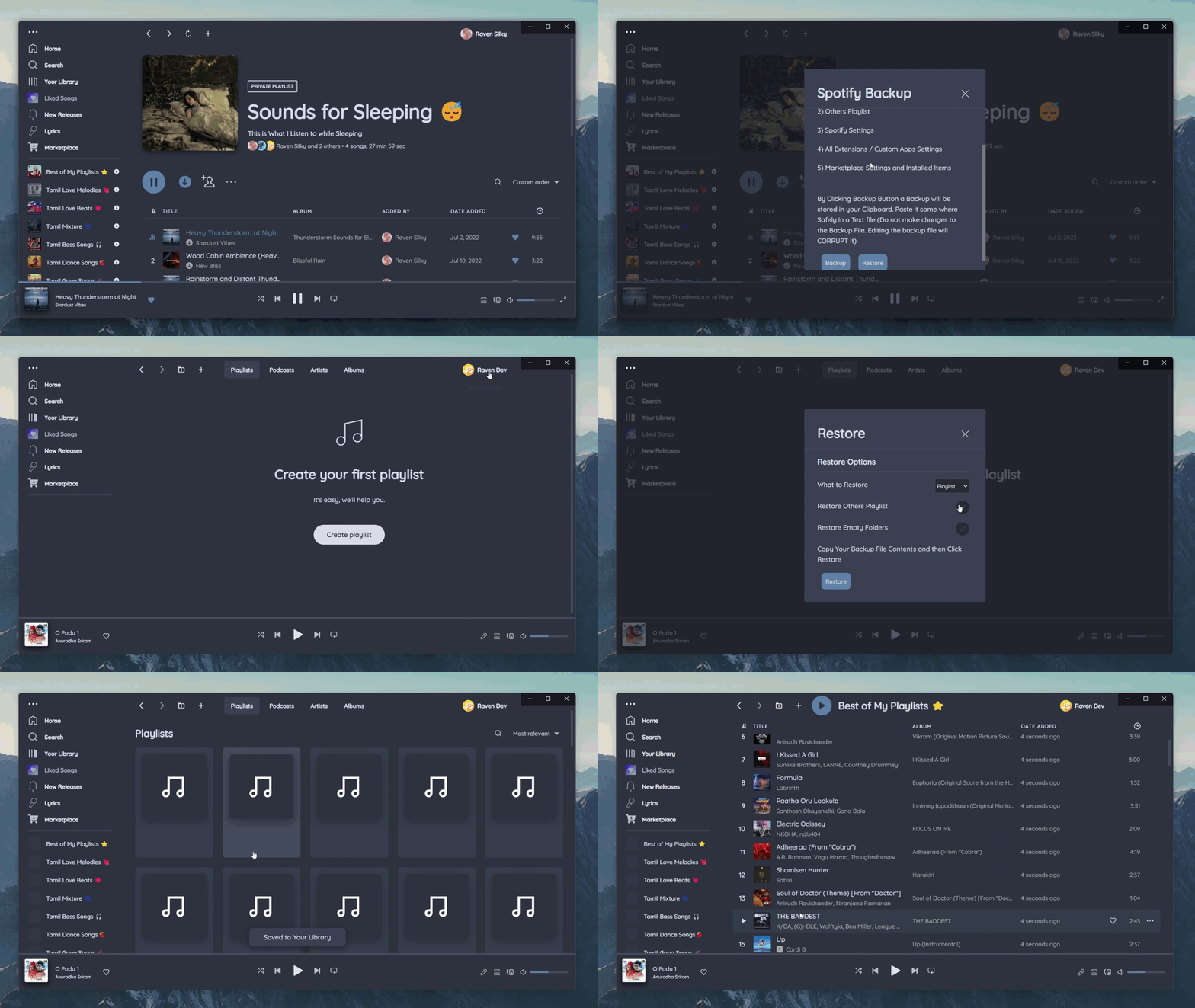
# 4. Spotify Backup
This Extension will Backup and Restore Playlist, Spotify and Marketplace Settings
## Get it on [Spicetify Marketplace](https://github.com/spicetify/spicetify-marketplace) or [Manually](https://github.com/Tetrax-10/Spicetify-Extensions/tree/master/Spotify-Backup)
Search `Spotify Backup` and Click Install Buttton.
# 5. Seek Song
This Extension Seeks Song when you press `1 to 9` for `10 % to 90 %` of the song like YouTube.
`left arrow` and `right arrow` Seeks `10 seconds` backward and forward like YouTube.
`up arrow` and `down arrow` Increase and Decrease volume like YouTube.
`,` and `.` Seeks `1 Second` backward and forward like YouTube.
`+` and `-` to change tracks.

## Get it on [Spicetify Marketplace](https://github.com/spicetify/spicetify-marketplace) or [Manually](https://github.com/Tetrax-10/Spicetify-Extensions/tree/master/Seek-Song)
Search `Seek Song` and Click Install Buttton.
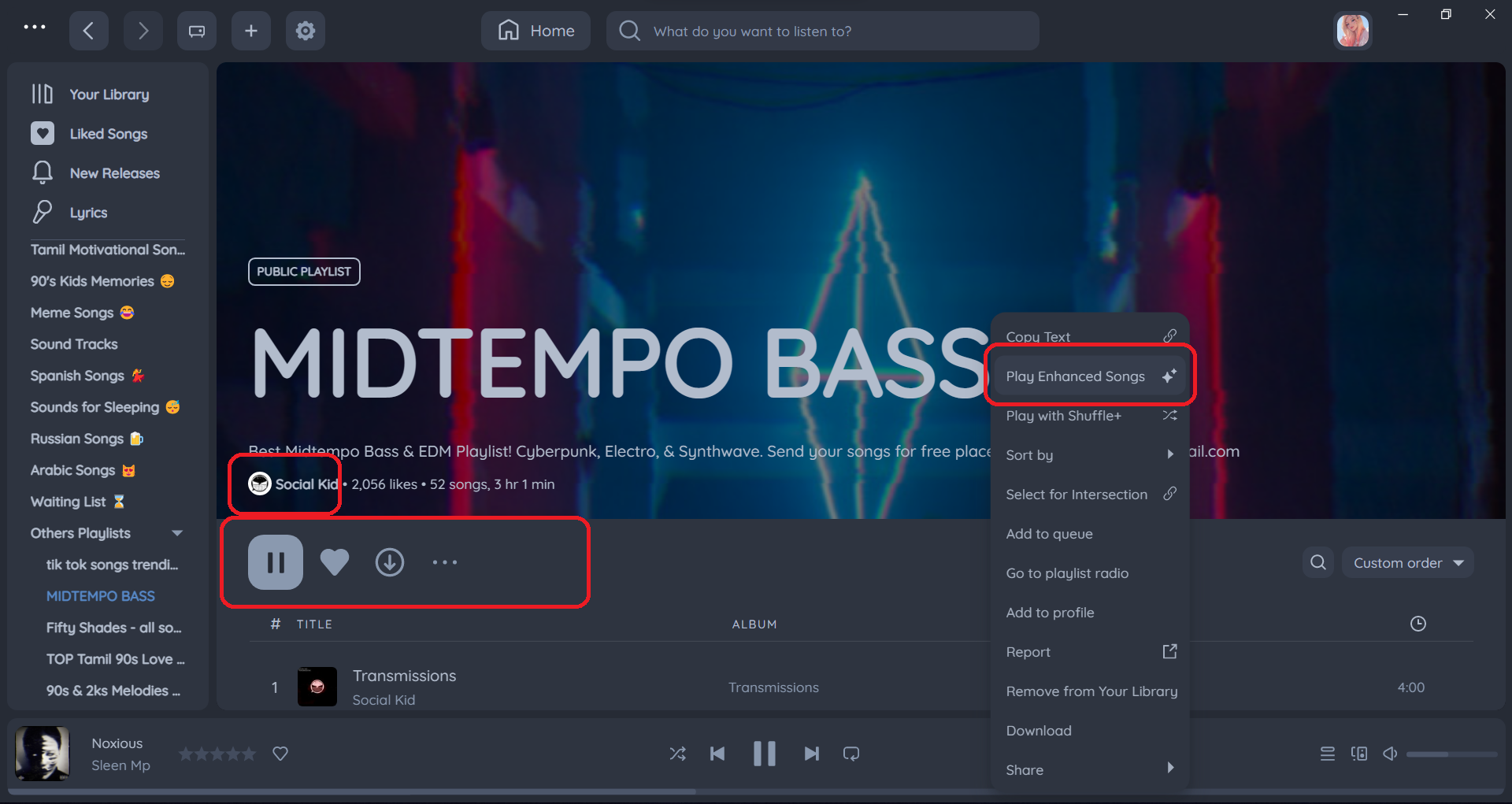
# 6. Play Enhanced Songs
This Extension only Plays the Enhanced Songs from a playlist. It even allows you to play Enhanced Songs from other's playlist.
## Get it on [Spicetify Marketplace](https://github.com/spicetify/spicetify-marketplace) or [Manually](https://github.com/Tetrax-10/Spicetify-Extensions/tree/master/Play-Enhanced-Songs)
Search `Play Enhanced Songs` and Click Install Buttton.
# 7. Skip or Play Liked Songs
This Extension Skips or Plays Liked Songs only
Very Useful if you are Discovering new Songs or want to play your Fav Songs in a PlayList or Album.
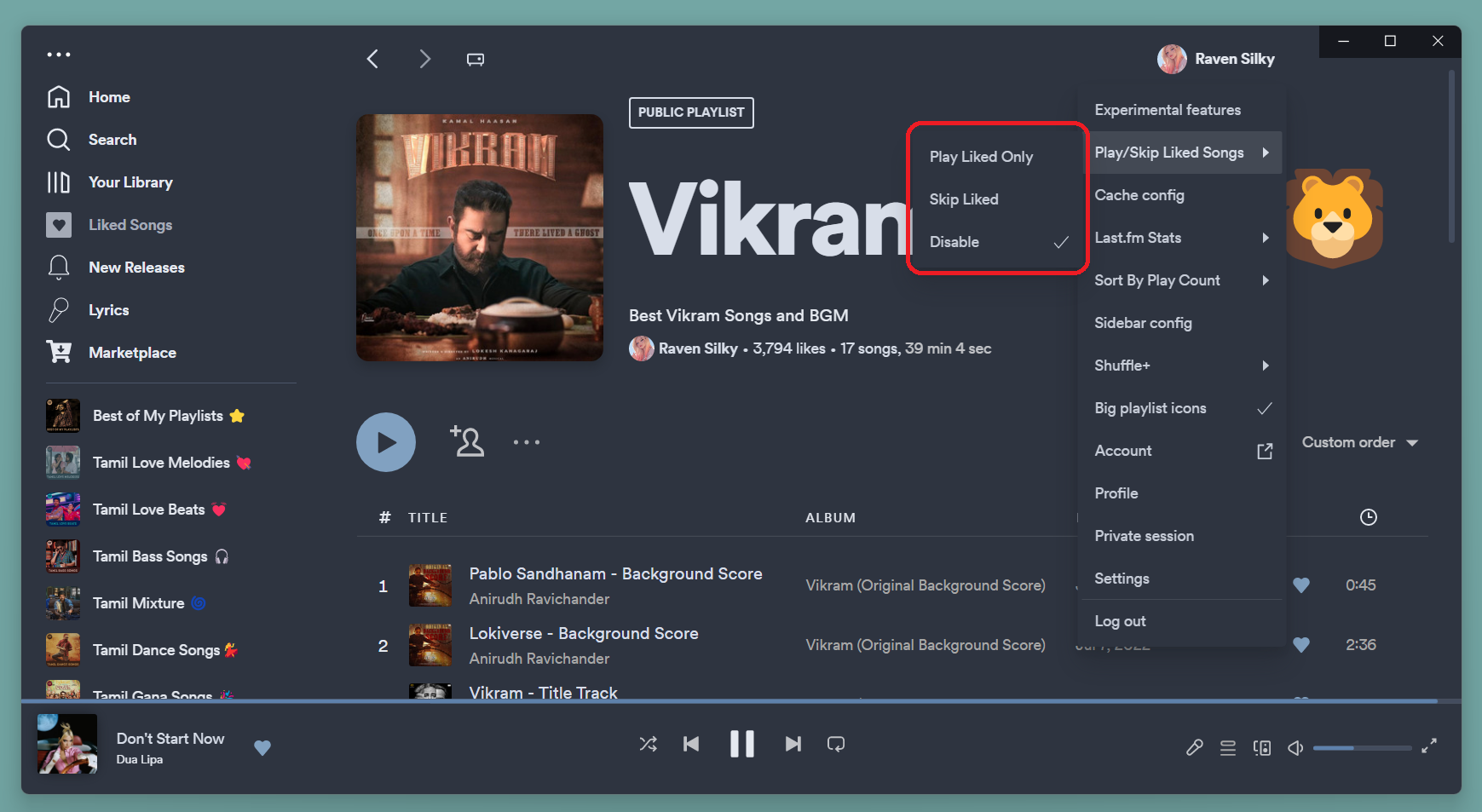
## Get it on [Spicetify Marketplace](https://github.com/spicetify/spicetify-marketplace) or [Manually](https://github.com/Tetrax-10/Spicetify-Extensions/tree/master/Skip-or-Play-Liked-Songs)
Search `Skip or Play Liked Songs` and Click Install Buttton.
# 8. Sort by Rating (deprecated)
Sort by Rating feature has been moved to [Star Ratings](https://github.com/duffey/spicetify-star-ratings) extension.
This extension sorts playlist by Rating.

# Development
## Clone this Repo
```sh
gh repo clone Tetrax-10/Spicetify-Extensions
```
## Install Repository dependencies
```sh
cd Spicetify-Extensions
npm install
```
## Developing Extensions made with [spicetify-creator](https://github.com/spicetify/spicetify-creator)
## Install Extension dependencies
```sh
cd Play-on-YouTube
npm install
```
### For Building and Watching Extension please reffer [spicetify-creator docs](https://spicetify.app/docs/development/spicetify-creator/building-and-testing)
**Note:** No need to [build locally](https://spicetify.app/docs/development/spicetify-creator/building-and-testing#building-locally). Github Actions will automatically build and publish extensions to [dist](https://github.com/Tetrax-10/Spicetify-Extensions/tree/dist) branch.
## Before Making Pull Request
### Always run the Prettier formatter before making the Pull Request
```sh
cd Spicetify-Extensions
npm run format
```
# Support
### People who Liked these Extensions
Want your name here? Just like this Repo 🤩
[](https://github.com/Tetrax-10/Spicetify-Extensions/stargazers)
Like These Extensions? Gimme Some ❤️ by Liking this Repository.
Made with ❤️ from [Chennai](https://www.google.com/maps/place/Chennai,+Tamil+Nadu).
[](https://github.com/Tetrax-10/Spicetify-Extensions)