https://github.com/The-OAG-Development-Project/Application-Gateway
OWASP Application Gateway is an HTTP proxy that handles Oauth2 authentication and session management
https://github.com/The-OAG-Development-Project/Application-Gateway
gateway iam reverse-proxy security spring-boot
Last synced: 8 months ago
JSON representation
OWASP Application Gateway is an HTTP proxy that handles Oauth2 authentication and session management
- Host: GitHub
- URL: https://github.com/The-OAG-Development-Project/Application-Gateway
- Owner: The-OAG-Development-Project
- License: apache-2.0
- Created: 2020-10-16T09:50:44.000Z (over 5 years ago)
- Default Branch: main
- Last Pushed: 2025-05-16T12:44:46.000Z (about 1 year ago)
- Last Synced: 2025-08-08T16:44:13.953Z (11 months ago)
- Topics: gateway, iam, reverse-proxy, security, spring-boot
- Language: Java
- Homepage: https://owasp.org/www-project-application-gateway/
- Size: 3.82 MB
- Stars: 85
- Watchers: 6
- Forks: 4
- Open Issues: 13
-
Metadata Files:
- Readme: README.md
- Contributing: CONTRIBUTING.md
- License: LICENSE
Awesome Lists containing this project
- awesome-java - OWASP Application Gateway
README
# OWASP Application Gateway
[](https://owasp.org/www-project-application-gateway/)
[](https://opensource.org/licenses/Apache-2.0)

[CI/CD](https://github.com/The-OAG-Development-Project/Application-Gateway/actions?query=workflow%3ACI%2FCD)
🏗️ **OWASP Application Gateway is work-in-progress. No productive version has been released yet.**


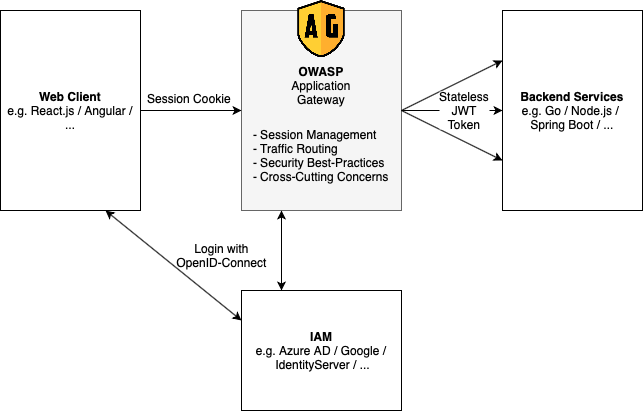
OWASP Application Gateway is an HTTP reverse proxy that sits between your web application and the client and handles Oauth2 login and session management. For you, as a developer, OWASP Application Gateway removes the hassle to implement complicated oauth2 logic in the backend and frontend so you can focus totally on your applications logic.
## Table of Contents
- [OWASP Application Gateway](#owasp-application-gateway)
- [Table of Contents](#table-of-contents)
- [Design Principles](#design-principles)
- [Secure by default](#secure-by-default)
- [Stateless](#stateless)
- [Configuration based](#configuration-based)
- [Configuration File](#configuration-file)
- [How to run](#how-to-run)
- [Docker Release](#docker-release)
- [Jar release](#jar-release)
- [Compile it Yourself](#compile-it-yourself)
- [Functionality](#functionality)
- [Mascot](#mascot)
## Design Principles
### Secure by default
Implementing secure logins and session management became much more complicated within the last few years. OWASP Application Gateway aims to make this easier. Also, it implements many security hardening measures out of the box.
### Stateless
Wherever possible, OWASP Application Gateway is stateless. All session information is stored within encrypted cookies on the clients. Stateless session management makes it a lot easier to deploy OWASP Application Gateway on multiple nodes.
### Configuration based
OWASP Application Gateway's behavior is controlled with a central configuration file describing all routes and Oauth2 integrations. This makes it easier to review the configuration for security issues and to debug on different environments. The deployment and scaling are straightforward; configure the config file's file path, and that's all you need to do.
## Configuration File
OWASP Application Gateway is fully configured with a simple and easy to understand configuration file. Details are documented in the [GitHub doc](https://github.com/The-OAG-Development-Project/Application-Gateway/wiki).
```yaml
hostUri: https://example.com
routes:
httpbin:
type: webapplication
path: /**
url: https://httpbin.org
allowAnonymous: yes
echo:
type: webapplication
path: /echo/**
url: https://nellydemoapp.azurewebsites.net
allowAnonymous: no
loginProviders:
google:
type: oidc
with:
authEndpoint: https://accounts.google.com/o/oauth2/auth
tokenEndpoint: https://oauth2.googleapis.com/token
clientId: 372143946338-48et57uhmcumku7am3ocvva0idc7u0td.apps.googleusercontent.com
clientSecret: env:GOOGLE_CLIENT_SECRET
scopes: [ "openid", "email" ]
github:
type: github
with:
authEndpoint: https://github.com/login/oauth/authorize
tokenEndpoint: https://github.com/login/oauth/access_token
clientId: 163ad3b08c3829216ba1
clientSecret: env:GITHUB_CLIENT_SECRET
scopes: [ "user", "email" ]
securityProfiles:
webapplication:
responseHeaders:
Server: <>
X-Powered-By: <>
X-XSS-Protection: 1;mode=block;
X-Frame-Options: SAMEORIGIN
X-Content-Type-Options: nosniff
Referrer-Policy: strict-origin-when-cross-origin
Content-Security-Policy: base-uri 'self';object-src 'self'
Permissions-Policy: geolocation=(),notifications=(),push=(),microphone=(),camera=(),speaker=(),vibrate=(),fullscreen=(),payment=(),usb=(),magnetometer=(),gyroscope=(),accelerometer=()
Strict-Transport-Security: max-age=31536000; includeSubDomains
traceProfile:
forwardIncomingTrace: true
maxLengthIncomingTrace: 254
acceptAdditionalTraceInfo: false
maxLengthAdditionalTraceInfo: 254
sendTraceResponse: true
type: w3cTraceContext
```
## How to run
You have three options on how to run OWASP Application Gateway:
* There is an official docker image that just works out of the box. You need to mount the config file via docker volumes.
* If you don't want to use docker, you can also download the released jar file. * Of course you can also build OWASP Application Gateway by yourself with Maven.
Note, that in all cases this starts the OAG with a self-signed certificate (This means you will get warnings in your browser when connecting.) It is recommended you change the certificate according to: [Configure TLS](https://github.com/The-OAG-Development-Project/Application-Gateway/wiki/TLS-configuration-in-OAG).
### Docker Release
You can find the Docker image at [Docker Hub](https://hub.docker.com/r/owasp/application-gateway/tags).
Download and Start:
```bash
# Download image of oag
docker pull owasp/application-gateway:main-SNAPSHOT
# Download sample config and adapt it to your needs
curl https://raw.githubusercontent.com/The-OAG-Development-Project/Application-Gateway/refs/heads/main/oag/sample-config.yaml >> oag-config.yaml
vim oag-config.yaml
# Start the container
docker run -e OAG_CONFIG_PATH=/app/oag-config.yaml -v ${PWD}/oag-config.yaml:/app/oag-config.yaml owasp/application-gateway:main-SNAPSHOT
```
### Jar release
Point your browser to https://github.com/The-OAG-Development-Project/Application-Gateway/releases/latest
Download the oag*.zip from the Assets section.
```bash
unzip oag*.zip
cd build/app
java -jar oag.jar
```
### Compile it Yourself
The easiest way is to use Docker to build OWASP Application Gateway.
```bash
git clone https://github.com/The-OAG-Development-Project/Application-Gateway.git
cd Application-Gateway
docker build -t owasp/application-gateway:SNAPSHOT .
docker run -p 8080:8080 owasp/application-gateway:SNAPSHOT
```
If you don't want to use Docker you can build the jar by yourself with Maven:
```bash
git clone https://github.com/The-OAG-Development-Project/Application-Gateway.git
cd Application-Gateway
cd oag
mvn package -DskipTests
java -jar target/oag-exec.jar
```
You may also use your IDE for building OAG. Please see [Setup OAG for development](https://github.com/The-OAG-Development-Project/Application-Gateway/wiki/Setup-for-OAG-development) for instructions using IntelliJ as an example.
## Functionality
- [x] TLS endpoint
- [x] OpenID Connect Login with multiple providers
- [x] Multiple Backend routes
- [x] Authenticated routes
- [x] Request Logging
- [x] Add and remove response headers
- [x] Secure, HTTP-only and same-site session cookies
- [x] Forward id token to backend
- [x] Upstream authentication with API key
- [x] GitHub Login support
- [x] Method whitelisting
- [x] CSRF protection
- [x] Rolling sessions
- [x] W3C compliant request tracing
Ideas:
- [ ] Header whitelisting
- [ ] Report URI Endpoint
- [ ] Default configuration
- [ ] ...
# Mascot