https://github.com/VadimBoev/FlappyBird
Less than 100 Kilobytes. Works for Android 5.1 and above
https://github.com/VadimBoev/FlappyBird
android apk c game opengl-es opengles opensl-es opensles
Last synced: 5 months ago
JSON representation
Less than 100 Kilobytes. Works for Android 5.1 and above
- Host: GitHub
- URL: https://github.com/VadimBoev/FlappyBird
- Owner: VadimBoev
- Created: 2024-09-14T06:46:26.000Z (almost 2 years ago)
- Default Branch: master
- Last Pushed: 2025-08-29T05:25:46.000Z (11 months ago)
- Last Synced: 2025-08-29T09:32:59.596Z (11 months ago)
- Topics: android, apk, c, game, opengl-es, opengles, opensl-es, opensles
- Language: C
- Homepage:
- Size: 4.94 MB
- Stars: 2,326
- Watchers: 10
- Forks: 148
- Open Issues: 12
-
Metadata Files:
- Readme: README.md
Awesome Lists containing this project
README

**[Readme на русском языке](README_RU.md)**
[Dev blog in Telegram (ENG/RU)](https://t.me/boevdev)
# 🐦 Flappy Bird in C: APK Size < 100 Kilobytes! 🚀
## 📜 History:
It all started in 2021 when I stumbled upon [rawdrawandroid](https://github.com/cnlohr/rawdrawandroid). My goal was simple: to create a game with the minimal APK size, yet still be understandable and interesting. 🎯
The idea of making a Flappy Bird clone seemed logical, given that this game had already been ported to many languages. 🐤
In 2021, I also studied [Raylib](https://github.com/raysan5/raylib), but my first attempt to make a game in C++ using [ImGui](https://github.com/ocornut/imgui/) failed. 💔
The problems were everywhere: the APK size was around 1 MB, the game crashed, and the APK only contained the armeabi-v7a library (Google's 2022 requirements state that the arm64-v8a library must be included!). 🤯
## 💡 Motivation:
In September 2024, seeing Flappy Bird in C# in the Raylib Discord channel, I decided to try implementing this game in C for Android with an APK size of less than 100 KB. 🚀
The idea seemed crazy, but the competitive interest took over. 💪
## 🛠️ Implementation:
I started by compiling a "Hello World" in C and packaging the library into an APK. 📦
Sounds were compressed to MP3 format, and OpenSLES was used for playback. 🎵
For PNG file decoding, I chose [upng](https://github.com/elanthis/upng). 🖼️
All of this was combined using OpenGL ES 2, shaders, and Android Native Activity. 🎮
## 🔧 Build:
### Visual Studio (Windows)
1. Download [Visual Studio 2022](https://visualstudio.microsoft.com/).
2. Install components: C++ Desktop Development and C++ Mobile Development.
3. Download Android Studio (for apktool, sdk, ndk).
4. Install NDK 27.1.12297006 and Android SDK Platform 30.
5. Configure the project for "Debug ARM" and make changes to build.bat.
6. Compile via CTRL + B. 🛠️
### Linux and macOS (Makefile)
For Linux and macOS users, you can build the project using the provided Makefile:
1. Install the Android command-line tools.
2. Set up your environment variables in a `.env` file in the project root directory (see `.env.example` for an example).
3. Build the project:
```bash
cd FlappyBird
make
```
For more detailed instructions, please refer to [BUILDING.md](BUILDING.md).
The signed APK will be generated at:
`FlappyBird/app/build/outputs/apk/FlappyBird-signed.apk`
## 📄 Copyright:
I do not claim any copyright. The rights to the game and resources belong to **DotGEARS**. 📜
## 🌟 Inspiration:
- [rawdrawandroid](https://github.com/cnlohr/rawdrawandroid)
- [Flapper](https://github.com/its-Lyn/Flapper)
- [Raylib](https://github.com/raysan5/raylib)
- [ImGui](https://github.com/ocornut/imgui/)
## 🌠 Star History
[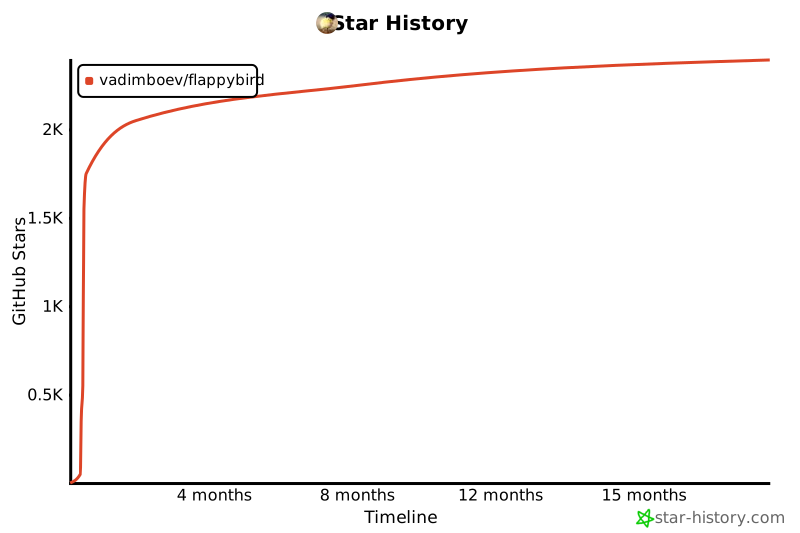](https://star-history.com/#VadimBoev/FlappyBird&Timeline)
---
🎉 Enjoy the game and don't forget to star it! 🌟