https://github.com/ViperX7/Alpaca-Turbo
Web UI to run alpaca model locally
https://github.com/ViperX7/Alpaca-Turbo
Last synced: about 1 year ago
JSON representation
Web UI to run alpaca model locally
- Host: GitHub
- URL: https://github.com/ViperX7/Alpaca-Turbo
- Owner: ViperX7
- License: agpl-3.0
- Created: 2023-03-20T23:22:39.000Z (over 3 years ago)
- Default Branch: main
- Last Pushed: 2023-05-27T01:41:38.000Z (about 3 years ago)
- Last Synced: 2024-11-29T16:38:28.586Z (over 1 year ago)
- Language: Python
- Size: 2.38 MB
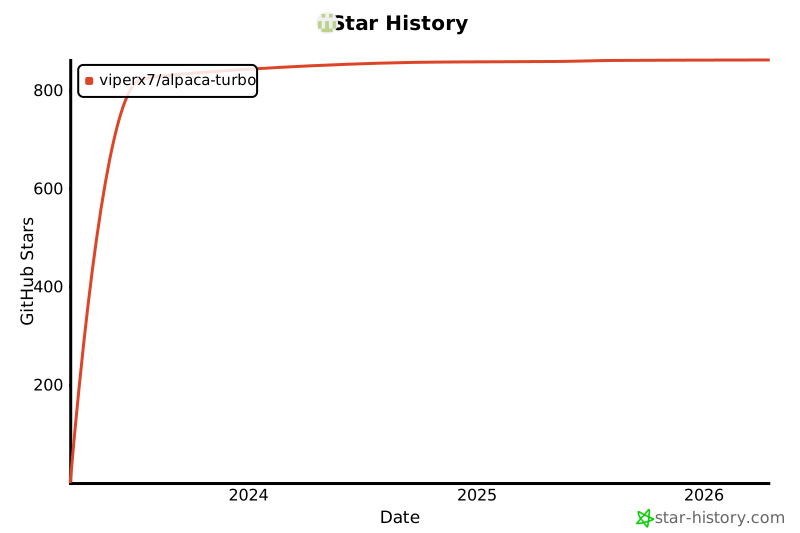
- Stars: 877
- Watchers: 24
- Forks: 92
- Open Issues: 36
-
Metadata Files:
- Readme: README.md
- Contributing: .github/CONTRIBUTING.md
- Code of conduct: CODE_OF_CONDUCT.md
Awesome Lists containing this project
- awesome - ViperX7/Alpaca-Turbo - Web UI to run alpaca model locally (Python)
README
# Alpaca-Turbo

[](https://github.com/ViperX7/Alpaca-Turbo/releases) 
 
[](https://discord.gg/pm4JzCBHNn)
Alpaca-Turbo is a frontend to use large language models that can be run locally without much setup required. It is a user-friendly web UI for the llama.cpp , with unique features that make it stand out from other implementations. The goal is to provide a seamless chat experience that is easy to configure and use, without sacrificing speed or functionality.
## 📝 Example views
https://user-images.githubusercontent.com/38191717/234747316-2e8d5f55-73f2-4f42-ad9a-11114de1825b.mp4
## 📦 Installation Steps
### 📺 Video Instructions
- ToDo
- ToDo
#### 🐳 Using Docker (only Linux is supported with docker)
- ToDo
#### 🪟 Using Windows (standalone or miniconda) AND Mac M1/M2 (using miniconda)
> #### For Windows users we have a [oneclick standalone launcher - Alpaca-Turbo.exe](https://github.com/ViperX7/Alpaca-Turbo/releases/latest).
1. Links for installing miniconda:
- [Windows](https://repo.anaconda.com/miniconda/Miniconda3-latest-Windows-x86_64.exe)
- [Mac M1/M2](https://repo.anaconda.com/miniconda/Miniconda3-latest-MacOSX-arm64.pkg)
> - Install for all users
> - Make sure to add `c:\ProgramData\miniconda3\condabin` to your environment variables
2. Download the [latest alpaca-turbo.zip from the release page](https://github.com/ViperX7/Alpaca-Turbo/releases/latest).
3. Extract Alpaca-Turbo.zip to Alpaca-Turbo
> Make sure you have enough space for the models in the extracted location
4. Copy your alpaca models to alpaca-turbo/models/ directory.
5. Open cmd as Admin and type
```
conda init
```
6. close that window
7. open a new cmd window in your Alpaca-Turbo dir and type
```
conda create -n alpaca_turbo python=3.10 -y
conda activate alpaca_turbo
pip install -r requirements.txt
python app.py
```
9. ready to interact
#### Directly installing with Pip
just get the latest release unzip and then run
```
pip install -r requirements.txt
python app.py
```
## 💁 Contributing
As an open source project in a rapidly developing field, I am open to contributions, whether it be in the form of a new feature, improved infra, or better documentation.
For detailed information on how to [contribute](.github/CONTRIBUTING.md).
## 🙌 Credits
- [ggerganov/LLaMA.cpp](https://github.com/ggerganov/LLaMA.cpp) For their amazing cpp library
- [antimatter15/alpaca.cpp](https://github.com/antimatter15/alpaca.cpp) For initial versions of their chat app
- [cocktailpeanut/dalai](https://github.com/cocktailpeanut/dalai) For the Inspiration
- MetaAI for the LLaMA models
- Stanford for the alpaca [models](https://github.com/tatsu-lab/stanford_alpaca)
## 🌟 History
[](https://star-history.com/#ViperX7/Alpaca-Turbo&Date)