https://github.com/VoIlAlex/rex
Manage requirements.txt automatically with pip.
https://github.com/VoIlAlex/rex
pip pypi python requirements-txt-pip utility virtualenv
Last synced: 8 months ago
JSON representation
Manage requirements.txt automatically with pip.
- Host: GitHub
- URL: https://github.com/VoIlAlex/rex
- Owner: VoIlAlex
- License: mit
- Created: 2021-12-20T20:57:44.000Z (over 4 years ago)
- Default Branch: master
- Last Pushed: 2025-05-03T12:08:23.000Z (about 1 year ago)
- Last Synced: 2025-09-29T11:19:36.789Z (9 months ago)
- Topics: pip, pypi, python, requirements-txt-pip, utility, virtualenv
- Language: Python
- Homepage:
- Size: 175 KB
- Stars: 28
- Watchers: 2
- Forks: 7
- Open Issues: 12
-
Metadata Files:
- Readme: README.md
- Changelog: CHANGELOG.md
- Contributing: CONTRIBUTING.md
- License: LICENSE.md
- Code of conduct: CODE_OF_CONDUCT.md
Awesome Lists containing this project
README
# REX | Automatically Update requirements.txt
[](https://pypi.org/project/rex/)
[](https://github.com/VoIlAlex/rex/actions/workflows/publish-to-pypi.yml)
[](https://img.shields.io/maintenance/yes/2025)
[](https://github.com/VoIlAlex/rex/blob/master/LICENSE.md)
**REX** allows for the automatic management of dependencies in `requirements.txt` using **pip** as a package manager.
[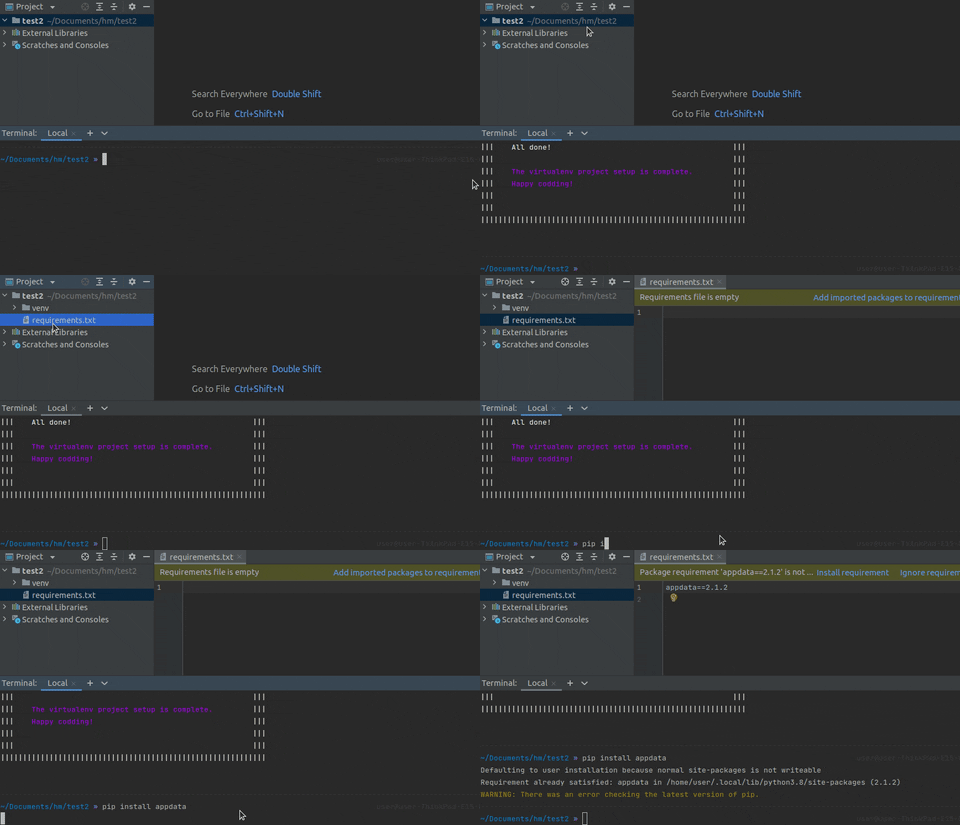](https://media.giphy.com/media/y9dUiCm2SwaU8qR0eD/giphy.gif)
## Benefits
- **Easy Setup**: The installation process involves just two steps: installing the package using pip and setting it up using the provided script. That's it.
- **One-Command Setup**: Set up a VirtualEnv-based project in a single command. It creates a virtual environment and installs *to-requirements.txt* automatically.
- **Customizable**: Customize it as you prefer: use it only in Git repositories, allow or disallow automated `requirements.txt` file creation, enable or disable the package itself.
- **User-Friendly**: After installation and setup, there are no additional conditions to use. Simply install, uninstall, or upgrade packages using *pip* as usual.
- **Always in Sync**: With *to-requirements.txt*, the project's `requirements.txt` will always stay in sync with packages installed via *pip*.
## Installation
To install the package, run the following command:
```shell
pip install rex
```
To enable all available functionality, add the following lines to your `.bashrc`, `.zshrc`, or other `.*rc` file:
```shell
rex alias
```
or just paste this lines to your `.bashrc`, `.zshrc`, or other `.*rc` file:
```shell
alias rt=". rt"
alias requirements-txt=". requirements-txt"
alias rex=". rex"
```
This enables sourced mode of the CLI execution and allows the CLI to activate or deactivate your virtual environment if required.
### Setup Project
To set up a VirtualEnv-based project, simply type:
```shell
rex init
```
Or, achieve the same effect more easily with aliases:
```shell
rex i
```
*Note: The changes made to **pip** scripts will not affect the ordinary *pip* workflow after uninstalling **to-requirements.txt*.**
## Aliases
There are a few aliases available to use instead of `rex` command:
- `requirements-txt` - legacy command.
- `rt` - legacy command shortened.
## Documentation
For detailed documentation, visit [requirements-txt.readthedocs.io](https://requirements-txt.readthedocs.io/en/latest/index.html).
## Contributing
See [CONTRIBUTING.md](CONTRIBUTING.md) for contribution guidelines.
## License
This project is licensed under the [MIT License](LICENSE.md).