https://github.com/XD-DENG/rediseen
Create REST-like API service for Redis DB or expose Redis metrics in Prometheus-compatible format, easily.
https://github.com/XD-DENG/rediseen
api golang redis redis-database
Last synced: 6 months ago
JSON representation
Create REST-like API service for Redis DB or expose Redis metrics in Prometheus-compatible format, easily.
- Host: GitHub
- URL: https://github.com/XD-DENG/rediseen
- Owner: XD-DENG
- License: apache-2.0
- Created: 2019-10-15T14:33:45.000Z (almost 7 years ago)
- Default Branch: master
- Last Pushed: 2023-02-25T04:28:33.000Z (over 3 years ago)
- Last Synced: 2025-04-14T23:41:26.914Z (over 1 year ago)
- Topics: api, golang, redis, redis-database
- Language: Go
- Homepage:
- Size: 2.72 MB
- Stars: 39
- Watchers: 5
- Forks: 6
- Open Issues: 3
-
Metadata Files:
- Readme: README.md
- License: LICENSE
Awesome Lists containing this project
README
# Rediseen
[](https://github.com/xd-deng/rediseen/releases/latest)
[](https://github.com/XD-DENG/rediseen/actions)
[](https://travis-ci.org/XD-DENG/rediseen/branches)
[](https://codecov.io/gh/XD-DENG/rediseen)
[](http://www.apache.org/licenses/LICENSE-2.0.html)
[](https://goreportcard.com/report/github.com/xd-deng/rediseen)
[](https://hub.docker.com/r/xddeng/rediseen)
Start a REST-like API service for your Redis database, without writing a single line of code.
- Allows clients to query records in Redis database via HTTP conveniently
- Allows you to specify which logical DB(s) to expose, and what key patterns to expose
- Expose results of [Redis `INFO` command](https://redis.io/commands/info) in a nice format, so **you can use `Rediseen` as a connector between your Redis DB and monitoring dashboard** as well.
- Endpoint `/info` provides JSON format.
- Endpoint `/metrics` provides [Prometheus-compatible format](docs/documentation.md#use-rediseen-as-redis-info-exporter-for-prometheus).
- Supports API Key authentication
(Inspired by [sandman2](https://github.com/jeffknupp/sandman2); Built on shoulder of [go-redis/redis
](https://github.com/go-redis/redis); CLI implemented with [Cobra](https://github.com/spf13/cobra))
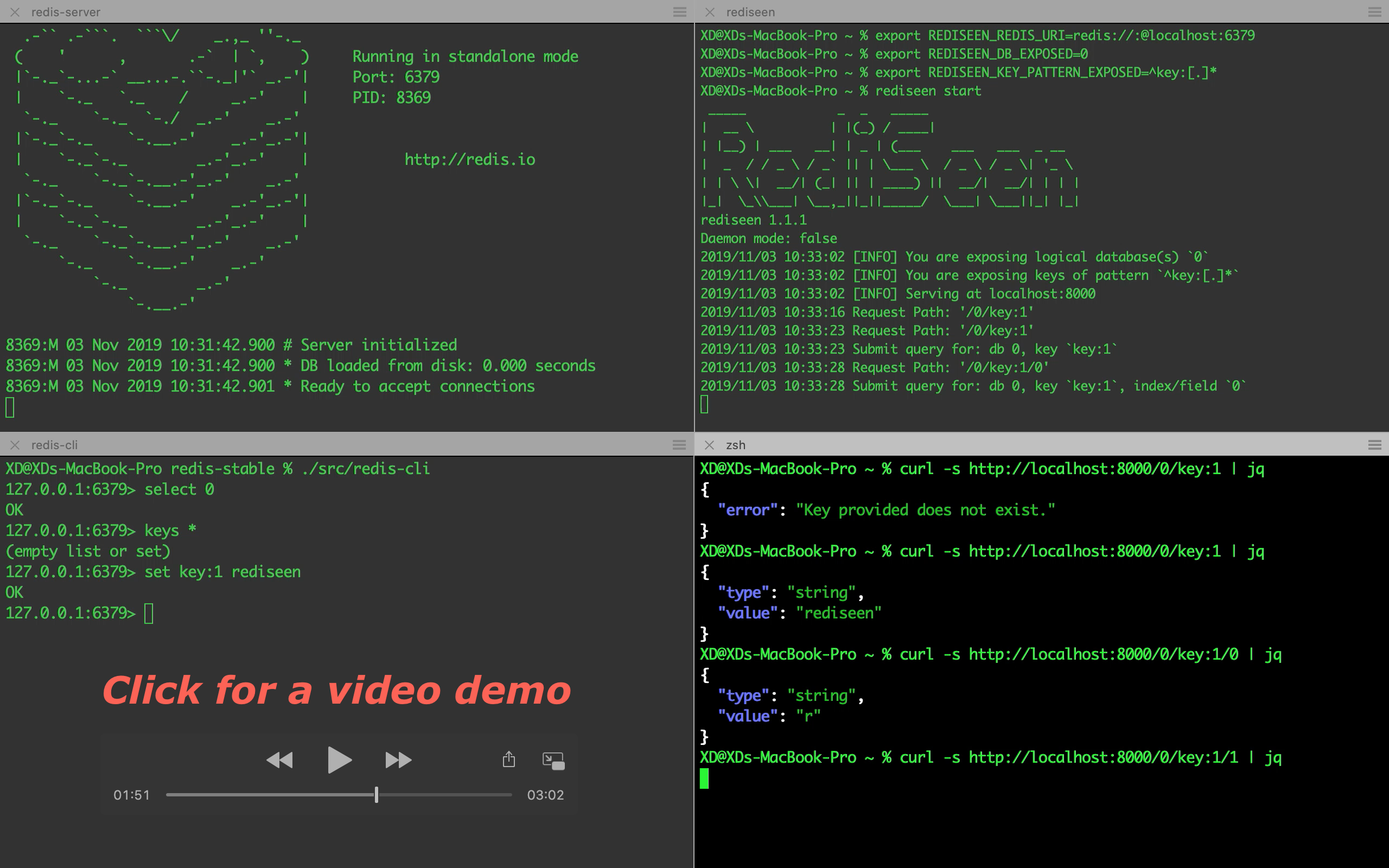
- [Quick Start](#quick-start)
- [Quick Start with `go get`](#quick-start-with-go-get)
- [Quick Start with Homebrew](#quick-start-with-homebrew)
- [Quick Start with Docker](#quick-start-with-docker)
- [Documentation](docs/documentation.md)
- [Installation](docs/documentation.md#installation)
- [Configuration](docs/documentation.md#configuration)
- [How to Start the Service](docs/documentation.md#how-to-start-the-service)
- [How to Consume the Service](docs/documentation.md#how-to-consume-the-service)
- [API Authentication](docs/documentation.md#api-authentication)
- [Run Rediseen on Kubernetes](docs/documentation.md#run-rediseen-on-kubernetes)
- [Handle Special Character in Keys](docs/documentation.md#handle-special-character-in-keys)
- [Use Rediseen as Redis INFO Exporter for Prometheus](docs/documentation.md#use-rediseen-as-redis-info-exporter-for-prometheus)
- [License](#license)
- [Reference](#reference)
## Quick Start
Let's assume that your Redis database URI is `redis://:@localhost:6379`, and you want to expose keys with prefix `key:` in logical database `0`.
### Quick Start with `go get`
If you have Go (1.11+) installed, you can install `Rediseen` easily by running
```bash
go get github.com/xd-deng/rediseen
```
If your `GOPATH` is added to `PATH`, you should be able to run command `rediseen` now.
```bash
# Configuration
export REDISEEN_REDIS_URI="redis://:@localhost:6379"
export REDISEEN_DB_EXPOSED=0
export REDISEEN_KEY_PATTERN_EXPOSED="^key:([0-9a-z]+)"
# Start the service
rediseen start
```
Now you should be able to query against your Redis database, like `http://localhost:8000/0`, `http://localhost:8000/0/key:1`,
`http://localhost:8000/info` or `http://localhost:8000/info/server`
(say you have keys `key:1` (string) and `key:2` (hash) set in your logical DB `0`). Sample responses follow below.
```bash
GET /0
{
"count": 2,
"total": 2,
"keys": [
{
"key": "key:1",
"type": "string"
},
{
"key": "key:2",
"type": "hash"
}
]
}
```
```bash
GET /0/key:1
{
"type": "string",
"value": "rediseen"
}
```
```bash
GET /info
{
Server: {
redis_version: "5.0.6",
...
},
Clients: {
...
},
...
}
```
```bash
GET /info/server
{
Server: {
redis_version: "5.0.6",
...
}
}
```
For more details, please refer to the rest of the [documentation](docs/documentation.md).
### Quick Start with Homebrew
```bash
# Install using Homebrew
brew install XD-DENG/rediseen/rediseen
```
Then you can configure and start the service as described above.
### Quick Start with Docker
```bash
docker run \
-e REDISEEN_REDIS_URI="redis://:@[YOUR REDIS HOST]:6379" \
-e REDISEEN_DB_EXPOSED=0 \
-e REDISEEN_KEY_PATTERN_EXPOSED="^key:([0-9a-z]+)" \
-p 8000:8000 \
xddeng/rediseen:latest
```
Please note:
- `REDISEEN_REDIS_URI` above should be a specific host address. If you are running Redis database using Docker
too, you can consider using Docker's `link` or `network` feature to ensure connectivity between Rediseen and your Redis database
(refer to the complete example below).
- You can choose the image tag among:
- `latest` (the latest release version)
- `nightly` (the latest code in master branch)
- `unstable` (latest dev branch)
- release tags (like `2.2.0`. Check [Docker Hub/xddeng/rediseen](https://hub.docker.com/r/xddeng/rediseen/tags)
for full list)
A **complete example** using Docker follows below
```bash
docker network create test-net
docker run -d --network=test-net --name=redis-server redis
docker run \
-d --network=test-net \
-e REDISEEN_REDIS_URI="redis://:@redis-server:6379" \
-e REDISEEN_DB_EXPOSED=0 \
-e REDISEEN_KEY_PATTERN_EXPOSED="^key:([0-9a-z]+)" \
-p 8000:8000 \
xddeng/rediseen:latest
curl -s http://localhost:8000/0
```
Result is like
```
{
"count": 0,
"total": 0,
"keys": null
}
```
Then you can execute
```bash
docker exec -i redis-server redis-cli set key:0 100
curl -s http://localhost:8000/0
```
and you can expect output below
```
{
"count": 1,
"total": 1,
"keys": [
{
"key": "key:0",
"type": "string"
}
]
}
```
## Documentation
- [Documentation](docs/documentation.md)
- [Installation](docs/documentation.md#installation)
- [Configuration](docs/documentation.md#configuration)
- [How to Start the Service](docs/documentation.md#how-to-start-the-service)
- [How to Consume the Service](docs/documentation.md#how-to-consume-the-service)
- [API Authentication](docs/documentation.md#api-authentication)
- [Run Rediseen on Kubernetes](docs/documentation.md#run-rediseen-on-kubernetes)
- [Handle Special Character in Keys](docs/documentation.md#handle-special-character-in-keys)
- [Use Rediseen as Redis INFO Exporter for Prometheus](docs/documentation.md#use-rediseen-as-redis-info-exporter-for-prometheus)
## License
[Apache-2.0](https://www.apache.org/licenses/LICENSE-2.0)
## Reference
[1] https://swagger.io/docs/specification/authentication/api-keys/
[2] Prometheus Exposition Formats, https://prometheus.io/docs/instrumenting/exposition_formats/