https://github.com/YoRyan/smtp-translator
An SMTP server that converts emails into Pushover notifications.
https://github.com/YoRyan/smtp-translator
email pushover pushover-notifications smtp-server
Last synced: over 1 year ago
JSON representation
An SMTP server that converts emails into Pushover notifications.
- Host: GitHub
- URL: https://github.com/YoRyan/smtp-translator
- Owner: YoRyan
- Archived: true
- Created: 2019-12-15T05:43:04.000Z (over 6 years ago)
- Default Branch: master
- Last Pushed: 2022-08-09T16:48:22.000Z (about 4 years ago)
- Last Synced: 2025-04-04T02:36:35.813Z (over 1 year ago)
- Topics: email, pushover, pushover-notifications, smtp-server
- Language: Go
- Homepage:
- Size: 90.8 KB
- Stars: 33
- Watchers: 4
- Forks: 2
- Open Issues: 1
-
Metadata Files:
- Readme: README.md
Awesome Lists containing this project
README

# SMTP Translator
SMTP Translator is a custom SMTP server that converts all emails it receives
into [Pushover](https://pushover.net) notifications - a faster, simpler, and
more contemporary alternative to email messages. No more replicating your Gmail
password to the email daemons on all of your Linux boxes!
SMTP Translator has been succeeded by my [Mailrise](https://mailrise.xyz)
project, which can push to practically any service - not just Pushover - using
the [Apprise](https://github.com/caronc/apprise) library.
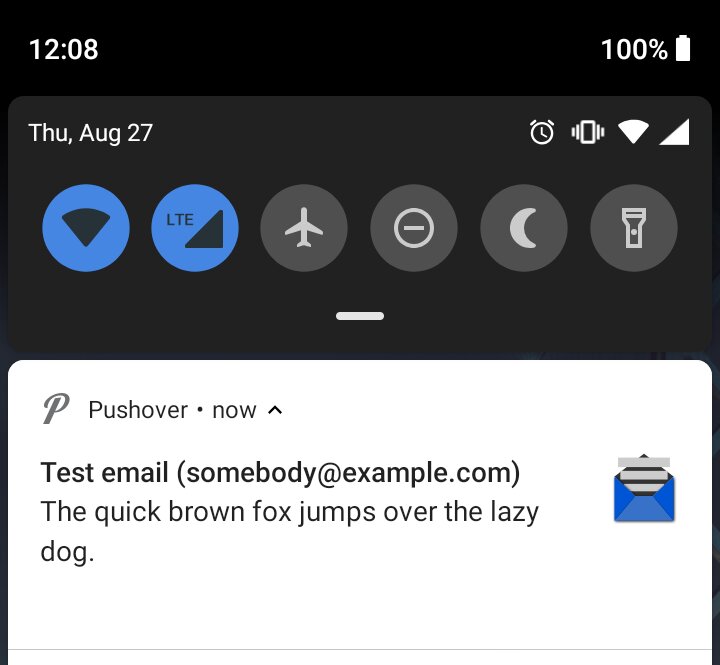
## How to use
With an SMTP Translator instance set as your SMTP relay, send an email to `(your
user key here)@pushover.net`. Then, instead of routing the email to Pushover via
the conventional email network, SMTP Translator submits it directly to the
Pushover API. You can make up any sender addresses you want, since they never
touch the public email system.
Please note that with SMTP Translator as your sole smarthost, your system will
not be able to send email to non-Pushover destinations.
As of June 6, 2021, the demo server formerly available at smtpt.youngryan.com
has been discontinued.
## Run your own instance
First, install SMTP Translator into your `GOPATH`:
```
$ go get -u github.com/YoRyan/smtp-translator
```
To start the server, you need to specify the Pushover app token it will use. You
do this by setting the `PUSHOVER_TOKEN` environment variable:
```
$ export PUSHOVER_TOKEN=xxx
$ sudo smtp-translator
```
Optionally, you can specify your own listening address and advertised hostname.
```
$ smtp-translator -addr 127.0.0.1:2525 -hostname My-Host-Not-Root
```
### Pushover flags
You may also insert the following flags directly after your user token to
further customize the notification:
* `>device` to send the notification to a particular
[device](https://pushover.net/api#identifiers) (or, by inserting comma
separators, multiple devices)
* `#priority` to set the notification
[priority](https://pushover.net/api#priority) (from -2 to 2)
* `%retry` to set the retry interval for emergency priority notifications
* `$expire` to set the expiration time for emergency priority notifications
* `!sound` to set the notification [tone](https://pushover.net/api#sounds)
For example, sending an email to
`uQiRzpo4DXghDmr9QzzfQu27cmVRsG>phone!incoming@pushover.net` will route the
notification to your `phone` device and play the `incoming` sound.
### Image attachments
If the email contains an image attachment that is within Pushover's 2.5 MB
[limit](https://pushover.net/api#attachments), SMTP Translator will attach it
to the Pushover notification.
## FAQ
##### Q: What's the catch?
No catch. I promise that the code on this repository is what I run on my
server, and that I do not log messages or metadata. But if you would prefer some
more privacy, you are of course free to acquire your own app token and host your
own instance.
##### Q: Does `smtpt.youngryan.com` support encryption?
Yes. To use TLS encryption, make note of the following table:
| Port | Encryption |
| --- | --- |
| 25 | STARTTLS (optional) |
| 465 | TLS-on-connect |
| 587 | STARTTLS (mandatory) |
In theory, I could still read your messages. Email, by its nature, cannot be
end-to-end encrypted.
##### Q: Help! My message didn't go through!
Double-check the token in your recipient address - it is easy to confuse an app
token for a user or group token.
## Configuration examples
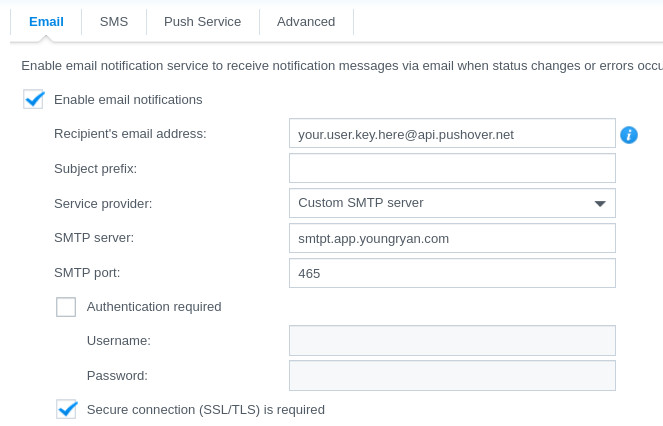
### Synology NAS
### exim4 (Debian/Ubuntu)
Run `dpkg-reconfigure exim4-config` and answer the following:
- General type of mail configuration: "mail sent by smarthost; no local mail"
- IP address or host name of the outgoing smarthost: "smtpt.youngryan.com::587"
```
$ mailx -s 'Test Email' 'your.user.key.here@pushover.net'
Hello, World!
```
### postfix
```
# cat >>/etc/postfix/main.cf
relayhost = [smtpt.youngryan.com:587]
smtp_tls_security_level = verify
smtp_tls_mandatory_ciphers = high
smtp_tls_verify_cert_match = hostname
```
```
$ mailx -s 'Test Email' 'your.user.key.here@pushover.net'
Hello, World!
```
### sendmail
```
# cat >>/etc/mail/sendmail.mc; /etc/mail/make
define(`SMART_HOST', `smtpt.youngryan.com')dnl
define(`RELAY_MAILER', `esmtp')dnl
define(`RELAY_MAILER_ARGS', `TCP $h 587')dnl
define(`confAUTH_MECHANISMS', `CRAM-MD5')dnl
```
```
$ mailx -s 'Test Email' 'your.user.key.here@pushover.net'
Hello, World!
```
### Docker support
SMTP Translator can be run inside Docker, and an official image is [available](https://hub.docker.com/r/yoryan/smtp-translator) from Docker Hub. This image listens on port 25. It will not run out of the box; you need to supply the `PUSHOVER_TOKEN` environment variable to get the daemon to start:
```
# docker pull yoryan/smtp-translator
# docker run -e PUSHOVER_TOKEN=xxx -t yoryan/smtp-translator
```
To pass additional command-line arguments, use `/app/smtp-translator` as the binary path:
```
# docker run -it yoryan/smtp-translator /app/smtp-translator -help
```
If you want to enable TLS when running SMTP Translator inside a Docker container, you will need to use [bind mounts](https://docs.docker.com/storage/bind-mounts/) to supply the certificate files.
### Multiple app token mode
Passing the `-multi` flag will instruct SMTP Translator to read the app token
from the sender's email address instead of the environment variable. In this
mode, all sender addresses must be in the form of `(app token)@pushover.net`.
You do not need to set `PUSHOVER_TOKEN` in this mode.
### Enabling TLS
To quickly generate your own cert:
```
$ openssl req -newkey rsa:4096 -nodes -sha512 -x509 -days 3650 -nodes -out mycert.pem -keyout mycert.key
```
(This is self-signed, so production email clients will reject it by default.
For an authentic certificate, request one from a service like
[Let's Encrypt](https://letsencrypt.org).)
There are three possible operating modes depending on whether you want to
encrypt the entire session or kickstart unencrypted connections with STARTTLS -
and if you use STARTTLS, whether or not to mandate encryption. For a historical
discussion of the differing standards, see this [overview by
Fastmail](https://www.fastmail.com/help/technical/ssltlsstarttls.html).
| Arguments | Mode |
| --- | --- |
| `-tls-cert mycert.pem -tls-key mycert.key` | Immediate TLS encryption |
| `-tls-cert mycert.pem -tls-key mycert.key -starttls` | Initial connection unencrypted, optional upgrade to TLS |
| `-tls-cert mycert.pem -tls-key mycert.key -starttls-always` | Initial connection unencrypted, mandatory upgrade to TLS |
### Enabling authentication
To password-protect your server, use the `-auth` switch to provide a path to a
credentials file, where each line represents an authorized login in the form of
`username:password`.
```
$ cat >mycreds.txt <