https://github.com/ZetaPlugins/ServerLinksZ
A simple Minecraft Plugin that allows you to add Links to the new Server Links section of your Minecraft server.
https://github.com/ZetaPlugins/ServerLinksZ
minecraft minecraft-paper minecraft-plugin minecraft-server minecraft-server-links modrinth
Last synced: about 1 year ago
JSON representation
A simple Minecraft Plugin that allows you to add Links to the new Server Links section of your Minecraft server.
- Host: GitHub
- URL: https://github.com/ZetaPlugins/ServerLinksZ
- Owner: ZetaPlugins
- License: gpl-3.0
- Created: 2024-07-26T21:59:48.000Z (almost 2 years ago)
- Default Branch: main
- Last Pushed: 2025-04-30T16:14:13.000Z (about 1 year ago)
- Last Synced: 2025-05-07T00:11:50.796Z (about 1 year ago)
- Topics: minecraft, minecraft-paper, minecraft-plugin, minecraft-server, minecraft-server-links, modrinth
- Language: Java
- Homepage: https://modrinth.com/plugin/serverlinksz
- Size: 941 KB
- Stars: 12
- Watchers: 1
- Forks: 6
- Open Issues: 0
-
Metadata Files:
- Readme: README.md
- License: LICENSE
Awesome Lists containing this project
README



[](https://github.com/KartoffelChipss/ServerLinksZ)
[](https://modrinth.com/plugin/serverlinksz)
[](https://docs.zetaplugins.com/serverlinksz)
[](https://strassburger.org/discord)
[](https://gitlocalize.com/repo/9890)
ServerLinksZ is a simple plugin, that allows you to add Links to the "Server Links" page in the pause menu. ServerLinksZ also adds a command for users to quickly look up links like /discord.
## Features
- ✅ Custom links
- ✅ Colored link Names
- ✅ HEX Colors
- ✅ Link commands (e.g. `/discord`, `/website`)
- ✅ Highly customizable
- ✅ Easy setup
- ✅ Multiple languages
## Commands
- **/sl help** - Open the help menu
- **/sl add ** - Add a link to the Link page
- **/sl remove ** - Remove the link with this id
- **/sl reload** - Reload the plugin
- **/link ** - Open a link with this id
and custom link commands (e.g. `/discord`, `/website`)
## Permissions
- **serverlinksz.admin** - Allows a user to manage links and do admin tasks (default: op)
## Config
Here is an example of the configuration file:
config.yml
```yml
# _____ _ _ _ ______
# / ____| | | (_) | | |___ /
# | (___ ___ _ ____ _____ _ __ | | _ _ __ | | _____ / /
# \___ \ / _ \ '__\ \ / / _ \ '__| | | | | '_ \| |/ / __| / /
# ____) | __/ | \ V / __/ | | |____| | | | | <\__ \ / /__
# |_____/ \___|_| \_/ \___|_| |______|_|_| |_|_|\_\___/ /_____|
# === COLOR CODES ===
# This plugin supports old color codes like: &c, &l, &o, etc.
# It also supports MiniMessage, a more advanced way to format messages:
# https://docs.advntr.dev/minimessage/format.html
# With MiniMessage, you can add HEX colors, gradients, hover and click events, etc.
# === GENERAL SETTINGS ===
# Set the language to any code found in the "lang" folder (don't add the .yml extension)
# You can add your own language files. Use https://github.com/KartoffelChipss/ServerLinksZ/tree/main/src/main/resources/lang/en-US.yml as a template
# If you want to share your language file, either create a pull request on GitHub or use GitLocalize: https://gitlocalize.com/repo/9890
# | en-US | de-DE | zh-CN | ru-RU | zh-TW
lang: "en-US"
# Wether to show hints when using commands
hints: true
# Add a /link command to view the links
linkCommand: true
# Instead of using the /link command, you can also use a custom command for any link (e.g. /mycoollink)
# This feature is experimental and might not work as expected
dynamicCommands: false
# [!!!] You can configure the links in the links.yml file!
```
And here an example of the links configuration file:
links.yml
```yml
discord:
name: "<#7289da>&lDiscord"
url: "https://strassburger.org/discord"
allowCommand: true
website:
name: "<#7cd770>&lWebsite"
url: "https://modrinth.com/plugin/serverlinksz"
allowCommand: false
```
## Support
If you need help with the setup of the plugin, you can join my Discord:
[](https://strassburger.org/discord)
---
[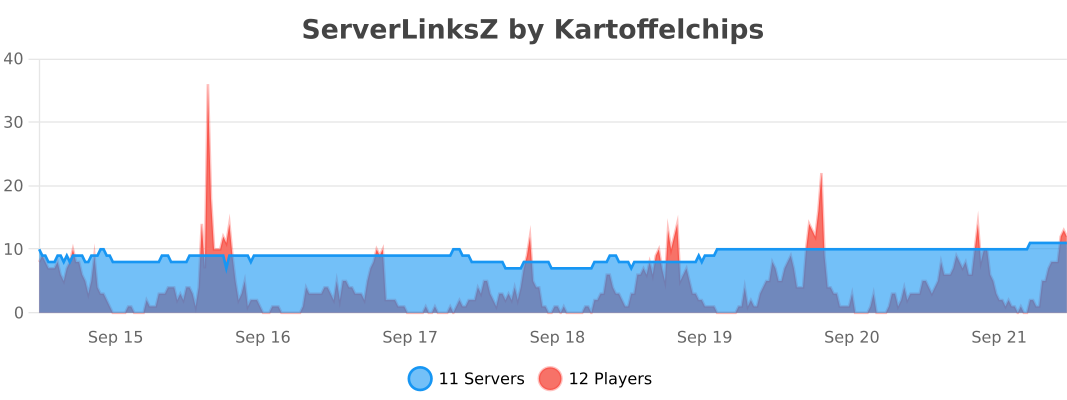](https://bstats.org/plugin/bukkit/ServerLinksZ/22795)