https://github.com/aaddrick/claude-desktop-debian
Claude Desktop for Debian-based Linux distributions
https://github.com/aaddrick/claude-desktop-debian
Last synced: about 2 months ago
JSON representation
Claude Desktop for Debian-based Linux distributions
- Host: GitHub
- URL: https://github.com/aaddrick/claude-desktop-debian
- Owner: aaddrick
- License: apache-2.0
- Created: 2024-12-26T16:09:43.000Z (over 1 year ago)
- Default Branch: main
- Last Pushed: 2026-04-12T20:00:35.000Z (4 months ago)
- Last Synced: 2026-04-12T21:32:23.755Z (4 months ago)
- Language: Shell
- Size: 4.72 GB
- Stars: 3,138
- Watchers: 48
- Forks: 359
- Open Issues: 28
-
Metadata Files:
- Readme: README.md
- Funding: .github/FUNDING.yml
- License: LICENSE-APACHE
- Agents: AGENTS.md
Awesome Lists containing this project
- awesome-claude - Claude Desktop Debian
- awesome-github-repos - aaddrick/claude-desktop-debian - Claude Desktop for Linux (TypeScript)
README
# Claude Desktop for Linux
This project provides build scripts to run Claude Desktop natively on Linux systems. It repackages the official Windows application for Linux distributions, producing `.deb` packages (Debian/Ubuntu), `.rpm` packages (Fedora/RHEL), distribution-agnostic AppImages, an [AUR package](https://aur.archlinux.org/packages/claude-desktop-appimage) for Arch Linux, and a Nix flake for NixOS.
**Note:** This is an unofficial build script. For official support, please visit [Anthropic's website](https://www.anthropic.com). For issues with the build script or Linux implementation, please [open an issue](https://github.com/aaddrick/claude-desktop-debian/issues) in this repository.
**Documentation:** Full docs at [`docs/index.md`](docs/index.md). Release history in [`CHANGELOG.md`](CHANGELOG.md). Contributing: [`CONTRIBUTING.md`](CONTRIBUTING.md). Security reports: [`SECURITY.md`](SECURITY.md).
---
> **⚠️ APT migration notice (April 2026)**
>
> The APT/DNF repo moved to `pkg.claude-desktop-debian.dev` (#493) — binaries are now served from GitHub Releases via a Cloudflare Worker so they don't hit the 100 MB per-file push cap on `gh-pages`. **DNF users are unaffected.** APT users on the legacy `aaddrick.github.io` sources.list will see a scheme-downgrade error on `apt update`. [One-line `sed` fix](#migrating-from-the-old-aaddrickgithubio-url).
---
## Features
- **Native Linux Support**: Run Claude Desktop without virtualization or Wine
- **MCP Support**: Full Model Context Protocol integration
Configuration file location: `~/.config/Claude/claude_desktop_config.json`
- **System Integration**:
- Global hotkey support (Ctrl+Alt+Space) - works on X11 and Wayland (via XWayland)
- System tray integration
- Desktop environment integration
### Screenshots
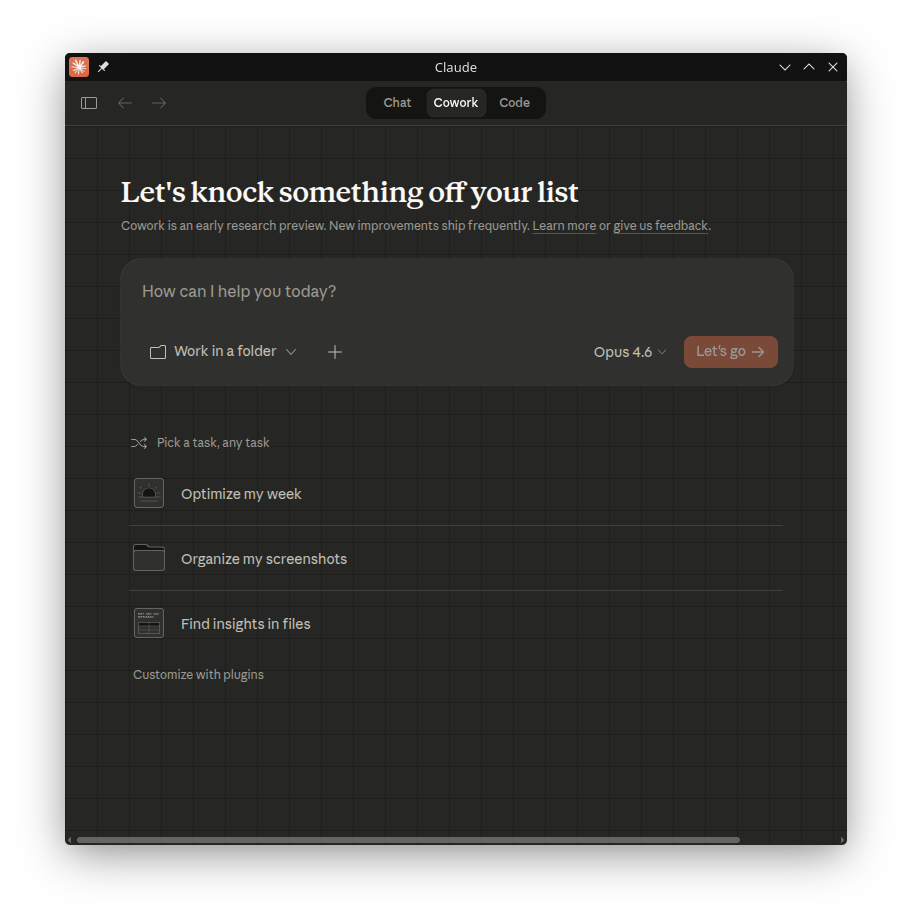

## Installation
### Using APT Repository (Debian/Ubuntu - Recommended)
Add the repository for automatic updates via `apt`:
```bash
# Add the GPG key
curl -fsSL https://pkg.claude-desktop-debian.dev/KEY.gpg | sudo gpg --dearmor -o /usr/share/keyrings/claude-desktop.gpg
# Add the repository
echo "deb [signed-by=/usr/share/keyrings/claude-desktop.gpg arch=amd64,arm64] https://pkg.claude-desktop-debian.dev stable main" | sudo tee /etc/apt/sources.list.d/claude-desktop.list
# Update and install
sudo apt update
sudo apt install claude-desktop
```
Future updates will be installed automatically with your regular system updates (`sudo apt upgrade`).
### Using DNF Repository (Fedora/RHEL - Recommended)
Add the repository for automatic updates via `dnf`:
```bash
# Add the repository
sudo curl -fsSL https://pkg.claude-desktop-debian.dev/rpm/claude-desktop.repo -o /etc/yum.repos.d/claude-desktop.repo
# Install
sudo dnf install claude-desktop
```
Future updates will be installed automatically with your regular system updates (`sudo dnf upgrade`).
#### Migrating from the old `aaddrick.github.io` URL
If you installed claude-desktop before April 2026, your repo config points at `https://aaddrick.github.io/claude-desktop-debian`. That URL now auto-redirects to `pkg.claude-desktop-debian.dev` — DNF follows the redirect transparently, but **apt refuses it as a security downgrade**, so `apt update` fails. Update your sources list to the new URL:
```bash
# APT (Debian/Ubuntu)
sudo sed -i 's|https://aaddrick\.github\.io/claude-desktop-debian|https://pkg.claude-desktop-debian.dev|g' \
/etc/apt/sources.list.d/claude-desktop.list
sudo apt update
# DNF (Fedora/RHEL) — optional refresh; the old URL still works but pointing directly at the new host is cleaner
sudo curl -fsSL https://pkg.claude-desktop-debian.dev/rpm/claude-desktop.repo \
-o /etc/yum.repos.d/claude-desktop.repo
```
Background: binaries for recent releases are no longer committed to the `gh-pages` branch — `.deb` files grew past GitHub's 100 MB per-file cap (#493). The new URL is fronted by a small Cloudflare Worker that serves the existing metadata directly and 302-redirects package downloads to the corresponding GitHub Release asset. Bandwidth and package bytes still come from GitHub; the Worker just handles the routing.
### Using AUR (Arch Linux)
The [`claude-desktop-appimage`](https://aur.archlinux.org/packages/claude-desktop-appimage) package is available on the AUR and is automatically updated with each release.
```bash
# Using yay
yay -S claude-desktop-appimage
# Or using paru
paru -S claude-desktop-appimage
```
The AUR package installs the AppImage build of Claude Desktop.
### Using Nix Flake (NixOS)
Install directly from the flake:
```bash
# Basic install
nix profile install github:aaddrick/claude-desktop-debian
# With MCP server support (FHS environment)
nix profile install github:aaddrick/claude-desktop-debian#claude-desktop-fhs
```
Or add to your NixOS configuration:
```nix
# flake.nix
{
inputs.claude-desktop.url = "github:aaddrick/claude-desktop-debian";
outputs = { nixpkgs, claude-desktop, ... }: {
nixosConfigurations.myhost = nixpkgs.lib.nixosSystem {
modules = [
({ pkgs, ... }: {
nixpkgs.overlays = [ claude-desktop.overlays.default ];
environment.systemPackages = [ pkgs.claude-desktop ];
})
];
};
};
}
```
### Using Pre-built Releases
Download the latest `.deb`, `.rpm`, or `.AppImage` from the [Releases page](https://github.com/aaddrick/claude-desktop-debian/releases).
### Building from Source
See [docs/building.md](docs/building.md) for detailed build instructions.
## Configuration
Model Context Protocol settings are stored in:
```
~/.config/Claude/claude_desktop_config.json
```
For additional configuration options including environment variables and Wayland support, see [docs/configuration.md](docs/configuration.md).
## Troubleshooting
Run `claude-desktop --doctor` for built-in diagnostics that check common issues (display server, sandbox permissions, MCP config, stale locks, and more). It also reports cowork mode readiness — which isolation backend will be used, and which dependencies (KVM, QEMU, vsock, socat, virtiofsd, bubblewrap) are installed or missing.
For additional troubleshooting, uninstallation instructions, and log locations, see [docs/troubleshooting.md](docs/troubleshooting.md).
## Acknowledgments
This project was inspired by [k3d3's claude-desktop-linux-flake](https://github.com/k3d3/claude-desktop-linux-flake) and their [Reddit post](https://www.reddit.com/r/ClaudeAI/comments/1hgsmpq/i_successfully_ran_claude_desktop_natively_on/) about running Claude Desktop natively on Linux.
Special thanks to:
- **k3d3**
- Original NixOS implementation
- Native bindings insights
- **[emsi](https://github.com/emsi/claude-desktop)**
- Title bar fix
- Alternative implementation approach
- **[leobuskin](https://github.com/leobuskin/unofficial-claude-desktop-linux)** for the Playwright-based URL resolution approach
- **[yarikoptic](https://github.com/yarikoptic)**
- Codespell support
- Shellcheck compliance
- **[IamGianluca](https://github.com/IamGianluca)** for build dependency check improvements
- **[ing03201](https://github.com/ing03201)** for IBus/Fcitx5 input method support
- **[ajescudero](https://github.com/ajescudero)** for pinning @electron/asar for Node compatibility
- **[delorenj](https://github.com/delorenj)** for Wayland compatibility support
- **[Regen-forest](https://github.com/Regen-forest)** for suggesting Gear Lever as AppImageLauncher replacement
- **[niekvugteveen](https://github.com/niekvugteveen)** for fixing Debian packaging permissions
- **[speleoalex](https://github.com/speleoalex)** for native window decorations support
- **[imaginalnika](https://github.com/imaginalnika)** for moving logs to `~/.cache/`
- **[richardspicer](https://github.com/richardspicer)** for the menu bar visibility fix on Linux
- **[jacobfrantz1](https://github.com/jacobfrantz1)**
- Claude Desktop code preview support
- Quick window submit fix
- **[janfrederik](https://github.com/janfrederik)** for the `--exe` flag to use a local installer
- **[MrEdwards007](https://github.com/MrEdwards007)** for discovering the OAuth token cache fix
- **[lizthegrey](https://github.com/lizthegrey)**
- Version update contributions
- Close-to-tray on Linux to keep in-app schedulers, MCP servers, and the tray icon alive across window close
- "Run on startup" persistence on Linux via XDG Autostart, fixing the toggle that would silently revert
- In-place package upgrade detection that watches `app.asar` for dpkg/rpm replacement and offers a click-to-restart notification, fixing the Quick Entry / About / Ctrl+Q symptom cluster from a running v(N) main process loading v(N+1) renderer assets (#564)
- **[mathys-lopinto](https://github.com/mathys-lopinto)**
- AUR package
- Automated deployment
- **[pkuijpers](https://github.com/pkuijpers)** for root cause analysis of the RPM repo GPG signing issue
- **[dlepold](https://github.com/dlepold)** for identifying the tray icon variable name bug with a working fix
- **[Voork1144](https://github.com/Voork1144)**
- Detailed analysis of the tray icon minifier bug
- Root-cause analysis of the Chromium layout cache bug
- Direct child `setBounds()` fix approach
- **[sabiut](https://github.com/sabiut)**
- `--doctor` diagnostic command
- SHA-256 checksum validation for downloads
- Post-build integration tests for deb, rpm, and AppImage artifacts
- `tests.yml` CI workflow that runs the 186-test BATS suite on push and PR — the suite was inert in CI before this (#520)
- Isolating `cleanup_stale_cowork_socket` BATS from host `pgrep` state so the test passes on developer machines running Claude Desktop (#533, #534)
- Headless launch and `--doctor` smoke tests for the AppImage artifact, catching runtime regressions (frame-fix-wrapper syntax errors, asar patch breakage, `main` field mismatches) that the structural test missed (#592)
- **[milog1994](https://github.com/milog1994)**
- Popup detection
- Functional stubs
- Wayland compositor support
- **[jarrodcolburn](https://github.com/jarrodcolburn)**
- Passwordless sudo support in container/CI environments
- Identifying the gh-pages 4GB bloat fix
- Identifying the virtiofsd PATH detection issue on Debian
- Detailed analysis of the CI release pipeline failure caused by runner kills during compare-releases
- Diagnosing the session-start hook sudo blocking issue with three solution approaches
- **[chukfinley](https://github.com/chukfinley)** for experimental Cowork mode support on Linux
- **[CyPack](https://github.com/CyPack)**
- Orphaned cowork daemon cleanup on startup
- `COWORK_VM_BACKEND` documentation, Cowork troubleshooting sections, and unknown-value warning in `--doctor`
- **[IliyaBrook](https://github.com/IliyaBrook)**
- Fixing the platform patch for Claude Desktop >= 1.1.3541 arm64 refactor
- Fixing the duplicate tray icon on OS theme change with an in-place `setImage`/`setContextMenu` fast-path that avoids the KDE Plasma SNI re-registration race
- **[MichaelMKenny](https://github.com/MichaelMKenny)**
- Diagnosing the `$`-prefixed electron variable bug
- Root cause analysis and workaround
- **[daa25209](https://github.com/daa25209)** for detailed root cause analysis of the cowork platform gate crash and patch script
- **[noctuum](https://github.com/noctuum)**
- `CLAUDE_MENU_BAR` env var with configurable menu bar visibility
- Boolean alias support
- **[typedrat](https://github.com/typedrat)**
- NixOS flake integration with build.sh
- node-pty derivation
- CI auto-update
- Fixing the flake package scoping regression
- Fixing the NixOS electron binary not being marked executable (#431, #581)
- **[cbonnissent](https://github.com/cbonnissent)**
- Reverse-engineering the Cowork VM guest RPC protocol
- Fixing the KVM startup blocker
- Fixing RPC response id echoing for persistent connections
- Configurable bwrap mount points via a dedicated Linux config file
- `{src, dst}` mount form in `coworkBwrapMounts` for distinct host/sandbox paths (e.g. persistent `/tmp` across Bash tool calls)
- **[joekale-pp](https://github.com/joekale-pp)** for adding `--doctor` support to the RPM launcher
- **[ecrevisseMiroir](https://github.com/ecrevisseMiroir)** for the bwrap backend sandbox isolation with tmpfs-based minimal root
- **[arauhala](https://github.com/arauhala)** for detailed root cause analysis of the NixOS `isPackaged` regression
- **[cromagnone](https://github.com/cromagnone)** for confirming the VM download loop on bwrap installs with detailed logs that disproved the initial triage
- **[aHk-coder](https://github.com/aHk-coder)** for diagnosing the hardcoded minified variable crash in the cowork smol-bin patch
- **[RayCharlizard](https://github.com/RayCharlizard)**
- Detailed analysis of the self-referential `.mcpb-cache` symlink ELOOP bug
- Fixing auto-memory path translation on HostBackend
- Fixing the `ion-dist` static asset copy for the `app://` protocol handler
- `--doctor` diagnostic that detects the Ubuntu 24.04 AppArmor `apparmor_restrict_unprivileged_userns=1` block on bwrap, instead of letting it silently fall through to a hanging KVM probe (#351, #434)
- Documenting the upstream MCP double-spawn root-cause analysis in `docs/learnings/mcp-double-spawn.md` (#526, #527)
- **[reinthal](https://github.com/reinthal)** for fixing the NixOS build breakage caused by the nixpkgs `nodePackages` removal
- **[gianluca-peri](https://github.com/gianluca-peri)**
- Reporting the GNOME quit accessibility issue
- Confirming tray behavior with AppIndicator
- **[martin152](https://github.com/martin152)** for detailed diagnosis and a complete patch for three launcher cleanup bugs: `cleanup_orphaned_cowork_daemon` self-match, `cleanup_stale_cowork_socket` socat dependency no-op, and the same self-match in `--doctor`
- **[hfyeh](https://github.com/hfyeh)** for diagnosing the Ubuntu 24.04 AppArmor unprivileged-userns block on Cowork bwrap and contributing the AppArmor profile workaround
- **[davidamacey](https://github.com/davidamacey)** for identifying and fixing the XRDP GPU compositing blank-window issue on remote desktop sessions
- **[pb3ck](https://github.com/pb3ck)** for diagnosing the Cowork `CLAUDE_CODE_OAUTH_TOKEN` env-strip bug with a working reference diff
- **[Joost-Maker](https://github.com/Joost-Maker)** for fixing the `$e` fs reference crash in cowork Patch 9 on Claude Desktop 1.3109.0, introducing the `[$\w]+` identifier-capture pattern at `cowork.sh:482-501` (#421)
- **[aJV99](https://github.com/aJV99)** for exporting `GDK_BACKEND=wayland` in native Wayland mode to fix XWayland fallback blur on HiDPI displays
- **[Andrej730](https://github.com/Andrej730)**
- Quick-window regex readability refactor (`String.raw` + `escapeRegExp` helper)
- Fixing the visibility-function regex break on Claude Desktop 1.3883.0 (#496)
- **[HumboldtJoker](https://github.com/HumboldtJoker)** for diagnosing the cowork Patch 2b silent failure on Claude Desktop 1.5354.0 — identifying that the log line was patched but session init still routed through the Swift addon (#553)
- **[zabka](https://github.com/zabka)** for identifying that `cowork-vm-service.js` was never auto-spawned on Linux and contributing a systemd-unit workaround that scoped the daemon auto-launch fix (#445)
- **[sirfaber](https://github.com/sirfaber)** for fixing the `$`-in-minified-identifier breakage of cowork Patch 2b (vm module assignment) and Patch 6 step 2 (retry-delay auto-launch) on Claude Desktop 1.5354.0 (#555)
- **[ProfFlow](https://github.com/ProfFlow)** for re-fixing the RPM repodata signing regression by appending `!` to the keyid passed to `gpg --default-key`, forcing `repomd.xml` to be signed by the primary key instead of the auto-selected signing subkey (#566)
- **[jslatten](https://github.com/jslatten)** for fixing the KDE Plasma Wayland launcher-grouping bug by setting `pkg.desktopName` in the packaged `app.asar`'s `package.json`, format-conditional so deb/rpm get `claude-desktop.desktop` and AppImage gets `io.github.aaddrick.claude-desktop-debian.desktop` (#562)
- **[JoshuaVlantis](https://github.com/JoshuaVlantis)**
- RPM `chrome-sandbox` SUID via `%attr(4755, ...)` instead of a `%post` chmod scriptlet so the bit survives `--noscripts` and layered images (#539)
- `autoUpdater` no-op Proxy on Linux that defends against future feed activation, with a thenable allowlist masking `then`/`catch`/`finally`/`Symbol.toPrimitive`/`Symbol.iterator` to `undefined` (#567)
- Failing loudly on `npm install node-pty` failures instead of silently shipping the upstream Windows binaries, plus auto-installing `gcc`/`g++`/`make`/`python3` on minimal build environments (#401)
- Silencing the RPM "File listed twice" warning on `chrome-sandbox` by moving `chmod 4755` into `%install`, with thorough investigation of four `%exclude`-based alternatives (#610)
- Cleaning upstream Windows binaries from node-pty before staging the Linux build, preventing PE32+ orphans in the packaged asar (#597)
- **[Hayao0819](https://github.com/Hayao0819)** for diagnosing the upstream `titleBarStyle:""` → `titleBarStyle:"hiddenInset"` migration that broke the About window render on GNOME/X11 and contributing the `isPopupWindow()` match extension (#481, #489)
- **[michelsfun](https://github.com/michelsfun)** for reporting the cowork `ENAMETOOLONG` failure on eCryptfs-encrypted home directories with detailed `--doctor` output that pinpointed the short-NAME_MAX filesystem as the cause (#590)
- **[proffalken](https://github.com/proffalken)** for the LUKS-volume + `pam_mount` workaround documented in `docs/troubleshooting.md`, restoring cowork support on legacy eCryptfs-encrypted home directories (#590)
- **[phelps-matthew](https://github.com/phelps-matthew)** for fixing `CLAUDE_QUIT_ON_CLOSE=1` to actively quit via `app.quit()` instead of relying on the bundled handler that hardcodes hide-to-tray on Linux, with thorough root cause analysis and alternatives evaluation (#624, #623)
- **[dubreal](https://github.com/dubreal)** for `--password-store` keyring detection that probes D-Bus for kwallet6 / gnome-libsecret at startup, fixing session persistence on KDE Plasma and other desktops where Electron's `safeStorage` was unavailable (#611, #593)
- **[JustinJLeopard](https://github.com/JustinJLeopard)** for detecting missing electron binaries after Node 24's `extract-zip` silently no-ops, with an `unzip` fallback that recovers from the `@electron/get` cache (#631, #584)
- **[tkrag](https://github.com/tkrag)** for diagnosing and fixing the X11 window-raise-on-hover bug under sloppy/focus-follows-mouse WMs, tracing the upstream `webContents.focus()` → `_NET_ACTIVE_WINDOW` path through three iterations of review (#589, #416)
- **[maplefater](https://github.com/maplefater)** for re-anchoring the `addTrustedFolder` `.asar` guard on the `async addTrustedFolder(…)` method declaration after upstream 1.10628.x folded the log call into a comma-expression, keying both the parameter extraction and the injection point off the unminified method name so they can't drift apart (#685)
- **[MitchSchwartz](https://github.com/MitchSchwartz)** for finding the second `app.asar` file-drop path — the `existsSync()` branch in the second-instance argv collector that #640 never guarded — and rejecting `.asar` paths there so the app no longer prompts to attach its own bundle on every taskbar reopen (#669, #668)
- **[LiukScot](https://github.com/LiukScot)** for making the tray rebuild mutex trailing-edge so the startup dark-theme icon no longer latches black, and restoring the in-place `setImage` fast-path after upstream changed the context-menu wiring to a prebuilt menu object (#680, #679)
- **[sabiut](https://github.com/sabiut)**
- BATS coverage for `cleanup_orphaned_cowork_daemon`, mutation-tested so the kill/escalation branches genuinely bite (#693)
- Fixing two false-green `--doctor` PASSes: an empty password store read as healthy, and a non-numeric `df` reading falling through to the PASS branch (#692)
- Extending the artifact launch smoke tests to arm64 on native `ubuntu-22.04-arm` runners, and re-keying the AppImage pkill sweep to `mount_claude` so escaped zygote/electron children stop leaking on the runner (#691)
- **[jerem](https://github.com/jerem)** for routing Quick Entry's global shortcut through the XDG GlobalShortcuts portal on native Wayland, and merging all Chromium feature requests into a single `--enable-features=` switch — the old code silently clobbered `WindowControlsOverlay` (#690, #404)
- **[caidejager](https://github.com/caidejager)** for diagnosing why Cowork's VM daemon never auto-launched on packages built under a restrictive umask — `app.asar.unpacked/` shipped mode `0700`, failing the auto-launch `existsSync()` guard — and normalizing install permissions across deb and AppImage, with `dpkg-deb --root-owner-group` closing a build-uid write exposure (#695)
- **[JustinJLeopard](https://github.com/JustinJLeopard)** for the AppStream metainfo that surfaces the package in GNOME Software, KDE Discover, and App Center, wired into the deb, rpm, and AppImage builds (#633)
- **[DhanushSantosh](https://github.com/DhanushSantosh)** for the GPU crash auto-recovery in the launcher: detecting a previous GPU-process FATAL in the launcher log and re-launching with safe GPU flags automatically, instead of leaving users to discover `CLAUDE_DISABLE_GPU=1` by hand (#666)
- **[diarized](https://github.com/diarized)** for auto-installing scoped AppArmor userns profiles from the `.deb` postinst on Ubuntu 24.04+ — one for the bundled Electron binary (fixing the launch crash without `--no-sandbox`) and one for `/usr/bin/bwrap` (keeping Cowork's sandbox isolated instead of silently falling back to host-direct), automating the workaround from #351 (#687, #694)
- **[emandel82](https://github.com/emandel82)** for root-causing the "Attach app.asar?" prompt: every launcher passed `app.asar` as a redundant Electron argument, which the second-instance argv collector treated as a file to open — removed at the source across all four package formats (#700, #696)
- **[svankirk](https://github.com/svankirk)** for cleaning up Desktop helper processes after an explicit quit — a quit wrapper with signal forwarding and a bundle-keyed live-UI check, so closing the app no longer strands helper processes (#682)
## Sponsorship
If this project is useful to you, consider [sponsoring on GitHub](https://github.com/sponsors/aaddrick).
## License
The build scripts in this repository are dual-licensed under:
- MIT License (see [LICENSE-MIT](LICENSE-MIT))
- Apache License 2.0 (see [LICENSE-APACHE](LICENSE-APACHE))
The Claude Desktop application itself is subject to [Anthropic's Consumer Terms](https://www.anthropic.com/legal/consumer-terms).
## Privacy
This repository uses an automated triage bot that sends issue contents to Anthropic's API for classification and investigation when you file a bug report or feature request. The bot reads the issue body, title, and any referenced related issues; it does not follow URLs, execute code blocks, or read content outside the triggering issue.
Do not include credentials, tokens, personal data, or anything you wouldn't put on a public issue tracker. If you post sensitive content and then edit it out, the bot's original read is preserved as a run artifact for audit — GitHub's UI hides the edit, but the bot's view of what you wrote is recoverable by maintainers.
Full design and data inventory: [`docs/issue-triage/README.md`](docs/issue-triage/README.md).
## Contributing
Contributions are welcome! By submitting a contribution, you agree to license it under the same dual-license terms as this project.