https://github.com/aamir-hullur/script-visualizer
A language-agnostic visualization web application for generating data visualizations from Python and R scripts in isolated Docker containers.
https://github.com/aamir-hullur/script-visualizer
docker fastapi python r react shadcn tailwindcss typescript vite
Last synced: about 1 year ago
JSON representation
A language-agnostic visualization web application for generating data visualizations from Python and R scripts in isolated Docker containers.
- Host: GitHub
- URL: https://github.com/aamir-hullur/script-visualizer
- Owner: Aamir-Hullur
- Created: 2025-04-12T00:02:25.000Z (about 1 year ago)
- Default Branch: main
- Last Pushed: 2025-04-12T14:41:56.000Z (about 1 year ago)
- Last Synced: 2025-05-07T08:57:56.071Z (about 1 year ago)
- Topics: docker, fastapi, python, r, react, shadcn, tailwindcss, typescript, vite
- Language: TypeScript
- Homepage:
- Size: 53 MB
- Stars: 0
- Watchers: 1
- Forks: 0
- Open Issues: 0
-
Metadata Files:
- Readme: README.md
Awesome Lists containing this project
README
# Script Visualizer
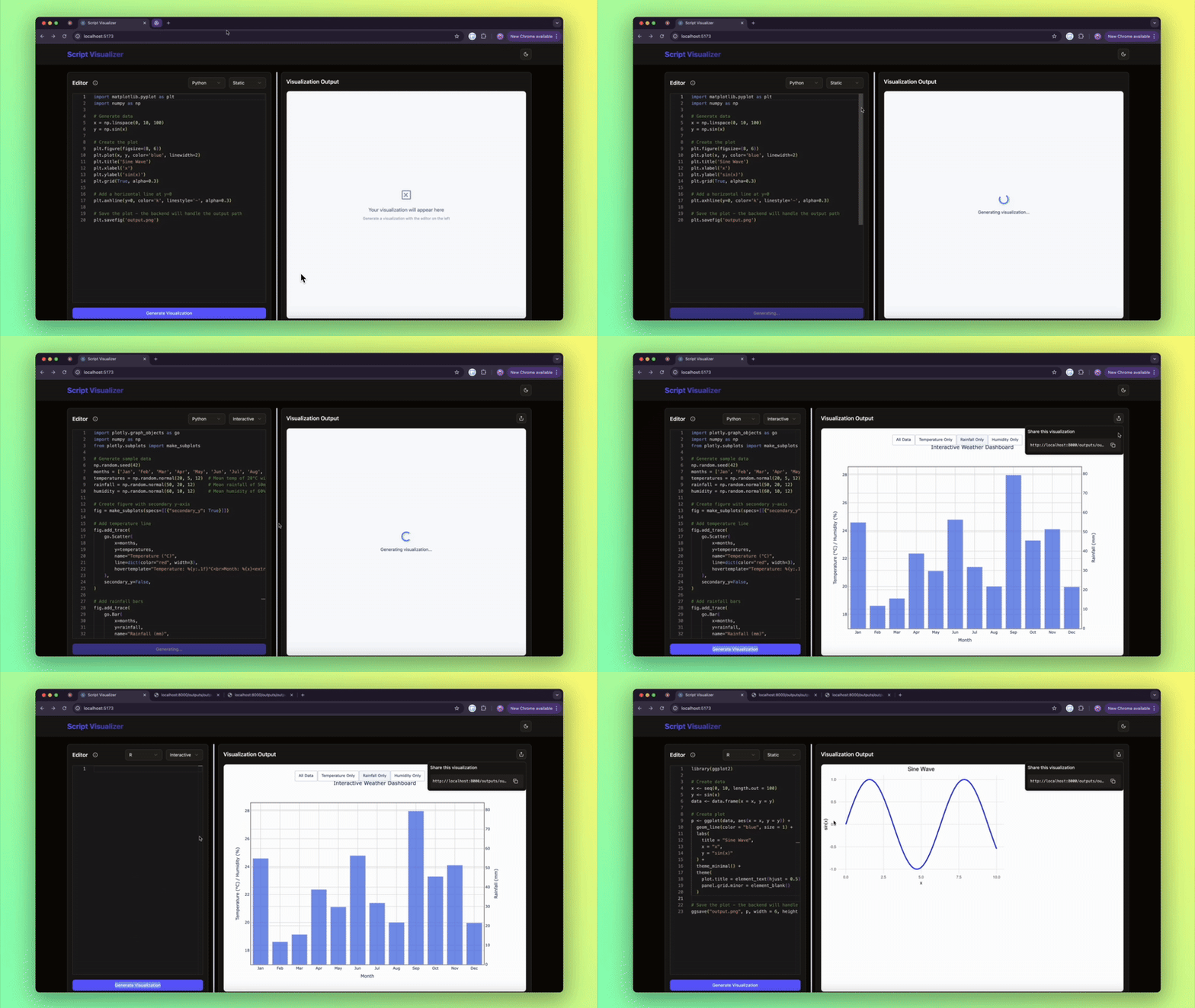
A web application that allows users to generate data visualizations from Python and R scripts. This project emphasizes performance, and user experience by executing code in isolated docker containers and providing a rich development environment.
## Demo
## Tech Stack
### Frontend
- **React with Vite**: For lightning-fast development and optimal production builds
- **TypeScript**: For type safety and better developer experience
- **Monaco Editor**: VS Code-like script editing experience
- **ShadCn UI**: Modern, accessible UI components
- **Tailwind CSS**: Utility-first styling
### Backend
- **FastAPI**: High-performance Python web framework
- **Docker**: For secure script execution in isolated containers
- **Python Libraries**: matplotlib, plotly
- **R Libraries**: ggplot2
## Key Features
1. **Secure Code Execution**:
- Scripts run in isolated Docker containers
- Resource limits (CPU, memory, timeout)
- Network access restrictions
- Automated container cleanup after execution
2. **Rich Development Experience**:
- Syntax highlighting for Python and R
- Code examples for different visualization types
- Real-time preview
3. **Multiple Visualization Types**:
- Static plots (PNG output)
- Interactive visualizations (HTML output)
- 3D visualizations (via plotly)
4. **Modern UI/UX**:
- Dark/light theme support
- Resizable panels
- Copy-to-clipboard functionality
- Error handling with user-friendly messages
## Development Challenges & Solutions
#### 1. **Secure Execution of Dynamic Code**
**Issue:**
Executing arbitrary Python and R scripts from user input posed a significant security risk, including the potential for code injection or resource exhaustion.
**Resolution:**
To mitigate this:
- A sandboxed environment (Docker containers) was implemented to isolate script execution.
- Resource limits (CPU/memory/timeouts) were set on containers to prevent abuse.
- Only specific packages required for visualization (e.g., `matplotlib`, `plotly`, `ggplot2`) were pre-installed to limit what scripts could access.
#### 2. **Rendering and Serving Visualizations**
**Issue:**
Returning visualizations from backend execution to the frontend required supporting multiple formats (e.g., static PNG, interactive HTML).
**Resolution:**
- For **static charts**, image files (PNG) were saved and served via a public endpoint.
- For **interactive charts**, the backend captured and returned full HTML snippets (e.g., from Plotly or R’s htmlwidgets), which were embedded in an `` on the frontend.
#### 3. **Error Handling and Debugging**
**Issue:**
Errors in user-submitted code were initially hard to trace and led to silent failures, making it difficult for users to understand what went wrong.
**Resolution:**
- Integrated **Monaco Editor** on the frontend to enhance the code editing experience with syntax highlighting and error hints.
- Improved backend logging to capture and return detailed error messages (e.g., syntax errors, missing libraries).
#### 4. **Docker Image Build Time and Size**
**Issue:**
The initial Docker images — particularly for the Python environment — were large and slow to build, which negatively impacted development speed and deployment readiness.
**Resolution:**
- Switched to the `python:3.11-slim` base image to significantly reduce the Python container size.
- Installed only the essential visualization libraries (`matplotlib`, `plotly`) to avoid unnecessary dependencies.
- Applied Docker layer caching and cleanup (e.g., using `--no-cache-dir` with pip) to speed up rebuilds and reduce final image size.
- Used a similar minimal setup for the R container to keep both environments lean and efficient.
## Environment Configuration
### Backend (.env)
```
API_V1_STR=/api/v1
DOCKER_CONTAINER_TIMEOUT=300
DOCKER_MEMORY_LIMIT=512m
DOCKER_CPU_LIMIT=0.5
DOCKER_NETWORK_ACCESS=false
```
### Frontend (.env)
```
VITE_BACKEND_URL=http://localhost:8000
```
## Getting Started
1. **Clone the repository**
```bash
git clone https://github.com/Aamir-Hullur/script-visualizer.git
```
2. **Backend Setup**
```bash
cd backend
python -m venv venv
source venv/bin/activate # or `venv\Scripts\activate` on Windows
pip install -r requirements.txt
# Build Docker images for Python and R visualization environments
cd docker
chmod +x build_images.sh
./build_images.sh
```
3. **Frontend Setup**
```bash
cd frontend
npm install
```
4. **Start Development Servers**
```bash
# Terminal 1 - Backend
cd backend
uvicorn app.main:app --reload
# Terminal 2 - Frontend
cd frontend
npm run dev
```
5. **Access the application**
```
Frontend: http://localhost:5173
Backend API: http://localhost:8000/docs
```
## Example Visualizations
### Python with Matplotlib (Static)
```python
import matplotlib.pyplot as plt
import numpy as np
# Generate data
x = np.linspace(0, 10, 100)
y = np.sin(x)
# Create visualization
plt.figure(figsize=(8, 6))
plt.plot(x, y, 'b-', linewidth=2)
plt.title('Sine Wave')
plt.xlabel('X axis')
plt.ylabel('Y axis')
plt.grid(True)
plt.savefig('/output/plot.png') # Save to mounted output directory
```
### Python with Plotly (Interactive)
```python
import plotly.express as px
import pandas as pd
# Create sample data
data = {
'Category': ['A', 'B', 'C', 'D'],
'Values': [10, 40, 30, 20]
}
df = pd.DataFrame(data)
# Create interactive visualization
fig = px.bar(df, x='Category', y='Values', title='Interactive Bar Chart')
fig.write_html('/output/plot.html') # Save as interactive HTML
```
### R with ggplot2 (Static)
```r
library(ggplot2)
# Create sample data
data <- data.frame(
x = 1:10,
y = 1:10
)
# Create visualization
p <- ggplot(data, aes(x, y)) +
geom_point() +
geom_smooth(method = "lm") +
theme_minimal() +
labs(title = "Linear Relationship")
# Save to output directory
ggsave("/output/plot.png", p)
```
## System Architecture
```mermaid
architecture-beta
group frontend(cloud)[Frontend]
service reactApp(server)[React App] in frontend
service monacoEditor(database)[Monaco Editor] in frontend
service ui(internet)[ShadCn UI] in frontend
group backend(cloud)[Backend]
service fastapi(server)[FastAPI Server] in backend
service docker(server)[Docker Container] in backend
service storage(disk)[Storage] in backend
reactApp:R -- L:monacoEditor
monacoEditor:R -- L:ui
reactApp:B -- T:fastapi
fastapi:R -- L:docker
docker:B -- T:storage
```
## Visualization Flow
```mermaid
flowchart TD
A[Code Editor Input] --> B{Language Selection}
B -->|Python| C[Python Container]
B -->|R| D[R Container]
C --> E[Generate Visualization]
D --> E
E --> F{Visualization Type}
F -->|Static| G[Save as PNG]
F -->|Interactive| H[Generate HTML]
G --> I[Display Output]
H --> I
```
## Future Implementations
1. Support for more programming languages
2. Additional visualization libraries
3. Collaborative features
4. User accounts and saved visualizations
5. Adding a download button