https://github.com/aamnah/dotfiles
.files and *nix defaults
https://github.com/aamnah/dotfiles
Last synced: 4 months ago
JSON representation
.files and *nix defaults
- Host: GitHub
- URL: https://github.com/aamnah/dotfiles
- Owner: aamnah
- Created: 2014-06-20T10:09:34.000Z (about 12 years ago)
- Default Branch: master
- Last Pushed: 2023-02-05T10:31:53.000Z (over 3 years ago)
- Last Synced: 2024-03-15T06:53:12.924Z (over 2 years ago)
- Language: Shell
- Homepage: http://aamnah.github.io/dotfiles
- Size: 133 KB
- Stars: 4
- Watchers: 2
- Forks: 0
- Open Issues: 1
-
Metadata Files:
- Readme: README.md
Awesome Lists containing this project
README
.Files
========
These files are an accumulation of bash aliases, shortcuts and functions that i have collected over the years.
While these are Mac specific (for example, the LSCOLORS is different as compared to the GNU LS_COLORS), they can easily be ported for use on Linux.
.bash_aliases
---
Shortcuts for directories, programs, system processes and commands.
#### Directories
- `desk` go to Desktop
- `dl` go to Downloads
- `proj` go to the folder where all projects are (variable)
- `sites` go to the folder where all sites are (variable)
#### Commands and tools
- `ydl` shortcut for `youtube-dl`
- `gath` starts ssh-agent and loads SSH key (variable). used for Git purposes
#### Misc.
- `emptytrash` Empty the Trash on all mounted volumes and the main HDD
- `cleanup` Recursively delete _.DS_Store_ files
- `chromekill` Kill all the tabs in Chrome to free up memory
- `afk` Lock the screen (when going AFK)
- `reload` Reload the shell (i.e. invoke as a login shell)
- `tree` Always list the tree command in color coding
#### Smart Listings
- `ll` List all (-a) files and directories in a detailed (-l), human readable (-h), color coded (-G) way with a trailing slash (-F).
- `lsd` Only list directories, including hidden ones
#### Sudo
- `dang` repeat the last command with sudo, basically `sudo !!` equivalent
#### Disk Usage
- `ducks` List top ten largest files/directories in current directory
- `ds` Find the biggest in a folder
#### Memory
- `wotgobblemem` What's gobbling the memory?
#### DNS
- `flush`, `flushdns` Flush DNS cache
- `dig` Better and more to-the-point dig results
#### IPs
- `ip`, `myip` Show Public IP address
- `localip` Show local IP
#### Security
- `netlisteners` Show active network listeners
.bash_colors
---
This file has ANSI color codes saved into human readable variables. The
variable names and codes have been taken from
[here](https://misc.flogisoft.com/bash/tip_colors_and_formatting)
and have been kept the same for universal recognition.
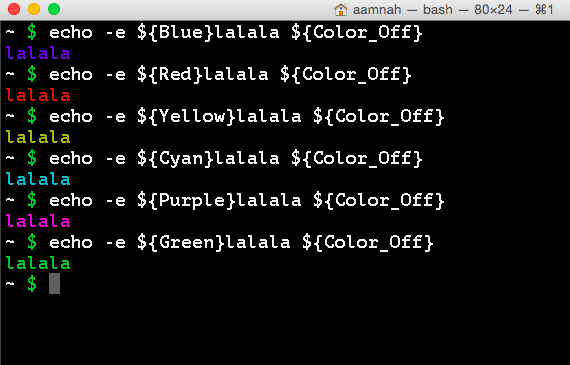
`.bash_colors` has variables with eight colors and their bold, underlined,
and background versions.
#### Usage:
Six basic colors (blue, cyan, green, magenta, red, yellow) have been set in `.bash_colors` for easy use.
You can use these anywhere in the terminal once the `~/.bash_colors` file has been sourced inside `~/.bash_profile`
Wrap the code you want to color in the appropriate tags. There is an
opening tag in the format of `$NAME` and a closing tag `$COLORRESET` at
the end. For example
`echo -e "\n${YELLOW}Current date :${COLORRESET} " ; date`
will echo `Current date :` in yellow color and then output `date` in
default color on the next line.
There are four available types of colors: Regular, Bold, Underline, and Background.
BLACK='\033[0;30m' # Regular Black
BBLACK='\033[1;30m' # Bold Black
UBLACK='\033[4;30m' # Underline Black
ONBLACK='\033[40m' # Background Black
You can also use multiple color tags in one statement like so:
${GREEN} WordPress was sucessfully copied! Don't forget to edit ${BGREEN}wp-config.php ${GREEN}to add Database details ${COLORRESET}
.bash_profile
---
- `PS1` - Prompt shows only current working directory `\w` and `\$`. Newline at both beginning and end makes differentiating command output easier
.functions
---
- `take()` create a dir and cd to it by taking a name
- `fopen()` create a file and open it in Sublime Text
- `extract()` Extract most know archives with one command
- `ii()` display useful host related informaton
- `getwebsite()` wget a whole website
- `spy()` identify and search for active network connections
- `sniff()` sniff GET and POST traffic over http v2
- `bell()` Ring the system bell after finishing a script/compile
- `jpost` Create new Jekyll posts
.dev
---
- `gplv3` Add a GPL license file to your project
- `gruntfile` Add gruntfile.js template file to the project
- `ocmod()` Create an OCMOD script with template code. Provide a name for script as argument.
- `vqmod()` Create a vQmod script with template code. Provide a name for script as argument.
- `install()` Install popular software/frameworks with one command. Supports WordPress, Opencart and Bootstrap at the moment.
- `jekylldo` build jekyll, run some grunts and deploy on Amazon S3
- `jpost()` create a new Jekyll post in the pre-defined directory with YAML template. Takes `-o` flag for opening files in Sublime Text after they are created.
- `ocext()` create opencart module/extension skeleton
- `dash()` Initiate a Dash search from within Terminal
- `bbkey()` Lets you `add`, `load`, `list`, `try` and `check` Bitbucket Key
Resources
---
- Take a look at [Command Line Fu](http://www.commandlinefu.com/commands/browse/sort-by-votes) for some really cool commands