https://github.com/aaronhallaert/nephrostatus
https://github.com/aaronhallaert/nephrostatus
Last synced: 10 months ago
JSON representation
- Host: GitHub
- URL: https://github.com/aaronhallaert/nephrostatus
- Owner: aaronhallaert
- Created: 2022-09-27T11:28:18.000Z (over 3 years ago)
- Default Branch: master
- Last Pushed: 2022-09-27T14:11:40.000Z (over 3 years ago)
- Last Synced: 2023-03-04T04:36:00.768Z (over 3 years ago)
- Language: Go
- Size: 2.29 MB
- Stars: 0
- Watchers: 1
- Forks: 0
- Open Issues: 0
-
Metadata Files:
- Readme: README.md
Awesome Lists containing this project
README
# NephroStatus
Add NephroFlow API and Manager status in system tray.
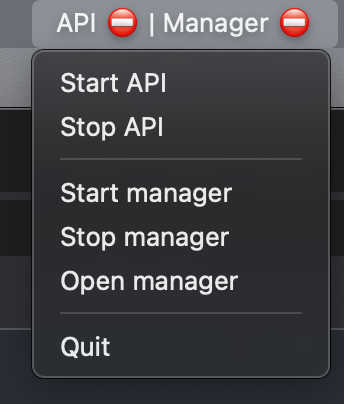
## State
- API: curl `http://localhost:3000/api/version_info`
- Manager: check for open port 8080 (LISTEN)
## Actions
- Start API: `tmux send-keys -t nipro:api.1 "run_api.sh -- rails s\n"`
- Stop API: `docker ps | grep nephroflow/server | awk '{print $1}' | xargs -r docker stop`
- Stop Manager: `tmux send-keys -t nipro:manager.1 "C-c"`
- Start Manager: `tmux send-keys -t nipro:manager.1 yarn dev C-m`
- Open Manager
- NephroFlow tab is activated with chrome-cli and chrome is focused with `open -a Google\ Chrome`
## Shortcomings
### Check open port with docker container
If the API web container is running (without an active rails server), the port is
already exposed so the status of the API seems to be `running`.
### Focus Chrome window
Opening NephroFlow manager will open the last used Google Chrome window.
If you use different profiles and multiple windows are active, it is possible
the wrong Chrome window will be opened. However, in the correct window,
the nephroflow tab will always be focused.
## Setup
### Dependencies
- [chrome-cli on Github](https://github.com/prasmussen/chrome-cli)
- `brew install chrome-cli`
- Tmux
- Currently, most of the commands to start/stop are based on `tmux send-keys`
### Installation
TODO
- Run with `go run main.go`
## TODO
- [ ] Make commands more generic
- [ ] Allow custom commands
- [ ] Add Github actions