https://github.com/abagames/peekpoke
Tiny minimal retro fantasy console having only two commands: peek and poke.
https://github.com/abagames/peekpoke
fantasy-console game-development
Last synced: 6 months ago
JSON representation
Tiny minimal retro fantasy console having only two commands: peek and poke.
- Host: GitHub
- URL: https://github.com/abagames/peekpoke
- Owner: abagames
- License: mit
- Created: 2023-05-14T01:13:35.000Z (about 3 years ago)
- Default Branch: main
- Last Pushed: 2025-06-29T01:35:27.000Z (12 months ago)
- Last Synced: 2025-10-04T08:19:12.654Z (9 months ago)
- Topics: fantasy-console, game-development
- Language: TypeScript
- Homepage:
- Size: 609 KB
- Stars: 35
- Watchers: 2
- Forks: 1
- Open Issues: 0
-
Metadata Files:
- Readme: README.md
- License: LICENSE.txt
Awesome Lists containing this project
README
# PEEKPOKE
Tiny minimum retro fantasy console having only two commands: peek and poke.
## Sample game 'BOMB SNAKE'
[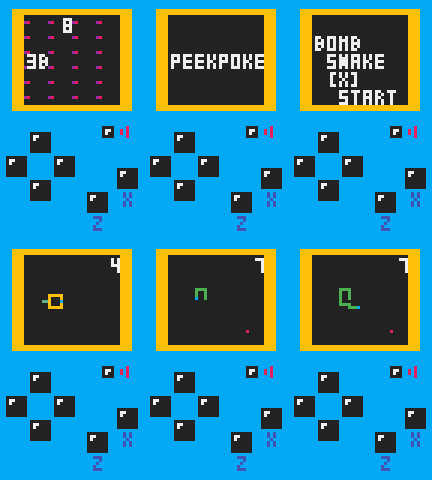](https://abagames.github.io/peekpoke/bombsnake/)
Games for PEEKPOKE can be written in [simple JavaScript code](https://github.com/abagames/peekpoke/blob/main/docs/bombsnake/main.js). PEEKPOKE games [run in the browser](https://abagames.github.io/peekpoke/bombsnake/) of any PC or mobile device.
## Memory map
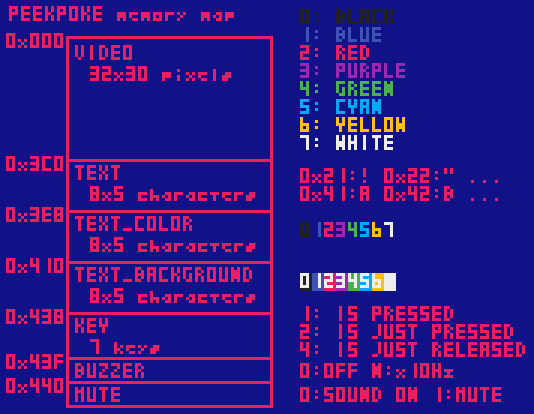
You can draw pixels or text by writing a number to a specific address in memory (poke), or get the input status of a key by reading a number from the address (peek).
## Getting started
Download [docs/getting_started/index.html](https://raw.githubusercontent.com/abagames/peekpoke/main/docs/getting_started/index.html) and write your game code in the `` element. Open `index.html` in a browser and play the game.
## Use with npm
```
% npm i peekpoke
```
The peekpoke library must be imported and initialized.
```JavaScript
import "peekpoke";
initPeekpoke({ setup, loop, enableSplashScreen: false });
function setup() { ... }
function loop() { ... }
```
## Sample snippets
### Draw a pixel
```JavaScript
// Draw a red pixel at (x, y).
poke(ADDRESS_VIDEO + x + y * VIDEO_WIDTH, COLOR_RED);
```
### Draw a text
```JavaScript
// Draw a 'A' text at (x, y).
poke(ADDRESS_TEXT + x + y * TEXT_WIDTH, "A".charCodeAt(0));
```
### Set text color
```JavaScript
// Make the text color green.
poke(ADDRESS_TEXT_COLOR + x + y * TEXT_WIDTH, COLOR_GREEN);
```
### Set text background color
```JavaScript
// Make the text background color blue.
poke(ADDRESS_TEXT_BACKGROUND + x + y * TEXT_WIDTH, COLOR_BLUE);
```
### Check keystroke state
```JavaScript
// Check if the up key is pressed.
if (peek(ADDRESS_KEY + KEY_UP) & KEY_STATE_IS_PRESSED) ...
// Check if the left key is just pressed.
if (peek(ADDRESS_KEY + KEY_LEFT) & KEY_STATE_IS_JUST_PRESSED) ...
// Check if the X key is just released.
if (peek(ADDRESS_KEY + KEY_X) & KEY_STATE_IS_JUST_RELEASED) ...
```
### Buzzer
```JavaScript
// Buzzer at 500 (50 x 10) Hz.
poke(ADDRESS_BUZZER, 50);
// Stop buzzer.
poke(ADDRESS_BUZZER, 0);
```
## Other sample games
Click on the image to play the game.
<a href="https://abagames.github.io/peekpoke/dashracket/"><img src="https://raw.githubusercontent.com/abagames/peekpoke/main/docs/dashracket/screenshot.gif" width="25%" loading="lazy"></a><a href="https://abagames.github.io/peekpoke/beebees/"><img src="https://raw.githubusercontent.com/abagames/peekpoke/main/docs/beebees/screenshot.gif" width="25%" loading="lazy"></a><a href="https://abagames.github.io/peekpoke/laserlaser/"><img src="https://raw.githubusercontent.com/abagames/peekpoke/main/docs/laserlaser/screenshot.gif" width="25%" loading="lazy"><a href="https://abagames.github.io/peekpoke/banebox/"><img src="https://raw.githubusercontent.com/abagames/peekpoke/main/docs/banebox/screenshot.gif" width="25%" loading="lazy"></a>
The source code is located in [the docs directory](https://github.com/abagames/peekpoke/tree/main/docs). See `main.js` in the directory for each game.