https://github.com/abdultolba/friend.ly
A social media platform that uses 'cards' to connect people virtually, built with the PERN (previously MERN) stack.
https://github.com/abdultolba/friend.ly
bcrypt es6 esnext express javascript postgres postgresql react redux
Last synced: 2 months ago
JSON representation
A social media platform that uses 'cards' to connect people virtually, built with the PERN (previously MERN) stack.
- Host: GitHub
- URL: https://github.com/abdultolba/friend.ly
- Owner: abdultolba
- Created: 2020-08-15T00:24:15.000Z (almost 6 years ago)
- Default Branch: main
- Last Pushed: 2025-08-14T21:54:55.000Z (10 months ago)
- Last Synced: 2025-08-14T23:27:13.484Z (10 months ago)
- Topics: bcrypt, es6, esnext, express, javascript, postgres, postgresql, react, redux
- Language: JavaScript
- Homepage:
- Size: 8.48 MB
- Stars: 1
- Watchers: 1
- Forks: 0
- Open Issues: 2
-
Metadata Files:
- Readme: README.md
Awesome Lists containing this project
README

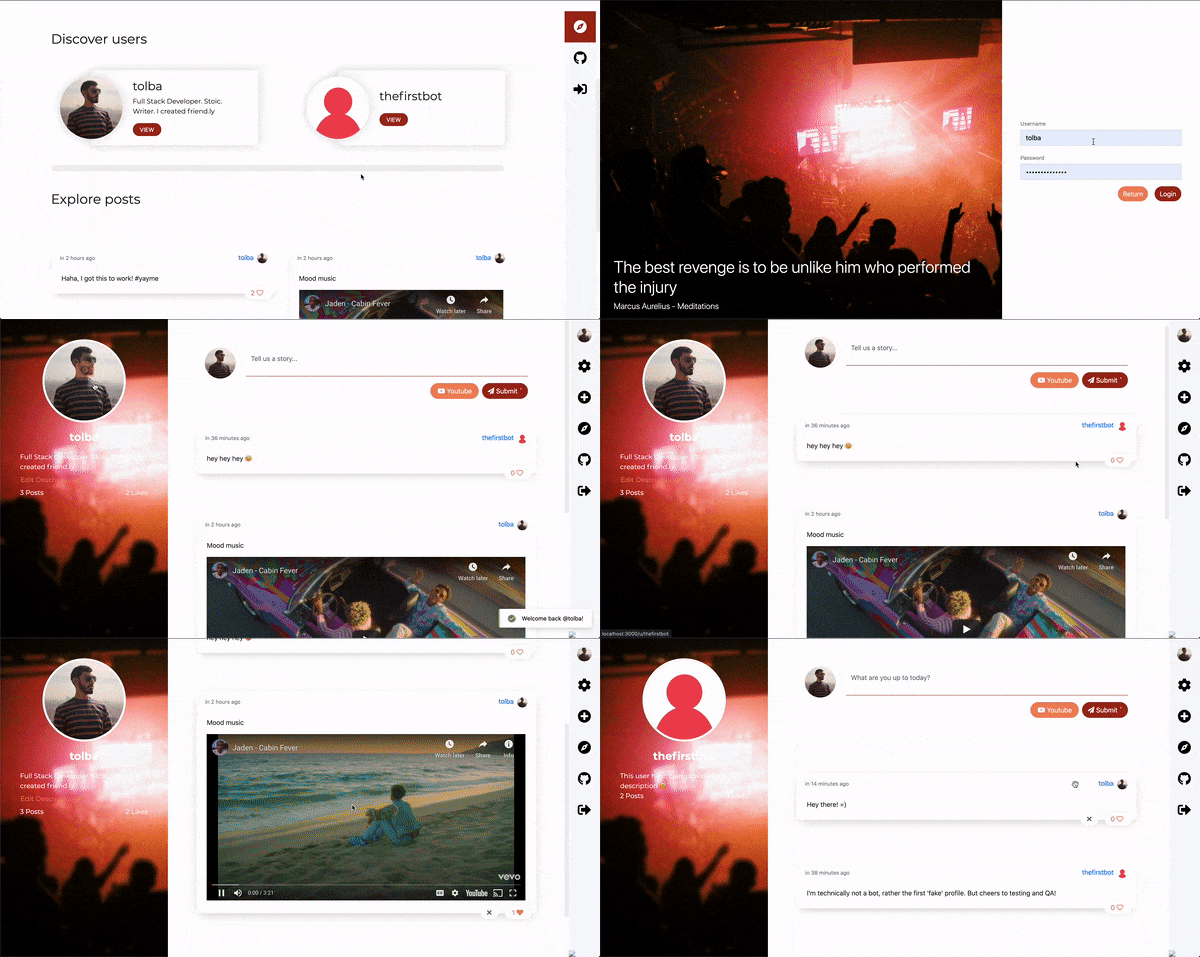
friend.ly is a small social media platform that uses 'cards' to connect people virtually, built with the PERN stack (PostgreSQL, Express.js, React, Node.js).
## Features
- User authentication (sign up/sign in)
- Create and share posts
- Like/unlike posts
- User profiles with customizable descriptions
- Real-time social interactions
- Modern UI with React 18 and Bootstrap 5
- Dark Mode theme
## Tech Stack
### Backend
- **Node.js** with Express.js 5 (latest with modern async/await patterns)
- **PostgreSQL 17** with [Sequelize ORM](https://sequelize.org/)
- **JWT** for authentication
- **bcrypt** for password hashing
- **Cloudinary** for image storage (with local fallback)
- **Multer** with manual upload handling for Express 5 compatibility
- **Sharp** for image processing
### Frontend
- **React 19** with concurrent features and automatic memoization
- **Redux Toolkit** for state management
- **React Router 7** for enhanced navigation
- **Bootstrap 5** for styling
- **Vite 7** for lightning-fast development and bundling
- **esbuild** for ultra-fast transpilation
## 📋 Prerequisites
- **Node.js** (v14 or higher)
- **PostgreSQL 17** (or any modern version)
- **npm** or **yarn**
## 🔧 Installation
### 1. Clone the repository
```bash
git clone
cd social-mern
```
### 2. Install PostgreSQL
#### macOS (using Homebrew)
```bash
brew install postgresql@17
brew services start postgresql@17
```
#### Ubuntu/Debian
```bash
sudo apt update
sudo apt install postgresql postgresql-contrib
sudo systemctl start postgresql
sudo systemctl enable postgresql
```
#### Windows
Download and install from [PostgreSQL official website](https://www.postgresql.org/download/windows/)
### 3. Set up the database
```bash
# Create the database
createdb social_mern_db
# Or use the npm script
npm run db:create --prefix server
```
### 4. Environment Configuration
Copy the example environment file and configure your settings:
```bash
cp server/.env.example server/.env
```
Edit `server/.env` with your configuration:
```env
# Database Configuration
DB_HOST=localhost
DB_PORT=5432
DB_NAME=social_mern_db
DB_USERNAME=postgres
DB_PASSWORD=your_password
# JWT Secret Key (generate a random string)
SECRET_KEY=your-super-secret-jwt-key-here
# Cloudinary Configuration (optional)
CLOUDINARY_CLOUD_NAME=your_cloud_name
CLOUDINARY_API_KEY=your_api_key
CLOUDINARY_API_SECRET=your_api_secret
# Server Configuration
NODE_ENV=development
PORT=3000
```
### 5. Install dependencies
```bash
npm run postinstall
```
## 🚦 Running the Application
### Development Mode
```bash
# Run both client and server in development mode
npm run dev
# Or run them separately:
# Client only (with hot reload)
npm run serve --prefix client
# Server only (with nodemon)
npm run dev --prefix server
```
### Production Mode
```bash
# Build and start the application
npm start
```
The application will be available at:
- **Frontend**: http://localhost:8080 (development) or http://localhost:3000 (production)
- **Backend API**: http://localhost:3000/api
## 📁 Project Structure
```
social-mern/
├── client/ # React frontend
│ ├── src/
│ │ ├── components/ # Reusable React components
│ │ ├── pages/ # Page components
│ │ ├── actions/ # Redux actions
│ │ ├── reducers/ # Redux reducers
│ │ ├── styles/ # SCSS stylesheets
│ │ └── assets/ # Static assets
│ ├── webpack.config.js # Webpack configuration
│ └── package.json
├── server/ # Node.js backend
│ ├── routes/ # API routes
│ ├── models/ # Sequelize models
│ ├── middlewares/ # Express middlewares
│ ├── db/ # Database configuration
│ ├── scripts/ # Serverside scripts
│ ├── seeders/ # Database population
│ ├── public/ # Static files
│ └── package.json
└── package.json # Root package.json
```
## 🔄 Database Scripts
```bash
# Create database
npm run db:create --prefix server
# Drop database
npm run db:drop --prefix server
# Reset database (drop and recreate)
npm run db:reset --prefix server
# Sync database schema
npm run db:sync --prefix server
# Populate the database with user data (all passwords use 'password123')
npm run db:seed --prefix server
```
## 🛡️ Security Features
- Password hashing with bcrypt
- JWT token authentication
- CORS configuration
- Input validation and sanitization
- Modern security headers
## 🐛 Troubleshooting
### PostgreSQL Connection Issues
1. **Make sure PostgreSQL is running:**
```bash
brew services start postgresql@17 # macOS
sudo systemctl start postgresql # Linux
```
2. **Check if database exists:**
```bash
psql -l
```
3. **Create user if needed:**
```bash
createuser -s postgres
```
### Build Issues
1. **Clear node_modules:**
```bash
rm -rf node_modules client/node_modules server/node_modules
npm run postinstall
```
2. **Clear build cache:**
```bash
rm -rf client/dist server/public
```
## 🤝 Contributing
1. Fork the repository
2. Create a feature branch (`git checkout -b feature/amazing-feature`)
3. Commit your changes (`git commit -m 'Add some amazing feature'`)
4. Push to the branch (`git push origin feature/amazing-feature`)
5. Open a Pull Request
## 📝 License
This project is licensed under the ISC License.
## 🙏 Acknowledgments
- Originally implemented with the MERN stack
- Modernized with PostgreSQL, React 18, and latest dependencies
- Security vulnerabilities fixed and dependencies updated
## Demo
Made with ❤️.