https://github.com/abhisheksoni27/lexer.js
A lexer and longest common sequence finder (between JS source code files)
https://github.com/abhisheksoni27/lexer.js
javascript lexer longest-common-substring npm
Last synced: 24 days ago
JSON representation
A lexer and longest common sequence finder (between JS source code files)
- Host: GitHub
- URL: https://github.com/abhisheksoni27/lexer.js
- Owner: abhisheksoni27
- License: mit
- Created: 2017-12-29T06:46:46.000Z (over 8 years ago)
- Default Branch: master
- Last Pushed: 2018-01-09T17:23:10.000Z (over 8 years ago)
- Last Synced: 2026-05-17T09:55:53.084Z (25 days ago)
- Topics: javascript, lexer, longest-common-substring, npm
- Language: JavaScript
- Homepage:
- Size: 467 KB
- Stars: 0
- Watchers: 1
- Forks: 0
- Open Issues: 0
-
Metadata Files:
- Readme: README.md
- License: LICENSE
Awesome Lists containing this project
README
# lexer.js
A lexical analyzer and longest common shared sequence finder between a list of JS files.
[](https://travis-ci.org/abhisheksoni27/lexer.js)
# Table of Contents
* [What It Does](#what-it-does)
* [Installation](#installation)
* [Running lexer.js](#running-lexer.js)
- [JSON configruation](#json-configuration)
- [CSV configruation](#csv-configuration)
* [Result](#result)
* [Options](#options)
* [Running Examples](#running-examples)
- [Test Github Project](#test-github-project)
* [Tests](#tests)
* [Known Issues](https://github.com/abhisheksoni27/lexer.js/wiki/Known-Issues)
# What it does
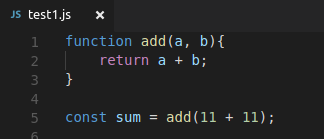
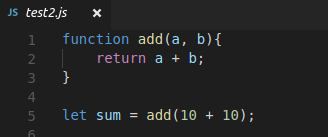
Suppose, you have two files with the same function but different function calls:
**`test1.js`**
```js
function add(a, b){
return a + b;
}
const sum = add(11 + 11);
```
**`test2.js`**
```js
function add(a, b){
return a + b;
}
let sum = add(11 + 11);
```
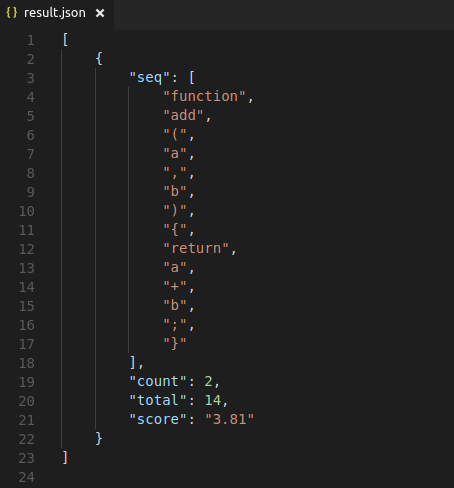
The longest common shared sequence between these two files is the *entire function definition.*
**LCSS**
```js
function add(a, b){
return a + b;
}
```
# Installation
### CLI
You can download the module via ***npm***. (To install npm, which ships with node.js, you can download node from [nodejs.org](https://nodejs.org) for your OS.) `node.js > 6.x`
```bash
$ npm install -g lexer.js
```
Or, if you prefer ***yarn***
```bash
$ yarn global add lexer.js
```
That's it. 🎉
### As module
In your application:
```js
const lexerJS = require('lexer.js');
const result = lexerJS(files, options);
```
`files`: An array of files.
`options`: See [options](#options) This parameter is *(ironically)* optional.
# Running lexer.js
To run it on your own set of files, you can either provide the files in CSV/JSON, or as command line arguments like this:
```bash
lexer.js test1.js test2.js
```
### JSON configuration
The **JSON** must have a key named `files` and it's value should be an array of the *paths* of files you want to test on.
```json
{
"files": [
"./example/test1.js",
"./example/test2.js",
]
}
```
### CSV configuration
The **CSV** config file only has one header (or column) and is called `filename`. Each new line should contain the path of a source code file.
```csv
filename,
./example/test1.js,
./example/test2.js
```
# Result
The result contains the **longest common `shared` sequence** found between the set of files. The default format is JSON, but can be configured. (See options below.)
It also asssigns a score to each subsequnce using the following formula:
```js
score = log2(count) * log2(total)
```
**count**: Total number of occurences of the subsequence
**total**: Total number of tokens in the subsequence
## Options
#### **`-o`** Output Mode `[default: "json"]`
lexer.js supports **JSON** as well as **CSV** output. JSON is the defualt output format if you do not specify any during invocation.
```bash
lexer.js test.json -o csv
```
> Output would now be a `CSV` file. To know what that file would contain, check out [result](#result).
#### **`-s`** Save Tokens `[default: false]`
This is a boolean option, which when set, saves the tokens for each test file.
```bash
lexer.js test.json -s
```
> It will generate a tokens folder, and save individual `tokens` for each file in that directory.
#### **`-f`** Output File Name `[default: "result"]`
```
lexer.js test.json -f YayTheResultsYay
```
***Note:*** If you provide a file name with extension, such as `art.json`, then the output mode will be determined from the fileName and the output mode flag (if passed) will be overridden.
# Running Examples
The [examples](https://) directory contains a minimal example set that you can run lexer.js on. To do so, clone the repo, fire a terminal, and run:
```bash
npm install
```
This will downdload the dependencies. Then, run:
```bash
lexer.js test.json
```
This assumes that you already have lexer.js installed. If you don't, you can directly invoke the node script as follows:
```bash
node index.js test.json
```
As always, you must have `node` installed.
## Test GitHub project
The repo also contains a script to test lexer.js on any GitHub project. The script does the following:
1. Find all JS files in a project.
2. Select a file which has more than **n** commits. n is configurable.
3. Downloads the file at that point in time (when that commit was made).
4. Generates a configuration file for lexer.js.
5. Run lexer.js with that config file.
To run it, fire a terminal and run (assuming you are inside the project directory):
```bash
node runGitHubExamples.js -t TOKEN --owner OWNERNAME --repo REPONAME -n 20
```
**`OWNERNAME`**: Owner of the repo `[default: prettier]`
**`REPONAME`**: Name of the repo `[default: prettier]`
**`n`**: Minimum commits the selected file must have `[default: 10]`
**`t`**: GitHub OAuth token `[Mandatory]`
The results are saved in `result.json`. The command line [options](#options) for **lexer.js** can also be passed.
The GitHub OAuth token is a required argument. To generate a Personal Access Token for testing, you can generate one here: [GitHub - Personal Access Token](https://github.com/settings/tokens)
# Tests
To run tests, clone the repo (That green button above the repo contents) and run the following command:
```bash
npm install && npm run test
```
This will first download the dependencies, and then run the tests (using `mocha`) and output the result.