https://github.com/abom-me/thawani_payment
Flutter Package allowed you to add Thawani Payment For Flutter app
https://github.com/abom-me/thawani_payment
android dart flutter flutter-package ios pubdev
Last synced: 9 months ago
JSON representation
Flutter Package allowed you to add Thawani Payment For Flutter app
- Host: GitHub
- URL: https://github.com/abom-me/thawani_payment
- Owner: abom-me
- License: mit
- Created: 2022-12-25T04:34:51.000Z (over 3 years ago)
- Default Branch: main
- Last Pushed: 2025-02-10T17:28:49.000Z (over 1 year ago)
- Last Synced: 2025-04-01T21:03:10.622Z (over 1 year ago)
- Topics: android, dart, flutter, flutter-package, ios, pubdev
- Language: Dart
- Homepage: https://pub.dev/packages/thawani_payment
- Size: 440 KB
- Stars: 6
- Watchers: 1
- Forks: 1
- Open Issues: 0
-
Metadata Files:
- Readme: README.md
- Changelog: CHANGELOG.md
- License: LICENSE
Awesome Lists containing this project
README
# thawani_payment:

#### A package helps you to use thawani checkout api , to add thawani payment in Flutter App
------------------
## # 👨💻 *Developed by:*

**Nasr Al-Rahbi [@abom_me](https://twitter.com/abom_me)**
## 👨🏻💻 Find me in :
[](https://twitter.com/abom_me)
[](https://instagram.com/abom.me)
[](https://linkedin.com/in/nasr-al-rahbi-08a573245)
[](https://stackoverflow.com/users/19994059/nasr-al-rahbi)
---------------
**thawani_payment** using the official [webview_flutter](https://pub.dev/packages/webview_flutter).
### ⚠️ The Requirement ⚠️ :
| | Android | iOS |
| ----------- | ------- | ------ |
| **Support** | SDK 19+ or 20+ | iOS 9+
## Setup:
Pubspec changes:
```
dependencies:
thawani_payment:
```
Sample example to add pay button :
```dart
import 'package:thawani_payment/thawani_payment.dart';
ThawaniPayBtn(
api: 'API Key',
pKey: 'Publishable Key',
clintID: 'String',
onError: (e){},
products:[],
onCreate: (v) {},
onCancelled: (v){},
onPaid: (v){},
);
```
-----
Sample example to add pay function :
```dart
import 'package:thawani_payment/thawani_payment.dart';
Thawani.pay(
api: 'API Key',
pKey: 'Publishable Key',
clintID: 'String',
onError: (e){},
products:[],
onCreate: (v) {},
onCancelled: (v){},
onPaid: (v){},
);
```
## Getting Started
- The official API Document From Thawani in .
- **First You Should have Keys From Thawani** [Thawani Checkout](https://thawani.om/checkout/)
- And ensure to enable billing for the project.
### Android
1. You should however make sure to set the correct `minSdkVersion` in `android/app/build.gradle` if it was previously lower than 19:
```groovy
android {
defaultConfig {
minSdkVersion 19
}
}
```
### Note
- **This package will update if there any update in Thawani checkout**
- Your use of the package is your personal choice. The developer of the package has nothing to do with errors that may occur with you during payment.
- I recommend using the test mode to ensure that the package is free of errors before uploading it to users.
See the `example` directory for a complete sample app.
### Parameters of the ThawaniPayBtn
```dart
/// API Code From Thawani Company
/// For Test Mode: rRQ26GcsZzoEhbrP2HZvLYDbn9C9et
final String api;
/// The Publishable Key From Thawani Company
/// For Test Mode: HGvTMLDssJghr9tlN9gr4DVYt0qyBy
final String pKey;
/// The Widget Shown In The Button , By Default it have Text
/// Text("Pay",style: TextStyle(color: Colors.white,fontSize: 17),)
final Widget? child;
/// Button Style
/// ButtonStyle(
/// elevation: MaterialStateProperty.all(0),
/// shape: MaterialStateProperty.all(RoundedRectangleBorder(borderRadius: BorderRadius.circular(10))),
/// backgroundColor: MaterialStateProperty.all(const Color(0xff4FB76C)),
/// )
final ButtonStyle? buttonStyle;
/// The Clint Id to be generated by merchant to identify the session (From Thawani API Doc).
/// You can use The User ID As Clint ID
final String clintID;
/// The customer would be redirected to successUrl if payment processed successfully (From Thawani API Doc).
/// In This Package , The URL Unuseful
final String? successUrl;
/// The customer would be redirected to successUrl if he decides to cancel the payment (From Thawani API Doc).
/// In This Package , The URL Unuseful
final String? cancelUrl;
/// A list of products the customer is purchasing. maximum 100 products (From Thawani API Doc).
/// [
/// {
/// "name": "product Name",
/// "unit_amount": the price by Baisa, >=100 <=5000000000
/// "quantity": the quantity of the line product, >=1 <=100
/// }
/// ]
final List products;
/// Useful for storing additional information about your products, customers (From Thawani API Doc).
/// storing Any Data about your products, customers(users)
/// EX:
/// { "userName":"Nasr Al-Rahbi", "Twitter":"abom_me"}
final Map? metadata;
/// Make It true If You Want Test The Package Or The Api
/// By Default It's false
/// testMode: false
final bool? testMode;
///The Function And The Result Of Data After Create Session.
final void Function(Create create) onCreate;
///The Function And The Result Of Data If The User Cancelled The Payment.
final void Function(StatusClass payStatus) onCancelled;
///The Function And The Result Of Data If The User Cancelled The Payment.
final void Function(StatusClass payStatus) onPaid;
///The Function And The Reason Of The Error, If Any Error Happen.
final Function(Map error)? onError;
```
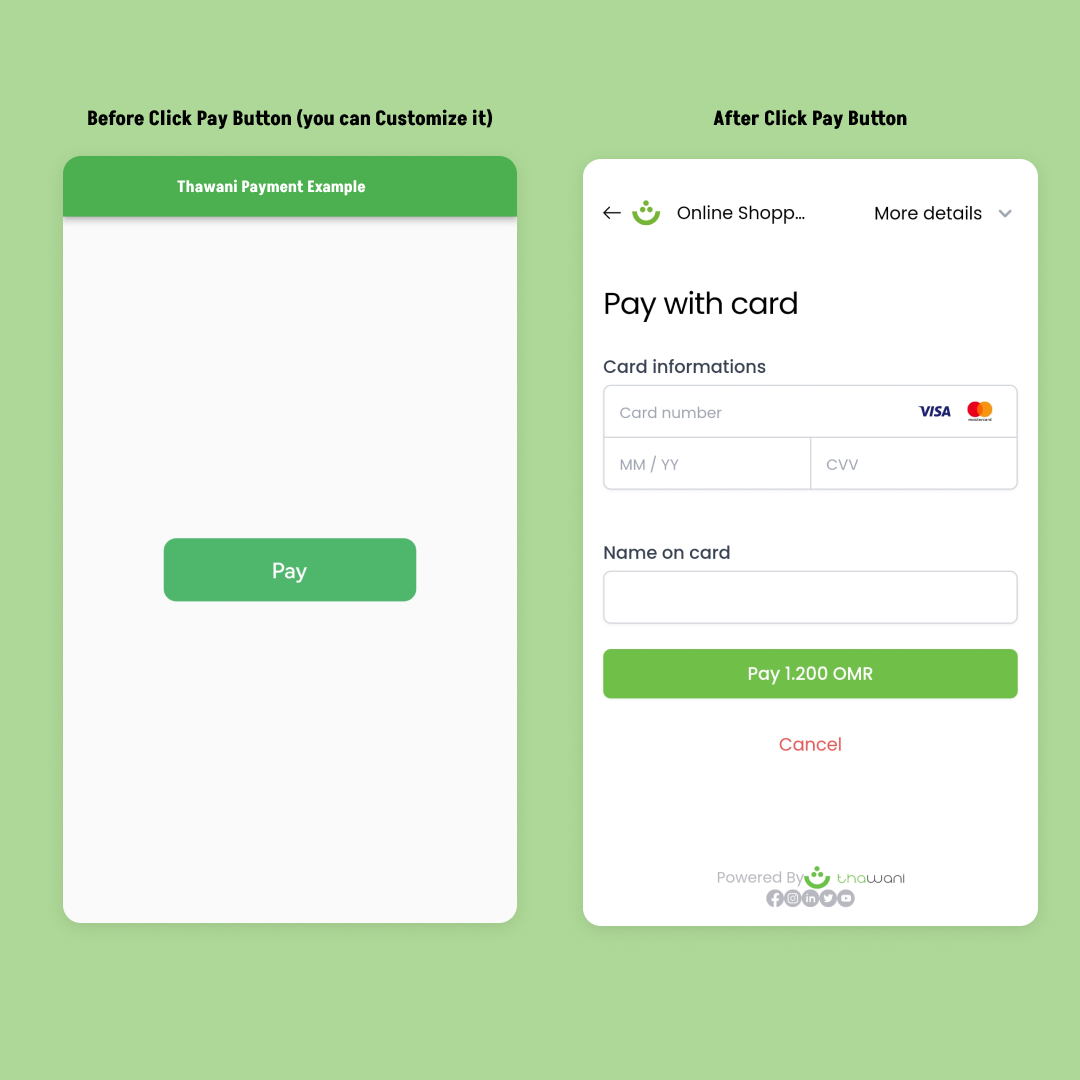
## Real Example:
## 🤗 Special thanks :
- For Khalfan [@pwkhalfan](https://github.com/pwkhalfan) , for helping me with Thawani Document