https://github.com/abraham/m3_floating_toolbar
A Material Design 3 floating toolbar widget for Flutter
https://github.com/abraham/m3_floating_toolbar
android flutter material-design material3
Last synced: 6 months ago
JSON representation
A Material Design 3 floating toolbar widget for Flutter
- Host: GitHub
- URL: https://github.com/abraham/m3_floating_toolbar
- Owner: abraham
- License: mit
- Created: 2025-11-24T02:21:31.000Z (7 months ago)
- Default Branch: main
- Last Pushed: 2025-11-24T02:38:17.000Z (7 months ago)
- Last Synced: 2026-01-11T10:14:04.917Z (6 months ago)
- Topics: android, flutter, material-design, material3
- Language: Dart
- Homepage: https://pub.dev/packages/m3_floating_toolbar
- Size: 32.2 KB
- Stars: 1
- Watchers: 0
- Forks: 0
- Open Issues: 0
-
Metadata Files:
- Readme: README.md
- Changelog: CHANGELOG.md
- License: LICENSE
Awesome Lists containing this project
README
# M3 Floating Toolbar
A Flutter package that provides a Material Design 3 [floating pill-style toolbar](https://m3.material.io/components/toolbars/overview) widget. Perfect for creating action bars with icon-only or labeled buttons that follow Material You design principles.
## Features
- 🎨 Material Design 3 styling with automatic theming
- 🔘 Support for both icon-only and labeled action buttons
- ♿ Built-in accessibility with semantic labels and tooltips
- 🎯 Optional FloatingActionButton integration
- ⚙️ Customizable elevation, padding, spacing, and colors
- 📱 Responsive layout that adapts to content
[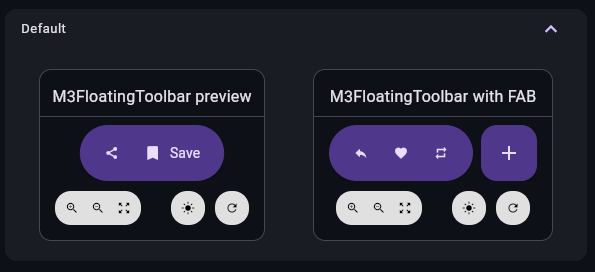](https://raw.githubusercontent.com/abraham/m3_floating_toolbar/refs/heads/main/screenshot.png)
## Getting started
Add this package to your `pubspec.yaml`:
```yaml
dependencies:
m3_floating_toolbar: ^0.1.0
```
Then run:
```bash
flutter pub get
```
Import the package in your Dart code:
```dart
import 'package:m3_floating_toolbar/m3_floating_toolbar.dart';
import 'package:m3_floating_toolbar/m3_floating_toolbar_action.dart';
```
## Usage
### Basic toolbar with icon-only buttons
```dart
M3FloatingToolbar(
actions: [
M3FloatingToolbarAction(
icon: Icons.share,
semanticLabel: 'Share',
tooltip: 'Share',
onPressed: () => print('Share pressed'),
),
M3FloatingToolbarAction(
icon: Icons.favorite,
semanticLabel: 'Like',
tooltip: 'Like',
onPressed: () => print('Like pressed'),
),
M3FloatingToolbarAction(
icon: Icons.bookmark,
semanticLabel: 'Bookmark',
tooltip: 'Bookmark',
onPressed: () => print('Bookmark pressed'),
),
],
)
```
### Toolbar with labeled buttons
```dart
M3FloatingToolbar(
actions: [
M3FloatingToolbarAction(
icon: Icons.share,
label: 'Share',
semanticLabel: 'Share post',
onPressed: () => print('Share pressed'),
),
M3FloatingToolbarAction(
icon: Icons.bookmark,
label: 'Save',
semanticLabel: 'Bookmark post',
onPressed: () => print('Bookmark pressed'),
),
],
)
```
### With FloatingActionButton
```dart
M3FloatingToolbar(
actions: [
M3FloatingToolbarAction(
icon: Icons.share,
semanticLabel: 'Share',
onPressed: () => print('Share pressed'),
),
M3FloatingToolbarAction(
icon: Icons.bookmark,
semanticLabel: 'Bookmark',
onPressed: () => print('Bookmark pressed'),
),
],
floatingActionButton: FloatingActionButton(
onPressed: () => print('FAB pressed'),
child: Icon(Icons.add),
),
)
```
### Customization
```dart
M3FloatingToolbar(
actions: [...],
elevation: 4,
internalPadding: EdgeInsets.symmetric(horizontal: 20, vertical: 16),
spacing: 12,
color: Colors.blue.shade100,
foregroundColor: Colors.blue.shade900,
)
```
## Additional information
For a complete working example, see the [example](example/) directory.
To report issues or contribute to this package, visit the [GitHub repository](https://github.com/abraham/m3_floating_toolbar).