https://github.com/abratchik/hidlcd
This driver library allows host to communicate with HID-compliant Auxiliary Display for PC based on Arduino. Such displays can be used for showing system information such as hardware temperature, fan speed, etc., and used by host applications as necessary.
https://github.com/abratchik/hidlcd
Last synced: 10 days ago
JSON representation
This driver library allows host to communicate with HID-compliant Auxiliary Display for PC based on Arduino. Such displays can be used for showing system information such as hardware temperature, fan speed, etc., and used by host applications as necessary.
- Host: GitHub
- URL: https://github.com/abratchik/hidlcd
- Owner: abratchik
- License: gpl-3.0
- Created: 2021-11-27T11:01:08.000Z (over 4 years ago)
- Default Branch: master
- Last Pushed: 2022-02-15T22:15:49.000Z (over 4 years ago)
- Last Synced: 2025-10-25T23:44:27.696Z (9 months ago)
- Language: C
- Homepage:
- Size: 368 KB
- Stars: 2
- Watchers: 1
- Forks: 2
- Open Issues: 0
-
Metadata Files:
- Readme: README.md
- Changelog: ChangeLog
- License: COPYING
- Authors: AUTHORS
Awesome Lists containing this project
README
# HIDLCD Driver library for HID-compliant LCD Display
This driver allows the host to communicate with [HID-compliant Auxiliary Display based on Arduino](https://github.com/abratchik/HIDAuxiliaryDisplay).
The main idea of this library is to provide a simple unified communication with the small LCD displays
supported by Arduino. Such displays can be used for showing system information such as hardware temperature,
fan speed, percentage of memory available etc., and used by host applications as necessary.
HIDLCD is build on top of the HIDAPI library and provides the next level of abstraction specific to the HID-compliant
auxiliary LCD displays.
## Supported displays
Compatible types of displays include:
* 1602 LCD Display
* 1604 LCD Display (to be tested)
* 2004 LCD Display (to be tested)
## Supported operating systems
* Linux (tested on Ubuntu 18.04 LTS)
* Mac OSX (tested on macOS Big Sur 11.6.2)
## Architecture of the solution
The overall architecture of the solution is represented on the image below:
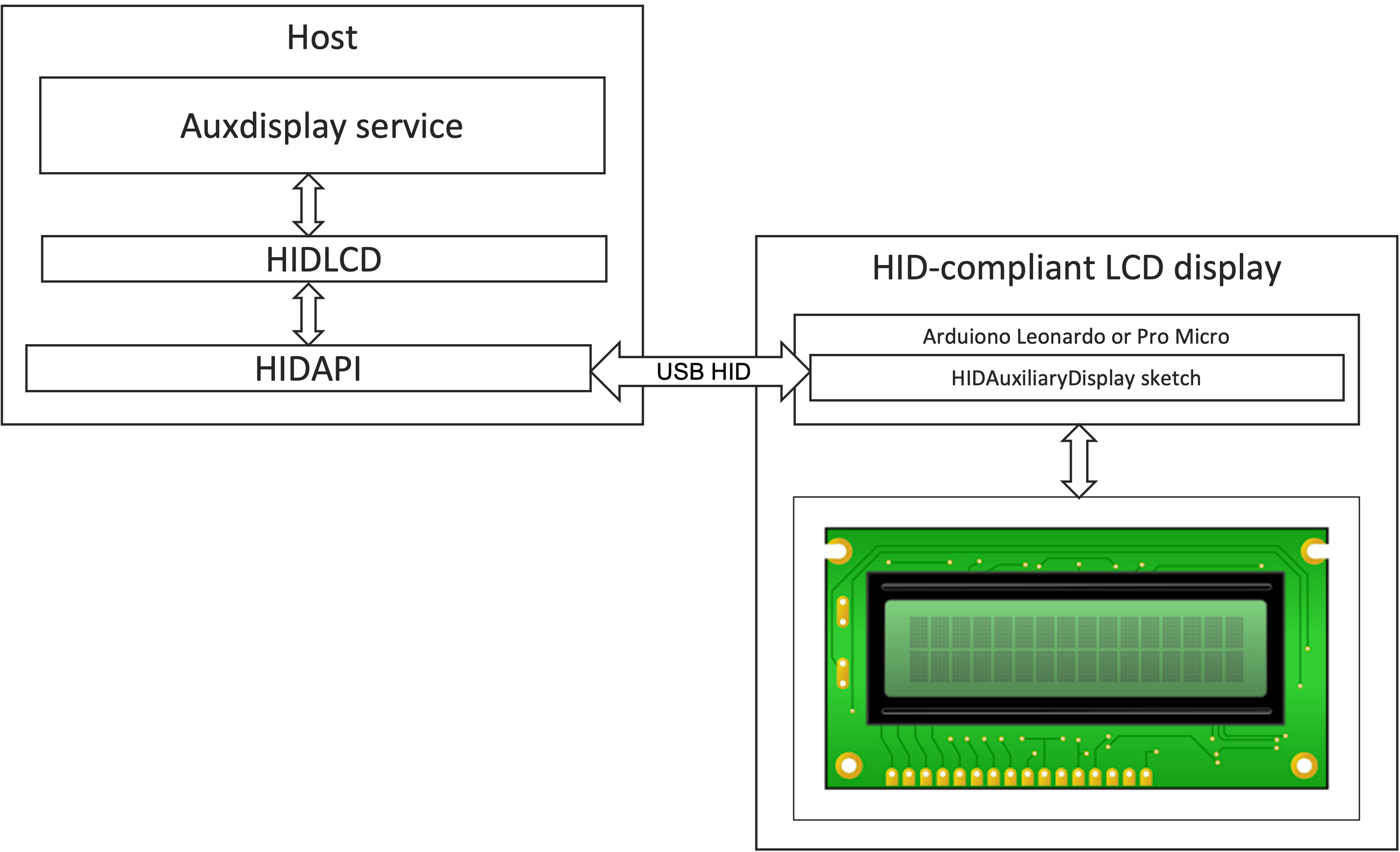
The solution is consisted of 2 parts - the HID-compliant LCD display and the host. The host part
contains the auxdisplay service, the HIDLCD driver (this project) and the HIDAPI library.
## Installation
### Linux
Before executing the steps below, please ensure the developer tools are installed on your host. If your operating
system is Ubuntu, you can run `sudo apt update` & `sudo apt install build-essential` in the bash terminal.
1. Install [HIDAPI library](https://github.com/libusb/hidapi). Just follow the instructions in HIDAPI Readme.
2. Clone this repository to a folder on your host machine.
3. Navigate to the folder and execute `make` and `sudo make install`
### Mac OSX
Please ensure Xcode Command Line Tools installed on your Mac. This can be done by running the command
`xcode-select --install` in the terminal.
The rest of the installation is the same as for Linux.
## Testing
Once the driver is installed, you can test it. Navigate to the root folder of this repository and run the
`make test`. If everything is installed properly, you should see the test messages on the LCD screen.
## Usage
API documentation can be found [here](https://abratchik.github.io/hidlcd/html/group__API.html).
## License
[GPL v.3](http://www.gnu.org/copyleft/gpl.html)