https://github.com/absaoss/spline-getting-started
https://github.com/absaoss/spline-getting-started
Last synced: 12 months ago
JSON representation
- Host: GitHub
- URL: https://github.com/absaoss/spline-getting-started
- Owner: AbsaOSS
- License: apache-2.0
- Created: 2020-11-26T00:03:56.000Z (over 5 years ago)
- Default Branch: main
- Last Pushed: 2024-09-09T12:25:58.000Z (almost 2 years ago)
- Last Synced: 2024-09-09T14:56:13.331Z (almost 2 years ago)
- Language: Scala
- Size: 15.1 MB
- Stars: 23
- Watchers: 8
- Forks: 17
- Open Issues: 7
-
Metadata Files:
- Readme: README.md
- License: LICENSE.md
Awesome Lists containing this project
README
Spline - data lineage tracking solution for data pipelines like Apache Spark and others
---
# Getting started
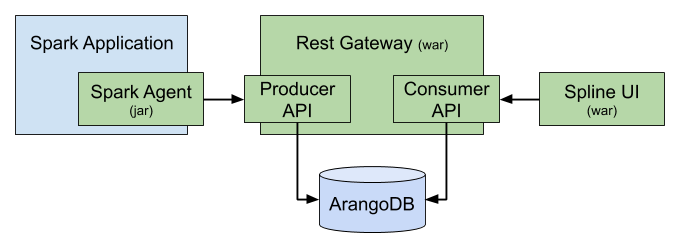
The project consists of three main parts:
- [Spark Agent](https://github.com/AbsaOSS/spline-spark-agent) that sits on a driver capturing the data lineage from Spark jobs by analyzing the execution plans
- [Rest Gateway](https://github.com/AbsaOSS/spline) that receives the lineage data from agent and stores it in the database
- [Web UI](https://github.com/AbsaOSS/spline-ui) application that visualizes the stored data lineages
## TL;DR
Spin up a Spline server in a Docker
```shell
wget https://raw.githubusercontent.com/AbsaOSS/spline-getting-started/main/docker/compose.yaml
wget https://raw.githubusercontent.com/AbsaOSS/spline-getting-started/main/docker/.env
SEED=1 docker-compose up
# SEED=1 means to also run sample jobs to populate the database.
```
You can access Spline services on the following URLs:
- Spline Web UI: http://localhost:9090
- Spline Server: http://localhost:8080
To access Spline UI from another host set `DOCKER_HOST_EXTERNAL` variable pointing to the current host before running `docker-compose`.
Spline UI will propagate it to the user browser so that one will be able to connect to the Spline REST endpoint from the outside of this machine.
```shell
DOCKER_HOST_EXTERNAL=192.168.1.222 docker-compose up
```
## How to extend/customize _Spline Spark Agent_ behavior
There are three ways how to customize default Spline Spark Agent behavior. Choose the one that fits you needs better.
1. A lot of things can be customized declaratively, without any coding needed, by just tweaking
the [Agent configuration](https://github.com/AbsaOSS/spline-spark-agent#configuration).
2. Spline agent is designed for extension, so the chances are it's enough to override some method or implement some trait to achieve desired behavior,
and attach it as an extension module to your Spark application. See the [example extension project](spark-agent-extension-example).
3. If the extension API isn't enough then fork the project, replace the Maven coordinates with your custom ones,
and [build](https://github.com/AbsaOSS/spline-spark-agent#building-for-different-scala-and-spark-versions) the agent as your own JAR.
## More Howto's
- [Running Spline on Databricks Notebook](spline-on-databricks)
- [Setting up Spline server on AWS](spline-on-AWS-demo-setup)
---
For more information about Spline see - https://absaoss.github.io/spline/
Enjoy.
---
Copyright 2019 ABSA Group Limited
you may not use this file except in compliance with the License.
You may obtain a copy of the License at
http://www.apache.org/licenses/LICENSE-2.0
Unless required by applicable law or agreed to in writing, software
distributed under the License is distributed on an "AS IS" BASIS,
WITHOUT WARRANTIES OR CONDITIONS OF ANY KIND, either express or implied.
See the License for the specific language governing permissions and
limitations under the License.