https://github.com/acecentre/movementswitch
On-body switch using a gyroscope to detect small subtle movements and self-adjusts over time
https://github.com/acecentre/movementswitch
arduino assistive-technology gyroscope hardware switch
Last synced: 3 months ago
JSON representation
On-body switch using a gyroscope to detect small subtle movements and self-adjusts over time
- Host: GitHub
- URL: https://github.com/acecentre/movementswitch
- Owner: AceCentre
- License: mit
- Created: 2020-06-18T08:50:52.000Z (about 6 years ago)
- Default Branch: master
- Last Pushed: 2022-12-13T04:37:47.000Z (over 3 years ago)
- Last Synced: 2025-04-07T02:49:53.846Z (over 1 year ago)
- Topics: arduino, assistive-technology, gyroscope, hardware, switch
- Language: C++
- Homepage:
- Size: 2.57 MB
- Stars: 1
- Watchers: 3
- Forks: 0
- Open Issues: 21
-
Metadata Files:
- Readme: README.md
- License: LICENSE
Awesome Lists containing this project
README
# MovementSwitch
> Hardware project to make a very sensitive, self calibrating and auto-adjusting on-body switch
MovementSwitch is a Arduino project designed to work with a range of Arduino boards (e.g. Arduino Pro micro) and a GY-521 Gyroscope. The device self calibrates to a users movement and a potentiometer can be used to adjust the sensitivity.

## Bill of materials
* x1 [Arduino Pro Micro](https://store.arduino.cc/arduino-micro)
* x1 [Gy-521 Gyroscope-Accelerometer](https://www.amazon.co.uk/WayinTop-MPU-6050-Gyroscope-Accelerometer-Converter/dp/B07P5YXBXV/)
* x1 [10K Pot](https://shop.pimoroni.com/products/pt10lv-horizontal-trimmer-multiple-values)
* x1 [Momentary Pushbutton or switch](https://shop.pimoroni.com/products/momentary-pushbutton-switch-12mm-square)
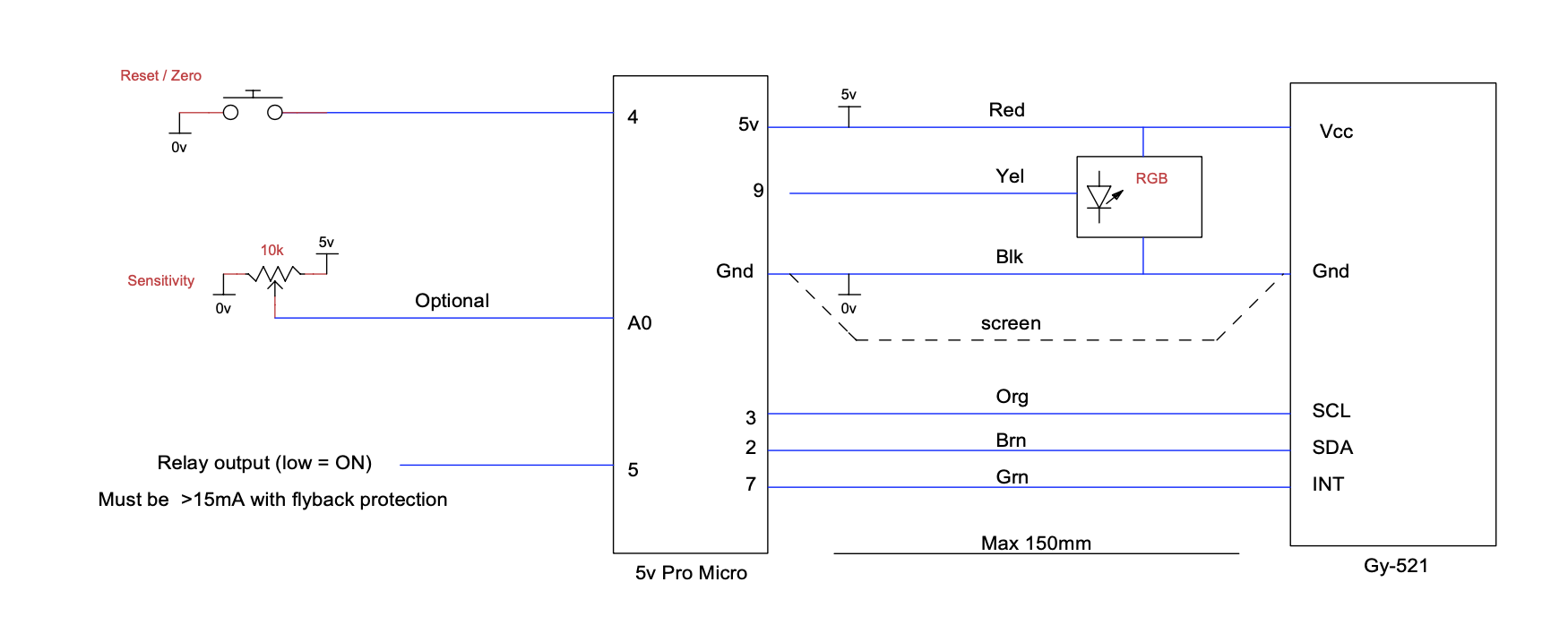
## Arduino wiring
* **Pin** 4 - Switch/Pushbutton **State**: Active Low
* **Pin** A0 - Potentiometer **State**: Active Low
* **Pin** 5 - Switch Output/Relay **State**: Active Low
* **Pin** 3 - SCL of GY-521
* **Pin** 2 - SDA of GY-521
* **Pin** 7 - INT of GY-521
* **Pin** 9 - Neopixel
See also this [TinyCad Diagram](https://github.com/AceCentre/MovementSwitch/blob/master/MovementSwitchSCM.dsn) :
### Usage
Wire it all up. The neopixel displays different colours:
* **RED**: On first start for a few seconds as device calibrates. Wait with steady hand until complete
* **White**: OFF. Waiting to detect movement down* (up is an option)
* **Green**: ON A single keyboard character* will have been sent to the PC Now waiting to detect movement up*
* **Yellow**: OFF. Indicates that the user has managed to return further than original OFF position by a factor of 2. Consider reducing Sensitivity
**Zero / Reset Button:**
On press a fast zero will occur and the led will be Purple for a second or less then return to White indicating OFF
If the unit has had a major movement (dropped etc) and a quick reset is not possible, then the display will colour Red and commence a full reset taking a few seconds in the same manner as starting up.
**Sensitivity Knob:**
Max sensitivity when fully clockwise
## Contributing
Pull requests are welcome. For major changes, please open an issue first to discuss what you would like to change.
## Files
All the Arduino code is in the sub-directory **MovementSwitch**
* MovementSwitch.ino - Main source code file
* A_Main.ino - Main Gyro State Machine
* B_Gyro_.ino - Gyro Read data functions
* F_MonitorLight.ino - Logging functions. "Light" because it is a lightweight version of a more complex version Graham uses in his projects
### Required libraries
You will need **THREE** libraries in your Arduino library folder for this to work:
* [I2Cdevlib](https://github.com/jrowberg/i2cdevlib/tree/master/Arduino/I2Cdev) and the [I2Cdevlib-MPU6050](https://github.com/jrowberg/i2cdevlib/tree/master/Arduino/MPU6050) Library in your Library folder.
* [Adafruit Neopixel](https://github.com/adafruit/Adafruit_NeoPixel) Library
## Documentation Development
We use [vuepress](http://vuepress.vuejs.org) for documentation
```bash
yarn dev
yarn build
```
## Credits
* Graham Law - Check out for some great AT hardware. Graham wrote *ALL* of this code. Graham is a legend. Hire him! [See his page here which documents it from his side](https://www.celticmagic.org/movement-detector).
* Gerard Cullen - Original inspiration and version 1 of this project was down to Gerard
## License
[MIT](https://choosealicense.com/licenses/mit/)