https://github.com/achetronic/pg-selector
Companion for Postgres HA deployment on Kubernetes that labels its pods with the current replication role
https://github.com/achetronic/pg-selector
cli golang ha kubernetes postgres
Last synced: about 1 year ago
JSON representation
Companion for Postgres HA deployment on Kubernetes that labels its pods with the current replication role
- Host: GitHub
- URL: https://github.com/achetronic/pg-selector
- Owner: achetronic
- License: apache-2.0
- Created: 2024-04-26T16:51:27.000Z (over 2 years ago)
- Default Branch: master
- Last Pushed: 2025-03-12T16:24:03.000Z (over 1 year ago)
- Last Synced: 2025-04-19T19:51:00.840Z (over 1 year ago)
- Topics: cli, golang, ha, kubernetes, postgres
- Language: Go
- Homepage:
- Size: 9.42 MB
- Stars: 5
- Watchers: 1
- Forks: 1
- Open Issues: 0
-
Metadata Files:
- Readme: README.md
- License: LICENSE
Awesome Lists containing this project
README
# PG Selector





A little companion for your Postgres HA deployment on Kubernetes that labels its pods
with the current replication role
## Motivation
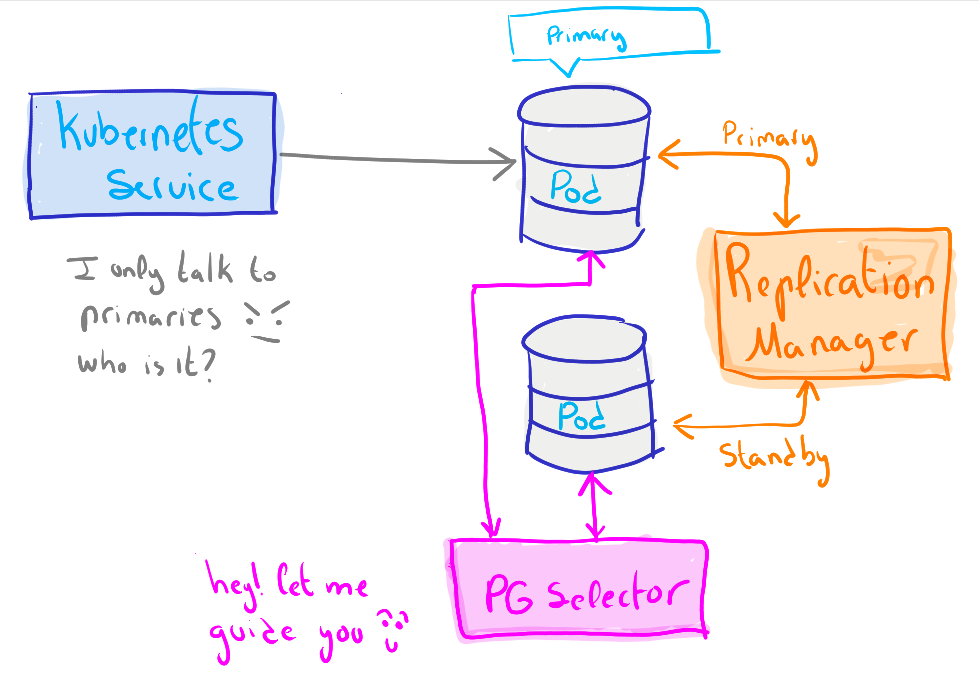
If you have played with Postgres in HA, having several primary servers, you probably know Replication Manager.
This tool keeps 'primary' and 'standby' nodes synchronized and promotes 'standby' to 'primary' on failures.
This commonly implies having a proxy in front of all Postgres nodes to route writing operations to 'primary',
balance reading operations to the rest of nodes, and other advantages.
This proxy-pattern helps to mask failures in a way the client application commonly doesn't notice,
being super useful in huge productive customer-facing systems.
But what happens if you require HA on smaller systems?
Is the overhead of configuring perfect proxy worth?
The answer is NO.
Replication Manager is taking care of your Postgres, so you always have a 'primary' available.
But Kubernetes cannot distinguish the role of your nodes, or it can?
This application is a little CLI that checks the roles of your Postgres Pods from time to time,
and labels them with the role.
This way you can create a Kubernetes Service that points always to the 'primary'
deleting the need of a complicated proxy on small HA deployments
## Diagram
## Flags
Every configuration parameter can be defined by flags that can be passed to the CLI.
They are described in the following table:
| Name | Description | Default | Example |
|:----------------------|:------------------------------------|:-------:|---------------------------------|
| `--log-level` | Define the verbosity of the logs | `info` | `--log-level info` |
| `--kubeconfig` | Path to kubeconfig | `-` | `--kubeconfig="~/.kube/config"` |
| `--services-creation` | Enable the creation of the services | `true` | `--services-creation=false` |
| `--sync-time` | Synchronization time in seconds | `5s` | `--sync-time=2m` |
## Environment Variables
Security-critical parameters are managed by environment variables.
They are described in the following table:
| Name | Description | Default | Example |
|:-----------------------|:------------------------------|:-------:|-----------------------------------------------------------------|
| `PG_CONNECTION_STRING` | OBDC styled connection string | `-` | `postgresql://username:password@postgres.namespace.svc:5432/db` |
## Examples
Here you have a complete example to use this command.
> Output is thrown always in JSON as it is more suitable for automations
```console
export PG_CONNECTION_STRING="postgresql://username:password@postgres.namespace.svc:5432/db"
pgs run \
--log-level=info
--kubeconfig="./path"
```
> ATTENTION:
> If you detect some mistake on the examples, open an issue to fix it.
> This way we all will benefit
## How to use
This project provides binary files and Docker images to make it easy to use wherever wanted
### Binaries
Binary files for the most popular platforms will be added to the [releases](https://github.com/achetronic/pg-selector/releases)
### Docker
Docker images can be found in GitHub's [packages](https://github.com/achetronic/pg-selector/pkgs/container/pg-selector)
related to this repository
> Do you need it in a different container registry? We think this is not needed, but if we're wrong, please, let's discuss
> it in the best place for that: an issue
## How to contribute
We are open to external collaborations for this project: improvements, bugfixes, whatever.
For doing it, open an issue to discuss the need of the changes, then:
- Fork the repository
- Make your changes to the code
- Open a PR and wait for review
The code will be reviewed and tested (always)
> We are developers and hate bad code. For that reason, we ask you the highest quality
> on each line of code to improve this project on each iteration.
## License
Copyright 2022.
Licensed under the Apache License, Version 2.0 (the "License");
you may not use this file except in compliance with the License.
You may obtain a copy of the License at
http://www.apache.org/licenses/LICENSE-2.0
Unless required by applicable law or agreed to in writing, software
distributed under the License is distributed on an "AS IS" BASIS,
WITHOUT WARRANTIES OR CONDITIONS OF ANY KIND, either express or implied.
See the License for the specific language governing permissions and
limitations under the License.
## Special mention
This project was done using IDEs from JetBrains. They helped us to develop faster, so we recommend them a lot! 🤓
