https://github.com/achu94/gnome-wallpaper-engine
gnome live-wallpaper wayland x11
https://github.com/achu94/gnome-wallpaper-engine
extension gnome gnome-shell gnome-shell-extension linux live-wallpapers mpv wallpaper wayland x11
Last synced: 4 months ago
JSON representation
gnome live-wallpaper wayland x11
- Host: GitHub
- URL: https://github.com/achu94/gnome-wallpaper-engine
- Owner: achu94
- Created: 2026-03-21T14:11:33.000Z (4 months ago)
- Default Branch: main
- Last Pushed: 2026-04-06T10:44:46.000Z (4 months ago)
- Last Synced: 2026-04-06T11:29:37.252Z (4 months ago)
- Topics: extension, gnome, gnome-shell, gnome-shell-extension, linux, live-wallpapers, mpv, wallpaper, wayland, x11
- Language: JavaScript
- Homepage: https://github.com/achu94/gnome-wallpaper-engine
- Size: 51.9 MB
- Stars: 49
- Watchers: 1
- Forks: 2
- Open Issues: 13
-
Metadata Files:
- Readme: README.md
Awesome Lists containing this project
README
# 🌌 GNOME Live Wallpaper Engine
No complex setup. No heavy dependencies. Just mpv, ffmpeg + the extension.
The **simplest and most reliable way** to use live wallpapers on GNOME — fully compatible with **Wayland & X11**.
Powered by **mpv** for maximum performance, low resource usage, and full format support (MP4, GIF, WebM, MKV…).
If you like this project, consider giving it a star ⭐ — it really helps!
## ☕ Support & Updates
If you’d like to support the project, you can do so here:
[](https://ko-fi.com/achu94)
I’ll also be sharing development updates, progress, and behind-the-scenes work on Ko-fi.
You don’t need to donate to see the posts — everyone is welcome to follow along and stay updated 🙂
And if you enjoy the project, a ⭐ on GitHub is always appreciated!
---
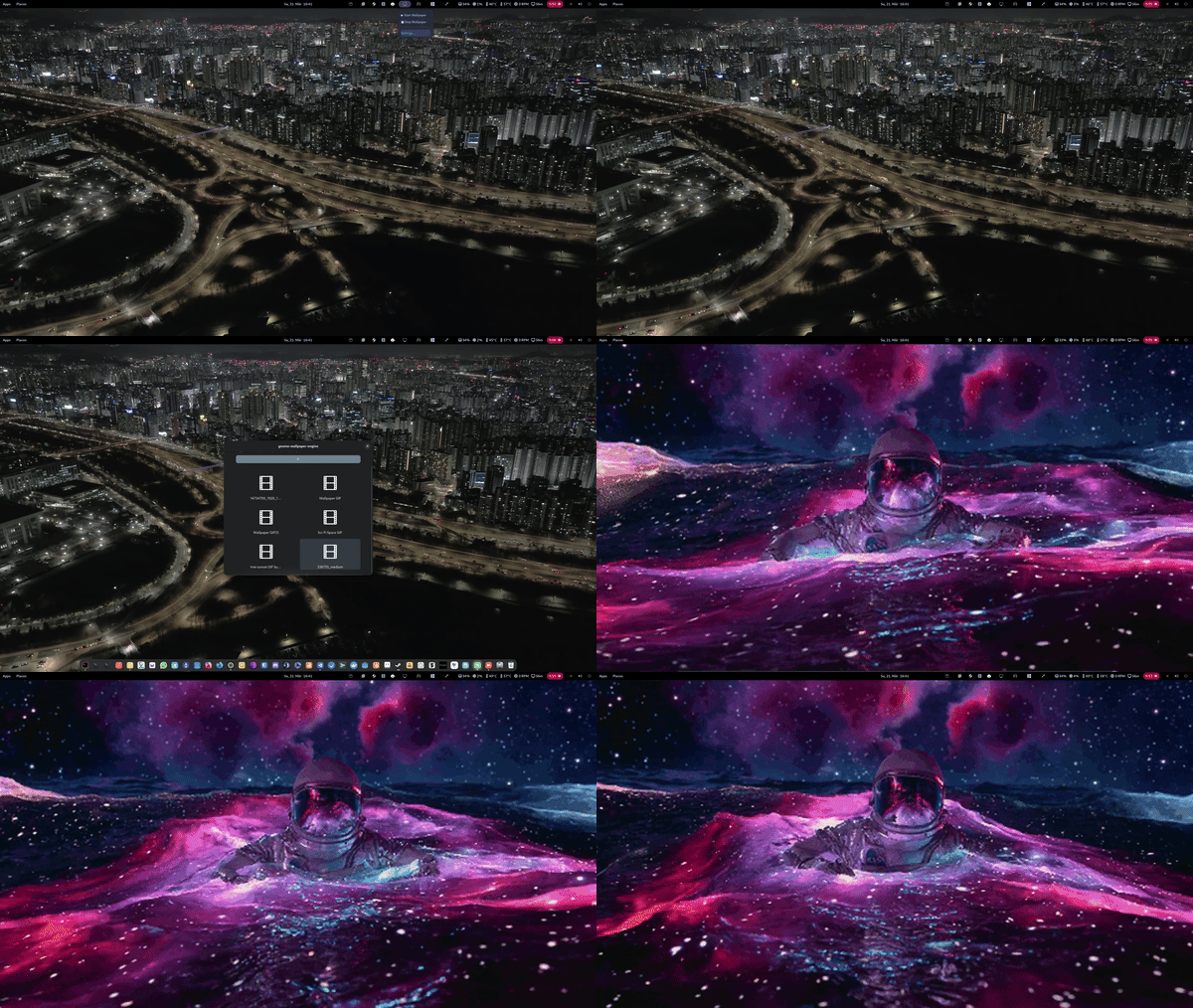
## 🎥 Demo
> Live wallpaper running on GNOME (Wayland)
---
## ✨ Features
- 🎬 **Integrated Gallery:** Browse and select wallpapers directly from GNOME Settings
- 🖼️ **Thumbnail Previews:** Automatically generated previews for all wallpapers
- 📥 **Smart Import:** Add videos with one click and apply instantly
- 🚀 **GPU Accelerated (enabled by default):** Uses mpv with `hwdec=auto`
- ⚡ **Very Low CPU Usage:** Typically ~1–3%
- 🔄 **Instant Apply:** Switch wallpapers in real-time
- 🖥️ **Wayland Ready:** Works reliably where most tools fail
- 📦 **Minimal Setup:** Only requires mpv and ffmpeg
- 🎞️ **Wide Format Support:** MP4, GIF, WebM, MKV and more
- 🔁 **Autostart:** Automatically start wallpaper on login
- 🧩 **Tray Icon Toggle:** Show or hide the top panel indicator
- ⏸️ **Auto Pause (Fullscreen):** Pauses when a fullscreen app is active
- 🔋 **Auto Pause (Battery):** Pauses when running on battery to save power
---
## 🚧 Roadmap
- 🎮 Steam Wallpaper Engine integration (auto-detect and list compatible wallpapers)
- 🎛️ Advanced playback settings (loop modes, speed, etc.)
- 🎨 Future rendering engine (without mpv)
---
## 🛠 Requirements
You only need **mpv** installed:
### Ubuntu / Debian / Zorin OS
```bash
sudo apt update && sudo apt install mpv ffmpeg
```
### Fedora
```bash
sudo dnf install mpv ffmpeg
```
### Arch Linux
```bash
sudo pacman -S mpv ffmpeg
```
### openSUSE
```bash
sudo zypper in mpv ffmpeg
```
## 📦 Installation
### ⚡ Quick Install (Recommended)
```bash
gnome-extensions install gnome-wallpaper-engine@gjs.com.zip
```
Then:
- Wayland: Log out and log back in
- X11: Press `Alt + F2`, type `r`, press Enter
Finally, enable the extension using the **Extensions** app
(or via the top panel indicator if enabled).
---
### 🧩 Manual Install
1. Download the ZIP file from the latest release
2. Extract it to:
```
~/.local/share/gnome-shell/extensions/
```
3. Make sure the folder is named:
```
gnome-wallpaper-engine@gjs.com
```
4. Restart GNOME Shell
- Wayland: Log out and log back in
- X11: Press `Alt + F2`, type `r`, press Enter
5. Enable the extension using the **Extensions** app
---
## 📖 Usage
1. Open the extension settings
2. Click **"Add Video/GIF"**
3. Select a wallpaper from the gallery
4. Wallpapers are applied instantly
5. Optionally use the top panel indicator to start or stop playback
6. Optionally hide the tray icon from the settings
---
## 💡 Why this exists
I built this to solve the lack of simple and reliable live wallpaper solutions on GNOME, especially on Wayland.
---
## ⚖️ License
GPL-3.0 — free and open source.