https://github.com/acook/uspec
Uspec is a shiny little testing framework for your apps!
https://github.com/acook/uspec
minimalist-library ruby ruby-gem test-automation test-framework testing-framework
Last synced: about 1 year ago
JSON representation
Uspec is a shiny little testing framework for your apps!
- Host: GitHub
- URL: https://github.com/acook/uspec
- Owner: acook
- License: mit
- Created: 2013-02-07T23:42:47.000Z (over 13 years ago)
- Default Branch: main
- Last Pushed: 2024-02-28T11:04:30.000Z (over 2 years ago)
- Last Synced: 2024-08-11T00:48:59.126Z (almost 2 years ago)
- Topics: minimalist-library, ruby, ruby-gem, test-automation, test-framework, testing-framework
- Language: Ruby
- Homepage:
- Size: 155 KB
- Stars: 2
- Watchers: 3
- Forks: 0
- Open Issues: 1
-
Metadata Files:
- Readme: README.markdown
- License: LICENSE.txt
Awesome Lists containing this project
README
Uspec
=====
Uspec is a shiny little testing framework for your apps!
[](https://rubygems.org/gems/uspec/)
[](https://app.circleci.com/pipelines/github/acook/uspec)
[](https://codeclimate.com/github/acook/uspec)
Philosophy / Why Uspec?
-----------------------
> Uspec is just Ruby!
- There's no need for special matchers
- You never have to worry that your tests lack assertions
- There is no monkey patching of core classes
No more digging around in your test framework's documentation to figure out what matcher you're supposed to use. Because you just use Ruby!
Uspec is well under 500 lines of code. Most of that is there to gracefully handle the weird edge cases that pop up all the time during development and testing of software. Uspec will catch issues at every stage and display a nicely formatted message to provide hints at what might have gone wrong.
Uspec is tiny, painless, and easy to use. Download it and give it a try!
Writing Tests
----------
Uspec is deceptively simple. You only need to remember one method: `spec`.
Writing a spec is easy:
```ruby
spec 'AwesomeMcCoolname.generate creates a cool name' do
AwesomeMcCoolname.generate.include? 'Cool'
end
```
That's it!
Quickstart
----------
1. Install in the typical way using Rubygems or Bundler:
- `gem install uspec`
- `echo 'gem "uspec"' >> Gemfile && bundle install`
2. Create a `uspec` directory to keep your specs in
3. Name your specs ending with `_spec.rb`
4. Write some specs in Ruby using the `spec` method (example above)
5. Use the included `uspec` executable to run your specs
And always remember that Uspec is **just Ruby**!
Commandline Usage
-----------------
```
$ uspec --help
uspec - minimalistic ruby testing framework
usage: uspec [...]
```
- Without arguments the `uspec` command will automatically look for a `uspec` directory and load any `*_spec.rb` files inside it.
- You can also pass in arbitrary files and it will attempt to run them as specs.
- If you pass in directories `uspec` will scan for and run any specs inside them.
- Uspec will return the number of failures as its exit status code to the or `0` if none.
Output
------
Uspec's output is in beautiful ANSI technicolor, with red for failures, green for successes, and yellow for pending specs.
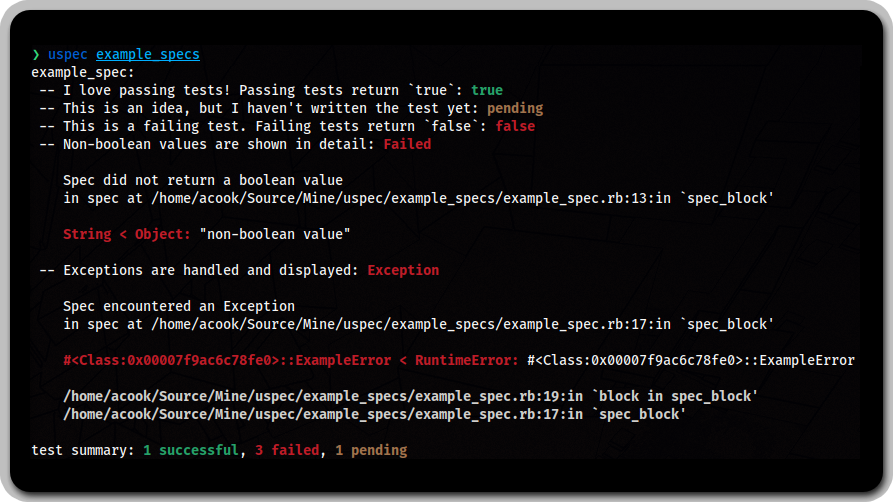
A brief explanation of `uspec`'s output to show you what it can do!
### Success
If a spec passes (returns `true`):
```
-- AwesomeMcCoolname.generate creates a cool name: true
```
### Failure
If a spec fails (returns `false`):
```
-- AwesomeMcCoolname.generate creates a cool name: false
```
### Exception
If the spec encounters an error (raises an `Exception`):
```
-- AwesomeMcCoolname.generate creates a cool name: Exception
Encountered an Exception while running spec
in spec at uspec/awesome_mc_coolname_spec.rb:3: in `'
RuntimeError < StandardError: 'wtf'
/Users/Dude/Projects/Awesome/lib/awesome_mc_coolname.rb:18:in `explode'
uspec/awesome_mc_coolname_spec.rb:4:in `block in '
```
### Non-boolean values
If you create a spec that doesn't return a boolean value (`nil` doesn't count either!) like this:
```ruby
spec 'AwesomeMcCoolname.generate creates a cool name' do
AwesomeMcCoolname.generate =~ /Badass/
end
```
Then Uspec will let you know so you can debug it:
```
-- AwesomeMcCoolname.generate creates a badass name: Failed
Spec did not return a boolean value
in spec at uspec/awesome_mc_coolname_spec.rb:6: in `'
Integer < Numeric: 5
```
### Pending
If you aren't ready to fill out a spec, maybe as a reminder to add functionality later, just leave off the block and it will be marked as `pending`:
```ruby
spec 'a feature I have not implemented yet'
```
When you run the test Uspec will helpfully display:
```
-- a feature I have not implemented yet: pending
```
Reusing Test Code
------------
Test code reuse doesn't require doing anything special. It's just like any other Ruby code. But here are a few examples!
**Hint:** A lot of people put `require_relative 'spec_helper'` at the top of their test files and put shared code and helper methods in a file called `spec_helper.rb`.
### Methods
If you find yourself repeating the same code in tests several times you can extract that code into a method and then call it within your `spec` blocks.
```ruby
def new_generator
AwesomeMcCoolname.new max_length: 15
end
spec 'generates a cool name' do
new_generator.generate.include? 'Badass'
end
```
### Instance Variables
This also works for instance variables!
```ruby
@favorite_color = 'fuschia'
spec 'remembers favorite color' do
ColorDB.fetch(:favorite) == @favorite_color
end
```
### Memoized Methods
By combining the previous two capabilities of Ruby, it is trivial to memoize method output as well:
```ruby
def reusable_generator
@reusable_generator ||= AwesomeMcCoolname.new max_length: 15
end
spec 'generates a cool name' do
reusable_generator.generate.include? 'Badass'
end
```
This is all the same kind of code that you use when writing any other Ruby object. You can put methods into objects and use those if you like too!
Test Matching in Plain Ruby
-----------
When the `spec` block is evaluated the `return` value is used (in a very Ruby-like way) to determine if the test has passed or failed. Standard Ruby comparisons are your friend!
Because there's no matchers and only one method there's no need for specialized reference documentation, but here are some ideas to get you going!
### String matching
Instead of `=~` (which returns either an `Integer` index or `nil`) Ruby has the nifty `include?` method, which returns a boolean:
```ruby
spec 'AwesomeMcCoolname.generate creates a cool name' do
AwesomeMcCoolname.generate.include? 'Badass'
end
```
### Regex matching
If you really need to regex, you can always use Ruby's `!!` idiom to coerce a boolean out of any result,
but its more precise to specify the index if you know it.
And you can always toss in an `||` to drop in more information if a comparison fails too:
```ruby
spec 'AwesomeMcCoolname.generate creates a cool name' do
index = AwesomeMcCoolname.generate =~ /Badass/
index == 0 || index
end
```
### Exceptions
What if you want to test that an error has occured? Just use Ruby!
```ruby
spec 'calling AwesomeMcCoolname.awesomeness without specifying the awesomeness level should explode' do
begin
AwesomeMcCoolname.awesomeness
rescue ArgumentError => error
error.message.include?("Needs awesomeness level!") || raise
end
end
```
If there's no error, then Uspec will see the result of the method call (whatever it might be).
If the wrong Exception is raised, then because of reraising (by just calling `raise` without parameters), Ruby will dutifully pass along the error for Uspec to display.
Mocks, Spies, Stubs, and More!
-----------------------
Since `uspec` is a very straight forward testing utility it is easy to use any of the standard Ruby mocking frameworks with it. However, the [Impasta gem](https://github.com/acook/impasta) was made specifically for simple but comprehensive mocking, stubbing, and spying.
Contributing
------------
1. Fork it
2. Create your feature branch (`git checkout -b my-new-feature`)
3. Commit your changes (`git commit -am 'Add some feature'`)
4. Push to the branch (`git push origin my-new-feature`)
5. Create new Pull Request
Author
------
> Anthony M. Cook 2013-2024