https://github.com/activewidgets/js
ActiveWidgets components for Javascript (no framework)
https://github.com/activewidgets/js
Last synced: 18 days ago
JSON representation
ActiveWidgets components for Javascript (no framework)
- Host: GitHub
- URL: https://github.com/activewidgets/js
- Owner: activewidgets
- License: mit
- Created: 2018-05-13T11:33:00.000Z (about 8 years ago)
- Default Branch: master
- Last Pushed: 2023-04-30T18:49:17.000Z (about 3 years ago)
- Last Synced: 2025-02-07T22:03:16.261Z (over 1 year ago)
- Language: JavaScript
- Homepage: http://www.activewidgets.com
- Size: 2.39 MB
- Stars: 1
- Watchers: 3
- Forks: 0
- Open Issues: 0
-
Metadata Files:
- Readme: README.md
- License: LICENSE
Awesome Lists containing this project
README
###
# ActiveWidgets/JS • Datagrid
[](https://www.npmjs.com/package/@activewidgets/js "View this project on npm")
[](https://www.npmjs.com/package/@activewidgets/js "npm package downloads/month")
[](https://github.com/activewidgets/js/issues "See Github issues")
[](https://github.com/activewidgets/js "Open Github repo")
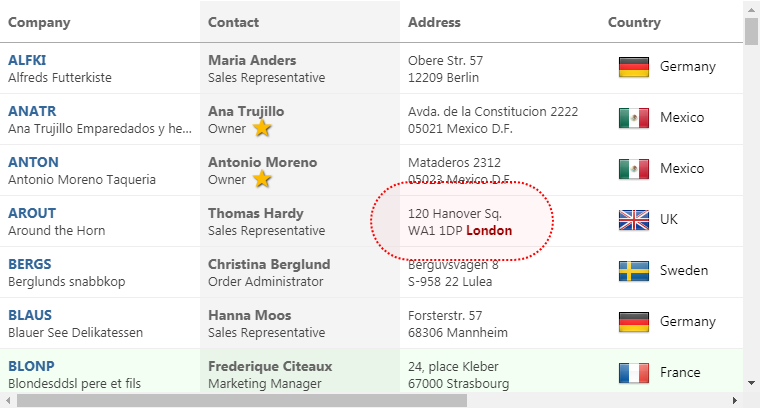
ActiveWidgets is a multi-framework UI component library. This package provides **datagrid component** for **javascript** / **no-framework** environments.
[Live demo](https://js.activewidgets.com) / [Developer guide](https://activewidgets.com/guide/) / [API reference](https://activewidgets.com/api/)
[](https://js.activewidgets.com)
- [Installation](#installation)
- [Usage](#usage)
- [CDN links](#cdn-links)
- [Data properties](#data-properties)
- [User events](#user-events)
## Installation
Add [@activewidgets/js](https://activewidgets.com/api/packages/js/) to your project dependencies -
```sh
> npm i --save @activewidgets/js
```
## Usage
Import `mount` function into your app -
```js
import { mount } from "@activewidgets/js";
```
Now, assuming that you've added a placeholder `ax-datagrid` tag to the page
```html
Loading...
```
Mount an actual ActiveWidgets component at the placeholder position -
```js
const rows = [
{ message: 'Hello, World!' }
];
mount('ax-datagrid', { rows });
```
[Live example](https://js.activewidgets.com/hello-world/) | [Source on github](https://github.com/activewidgets/js/tree/master/examples/hello-world) | [Edit on stackblitz](https://stackblitz.com/github/activewidgets/js/tree/master/examples/hello-world?file=src/index.js)
## CDN links
For quick prototyping the package is also available over ActiveWidgets CDN -
```html
```
In this case the `mount` function is available at `ActiveWidgets.JS` global namespace.
```js
var mount = ActiveWidgets.JS.mount;
var rows = [
{ framework: 'none', source: 'CDN', language: 'ES5'}
];
mount('ax-datagrid', { rows: rows });
```
[Live example](https://js.activewidgets.com/examples/local/cdn-es5/) | [Source on github](https://github.com/activewidgets/js/tree/master/examples/cdn-es5) | [Edit on stackblitz](https://stackblitz.com/github/activewidgets/js/tree/master/examples/cdn-es5)
## Mount function
The first argument for the `mount` function should be the target element (or selector).
The second argument is a properties object. The target element tagName defines the component ID.
```js
mount('#grid1', { columns, rows });
```
The placeholder element tag must be `ax-datagrid`
```html
```
The mount function returns `update` and `destroy` methods.
```js
const { update } = mount('#my-grid', { columns, rows });
//...
update({ rows: newRows });
```
## Data properties
You have to provide [columns](https://activewidgets.com/api/datagrid/columns/) and [rows](https://activewidgets.com/api/datagrid/rows/) properties to the datagrid to show some data. The properties of each `column` object define how the data will be rendered -
- [field](https://activewidgets.com/api/datagrid/columns/#field) - where the cell data comes from (string|function)
- [header](https://activewidgets.com/api/datagrid/columns/#header) - column header (string|object)
- [width](https://activewidgets.com/api/datagrid/columns/#width) - column width (number, in pixels)
- [align](https://activewidgets.com/api/datagrid/columns/#align) - cell text alignment (left|right|center)
- [format](https://activewidgets.com/api/datagrid/columns/#format) - number/date format (string|function)
- [fixed](https://activewidgets.com/api/datagrid/columns/#fixed) - fixed (true/false) for columns on the left or right side
The `style` (string|object) or `className` properties allow to change the styling of the column and cell elements.
```js
const columns = [
{ header: 'Code', field: 'customerID', width: 80, style: 'background:#def', fixed: true },
{ header: 'Company Name', field: 'companyName', width: 160 },
{ header: 'Contact', field: 'contactName', width: 120 },
{ header: 'Title', field: 'contactTitle', width: 120 },
{ header: 'Address', field: 'address', width: 120, align: 'right' }
];
const rows = northwind.customers;
mount('ax-datagrid', { columns, rows });
```
[Live example](https://js.activewidgets.com/columns/) | [Source on github](https://github.com/activewidgets/js/tree/master/examples/columns) | [Edit on stackblitz](https://stackblitz.com/github/activewidgets/js/tree/master/examples/columns?file=src/index.js)
## User events
In addition to the standard DOM keyboard and mouse events the datagrid emits composite
[mouse](https://activewidgets.com/api/datagrid/mouse-event/) event which makes it easier to find the elements affected by the user action -
```js
function onMouse({ row }){
alert(`row ${ row.key } clicked!`);
}
mount('ax-datagrid', { onMouse, columns, rows }); // put event handlers together with props
```
[Live example](https://js.activewidgets.com/events/) | [Source on github](https://github.com/activewidgets/js/tree/master/examples/events) | [Edit on stackblitz](https://stackblitz.com/github/activewidgets/js/tree/master/examples/events?file=src/index.js)
## More info
- [Live demo](https://react.activewidgets.com)
- [Developer guide](https://activewidgets.com/guide/)
- [API reference](https://activewidgets.com/api/)
- [Licensing](https://activewidgets.com/licenses/)
- [Support forum](https://activewidgets.com/messages/)
---
[](https://activewidgets.com)