https://github.com/ad/pwnmothership
https://github.com/ad/pwnmothership
golang pwnagotchi pwnagotchi-plugins
Last synced: about 1 year ago
JSON representation
- Host: GitHub
- URL: https://github.com/ad/pwnmothership
- Owner: ad
- License: mit
- Created: 2020-05-21T21:45:39.000Z (about 6 years ago)
- Default Branch: master
- Last Pushed: 2023-02-26T12:43:20.000Z (over 3 years ago)
- Last Synced: 2025-04-13T00:15:04.266Z (about 1 year ago)
- Topics: golang, pwnagotchi, pwnagotchi-plugins
- Language: Python
- Size: 2.41 MB
- Stars: 24
- Watchers: 3
- Forks: 4
- Open Issues: 0
-
Metadata Files:
- Readme: README.md
- License: LICENSE
Awesome Lists containing this project
README
# PWNMOTHERSHIP
The place where your [pwnagotchi](https://pwnagotchi.ai/) can send their current stats.
You can run it on the **pwnahotchi** itself.
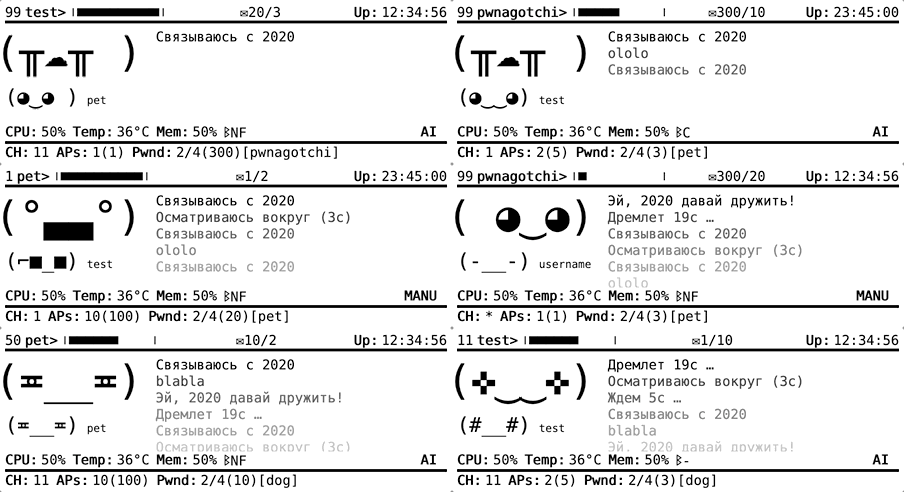
## Installation
```shell
$ git clone https://github.com/ad/pwnmothership.git
$ cd pwnmothership
$ go build
$ ./pwnmothership -addr=:8080
```
put `pwnmothership.py` into `/usr/local/share/pwnagotchi/installed-plugins` on your **pwnagotchi** and run
```shell
$ sudo pwnagotchi plugins install pwnmothership
$ sudo pwnagotchi plugins enable pwnmothership
```
It will be better with [death](https://github.com/dadav/pwnagotchi-custom-plugins) (stats) and [Experience](https://github.com/GaelicThunder/Experience-Plugin-Pwnagotchi) plugins.
## BUILD
```shell
$ go build
```
## RUN
```shell
$ go get -u github.com/ad/pwnmothership
$ pwnmothership -addr=:8080
```
will start on `127.0.0.1:8080`
## CHECK
open in browser `127.0.0.1:8080/#test`
this will show random data
## SETTINGS
to run, edit plugin settings on your **pwnagotchi**, add to your /etc/pwnagotchi/config.toml:
`main.plugins.pwnmothership.api_url = "https://your-pwnmothership-address/api/set"`
and restart
```shell
$ sudo systemctl restart pwnagotchi
```
## USING
check fingerprint of your **pwnagotchi** on page `pwnagotchi.local:8080/inbox/profile`
open in browser
`https://your-pwnmothership-address/#your-fingerprint-here`