https://github.com/adamfoneil/q3starter
A Quake 3 Arena game launch utility for selecting maps and bots
https://github.com/adamfoneil/q3starter
csharp quake3 winforms
Last synced: about 2 months ago
JSON representation
A Quake 3 Arena game launch utility for selecting maps and bots
- Host: GitHub
- URL: https://github.com/adamfoneil/q3starter
- Owner: adamfoneil
- Created: 2018-12-19T15:51:50.000Z (over 7 years ago)
- Default Branch: master
- Last Pushed: 2026-02-14T16:34:58.000Z (4 months ago)
- Last Synced: 2026-03-10T13:30:07.841Z (3 months ago)
- Topics: csharp, quake3, winforms
- Language: C#
- Size: 2.68 MB
- Stars: 2
- Watchers: 1
- Forks: 0
- Open Issues: 3
-
Metadata Files:
- Readme: README.md
Awesome Lists containing this project
README
# Q3Starter
I had used something in the past called Q3Launcher, I think, but I was having a hard time finding it. I'd started playing Q3 single-player again recently, and needed a way to set up map rotation. I had other things I needed to be working on, so of course it was time to make my own utility for this.
Only the bare-bones functionality works at this point. I can view the map list and select them for rotation, but there's no bot control, and way to select the game type. The profile dropdown (currently says "default") doesn't do what it's intended.
This was an opportunity to practice structuring a WinForms app cleanly, to experiment with an [easier form data binding](https://github.com/adamosoftware/Q3Starter/blob/master/Q3Starter/Util/BindingExtensions.cs) (used [here](https://github.com/adamosoftware/Q3Starter/blob/master/Q3Starter/frmMain.cs#L39)), to leverage my [JsonSettings](https://github.com/adamosoftware/JsonSettings) project. This project also involved reading and [working with zip files](https://github.com/adamosoftware/Q3Starter/blob/master/Q3Starter/Controllers/ConfigBuilder.cs#L14), since that's how Quake3 maps are packaged.
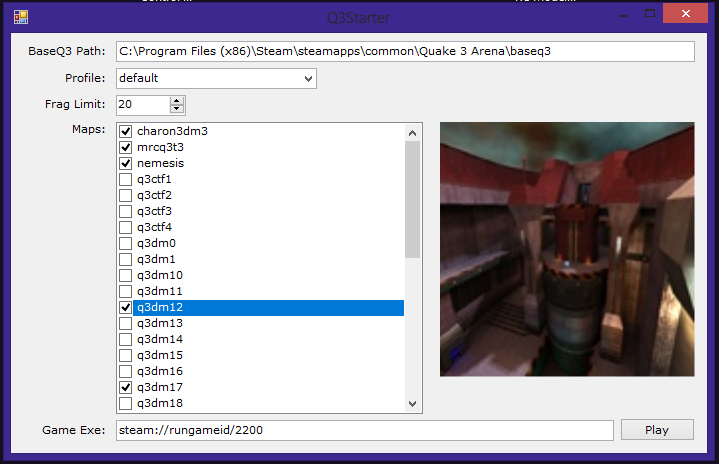
The map rotation script is generated [here](https://github.com/adamosoftware/Q3Starter/blob/master/Q3Starter/Controllers/ConfigBuilder.cs#L102), which had help from [this thread](https://www.quake3world.com/forum/viewtopic.php?f=7&t=53280).
## Projects
This solution now contains multiple versions of the application:
- **Q3Starter** - The original WinForms application targeting .NET Framework 4.7.2
- **Q3Starter.Wpf** - A modern WPF version targeting .NET 8.0 with the same functionality as the WinForms app
- **Q3Starter.Console** - A console version of the application
- **Tests** - Unit tests for the application
The WPF version provides a modern UI experience while maintaining all the functionality of the original WinForms application. Both desktop versions share the same Models and Controllers code, ensuring consistent behavior across platforms.
# Working Settings
When getting this app going on a new machine, I have a terrible time getting the startup settings right. Here is example of working config:
