https://github.com/adamlui/chatgpt-auto-talk
📣 Auto-plays ChatGPT responses
https://github.com/adamlui/chatgpt-auto-talk
chatgpt greasemonkey javascript openai tts userscript ux
Last synced: about 1 year ago
JSON representation
📣 Auto-plays ChatGPT responses
- Host: GitHub
- URL: https://github.com/adamlui/chatgpt-auto-talk
- Owner: adamlui
- License: other
- Created: 2024-07-17T03:04:39.000Z (almost 2 years ago)
- Default Branch: main
- Last Pushed: 2025-04-11T05:34:21.000Z (about 1 year ago)
- Last Synced: 2025-04-11T06:29:36.176Z (about 1 year ago)
- Topics: chatgpt, greasemonkey, javascript, openai, tts, userscript, ux
- Language: JavaScript
- Homepage: https://chatgptautotalk.com
- Size: 2.41 MB
- Stars: 12
- Watchers: 1
- Forks: 0
- Open Issues: 2
-
Metadata Files:
- Readme: docs/README.md
- Funding: .github/FUNDING.yml
- License: LICENSE.md
- Security: docs/SECURITY.md
Awesome Lists containing this project
- awesome-userscripts - ChatGPT Auto-Talk - Automatically play ChatGPT responses. (Scripts / ChatGPT)
README
#  ChatGPT Auto-Talk 📣
![[License: MIT]](https://img.shields.io/badge/License-MIT-orange.svg?logo=internetarchive&logoColor=white&labelColor=464646&style=for-the-badge)

![[CodeFactor grade]](https://img.shields.io/codefactor/grade/github/adamlui/chatgpt-auto-talk?label=Code+Quality&logo=codefactor&logoColor=white&labelColor=464646&color=b5fc7b&style=for-the-badge)
![[Powered by chatgpt.js]](https://img.shields.io/badge/Powered_by-chatgpt.js-black?logo=gamejolt&logoColor=white&labelColor=464646&style=for-the-badge)
![[SonarCloud vulnerabilities]](https://img.shields.io/badge/dynamic/json?url=https%3A%2F%2Fsonarcloud.io%2Fapi%2Fmeasures%2Fcomponent%3Fcomponent%3Dadamlui_chatgpt-auto-talk%26metricKeys%3Dvulnerabilities&query=%24.component.measures.0.value&style=for-the-badge&logo=sonarcloud&logoColor=white&labelColor=464646&label=Vulnerabilities&color=gold)
![[Mentioned in Awesome]](https://img.shields.io/badge/Mentioned_in-Awesome-cb48dc?logo=awesomelists&logoColor=white&labelColor=464646&style=for-the-badge)
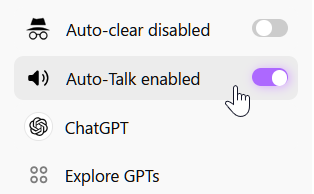
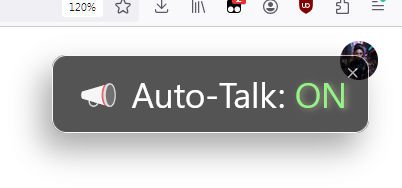
### Automatically play ChatGPT responses.
> [!IMPORTANT]
> _**Greasy Fork users:** If you installed ChatGPT Auto-Talk **before January 18, 2025**, auto-updates no longer work because the script's update mechanism has migrated to GitHub. To continue receiving updates, click the green 'Install this script' button below (once) or click [this link](https://gm.chatgptautotalk.com) (once)_
![[Install this script]](https://assets.chatgptautotalk.com/images/buttons/greasy-fork/install-button.svg)
![[How to install]](https://assets.chatgptautotalk.com/images/buttons/greasy-fork/help-button.svg "How to install")
[Discuss](https://github.com/adamlui/chatgpt-auto-talk/discussions) /
[Get support](https://support.chatgptautotalk.com) /
[Contact author](https://github.com/adamlui)
#
## 🚀 Installation
1. Install a userscript manager:
- ScriptCat for [Chrome](https://chromewebstore.google.com/detail/scriptcat/ndcooeababalnlpkfedmmbbbgkljhpjf), [Firefox](https://addons.mozilla.org/firefox/addon/scriptcat/) or [Edge](https://microsoftedge.microsoft.com/addons/detail/scriptcat/liilgpjgabokdklappibcjfablkpcekh)
- Violentmonkey for [Chrome](https://chromewebstore.google.com/detail/violentmonkey/jinjaccalgkegednnccohejagnlnfdag), [Firefox](https://addons.mozilla.org/firefox/addon/violentmonkey/) or [Edge](https://microsoftedge.microsoft.com/addons/detail/eeagobfjdenkkddmbclomhiblgggliao)
- [OrangeMonkey](https://chromewebstore.google.com/detail/orangemonkey/ekmeppjgajofkpiofbebgcbohbmfldaf) or [OrangeMonkey Pro](https://chromewebstore.google.com/detail/orangemonkey-pro/ggdmdoodcfamjggeigifpjfnnjfbland) for Chrome
- or Tampermonkey for [Chrome](https://chromewebstore.google.com/detail/tampermonkey/dhdgffkkebhmkfjojejmpbldmpobfkfo), [Firefox](https://addons.mozilla.org/firefox/addon/tampermonkey/) or [Edge](https://microsoftedge.microsoft.com/addons/detail/tampermonkey/iikmkjmpaadaobahmlepeloendndfphd)
2. Install [ChatGPT Auto-Talk](https://gm.chatgptautotalk.com) userscript (will load in manager installed above)
3. Visit [chatgpt.com](https://chatgpt.com) as normal, and replies will automatically be read aloud!
## ⚡ Dependencies

ChatGPT Auto-Talk relies on code from the powerful [chatgpt.js](https://github.com/KudoAI/chatgpt.js) library
© 2023–2025 KudoAI & contributors under the MIT license.
## 🧠 Contributors
This project exists thanks to code, testing, issues, translations & ideas from the following contributors:


### Supported by:
## 🤖 More ChatGPT apps
For even more epic ChatGPT apps, go here: https://github.com/adamlui/ai-web-extensions
## 📜 Related scripts
###  [AmazonGPT](https://amazongpt.kudoai.com)
> Add AI to Amazon shopping.
[Install](https://amazongpt.kudoai.com/#-installation) /
[Readme](https://amazongpt.kudoai.com/#readme) /
[Discuss](https://amazongpt.kudoai.com/discussions)
###  [ChatGPT Infinity](https://chatgptinfinity.com)
> Generate endless answers from all-knowing ChatGPT (in any language!)
[Install](https://docs.chatgptinfinity.com/#-installation) /
[Readme](https://docs.chatgptinfinity.com/#readme) /
[Discuss](https://github.com/adamlui/chatgpt-infinity/discussions)
###  [ChatGPT Widescreen Mode](https://chatgptwidescreen.com)
> Enhances ChatGPT with wide/full/tall-screen + spamblock modes. Also works on perplexity.ai + poe.com!
[Install](https://docs.chatgptwidescreen.com/#-installation) /
[Readme](https://docs.chatgptwidescreen.com/#readme) /
[Discuss](https://github.com/adamlui/chatgpt-widescreen/discussions)