https://github.com/adamtwo/klippal
Native macOS clipboard manager. Press Cmd+Shift+V to search and paste from your clipboard history. Supports text, URLs, images, and files. Privacy-first, local-only, no cloud sync, no telemetry.
https://github.com/adamtwo/klippal
macos productivity productivity-tools
Last synced: 2 months ago
JSON representation
Native macOS clipboard manager. Press Cmd+Shift+V to search and paste from your clipboard history. Supports text, URLs, images, and files. Privacy-first, local-only, no cloud sync, no telemetry.
- Host: GitHub
- URL: https://github.com/adamtwo/klippal
- Owner: adamtwo
- License: mit
- Created: 2025-11-28T18:13:31.000Z (7 months ago)
- Default Branch: main
- Last Pushed: 2026-04-25T20:56:47.000Z (2 months ago)
- Last Synced: 2026-04-25T21:25:52.944Z (2 months ago)
- Topics: macos, productivity, productivity-tools
- Language: Swift
- Homepage: https://klippal.app
- Size: 973 KB
- Stars: 2
- Watchers: 0
- Forks: 0
- Open Issues: 0
-
Metadata Files:
- Readme: README.md
- Contributing: CONTRIBUTING.md
- License: LICENSE
- Code of conduct: CODE_OF_CONDUCT.md
- Security: SECURITY.md
Awesome Lists containing this project
README
# KlipPal
A clipboard manager for macOS that remembers everything you copy.
## Why KlipPal?
Ever copied something, then copied something else, and lost the first thing? KlipPal solves that. It quietly saves your clipboard history so you can go back and find anything you've copied.
**Your data stays on your Mac.** No cloud sync, no accounts, no tracking. Just a simple tool that does one thing well.
## Demo
[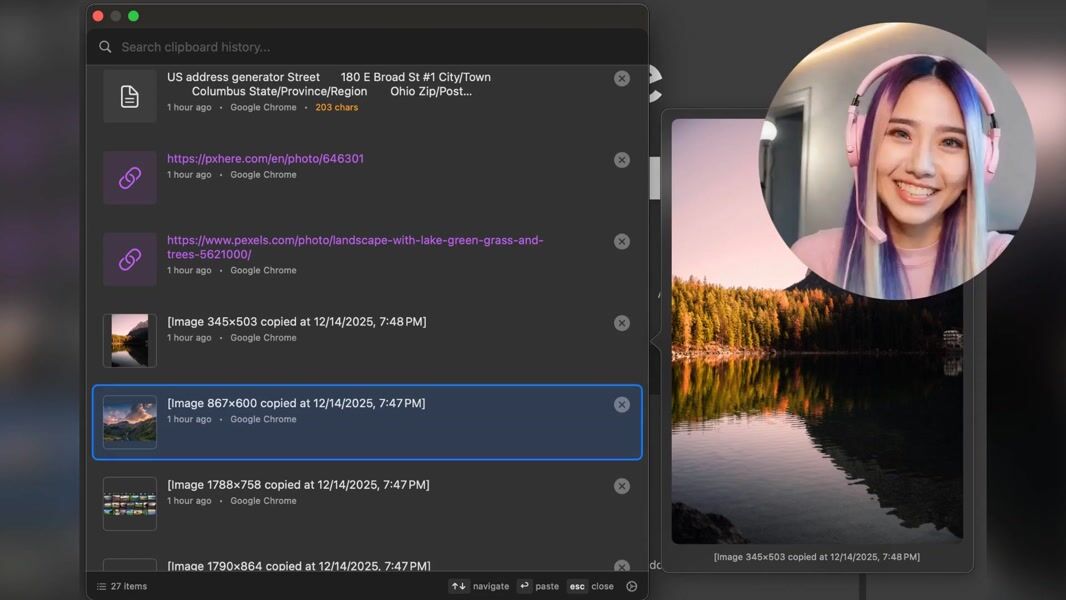](https://customer-3qavti5dlaqw85hj.cloudflarestream.com/fdda251f4a55407fc8f0fb9b305798a2/watch)
## Features
### Instant Access
Press **Cmd+Shift+V** from any app to see your clipboard history. Find what you need, press Enter, and it's pasted instantly.
### Smart Search
Type to filter through your history. KlipPal searches the content of everything you've copied, so you can find that URL, code snippet, or quote in seconds.
### Works with Everything
- Text and code snippets
- URLs (with domain preview)
- Images and screenshots
- File paths
### Pin Important Items
Keep your most-used items safe by pinning them. Pinned items:
- Never get automatically deleted
- Can be viewed separately with the "Pinned" filter
- Stay accessible even when you reach your history limit
Click the pin icon on any item to pin or unpin it.
### Stays Out of Your Way
- Lives in your menu bar as a small "Kᵖ" icon
- No dock icon cluttering your screen
- Uses minimal system resources
- Launches automatically at login (optional)
### Configurable
- Customize the keyboard shortcut
- Set how many items to keep (100-2000)
- Auto-delete old items after a set time
## Installation
### Homebrew (Recommended)
```bash
brew install --cask adamtwo/klippal/klippal
```
### Manual Installation
1. Download KlipPal from the releases page
2. Move to Applications
3. Launch and grant Accessibility permission when prompted
4. Start copying things - they'll appear when you press Cmd+Shift+V
### Accessibility Permission
KlipPal needs Accessibility permission to:
- Respond to the global keyboard shortcut
- Paste items into your apps
When you first launch KlipPal, macOS will prompt you to grant this permission in System Settings.
## Keyboard Shortcuts
| Action | Shortcut |
|--------|----------|
| Open clipboard history | Cmd+Shift+V (customizable) |
| Navigate items | ↑ / ↓ |
| Paste selected item | Enter |
| Close | Esc |
## Requirements
- macOS 13.0 (Ventura) or later
## Privacy
KlipPal is completely local. Your clipboard history is stored only on your Mac and is never sent anywhere. There's no analytics, no telemetry, and no network access.
## License
MIT