https://github.com/adamyodinsky/TerminalGPT
TerminalGPT - Terminal-based ChatGPT personal assistant app. Provides optimized, tailored answers for your machine's terminal.
https://github.com/adamyodinsky/TerminalGPT
ai assistant chatgpt generative-ai generative-model gpt gpt-3 gpt-3-5-turbo gpt-35-turbo gpt-4 gpt3-prompts gptchat openai terminal terminalgpt
Last synced: 11 months ago
JSON representation
TerminalGPT - Terminal-based ChatGPT personal assistant app. Provides optimized, tailored answers for your machine's terminal.
- Host: GitHub
- URL: https://github.com/adamyodinsky/TerminalGPT
- Owner: adamyodinsky
- License: mit
- Created: 2023-03-02T17:10:05.000Z (over 3 years ago)
- Default Branch: main
- Last Pushed: 2025-07-02T05:52:42.000Z (12 months ago)
- Last Synced: 2025-07-02T06:37:27.854Z (12 months ago)
- Topics: ai, assistant, chatgpt, generative-ai, generative-model, gpt, gpt-3, gpt-3-5-turbo, gpt-35-turbo, gpt-4, gpt3-prompts, gptchat, openai, terminal, terminalgpt
- Language: Python
- Homepage:
- Size: 1.27 MB
- Stars: 226
- Watchers: 4
- Forks: 32
- Open Issues: 17
-
Metadata Files:
- Readme: README.md
- Contributing: CONTRIBUTING.md
- License: LICENSE
- Code of conduct: CODE_OF_CONDUCT.md
- Security: SECURITY.md
Awesome Lists containing this project
- awesome-starz - adamyodinsky/TerminalGPT - TerminalGPT - Terminal-based ChatGPT personal assistant app. Provides optimized, tailored answers for your machine's terminal. (Python)
README
# 
   
Welcome to terminalGPT, the terminal-based ChatGPT personal assistant app!
With terminalGPT, you can easily interact with the OpenAI GPT-3.5 and GPT-4 language models.
Whether you need help with a quick question or want to explore a complex topic, TerminalGPT is here to assist you. Simply enter your query and TerminalGPT will provide you with the best answer possible based on its extensive knowledge base.

### Supported Models
- gpt-3.5-turbo
- gpt-4-turbo
- gpt-4o
- gpt-4o-mini
- o1
- o1-mini
## Why?
Some advantages of using TerminalGPT:
- TerminalGPT's answers are tailored to your machine's operating system, distribution, and chip-set architecture.
- Doesn't use your conversation data for training the model.
- Your conversations are stored locally on your machine, so only you can access them.
- Efficient context management for super cheap api usage.
- It's highly available and can be used whenever you need it.
- You can use TerminalGPT with your IDE terminal, which means you won't have to constantly switch between your browser and your IDE when you have questions.
- Fast, reliable, lightweight.
- Quick one shot question mode.
## Pre-requisites
- Python 3.6 or higher
- An OpenAI Account and API key.
1. Sign up at using email or Google/Microsoft account.
2. Go to or click on "View API keys" in the menu to get your API key.
## Installation
### Using pip
1. Install the latest TerminalGPT with pip install.
```sh
pip install terminalgpt -U --user
```
or
```sh
pip3 install terminalgpt -U --user
```
### Using pipx
1. remove old installation that was installed with pip
(do this only if you are migrating from a version that was installed with pip)
```sh
package_location=$(which terminalgpt)
rm "$package_location"
```
2. install with pipx
```sh
pipx install terminalgpt==2.2.7 --force
```
### Setup
1. Now you have `terminalgpt` command available in your terminal. Run the following install command to configure the app.
```sh
terminalgpt install
```
2. Enter your OpenAI API key when prompted and press enter.
3. Choose one of the models below as the default model. it can be overridden with the `-m --model` flag later.
4. Choose a printing style
That's it! You're ready to use TerminalGPT!
You can now start a new conversation with `terminalgpt new` or load a previous conversation with `terminalgpt load`. Also you can reinstall with `terminalgpt install` or delete previous conversations with `terminalgpt delete`.
---
## Usage
### TL;DR
```
Usage: terminalgpt [OPTIONS] COMMAND [ARGS]...
*~ TerminalGPT - Your Personal Terminal Assistant ~*
Options:
--version Show the version and exit.
-m, --model [gpt-3.5-turbo|gpt-4-turbo|gpt-4o|gpt-4o-mini|o1|o1-mini]
Choose a model to use. [default:
gpt-4o-mini]
-s, --style [markdown|plain] Output style. [default: plain]
-t, --token-limit INTEGER Set the token limit. this will override the
default token limit for the chosen model.
--help Show this message and exit.
Commands:
delete Choose a previous conversation to delete.
install Installing the OpenAI API key and setup some default settings.
load Choose a previous conversation to load.
new Start a new conversation.
one-shot One shot question answer.
```
### New
Start a new conversation:
```sh
terminalgpt new
```
### One-Shot (I love this feature)
One shot question to get a fast answer in the terminal.
```sh
terminalgpt one-shot "What is the meaning of life?"
```
**Note:** I recommend to make an alias, see at [Recommended aliases](#recommended-aliases).
### Load
Load previous conversations:
```sh
terminalgpt load
```
### Delete
Delete previous conversations:
```sh
terminalgpt delete
```
## Recommended aliases
### Zsh
```sh
echo alias tgpt="terminalgpt" >> ~/.zshrc
echo alias tgpto="terminalgpt one-shot" >> ~/.zshrc
echo alias tgptn="terminalgpt new" >> ~/.zshrc
```
### Bash
```sh
echo alias tgpt="terminalgpt" >> ~/.bashrc
echo alias tgpto="terminalgpt one-shot" >> ~/.bashrc
echo alias tgptn="terminalgpt new" >> ~/.bashrc
```
---
[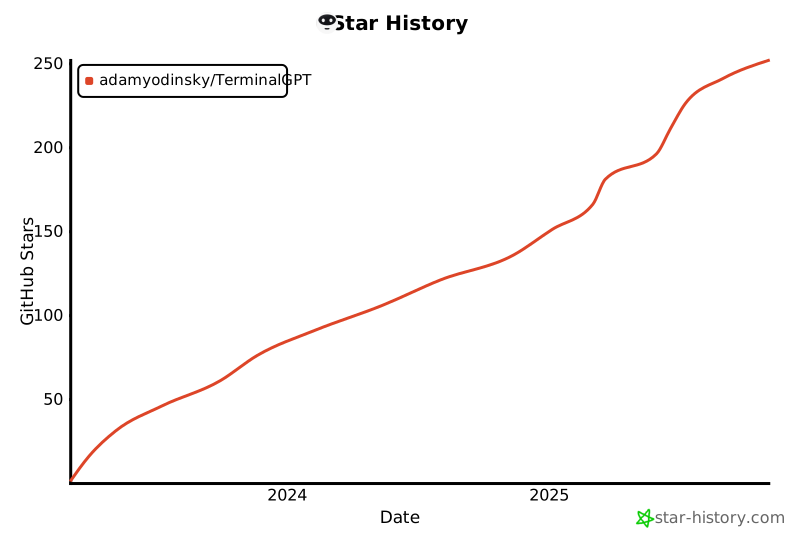](https://www.star-history.com/#adamyodinsky/TerminalGPT&Date)
---