https://github.com/adaptiveconsulting/rfqstatemachine
A sample event driven state machine using Stateless
https://github.com/adaptiveconsulting/rfqstatemachine
Last synced: 5 months ago
JSON representation
A sample event driven state machine using Stateless
- Host: GitHub
- URL: https://github.com/adaptiveconsulting/rfqstatemachine
- Owner: AdaptiveConsulting
- License: apache-2.0
- Created: 2014-06-21T08:04:43.000Z (about 12 years ago)
- Default Branch: master
- Last Pushed: 2014-06-25T12:42:09.000Z (about 12 years ago)
- Last Synced: 2025-04-14T01:35:58.608Z (over 1 year ago)
- Language: C#
- Size: 1.13 MB
- Stars: 68
- Watchers: 15
- Forks: 24
- Open Issues: 0
-
Metadata Files:
- Readme: README.html
- License: LICENSE
Awesome Lists containing this project
README
RFQ State Machine
We highlighted quite a few techniques to deal with reactive systems in Reactive Trader. There is another one, that we commonly use, that was not demonstrated.
A state machine is a simple yet powerfull way of decomposing some functionality into states and a set of valid transitions between them.
When you find yourself dealing for instance with user input and/or server events and see lots of branching in your code (if/switch statements) on some _state variables, chances are high that a statemachine could be introduced to simplify things.
In this post we will look at a concreate usecase, we will define a state machine for it and we will see how we can organise our code around the state machnine and interact with it. I've also created a companion GitHub project where you can find the
full example.
Example: RFQ workflow
In finance Request For Quote (RFQ) is a common mechanism used to request a price electronically: the client submits a request to the pricing server.
At some point the server provides a quote (or a serie of quotes) and the client can decide to execute (HIT the price) or pass (cancel).
We are going to build a state machine that would live client side, in some UI application like reactive trader, to control the state of a RFQ.
The following diagram describes the different states of the RFQ and the possible transitions.
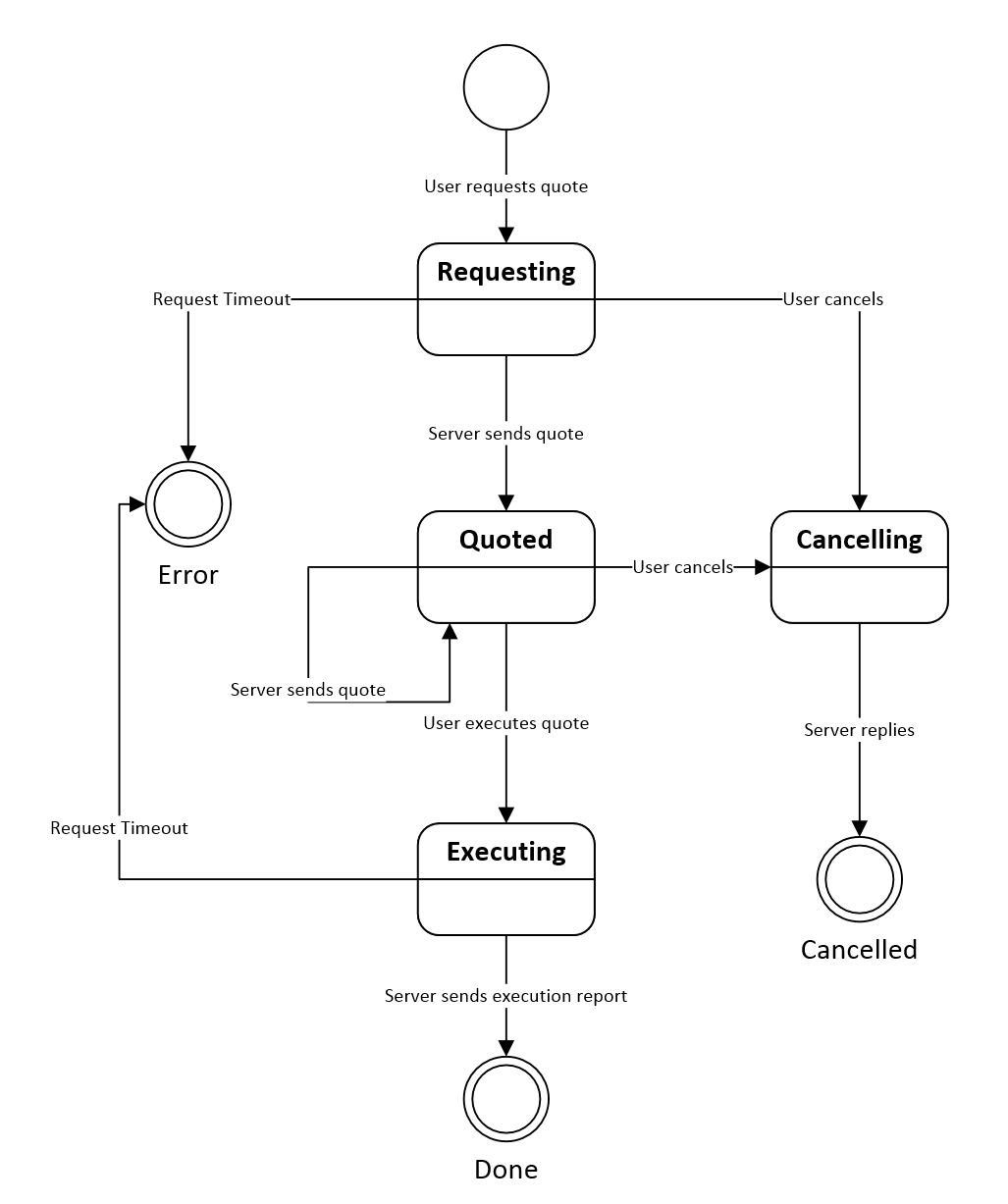
This is a visual representation of a statemachine, it contains
- states:
- an initial state (at the top),
- intermediate states (requesting, quoted, Executing)
- terminal states (Error, Done, Canceled)
- and transitions between states (arrows)
I find those diagrams very helpfull to think about the system, while building them I will generally go through all the states I already discovered and ask myself the following questions:
- could anything else happen in this state?
- Any unhappy path? (ie. timeout, error, etc)
- Do we have a representation of this particular state for the corresponding UI? (if you are building a UI).
Those diagrams are also very usefull to discuss with non developers: business people, UX, etc.
From diagram to code
Statemachines can be implemented in many differents ways, either from scratch or using some library.
For any decent size statemachine I tend to use Stateless but the recommendations that follow would stand for any library or hand written statemachine.
I like to define state machines in a single place: I find that spreading the definition accross multiple files/classes makes it harder to understand.
Stateless offers a nice fluent syntax to define states and possible transitions.
Defining states
The first thing we need to do is to define the set of states, we can use an enum for that:
csharp

public enum RfqState

{

    Input,

    Requesting,

    Cancelling,

    Cancelled,

    Quoted,

    Executing,

    Error,

    Done

}
gist
Events
Then we define the events which will trigger transitions between states. In our case those are events coming from the client or from the server.
Again we can use an enum to define those events.
```csharp
public enum RfqEvent
{
UserRequests,
UserCancels,
UserExecutes,
ServerNewQuote,

ServerQuoteError,

ServerQuoteStreamComplete,

ServerSendsExecutionReport,

ServerExecutionError,

ServerCancelled,

ServerCancellationError,

InternalError,
}
```
gist
I like to prefix those events with their origin, just to makes things explicit (here we have 'Server', 'User', 'Internal')
As you can see events coming from the server always expose a happy path (for instance ServerNewQuote when the server sends a new quote) and at least one corresponding error event (ServerQuoteError).
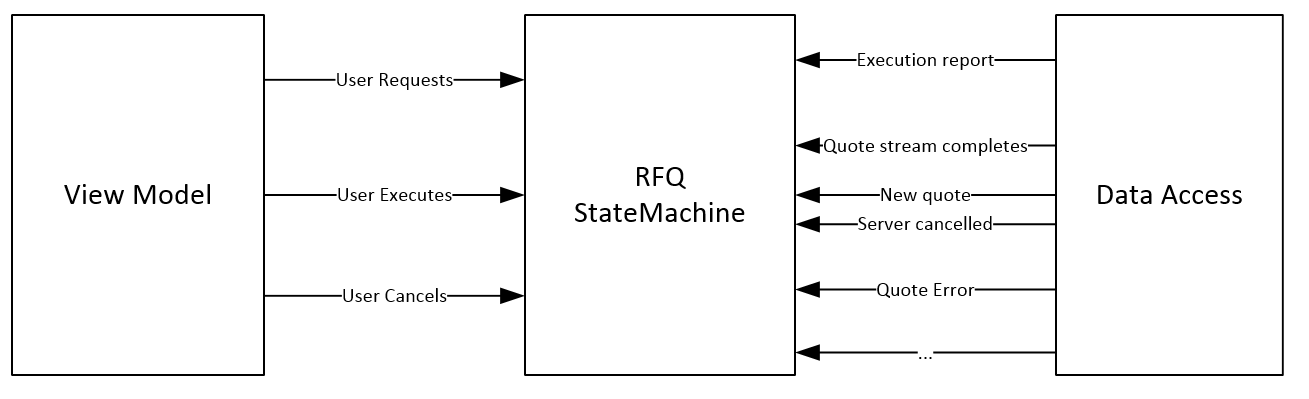
You will also often have internal events, for instance a timer expiring can raise an internal event to trigger a state transition.
Events may or not carry some data: for instance UserRequests event needs to contain the description of the product being priced.
For those events requiring parameters it is useful to define strongly typed events.
This is how we declare them with Stateless, for instance for the ServerSendsQuote event:
csharp

_rfqEventServerSendsQuote = _stateMachine.SetTriggerParameters<IQuote>(RfqEvent.ServerNewQuote);
gist
Defining transitions
Now we can define transitions. For each state we define which events are allowed and when they are triggered to which state we will transition.
This is very straight forward with stateless:
```csharp
_stateMachine.Configure(RfqState.Input)
.Permit(RfqEvent.UserRequests, RfqState.Requesting);
_stateMachine.Configure(RfqState.Requesting)
.Permit(RfqEvent.ServerNewQuote, RfqState.Quoted)
.Permit(RfqEvent.UserCancels, RfqState.Cancelling)
.Permit(RfqEvent.InternalError, RfqState.Error);
_stateMachine.Configure(RfqState.Quoted)
.PermitReentry(RfqEvent.ServerNewQuote)
.Permit(RfqEvent.UserCancels, RfqState.Cancelling)
.Permit(RfqEvent.UserExecutes, RfqState.Executing);
_stateMachine.Configure(RfqState.Executing)
.Permit(RfqEvent.ServerSendsExecutionReport, RfqState.Done);
_stateMachine.Configure(RfqState.Cancelling)
.Permit(RfqEvent.ServerCancelled, RfqState.Cancelled);
```
gist
Triggering events
When the user performs an action or the server sends back a message we want to fire an event at the state machine.
This is straight forward with stateless
```csharp
// for an event without parameters
_stateMachine.Fire(RfqEvent.ServerQuoteStreamComplete)
// for a strongly typed event
stateMachine.Fire(rfqEventServerSendsExecutionReport, executionReport)
```
gist
Defining actions
When we send an event to the state machine, two things can happen, the current state has a valid transition for this event or not.
If the current state can accept an event we generally want to execute our code at some point around the transition:
- when you enter a state (or re-enter a state since it's also possible to have transitions looping back on the same state)
- when you exit a state
- upon transition, if you have different behavior to implement for different transitions leading to a same state
I tend to apply actions upon entry into a state and use the other variants only in specific scenarios.
Important: when implementing a statemachine, you want to put all your logic inside those actions (on state entry, on state exit, on transition) because the state machine has already checked that the incoming event was valid for the current state.
Here is an example with Stateless syntax. When the user requests a quote we want to log the transition and also to perform some logic on entry in the requesting state:
```csharp
stateMachine.Configure(RfqState.Requesting)
.OnEntry(LogTransition)
.OnEntryFrom(rfqEventUserRequests, OnEntryRequesting)
.Permit(RfqEvent.ServerNewQuote, RfqState.Quoted)
.Permit(RfqEvent.UserCancels, RfqState.Cancelling)
.Permit(RfqEvent.InternalError, RfqState.Error);
private void OnEntryRequesting(IQuoteRequest quoteRequest)
{
// here goes the code to send a quote request to the server
}
```
gist
Tip: you can think of the OnExit action as a Dispose() method for the corresponding state. It is very useful if for instance you had a timer runing during that state and you need to cancel it or you have whatever active Rx query that you want to unsubscribe.
Handling errors
When an event is fired at the state machine and the state machine has no transition defined for this event in the current state we can implement 2 behaviors: ignoring the event or raising an exception.
By default Stateless will raise an exception but you can handle yourself invalid transitions:
```csharp
_stateMachine.OnUnhandledTrigger(OnUnhandledTrigger);
private void OnUnhandledTrigger(RfqState state, RfqEvent trigger)
{
var message = string.Format("State machine received an invalid trigger '{0}' in state '{1}'", trigger, state);
Console.WriteLine(message);
_rfqUpdateSubject.OnError(new ApplicationException(message));
}
```
gist
You can also ignore individual events on a state with the Stateless .Ignore() method.
Encapsulation
We have now defined everything we need for the state machine:
- states,
- events and strongly typed events
- possible transitions
- actions on entry and on exit
- error handling
- how to fire events at the state machine
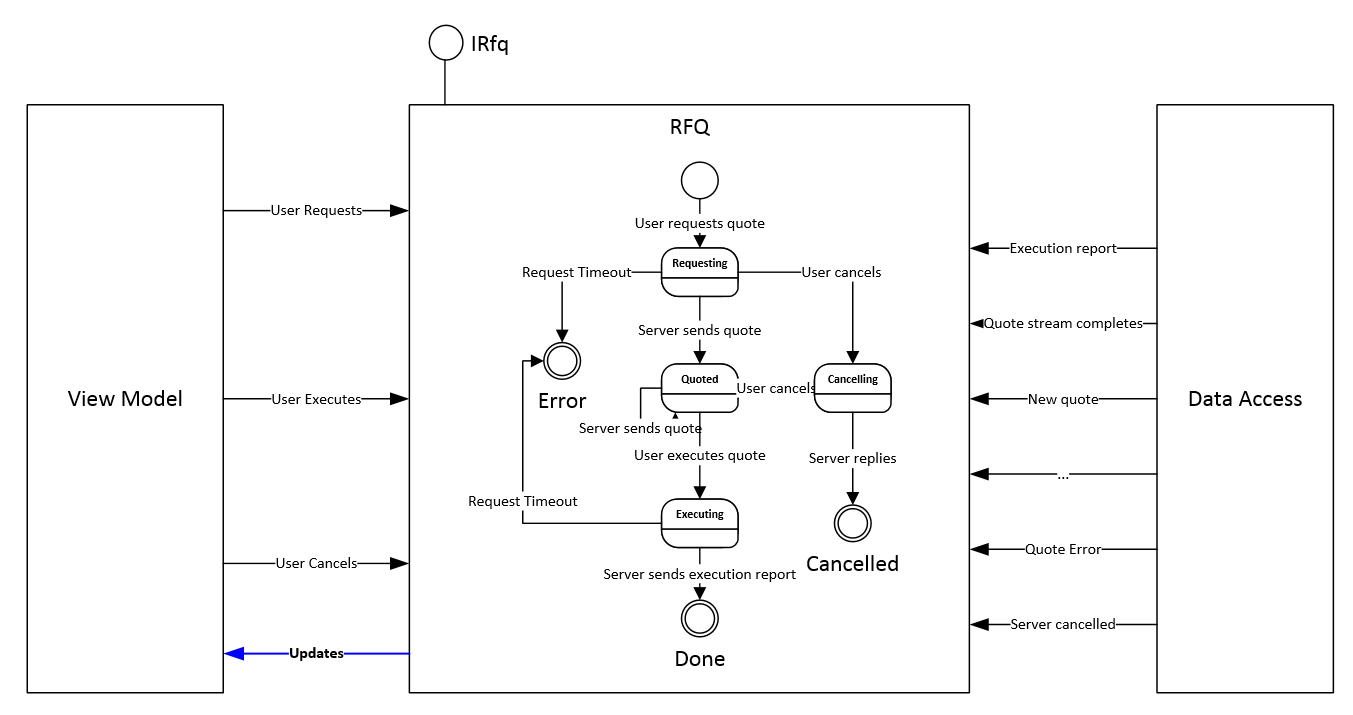
The next step is to encapsulate everything in a single class so we don't leak the specifics of Stateless and the state machine to the rest of our code.
For our example I've created a class Rfq that you can find here.
This class implements the following interface:
```csharp
public interface IRfq : IDisposable
{
void RequestQuote(IQuoteRequest quoteRequest);
void Cancel(long rfqId);
void Execute(IExecutionRequest quote);
IObservable<RfqUpdate> Updates { get; }
}
```
gist
This is very much CQRS style: a view model can call the RequestQuote, Cancel and Execute methods which act as Commands and internally fire events. Don't get confused by 'Command' and 'Event', they are the same, it's just that in the context of CQRS we talk about commands and for state machine I've use the term event from the beginning (we could use message as well if we want).
The view model also subscribes to the Updates stream which will notify when the state machine transitions and provide the relevant data (a quote, an execution report, etc).
You can find some sample usage of this API in the test project.
Concurrency
I would strongly suggest to get your state machine running on a single thread. In my example the view model MUST call from the UI thread (Dispatcher) and I explicitly marshal server side initiated messages to the UI thread using ObserveOn in my Rx queries.
If you are not building a UI you should consider running your statemachine in an actor or an event loop: anything that will guarantee that calls made on the state machine are sequenced and do not have to be synchronized.
Why? Simply because otherwise you will have to synchronise all accesses to the state machine (and other states in your encasulating class) with locks. If for instance you take a lock while firing an event, all the actions will run under that lock. Those actions will likely call on code external to this class and you now have risks of deadlock..
Race conditions
Never forget that in an event driven system things can happen in an order you do not expect, and your state machine should be ready for that.
Here is an example, which use a slightly different protocol for the RFQ:
- the user receives a valid quote Q1 from the server
- the server sends an invalid quote message (to invalidate the quote because the market has moved or for whatever reason)
- the user HIT the quote Q1 (executes) while the invalidation message is still in flight (ie. still travelling somewhere between the server and the client)
- the state machine transitions to the state 'Executing'
- the client receives the invalidate quote message/event but the state machine is in a state where you might not have expected to receive such event...
Because there is a propagation delay between a client and a server, you will see behaviors in your systems that you did not thought about initially and that you have probably not covered in your unit tests.
What to do about it?
- For each state go through the list of all possible events and ask yourself: could this one possibly happen in this state? If it does, how should it be handled?
- Log all transitions of the state machine and all events fired. This is priceless while investigating for such issues.
- Unit testing is not enough, you will need to test in a deployed environment.
Visualisation
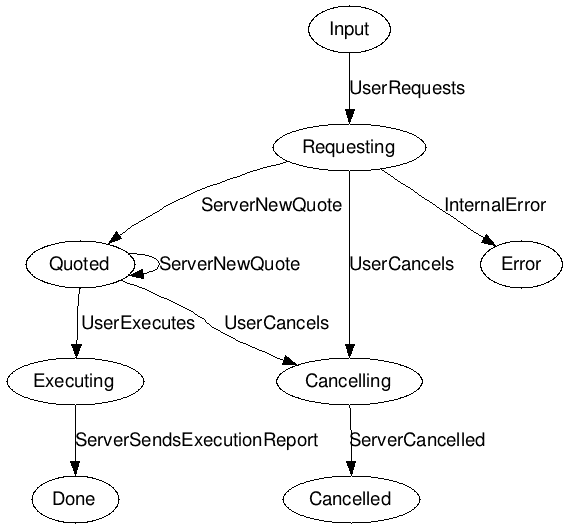
Matt wrote some code which reflectively retrieves the definition of the State machine and is able to produce a graph definition in DOT code (a language to represent graphs).
To generate a diagram from the output of the graph generation code, you can either download Graphviz and run it locally, or simply use an online GraphViz webapp.
This is the output I got using the webapp:
Wrap up
It takes a bit of time to get your head around state machines but once you get it those little things yield very nice clean code and it's also very simple to introduce new state and transitions if you follow the few guidelines we discussed here.
There are a few other things I'd like to talk about with state machines (for instance visualising them while the system is running, code generation, etc) but we will cover that in a future blog post.
I would also suggest to have a look to the work of Pieter Hintjens (ZeroMQ) on state machines and code generation, he has done some very cool stuff in this area