https://github.com/addyosmani/filter
Filter - Web Image Editor
https://github.com/addyosmani/filter
image-editor image-filters image-processing
Last synced: 2 months ago
JSON representation
Filter - Web Image Editor
- Host: GitHub
- URL: https://github.com/addyosmani/filter
- Owner: addyosmani
- License: mit
- Created: 2024-12-10T08:45:10.000Z (over 1 year ago)
- Default Branch: main
- Last Pushed: 2025-01-06T09:22:23.000Z (over 1 year ago)
- Last Synced: 2025-03-15T03:16:00.739Z (over 1 year ago)
- Topics: image-editor, image-filters, image-processing
- Language: TypeScript
- Homepage: https://filter.addy.ie
- Size: 523 KB
- Stars: 136
- Watchers: 1
- Forks: 4
- Open Issues: 0
-
Metadata Files:
- Readme: README.md
- License: LICENSE
Awesome Lists containing this project
README
# Filter - Web-based Image Editor
Filter is a powerful, web-based image editor built with React and TypeScript. It provides a modern, intuitive interface for quick image edits and filters, optimized for both desktop and mobile devices.
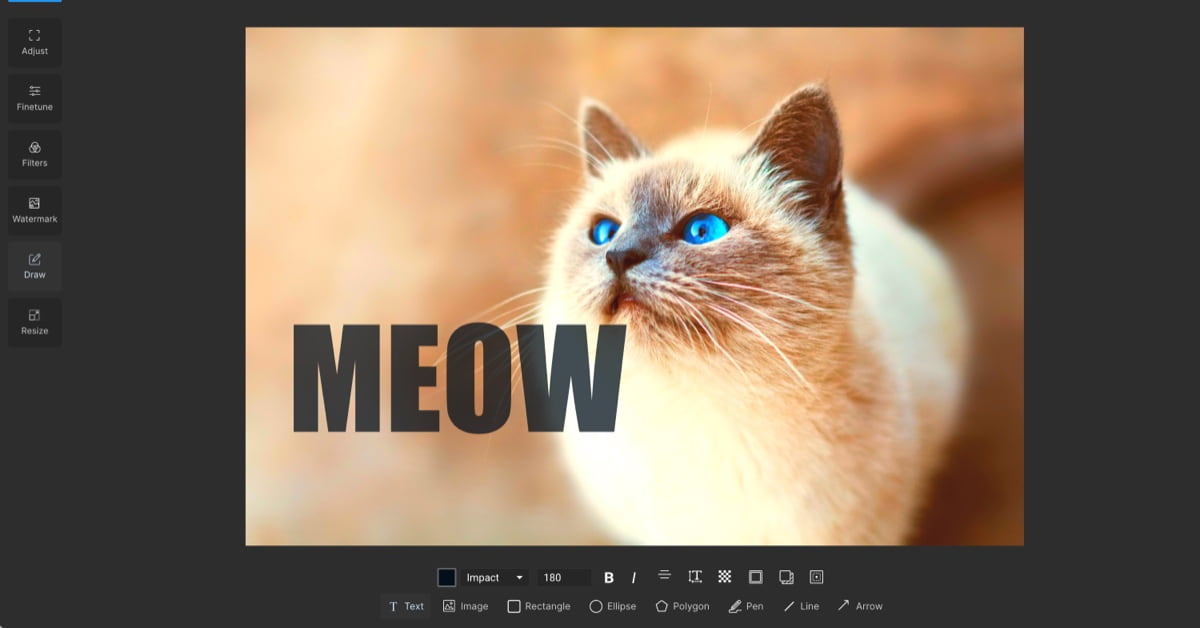
## ✨ Features
- 🖼️ **Intuitive Image Editing**: Easy-to-use interface for basic and advanced image modifications
- 📱 **Mobile-Optimized**: Fully responsive design that works great on all devices
- 🎨 **Rich Editing Tools**: Including crop, rotate, adjust, filters, and more
- ⚡ **Fast Processing**: Client-side image processing for quick edits
- 💾 **Easy Export**: Download edited images in various formats
- 🎯 **Preset Crops**: Common aspect ratios for social media and web use
## 🚀 Demo
Try out Filter at: [https://filter.addy.ie](https://filter.addy.ie)
## 🛠️ Technology Stack
- React 18
- TypeScript
- Vite
- Tailwind CSS
- Filerobot Image Editor
- Lucide Icons
## 📦 Installation
1. Clone the repository:
```bash
git clone https://github.com/addyosmani/filter.git
cd filter
```
2. Install dependencies:
```bash
npm install
```
3. Start the development server:
```bash
npm run dev
```
4. Build for production:
```bash
npm run build
```
## 🔧 Configuration
The editor can be customized through the `src/config/editorConfig.ts` file:
- Theme colors and typography
- Default tools and tabs
- Crop presets
- Supported fonts
- Translations
## 📱 Mobile Support
Filter is designed to be fully responsive and touch-friendly. Key mobile features include:
- Touch gesture support
- Mobile-optimized UI
- Responsive layout
- Performance optimizations
## 🤝 Contributing
Contributions are welcome! Please feel free to submit a Pull Request. For major changes, please open an issue first to discuss what you would like to change.
1. Fork the repository
2. Create your feature branch (`git checkout -b feature/AmazingFeature`)
3. Commit your changes (`git commit -m 'Add some AmazingFeature'`)
4. Push to the branch (`git push origin feature/AmazingFeature`)
5. Open a Pull Request
## 📄 License
This project is licensed under the MIT License - see the [LICENSE](LICENSE) file for details.
## 🙏 Acknowledgments
- [Filerobot Image Editor](https://github.com/scaleflex/filerobot-image-editor)
- [Lucide Icons](https://lucide.dev/)
- [Tailwind CSS](https://tailwindcss.com/)
## 📞 Support
For support, please open an issue in the GitHub repository or contact the maintainers.
---
Made with ❤️ by [Addy Osmani](https://github.com/addyosmani)