https://github.com/aden-q/visual-transit-system-simulator
This project implements a visual transit simulation system for buses in Minneapolis.
https://github.com/aden-q/visual-transit-system-simulator
cplusplus doxygen-documentation googletest html-css javascript js mit-license
Last synced: 3 months ago
JSON representation
This project implements a visual transit simulation system for buses in Minneapolis.
- Host: GitHub
- URL: https://github.com/aden-q/visual-transit-system-simulator
- Owner: Aden-Q
- License: mit
- Created: 2022-03-22T01:17:26.000Z (over 4 years ago)
- Default Branch: main
- Last Pushed: 2022-04-06T19:43:46.000Z (over 4 years ago)
- Last Synced: 2025-10-28T05:34:44.030Z (9 months ago)
- Topics: cplusplus, doxygen-documentation, googletest, html-css, javascript, js, mit-license
- Language: JavaScript
- Homepage: https://aden-q.github.io/visual-transit-system-simulator/
- Size: 4.67 MB
- Stars: 0
- Watchers: 1
- Forks: 0
- Open Issues: 0
-
Metadata Files:
- Readme: README.md
- License: LICENSE
Awesome Lists containing this project
README
# Visual Transit System Simulator
[](./LICENSE)
## Table of contents
- [Overview](#overview)
- [Directory Structures](#directory-structures)
- [Features](#features)
- [Dependencies](#dependencies)
- [Building](#building)
- [Running](#running)
- [Testing](#testing)
- [Code Style](#code-style)
- [Documentation](#documentation)
- [Contributors](#contributors)
- [License](#license)
## Overview
The simulation system models bus transit around the University of Minnesota campus, and can display the routings and statistics on a webpage in a timely manner.
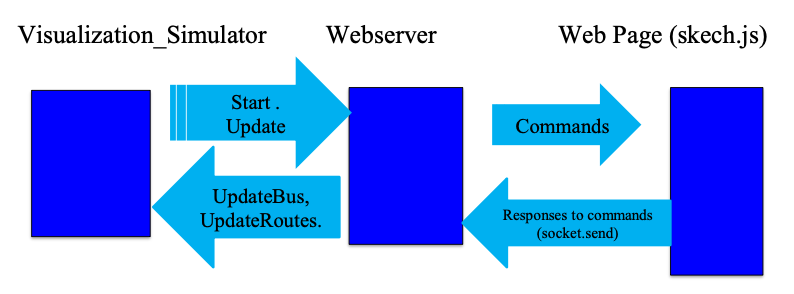
### System Architecture
### Demo

## Directory Structures
+ `config`: Contains `config.txt` which is a configuration file for bus stops and routes used by the transit simulation system, can be customized.
+ `cpplint`: Automatic Google Style cpplint script.
+ `docs`: Documentation files and images.
+ `drivers`: Contains source code with the main function that is used to create the drivers files for entities in the simulation system.
+ `googletest`:GoogleTest suits for unit testing and regression testing.
+ `src`: Directory that contains all the source code (.cc AND .h) for the backend simulator.
+ `test`: Directory of creating unit tests, using [Google Test](https://github.com/google/googletest) framework.
+ `build`: Created by `Makefile`, containing all the executables.
+ `web_code`: Source code for the web server used to enable communication between the visualization component and the backend simulation system.
+ `web_graphics`: Frontend HTML/CSS/JavaScript source code used to render the web page. It enables to configure and run the transit simulation system from the local browser.
## Features
- [X] Visualization on a web page
- [X] Functionality to Pause / Resume
- [X] Logging the statistics
- [X] Runtime behavior modificaiton at runtime
- [ ] Linking to an external database server
- [ ] Deploying the on the cloud
## Dependencies
+ `g++`
+ `node`
+ `npm`
## Building
The project can be compiled across different platforms using `Makefile`. However, to enable most of the features and functionalities of the system. It recommended to compile it on a Linux machine. Then we can run the simulation system and the web server on a Linux machine and access it via a browser on a different platform (Linux, OSX, Windows, or even on a mobile).
To compile and build the program, it is as simple as:
```bash
$ cd src
$ make
```
The built executable will be located in `./build/bin/`, named `vis_sim`.
## Running
To run the simulation and start the web server:
```bash
$ ./build/bin/vis_sim
```
The `port_number` is of your choice and should be a legal one (typically starting from 8000).
Then run your local browser (Firefox/Chrome are guaranteed to have the best performance), and enter following address:
```bash
https://127.0.0.1:/web_graphics/project.html
```
You will be directed to the main page of the simulation visualizer and you can play with it!
## Testing
All test cases are created with Google Test.
### Unit Tests
```bash
# Example usage
$ cd tests
$ make
$ ../build/bin/unittest
```
### Regression Tests
```bash
# Example usage
# The output of diff command should be silent
$ cd src
$ make regression_test
$ cd ../build/bin
$ ./regression_test > [log_file1]
$ ./regression_test > [log_file2]
$ diff [log_file1] [log_file2]
```
## Code style
The code in this project is [Google Style](https://google.github.io/styleguide/cppguide.html) compliant and uses [cpplint](https://github.com/google/styleguide/tree/gh-pages/cpplint) for linting.
For style check, do the following
```bash
$ ./cpplint/cpplint.py [path_target_dir] [file_name]
# Example usage
$ cd src
$ ../cpplint/cpplint.py *.cc *.h
```
## Documentation
`Doxygen` is used to generate documentation and UML for this project. The steps are following
1. Navigate to the `docs` directory.
```bash
$ cd docs
```
2. Generate the `html` pages and `latex` files for the documentation.
```bash
$ doxygen Doxyfile
```
3. Open the `index.html` file inside the `docs/html` directory with a browser and you will be directed to the main page of the project document.
## Contributors
[Zecheng Qian](https://aden-q.github.io/) - qian0102@umn.edu
## License
[MIT License](LICENSE)