https://github.com/adi3g/nox-cli
A versatile Python tool that automates everyday tasks for developers and sysadmins, including network operations, encryption, and Docker management.
https://github.com/adi3g/nox-cli
cli docker nox python s3
Last synced: 9 months ago
JSON representation
A versatile Python tool that automates everyday tasks for developers and sysadmins, including network operations, encryption, and Docker management.
- Host: GitHub
- URL: https://github.com/adi3g/nox-cli
- Owner: Adi3g
- License: mit
- Created: 2024-08-23T18:06:30.000Z (almost 2 years ago)
- Default Branch: main
- Last Pushed: 2025-01-15T19:15:24.000Z (over 1 year ago)
- Last Synced: 2025-04-30T06:09:27.898Z (about 1 year ago)
- Topics: cli, docker, nox, python, s3
- Language: Python
- Homepage:
- Size: 167 KB
- Stars: 8
- Watchers: 1
- Forks: 0
- Open Issues: 11
-
Metadata Files:
- Readme: README.md
- License: LICENSE
Awesome Lists containing this project
README

Nox is a Python CLI tool designed to automate and streamline various day-to-day tasks commonly performed by software engineers. It provides functionalities like JWT management, encryption/decryption, interaction with AWS S3, database operations, Docker management, and more.
## Table of Contents
- [Features](#features)
- [Usage](#usage)
- [JWT Management](#jwt-management)
- [Encryption and Decryption](#encryption-and-decryption)
- [S3 File Management](#s3-file-management)
- [Database Operations](#database-operations)
- [Docker Management](#docker-management)
- [Network Operations](#network-operations)
- [Secrets Management](#secrets-management)
- [File and Directory Operations](#file-and-directory-operations)
- [UUID Generation](#uuid-generation)
- [Hashing Utilities](#hashing-utilities)
- [Environment Management](#environment-management)
- [Service Management](#service-management)
- [Template Generation](#template-generation)
- [Time and Date Utilities](#time-and-date-utilities)
- [Cloud Operations](#cloud-operations)
- [Plugins](#plugins)
- [Contributing](#contributing)
- [License](#license)
## Features
- **JWT Management**: Generate and verify JWT tokens for different environments.
- **Encryption/Decryption**: Encrypt and decrypt text or files using various algorithms.
- **S3 File Management**: List, upload, and remove files from AWS S3 buckets.
- **Database Operations**: Run queries and manage database migrations.
- **Docker Management**: Build and run Docker containers with ease.
- **Network Operations**: Perform network-related tasks like ping, traceroute, and DNS lookups.
- **Secrets Management**: Store and retrieve secrets securely.
- **File and Directory Operations**: Search for files, calculate directory sizes, and more.
- **UUID Generation**: Generate UUIDs for various purposes.
- **Hashing Utilities**: Hash text or files using algorithms like SHA-256, MD5, etc.
- **Environment Management**: Manage environment variables by setting, getting, and listing them.
- **Service Management**: Start, stop, and check the status of system services.
- **Template Generation**: Generate boilerplate code for projects or components.
- **Time and Date Utilities**: Work with dates and times, convert timezones, etc.
- **Cloud Operations**: Deploy and manage applications on cloud providers.
## [](https://repography.com) / Recent activity [](https://repography.com)
[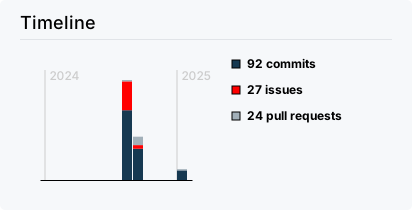](https://github.com/Adi3g/nox-cli/commits)
[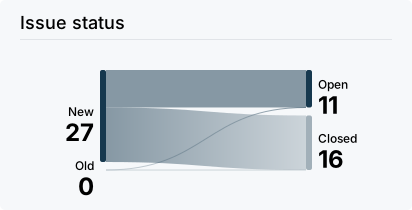](https://github.com/Adi3g/nox-cli/issues)
[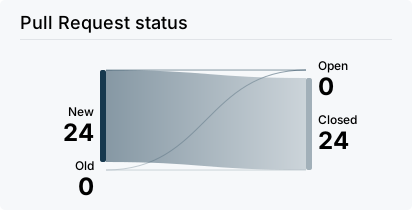](https://github.com/Adi3g/nox-cli/pulls)
[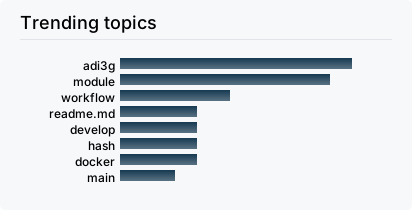](https://github.com/Adi3g/nox-cli/commits)
[](https://github.com/Adi3g/nox-cli/graphs/contributors)
[](https://github.com/Adi3g/nox-cli/commits)
## Usage
Nox provides a variety of commands. Here are some examples:
### JWT Management
Generate a JWT for a specific environment:
```bash
nox jwt generate --env prod --key /path/to/key.pem --claims claims.json
```
Verify a JWT token:
```bash
nox jwt verify --token your.jwt.token --key /path/to/public.pem
```
### Encryption and Decryption
Encrypt a file using Base64 encryption:
```bash
nox encrypt base64 --input /path/to/file --output /path/to/output
```
Decrypt a file:
```bash
nox decrypt base64 --input /path/to/encrypted_file --output /path/to/decrypted_file
```
### S3 File Management
List files in an S3 bucket:
```bash
nox s3 list --bucket my-bucket --region us-west-2
```
### Database Operations
Backup a PostgreSQL database:
```bash
nox db backup --db "postgresql://user:password@localhost:5432/mydb" --output /path/to/backup.sql
```
Restore a PostgreSQL database:
```bash
nox db restore --db "postgresql://user:password@localhost:5432/mydb" --input /path/to/backup.sql
```
### Docker Management
Clean up unused Docker containers, images, and volumes:
```bash
nox docker clean
```
Tail logs for a Docker container:
```bash
nox docker logs --container container_name
```
### Network Operations
Ping a host:
```bash
nox net ping --host google.com
```
Perform a DNS lookup:
```bash
nox net dns --domain example.com
```
### Secrets Management
Encrypt a secret:
```bash
nox secrets encrypt --secret "mysecret" --key /path/to/key.pem
```
Decrypt a secret:
```bash
nox secrets decrypt --secret "encrypted_secret" --key /path/to/key.pem
```
### File and Directory Operations
Compress a directory:
```bash
nox file compress --input /path/to/directory --output /path/to/output.zip --algorithm zip
```
Decompress a file:
```bash
nox file decompress --input /path/to/file.zip --output /path/to/output_directory
```
### UUID Generation
Generate a new UUID:
```bash
nox uuid generate
```
### Hashing Utilities
Hash a text using SHA-256:
```bash
nox hash --text "your text" --algorithm sha256
```
Hash a file:
```bash
nox hash --file /path/to/file --algorithm sha256
```
### Environment Management
Set environment variables from a file:
```bash
nox env set --file /path/to/.env
```
Retrieve the value of an environment variable:
```bash
nox env get --name ENV_VAR_NAME
```
### Service Management
Start a system service:
```bash
nox service start --name docker
```
Check the status of a system service:
```bash
nox service status --name docker
```
### Template Generation
Create a new project template:
```bash
nox template create --type flask-app --name my_project
```
### Time and Date Utilities
Display the current date and time in ISO format:
```bash
nox time now --format iso
```
### Cloud Operations
Deploy an application to a cloud provider:
```bash
nox cloud deploy --provider aws --config deploy_config.json
```
Check the status of a deployed application:
```bash
nox cloud status --provider aws --app my_app
```
## Plugins
Nox supports a plugin system that allows you to extend its functionality without modifying the core codebase.
### Creating a Plugin
To create a plugin, follow these steps:
1. Create a new Python file in the `nox/plugins/` directory.
2. Implement the `NoxPlugin` interface.
```python
# nox/plugins/my_plugin.py
import click
from nox.plugins import NoxPlugin
class MyPlugin(NoxPlugin):
def register_commands(self, cli):
@cli.command()
def my_command():
"""Command provided by MyPlugin."""
click.echo("This is a command from MyPlugin!")
plugin = MyPlugin()
```
3. Your plugin will be automatically discovered and loaded when you run Nox.
### Loading External Plugins
To load plugins distributed as separate packages, ensure they are installed in the same environment as Nox, and they will be discovered automatically.
## Contributing
Contributions are welcome! Please feel free to submit a Pull Request. Before contributing, please ensure you have read the [Contributing Guidelines](CONTRIBUTING.md).
## License
This project is licensed under the MIT License. See the [LICENSE](LICENSE) file for details.