https://github.com/adibfara/watchtower
🗼Observe OKHttp API Calls With Request And Response Details Right In Your Browser!
https://github.com/adibfara/watchtower
android kotlin networking okhttp retrofit2
Last synced: 11 months ago
JSON representation
🗼Observe OKHttp API Calls With Request And Response Details Right In Your Browser!
- Host: GitHub
- URL: https://github.com/adibfara/watchtower
- Owner: adibfara
- Created: 2018-12-28T13:46:59.000Z (over 7 years ago)
- Default Branch: master
- Last Pushed: 2021-04-15T18:48:28.000Z (over 5 years ago)
- Last Synced: 2025-07-26T06:32:21.742Z (about 1 year ago)
- Topics: android, kotlin, networking, okhttp, retrofit2
- Language: Kotlin
- Homepage:
- Size: 2.04 MB
- Stars: 315
- Watchers: 6
- Forks: 19
- Open Issues: 5
-
Metadata Files:
- Readme: README.md
Awesome Lists containing this project
README
WatchTower - Observe OKHttp API Calls With Request And Response Details Right In Your Browser!
----------------------------------------------------------------------------------------------
[](https://travis-ci.org/adibfara/Watchtower) [  ](https://bintray.com/adibfara/WatchTower/WatchTower/)
Download
--------
Add the dependencies to your project:
```groovy
debugImplementation 'com.snakyapps.watchtower:interceptor-okhttp:2.0.2'
releaseImplementation 'com.snakyapps.watchtower:interceptor-okhttp-no-op:2.0.2' // no-op dependency for non-debug build variants
```
Setup
-----
**Add the interceptor to your OKHttp Client**
```kotlin
val retrofit = Retrofit.Builder()
.client(
OkHttpClient.Builder()
.addInterceptor(WatchTowerInterceptor())
.build()
)
// ...
.build()
WatchTower.start(WebWatchTowerObserver(port = 8085)) // in Application class
```
**(Optional for Android) Add the Android artifact**
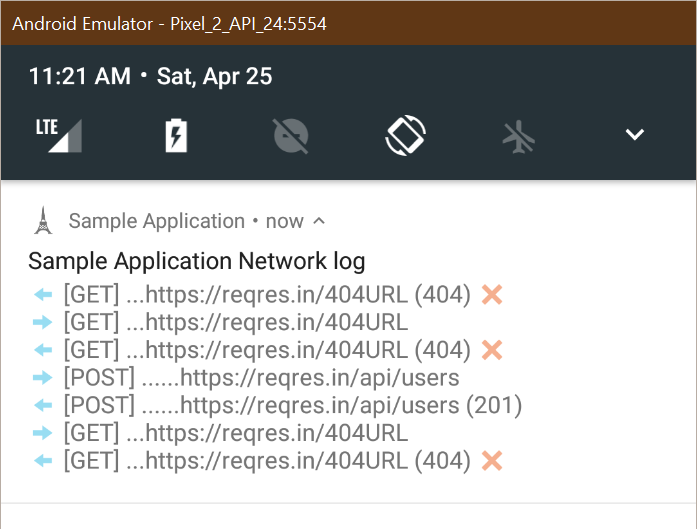
You can add the following artifact to see the requests right in your notification area. You can `collect` from a `Flow` and notify the notification manager.
```groovy
debugImplementation 'com.snakyapps.watchtower:android:2.0.2'
releaseImplementation 'com.snakyapps.watchtower:android-no-op:2.0.2' // no-op dependency for non-debug build variants
```
```kotlin
someScope.launch {
WatchTowerAndroid.notificationFlow(application, serverPort).collect {
notification ->
(getSystemService(Context.NOTIFICATION_SERVICE) as NotificationManager).notify(999991, notification.build())
}
}
```
To turn off notifications, you can cancel the coroutine `Job` (e.g. `launch`).
Features
--------
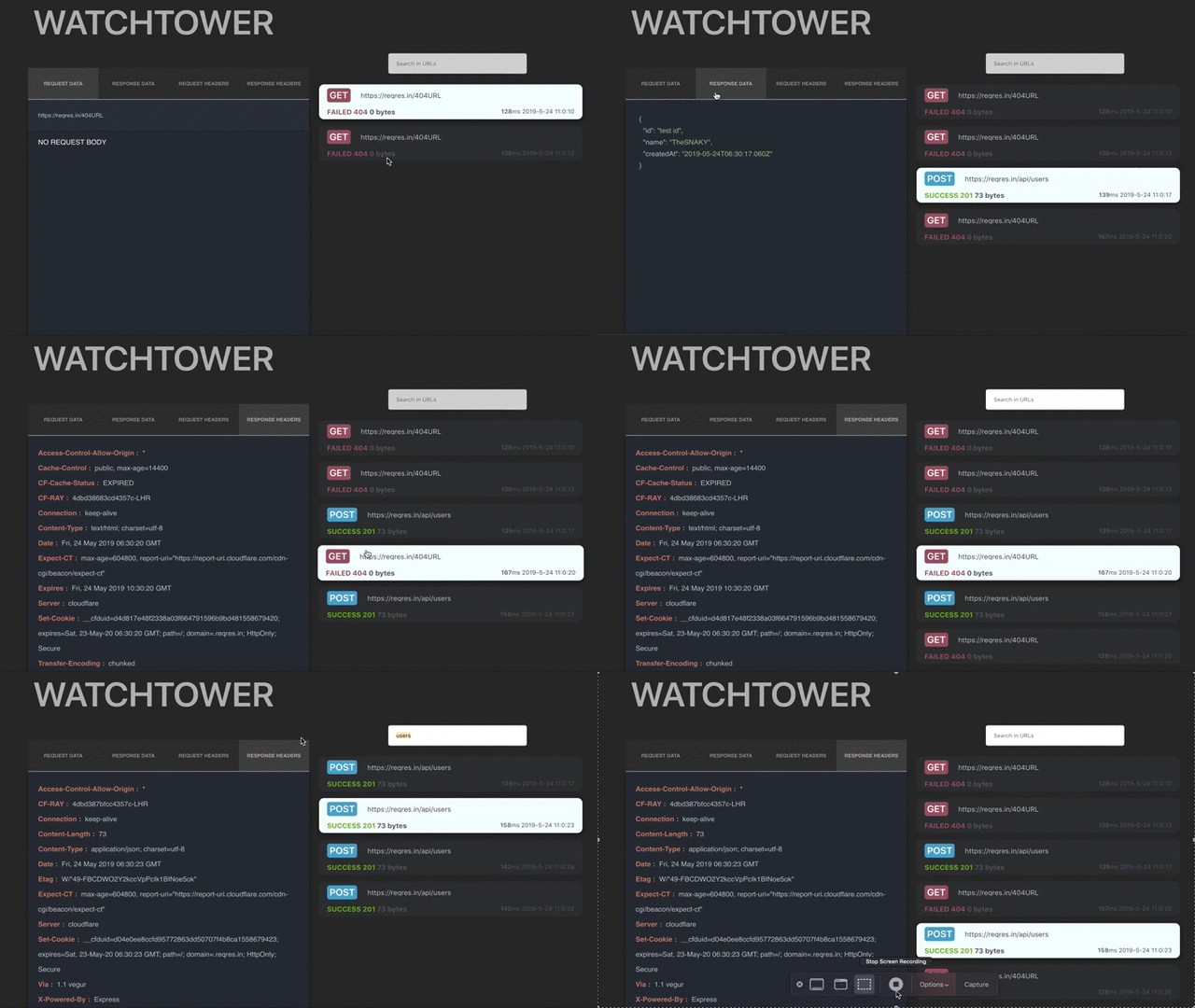
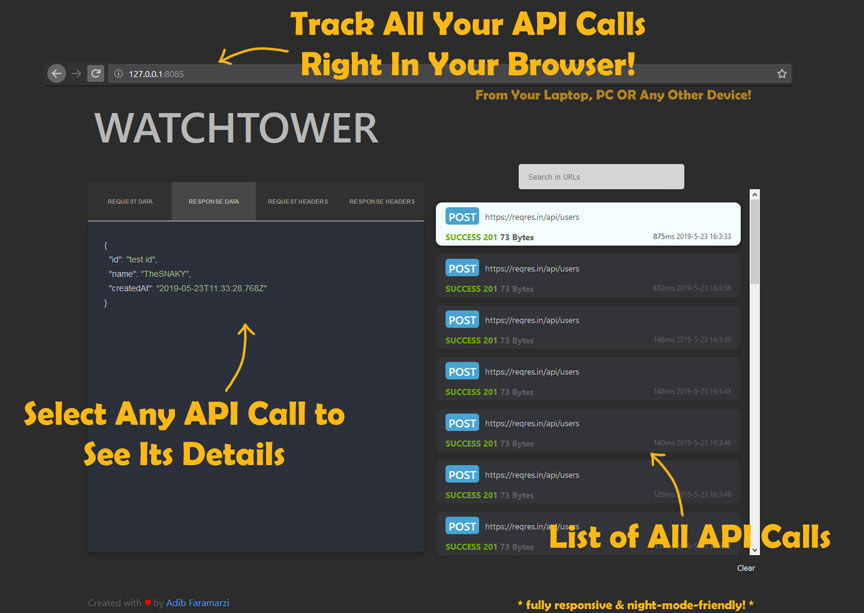
- Track and observe all API calls made through OKHttp's client
- GET, POST, PUT, DELETE, PATCH methods
- Query parameters, request and response body and headers
- Response success and failure status, size, date and latency
- Adjustable port for the server and the websocket server
- API call history, even If no browsers were open
- Search in the URLs of all requests
- Fully responsive UI
- Fully extensible
**Observing the events using your browser**
Connect the device that is running the app to the same network that you want to observe the data. If you are on a WiFi, both devices should be connected to the same WiFi so they can communicate with each other.
After running your application, you can navigate to `http://yourip:8085/` and view the network calls. If you don't know what `yourip` is, It will be printed out to the console with the message of `WatchTower started, listening on ... ` when `Watchtower.start()` is called.
**Observing emulator events in your computers browser**
If your running WatchTower in an emulator you need to forward both server and websocket ports from the emulator to your local computer. For example if WatchTower is running on port `8085` you would need to run:
```
adb forward tcp:8085 tcp:8085
adb forward tcp:5003 tcp:5003
```
The forward of port 5003 is used for the websocket connection.
#### Notes
PRs are more than welcome, and please file an issue If you encounter something 🍻.
You can also ping me on twitter [@TheSNAKY](http://twitter.com/TheSNAKY).
License
=======
Copyright 2019 Adib Faramarzi.
Licensed under the Apache License, Version 2.0 (the "License");
you may not use this file except in compliance with the License.
You may obtain a copy of the License at
http://www.apache.org/licenses/LICENSE-2.0
Unless required by applicable law or agreed to in writing, software
distributed under the License is distributed on an "AS IS" BASIS,
WITHOUT WARRANTIES OR CONDITIONS OF ANY KIND, either express or implied.
See the License for the specific language governing permissions and
limitations under the License.