https://github.com/adityabasude/video-transcoder
A gRPC-based service that transcodes videos into multiple resolutions using FFmpeg and stores them in AWS S3.
https://github.com/adityabasude/video-transcoder
aws-s3 ffmpeg golang grpc
Last synced: 4 months ago
JSON representation
A gRPC-based service that transcodes videos into multiple resolutions using FFmpeg and stores them in AWS S3.
- Host: GitHub
- URL: https://github.com/adityabasude/video-transcoder
- Owner: ADITYAbasude
- Created: 2025-01-01T10:34:10.000Z (over 1 year ago)
- Default Branch: main
- Last Pushed: 2025-02-25T14:23:39.000Z (over 1 year ago)
- Last Synced: 2025-04-16T03:13:43.121Z (about 1 year ago)
- Topics: aws-s3, ffmpeg, golang, grpc
- Language: Go
- Homepage: https://video-transcoder-beta.vercel.app
- Size: 14.6 KB
- Stars: 2
- Watchers: 1
- Forks: 0
- Open Issues: 0
-
Metadata Files:
- Readme: README.md
Awesome Lists containing this project
README
# Video Transcoder Service
A gRPC-based service that transcodes videos into multiple resolutions using FFmpeg and stores them in AWS S3.
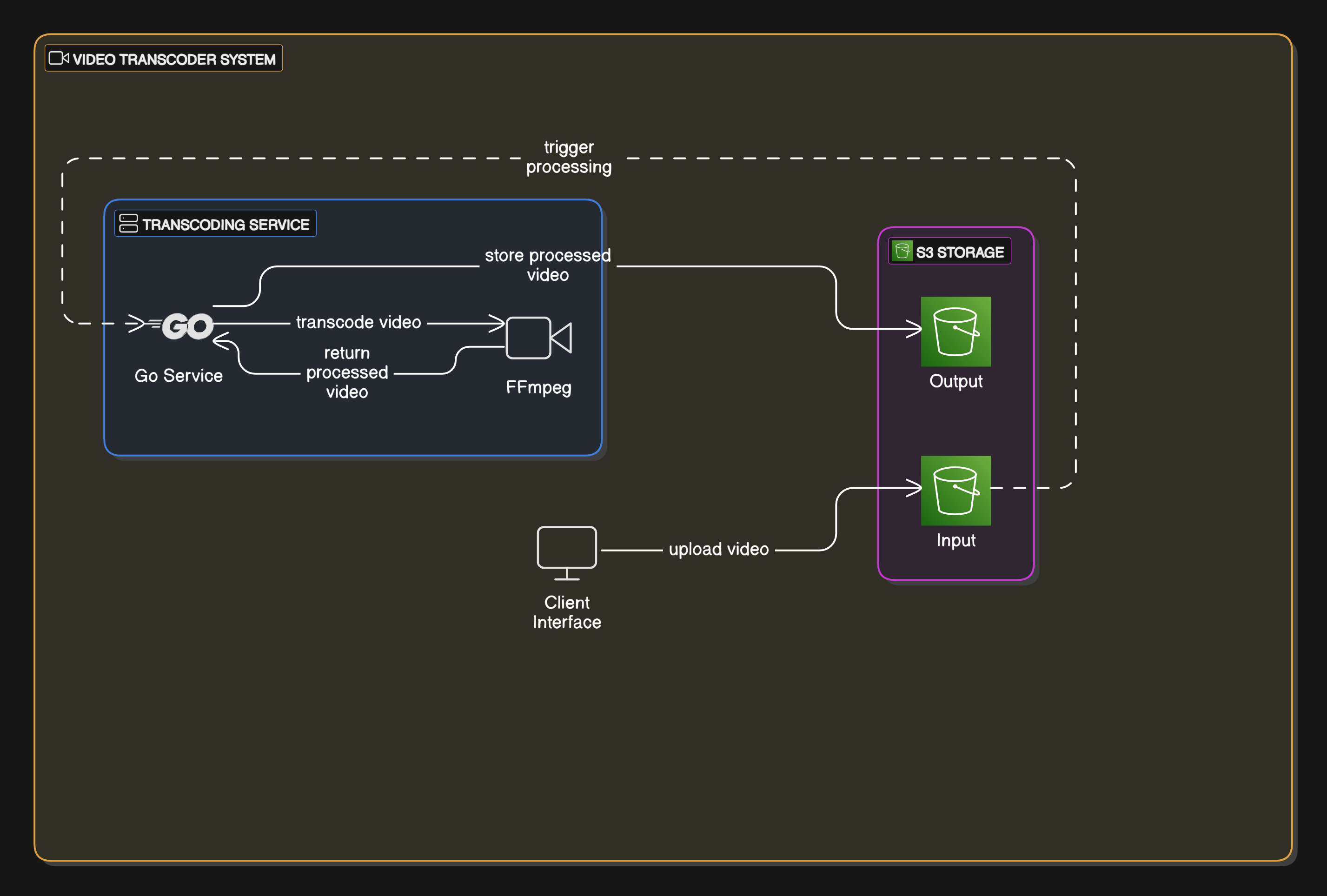
## System Architecture
## Features
- Transcodes videos to multiple resolutions (240p, 360p, 480p, 720p, 1080p)
- Generates HLS (HTTP Live Streaming) output
- Automatic resolution selection based on input video quality
- AWS S3 integration for storage
- gRPC streaming API
- Docker support
## Prerequisites
- Go 1.23 or higher
- FFmpeg
- AWS credentials and S3 buckets
- Docker (optional)
## Environment Variables
Create a `.env` file with the following variables:
```env
AWS_REGION=your_region
AWS_DOWNLOAD_BUCKET_NAME=your_input_bucket
AWS_UPLOAD_BUCKET_NAME=your_output_bucket
AWS_ACCESS_KEY_ID=your_access_key
AWS_SECRET_ACCESS_KEY=your_secret_key
```
## Installation
1. Clone the repository
2. Install dependencies:
```bash
go mod download
```
## Running the Service
### Local Development
```bash
go run cmd/server.go
```
### Using Docker
```bash
docker build -t video-transcoder .
docker run -p 50051:50051 video-transcoder
```
## API
The service implements a gRPC API defined in `proto/video.proto`:
```protobuf
service VideoTranscoderService {
rpc TranscodeVideo(stream TranscodeVideoRequest) returns (TranscodeVideoResponse);
}
```
### Request Format
```protobuf
message TranscodeVideoRequest {
string filename = 1;
repeated string resolutions = 2;
}
```
### Response Format
```protobuf
message TranscodeVideoResponse {
string message = 1;
bool success = 2;
repeated string transcoded_files = 3;
int64 duration = 4;
}
```
## Development
The project uses Air for hot reloading during development. To use it:
1. Install Air
2. Run:
```bash
air
```