https://github.com/adityarao127/motion-detector-system
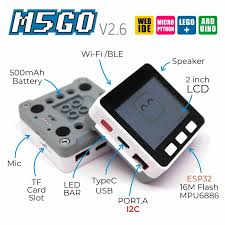
Motion detection system with M5GO
https://github.com/adityarao127/motion-detector-system
m5stack mms-messages pir-sensor sms-messages
Last synced: about 1 year ago
JSON representation
Motion detection system with M5GO
- Host: GitHub
- URL: https://github.com/adityarao127/motion-detector-system
- Owner: AdityaRao127
- License: mit
- Created: 2024-05-13T06:48:05.000Z (about 2 years ago)
- Default Branch: main
- Last Pushed: 2024-06-01T10:23:27.000Z (about 2 years ago)
- Last Synced: 2025-07-05T09:05:04.183Z (about 1 year ago)
- Topics: m5stack, mms-messages, pir-sensor, sms-messages
- Language: Python
- Homepage:
- Size: 66.4 KB
- Stars: 0
- Watchers: 1
- Forks: 0
- Open Issues: 1
-
Metadata Files:
- Readme: README.md
- License: LICENSE
Awesome Lists containing this project
README
# Motion Detection System with M5GO, PIR Sensor, and SMS/MMS notifications
Developed with MicroPython\

Developed with M5GO kit\
## How to use?
1. Follow manual instructions to plug the Motion sensor with appropriate wires into the ESP32 device.
2. Create a Gmail account (or use an existing one).
- Turn on two-factor authentication and obtain an app password. It should be in this format `xxxx-xxxx-xxxx`
4. Connect your M5GO device or ESP32 board. Click the `connected` button in the bottom-left corner and ensure the connection is successful.
5. Visit [m5stack website](https://flow.m5stack.com/) and insert [main.py](https://github.com/AdityaRao127/motion-detector-system/blob/main/main.py) into the file.
6. Add the environment variables into the appropriate fields. Choose the appropriate domain name for the `sender_email`:
- AT&T: **number@txt.att.net** for a normal text message (SMS), or **number@mms.att.net** for a multimedia message (MMS)
- Verizon: **number@vtext.com** for both SMS and MMS messages
- Sprint PCS: **number@messaging.sprintpcs.com** for both SMS and MMS messages
- T-Mobile: **number@tmomail.net** for both SMS and MMS messages
[Domain info taken from source](https://www.wikihow.com/Send-a-Text-from-Email)
6. Name the Python file `main` if it's not already. Then run the [main.py](https://github.com/AdityaRao127/motion-detector-system/blob/main/main.py) and test if it works.
- `1` means motion detected
- `0` means no motion detected
8. Change M5GO device into APP Mode -> Reset Device -> Go to Programs -> Scroll down and select the `main.py` file.
- Since you are in APP mode, the device will run `main.py` whenever the M5GO device is online.
## How does the motion detector work?
The PIR sensor detects the heat emitted by a person or object, and this detection signal is sent to the microcontroller, which then sends an email to the specified recipient.
PIR sensor image\

### GitHub Stats
[](https://github.com/AdityaRao127/motion-detector-system)
[](https://github.com/AdityaRao127/motion-detector-system/network)
[](https://opensource.org/licenses/MIT)
### GitHub Profile
[](https://github.com/AdityaRao127)