https://github.com/admin-dikesoft/angular-dk-grid-community
DkGrid - An Angular Data Grid for Angular developers.
https://github.com/admin-dikesoft/angular-dk-grid-community
Last synced: about 1 year ago
JSON representation
DkGrid - An Angular Data Grid for Angular developers.
- Host: GitHub
- URL: https://github.com/admin-dikesoft/angular-dk-grid-community
- Owner: admin-dikesoft
- Created: 2022-07-28T03:00:33.000Z (almost 4 years ago)
- Default Branch: main
- Last Pushed: 2022-07-28T21:44:16.000Z (almost 4 years ago)
- Last Synced: 2025-03-08T11:19:08.886Z (over 1 year ago)
- Size: 137 KB
- Stars: 0
- Watchers: 1
- Forks: 0
- Open Issues: 0
-
Metadata Files:
- Readme: README.md
- Changelog: CHANGELOG.md
Awesome Lists containing this project
README
# DkGrid Community Edition
**An Angular Data Grid for Angular Developers**
**DkGrid** is a component **engineered** and **built** using the **Angular Framework** and some **CDK behavior primitives** to display and manipulate tabular data. You can provide data from an array of **JSON** objects or a **REST API**.
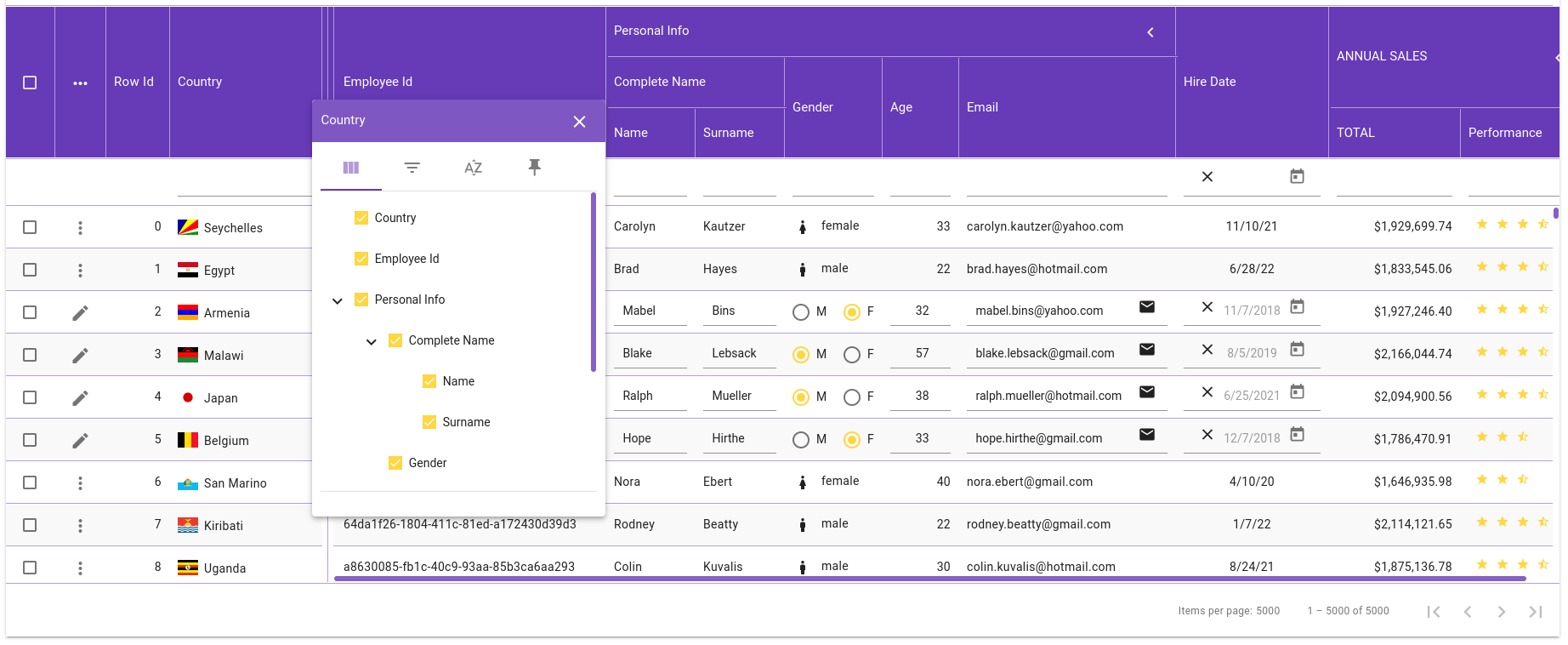
DkGrid has ready-to-use features such as **filtering**, **editing**, **selection**, **sorting**, **paging**, and **column grouping**, to mention a few. Apart from the key features, the DkGrid component is **highly customizable**. For instance, you can change the size of the column headers or the height of the content rows and customize many more properties.
The following image shows our grid with some filters and edition actions enabled.
## Compatibility
### DkGrid and Angular versions
DkGrid doesn't follow Angular's versioning. Instead, we try to maintain compatibility with Angular majors for as long as possible, only breaking when we need to support a new major version.
| Angular | DkGrid |
| --------|--------|
| 14 | ^2.0 |
| 13 | ^1.0 |
| 12 | ^1.0 |
## License

This work is licensed under a Creative Commons Attribution-NoDerivatives 4.0 International License
## Key Features
* [Column definitions](https://docs.dikesoft.com/columns/column-definitions) ‐ To start using the DkGrid, you may define the columns that comprise your tabular data. There are four types of columns depending on the data they hold. Apart from column definitions, you can group columns with no limit on nesting groups.
* [Customization](https://docs.dikesoft.com/fundamentals/grid-structure) ‐ You can customize the height of the column headers or the pagination row. In addition, you can make the DkGrid shows a mat-elevation and the value of this elevation. You can also make vertical lines visible and customize many more properties.
* [Column Operations (resizing, moving, locking)](https://docs.dikesoft.com/columns/column-sizing) ‐ Once you have defined which columns will comprise your DkGrid instance, you can change their size or move them to any of the existing panels. In addition, you can freeze any column in any panel.
* [Cell Formatting](https://docs.dikesoft.com/columns/column-definitions) ‐ By default, the DkGrid shows every field value with predefined templates depending on the column types. Nevertheless, you can provide your custom templates for each defined column.
* [In-Memory DataSource](https://docs.dikesoft.com/fundamentals/datasource/in-memory-datasource) ‐ The DkGrid uses the In-Memory DataSource when you provide your data from a REST API or simply an array.
* [Filtering](https://docs.dikesoft.com/filtering/column-filters) ‐ The easiest way to allow the user to filter rows is by displaying a dedicated filter row that shows a textbox for each visible column. Or any column could show a context menu where the user can type their values for each filter condition. You can tell DkGrid which filter conditions to display and define each condition implementation.
* [Editing](https://docs.dikesoft.com/editing/row-edition) ‐ You can define which columns the user can edit. By default, the DkGrid offers templates for fields edition, but you can provide your custom templates using the well-known ng-template. Furthermore, the user can toggle the edition mode at runtime.
* [Sorting](https://docs.dikesoft.com/rows/row-sorting) ‐ The DkGrid allows the user to order the rows by any column. Just tell DkGrid which columns are sortable.
* [Paging](https://docs.dikesoft.com/rows/row-pagination) ‐ With paging implemented, the DkGrid will only load the number of rows you specify in the DkGrid's pageSize property.
* [Selection](https://docs.dikesoft.com/rows/row-selection) ‐ The DkGrid allows the user to select one or more rows through a column of checkboxes. You can specify which rows are selectable, defining the criteria the rows must meet.
* [Theming](https://docs.dikesoft.com/fundamentals/theming) ‐ The DkGrid bases its theming process on the Angular Material's Theming System, allowing you to apply the same structure the Angular Material components use.
## Resources
[Getting Started with DkGrid](https://docs.dikesoft.com/getting-started/quick-start-tutorial)
[DkGrid product page](https://www.dikesoft.com/dk-grid)
[DkGrid product docs](https://docs.dikesoft.com/)
## Demos
You can visit our [complete demo](https://www.dikesoft.com/dk-grid-demo), which contains **22 columns**. Moreover, you can generate up to **100K** rows.
Furthermore, we have created one [live example](https://demos.dikesoft.com/dk-grid/getting-started) for each section in the [documentation](https://docs.dikesoft.com/).
## Support
For any issues you might encounter while working with the DkGrid component, please email support@dikesoft.com
*Copyright © 2022 Dikesoft. All rights reserved.*