https://github.com/adolfousier/ratifact
Track and manage build artifacts from multiple programming languages. Built with Ratatui
https://github.com/adolfousier/ratifact
Last synced: about 1 month ago
JSON representation
Track and manage build artifacts from multiple programming languages. Built with Ratatui
- Host: GitHub
- URL: https://github.com/adolfousier/ratifact
- Owner: adolfousier
- License: other
- Created: 2025-10-26T20:54:30.000Z (5 months ago)
- Default Branch: main
- Last Pushed: 2025-10-27T06:51:11.000Z (5 months ago)
- Last Synced: 2025-10-27T07:25:51.660Z (5 months ago)
- Language: Rust
- Size: 48.2 MB
- Stars: 0
- Watchers: 0
- Forks: 0
- Open Issues: 0
-
Metadata Files:
- Readme: README.md
- Changelog: CHANGELOG.md
- Contributing: CONTRIBUTING.md
- License: LICENSE
Awesome Lists containing this project
- awesome-ratatui - ratifact - Track and manage build artifacts from multiple programming languages. (💻 Apps / ⌨️ Development Tools)
README
[](https://www.rust-lang.org)
[](https://ratatui.rs)
[](https://docker.com)
[](https://just.systems)
[](https://www.postgresql.org)
[](https://meetneura.ai) [](https://meetneura.ai)
# Ratifact
**Track and manage build artifacts from multiple programming languages.**
This TUI app runs in your terminal and helps you monitor build processes, track artifacts, and clean up old builds. Built with Ratatui.

## Table of Contents
- [What Does This Do?](#what-does-this-do)
- [Quick Start](#quick-start)
- [How to Use It](#how-to-use-it)
- [What You Need](#what-you-need)
- [Special Notes](#special-notes)
- [Uninstall](#uninstall)
- [Contributing](#contributing)
- [License](#license)
## What Does This Do?
- **Tracks build artifacts** - Monitors directories for build outputs from Rust, JavaScript, Python, Go, C/C++, Java, PHP, Ruby, Swift, Kotlin, Scala, Haskell, Elixir, and more.
- **Shows artifact details** - Displays size, modification time, and language type in a table.
- **Selective deletion** - Choose individual or bulk delete with confirmations.
- **Timeframe cleanup** - Set rules to auto-remove old artifacts.
- **Rebuild integration** - Trigger rebuilds for tracked projects.
- **Works everywhere** - Fully supported on Linux, macOS, and Windows with easy one-liner installation.
## Quick Start (Easiest Way)
### Linux
Copy and paste this into your terminal:
```bash
sudo apt update && sudo apt install -y curl git && curl -fsSL https://raw.githubusercontent.com/adolfousier/ratifact/main/src/scripts/linux/install.sh | bash
```
That's it! The app will build and start automatically.
### macOS
1. Install [Docker Desktop](https://docs.docker.com/desktop/install/mac-install/) first (or the script will install it)
2. Then paste this into Terminal:
```bash
curl -fsSL https://raw.githubusercontent.com/adolfousier/ratifact/main/src/scripts/macos/install.sh | bash
```
### Windows
Open PowerShell as Administrator and run:
```powershell
powershell -Command "iwr -useb https://raw.githubusercontent.com/adolfousier/ratifact/main/src/scripts/windows/install.ps1 | iex"
```
### Already Have Rust and Docker?
If you already have the prerequisites installed:
```bash
git clone https://github.com/adolfousier/ratifact.git && cd ratifact && cargo build && ./target/debug/ratifact
```
### Build with Just
Use the provided justfile for common tasks:
```bash
just build # Build the project
just run # Build and run
just test # Run tests
just release # Build release version
just clean # Clean artifacts
just help # Show all targets
```
## How to Use It
Once the app is running:
- **Tab** - Switch between views (artifacts, history, charts, settings, summary)
- **↑↓** - Navigate within panels
- **Enter** - Select/rebuild in artifacts, edit settings in settings panel
- **s** - Start scanning for artifacts
- **d** - Delete selected artifacts
- **r** - Rebuild a project
- **h** - Load history
- **q** - Quit
In settings panel, use Enter to open popup for editing retention days, scan path, or toggling automatic removal. For scan path, browse directories with ↑↓ and Enter.
The app detects languages automatically and tracks builds once scanned.
## Settings
Customize the app behavior:
- **Retention Days**: Set how long to keep artifacts (default: 30 days)
- **Scan Path**: Choose the directory to scan for builds (default: current directory)
- **Automatic Removal**: Enable/disable auto-cleanup of old artifacts
Use Enter in the settings panel to edit these options via popups.
## What You Need
- **Computer**: Linux, macOS, or Windows
- **Rust**: Latest stable version
- **Space**: Minimal, depends on your build artifacts
## Special Notes
**First time running**: The app connects to PostgreSQL and creates tables automatically.
**Permissions**: Ensure read/write access to project directories and PostgreSQL access.
## Uninstall
To uninstall Ratifact and remove all associated components, use the uninstall scripts:
### Linux
```bash
curl -fsSL https://raw.githubusercontent.com/adolfousier/ratifact/main/src/scripts/linux/uninstall.sh | bash
```
Or locally:
```bash
bash src/scripts/linux/uninstall.sh
```
Or using Make:
```bash
make uninstall
```
### macOS
```bash
curl -fsSL https://raw.githubusercontent.com/adolfousier/ratifact/main/src/scripts/macos/uninstall.sh | bash
```
Or locally:
```bash
bash src/scripts/macos/uninstall.sh
```
Or using Make:
```bash
make uninstall
```
### Windows
Open PowerShell as Administrator and run:
```powershell
powershell -Command "iwr -useb https://raw.githubusercontent.com/adolfousier/ratifact/main/src/scripts/windows/uninstall.ps1 | iex"
```
Or locally:
```powershell
powershell -ExecutionPolicy Bypass -File src/scripts/windows/uninstall.ps1
```
### What the Uninstall Script Does
The uninstall process will:
1. **Stop PostgreSQL container** - Shuts down the running Docker container
2. **Remove database volume** (optional) - You'll be prompted to confirm deletion of all database data
3. **Clean build artifacts** - Removes compiled binaries and intermediate build files
4. **Remove installation directory** (optional) - You can choose to keep the source code or remove it completely
The script logs all actions to a file (e.g., `/tmp/ratifact-uninstall-*.log`) for reference.
## Contributing
Found a bug or want to add something? Check [CONTRIBUTING.md](CONTRIBUTING.md).
## License
See [LICENSE](LICENSE) file for details.
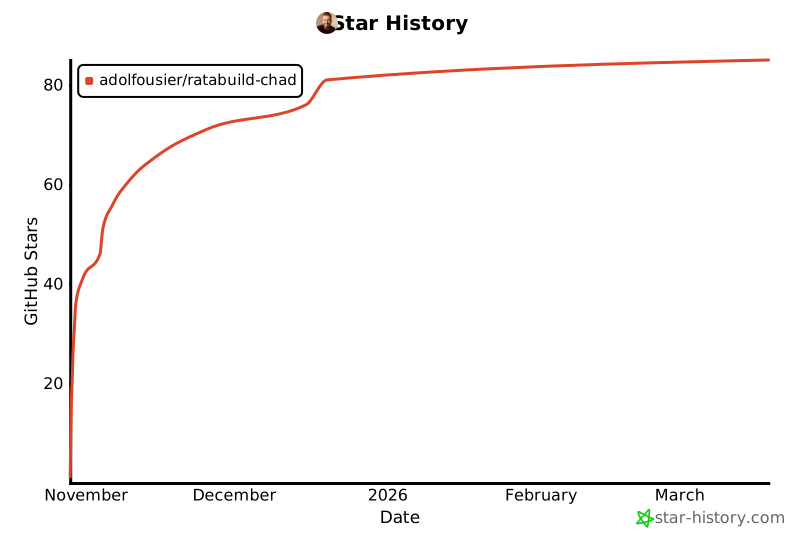
## Star History Chart
[](https://www.star-history.com/#adolfousier/ratabuild-chad&type=date&legend=top-left)
**Built with ❤️ by the Neura AI team** | [Website](https://meetneura.ai) | [Issues](https://github.com/adolfousier/ratifact/issues)