https://github.com/adriantanasa/github-wiki-sidebar
Github Wiki sidebar menu builder with multi-level, ordering and exclusion list support
https://github.com/adriantanasa/github-wiki-sidebar
github github-wiki github-wiki-sidebar markdown-converter navigation
Last synced: about 1 month ago
JSON representation
Github Wiki sidebar menu builder with multi-level, ordering and exclusion list support
- Host: GitHub
- URL: https://github.com/adriantanasa/github-wiki-sidebar
- Owner: adriantanasa
- License: mit
- Created: 2017-11-30T11:30:02.000Z (over 8 years ago)
- Default Branch: master
- Last Pushed: 2021-09-16T03:51:20.000Z (almost 5 years ago)
- Last Synced: 2025-02-14T18:01:43.890Z (over 1 year ago)
- Topics: github, github-wiki, github-wiki-sidebar, markdown-converter, navigation
- Language: JavaScript
- Homepage:
- Size: 25.4 KB
- Stars: 187
- Watchers: 4
- Forks: 30
- Open Issues: 14
-
Metadata Files:
- Readme: README.md
- License: LICENSE
Awesome Lists containing this project
README
# github-wiki-sidebar
[![NPM Version][npm-image]][npm-url]
[![NPM Downloads][downloads-image]][downloads-url]
Github Wiki sidebar menu generator with support for multi-level items, ordering, exclude list and re-usable options between executions. Can be used also to generate a TOC for a markdown (.md files) based project.
## Features:
* generates markdown menu starting from the Github Wiki pages (_Sidebar.md)
* step by step execution with user input (inquirer.js) for the job configuration
* option to automatically push changes to the git wiki origin repository
* option for the ordering of the menu items
* selection of files to add to an exclusion list
* option to define a template for the generated menu (add logo, text etc to the sidebar)
* persist all the options between the job executions
* option for multi-level menus based on the user-defined category separator
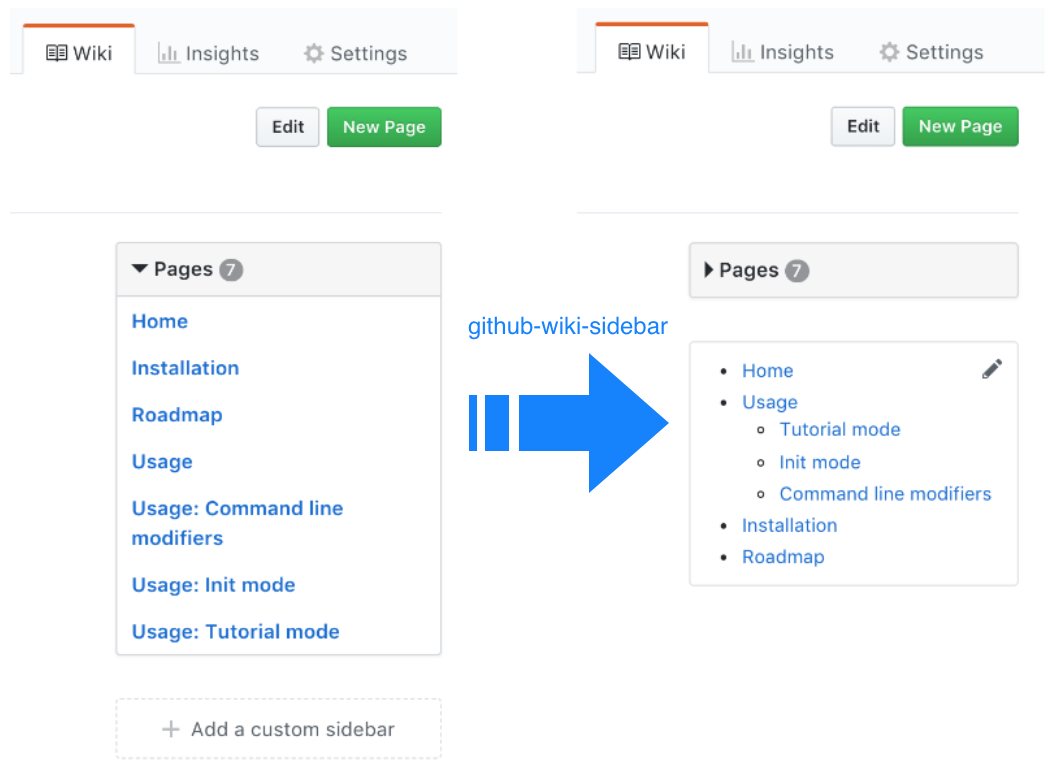
See examples of sidebar menu generated by this module at [github-wiki-sidebar's Wiki](https://github.com/adriantanasa/github-wiki-sidebar/wiki) and more in the *Examples* section (as [AngularJS](https://github.com/angular/angular.js/wiki), [ng-bootstrap](https://github.com/ng-bootstrap/ng-bootstrap/wiki), etc.)
## Installation
```shell
npm install github-wiki-sidebar -g
```
## Usage
```shell
github-wiki-sidebar --git-push
```
Starts the step by step enquire mode, reuses any previously saved configuration, generates the options.json and \_Sidebar.md files and pushes the updates to git _origin_ repository.
## Modifiers:
**--silent**
Updates _Sidebar.md file based on the local option.json file
**--git-push**
Updates locally the wiki git repository then executes github-wiki-sidebar job and finally pushes updates menu and configuration file back to the remote repository (_origin_) .
**--skip-options**
Remove the options.json file after execution
**--skip-sidebar**
Dry-run - Not generating the _Sidebar.md file
## End-to-End Scenario
**Configure the job**
* clone locally your wiki repository
* execute the job in default mode (optionally with git push _--git-push_)
**Updating sidebar menu**
* if there is no need to update the options for the job - run in _--silent_ mode (recommended for automation - integration with GitHub hooks
* when updates are needed - execute the job with the default parameters (_--enquire_) mode - hit to leave the previously changed options unchanged.
Example for a public wiki:
```shell
git clone https://github.com/adriantanasa/github-wiki-sidebar.wiki.git
cd github-wiki-sidebar.wiki
github-wiki-sidebar --git-push
```
```shell
# updating the sidebar menu
github-wiki-sidebar --silent --git-push
```
[](https://asciinema.org/a/vhcfzXYJclbJqRI2zU1exDQwh)
### Debug
```shell
export DEBUG=github-wiki-sidebar;github-wiki-sidebar
```
## Options available in init/tutorial mode
**Define the category separator for multi-level menu: (: )**
Change the sequence to break titles into categories (default to ":-"). Users on Windows operating system have to choose a different separator for categories as the colon (:) is not accepted as a file separator.
**Define the format of the page links: (./%s)**
Allows the user to change the links to a different format (default is relative). A full URI could be used for ex: ```https://github.com/adriantanasa/github-wiki-sidebar/wiki/%s```
**Define the _Sidebar.md content template: (%s)**
You can add markdown content before/after menu content - use this step to add for example a logo. The %s will be replaced with the content of the menu:
```
[](https://www.npmjs.com/package/github-wiki-side
bar)\n\n%s
```
**Select the items to be excluded from menu: (Press \ to select, \ to toggle all, \ to invert selection)**
Provides a checkable list with all the .md files available. Use SPACE to add items to the exlusion list. Checking a top category - ex: ```Categ1.md``` - will exclude all the subpages from the menu - as ```Categ1: Subpage1.md```, ```Categ1: Subpage2: Subsubpage1.md```
**Change the priority/order of the items in menu (ex: 3 4 0): n**
The list of local *.md files are displayed with numeric indexes - here you can specify in a space separated list the priority for them in the menu. By default, the script is looking for the position of Home.md (if any) in your local folder and adding it with the highest priority.
## Recipes
### Add a logo to your menu
Execute the script in init mode and at the *Select the _Sidebar.md content template: %s* change the default template with one that will include the logo:
```markdown
\n\n%s
```
You can also add your image directly to wiki repository and reference it directly in your template.
## Contribution
Check [Roadmap](https://github.com/adriantanasa/github-wiki-sidebar/wiki/Roadmap) for planned items.
We are welcoming contributors - feel free to create issues and help improve the tool. Also if you have a public wiki generated with this module please add it to README.md Examples section.
## Examples
GitHub wiki menus generated with this module:
* [AngularJS Wiki](https://github.com/angular/angular.js/wiki)
* [ng-bootstrap Wiki](https://github.com/ng-bootstrap/ng-bootstrap/wiki)
* [React.js Wiki](https://github.com/facebook/react/wiki)
* [ShellJS Wiki](https://github.com/shelljs/shelljs/wiki)
* [Synful Wiki](https://github.com/nathan-fiscaletti/synful/wiki)
[npm-image]: https://img.shields.io/npm/v/github-wiki-sidebar.svg
[npm-url]: https://npmjs.org/package/github-wiki-sidebar
[downloads-image]: https://img.shields.io/npm/dm/github-wiki-sidebar.svg
[downloads-url]: https://npmjs.org/package/github-wiki-sidebar