https://github.com/adrianvla/mlearn
A cross-platform desktop application made for Super-Fast Language Learning by immersion. Watch your favourite content in your target language.
https://github.com/adrianvla/mlearn
ajatt anki app easy-to-use german immersion japanese language-learning macos-app ocr srs subtitles translation windows
Last synced: about 1 month ago
JSON representation
A cross-platform desktop application made for Super-Fast Language Learning by immersion. Watch your favourite content in your target language.
- Host: GitHub
- URL: https://github.com/adrianvla/mlearn
- Owner: adrianvla
- License: other
- Created: 2024-10-28T16:57:12.000Z (over 1 year ago)
- Default Branch: main
- Last Pushed: 2026-05-20T22:26:49.000Z (about 2 months ago)
- Last Synced: 2026-05-21T04:29:31.361Z (about 2 months ago)
- Topics: ajatt, anki, app, easy-to-use, german, immersion, japanese, language-learning, macos-app, ocr, srs, subtitles, translation, windows
- Language: TypeScript
- Homepage: https://mlearn.kikan.net
- Size: 42 MB
- Stars: 7
- Watchers: 2
- Forks: 0
- Open Issues: 1
-
Metadata Files:
- Readme: README.md
- License: LICENSE
- Agents: AGENTS.md
Awesome Lists containing this project
README
# mLearn
[](https://github.com/adrianvla/mLearn/releases)
[](LICENSE)
[](https://deepwiki.com/adrianvla/mLearn)
> **Supercharge your language learning journey by watching native content**
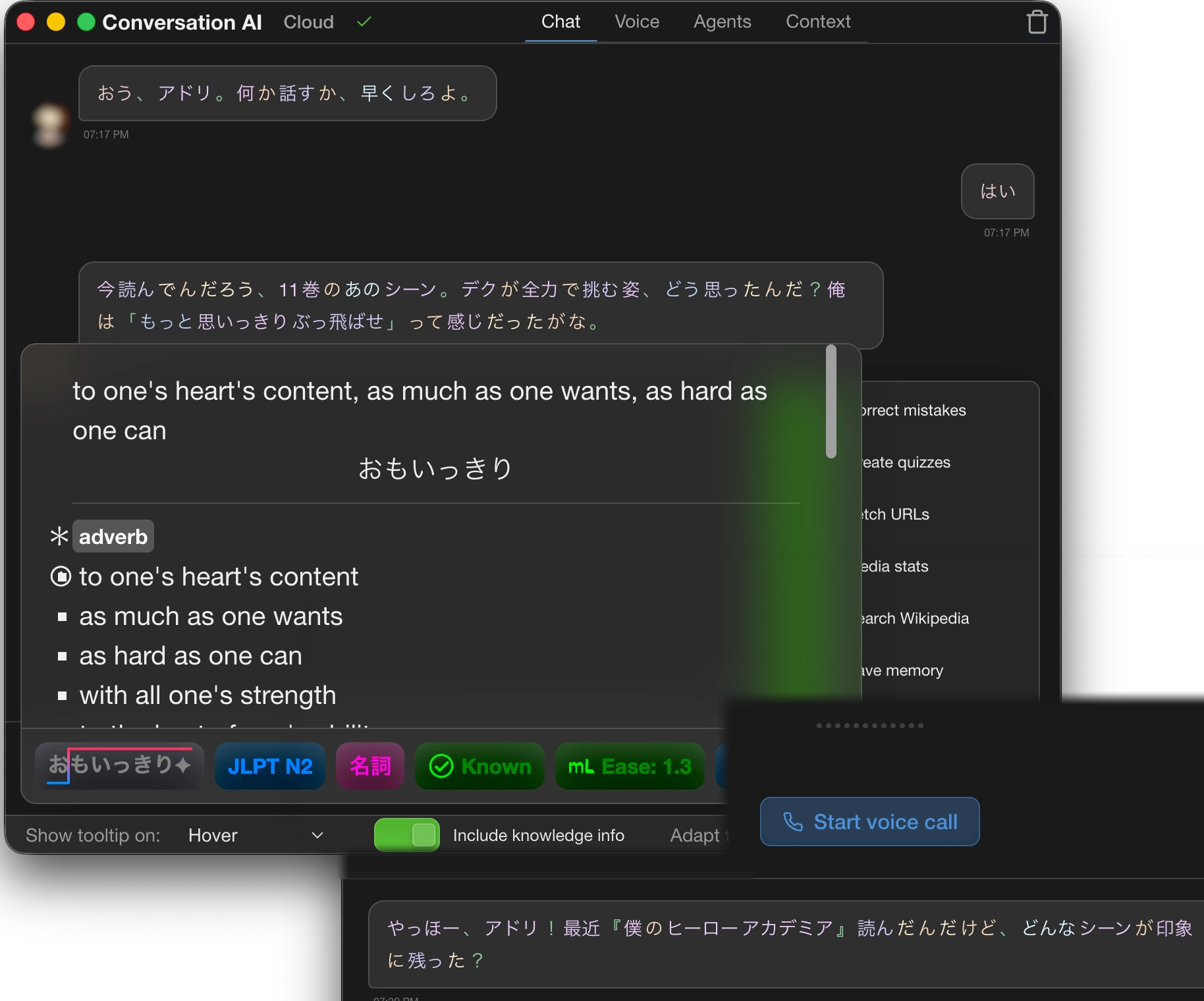
mLearn is an all-in-one immersion app that knows what you know. Watch videos, read manga, chat with an AI tutor, and review flashcards — all while the app passively tracks every word you encounter to build a personalized model of your knowledge.
**[Website](https://mlearn.kikan.net)** | **[Releases](https://github.com/adrianvla/mLearn/releases)** | **[Issues](https://github.com/adrianvla/mLearn/issues)**
---
## Features
### Core Learning Modes
| Feature | Description |
|---------|-------------|
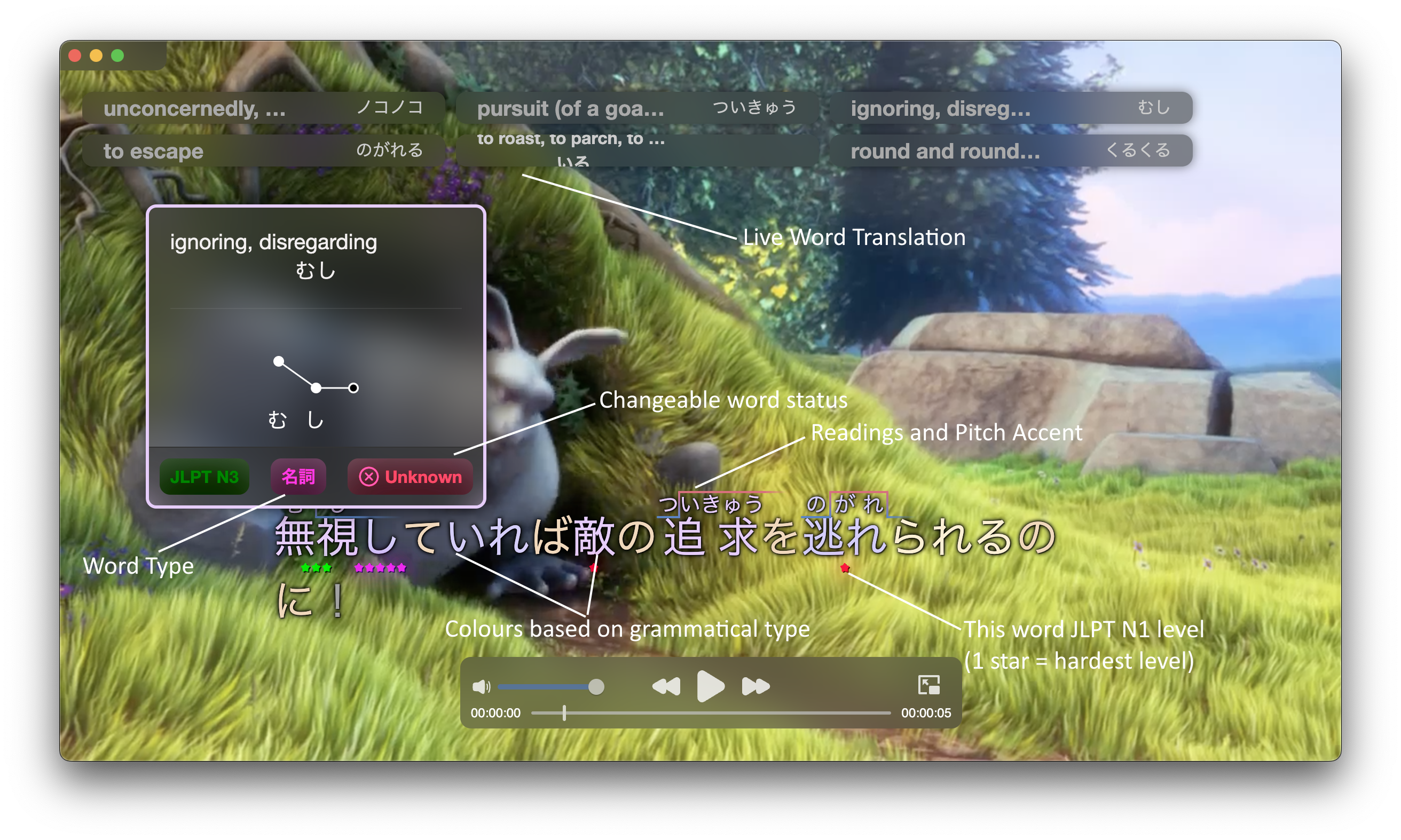
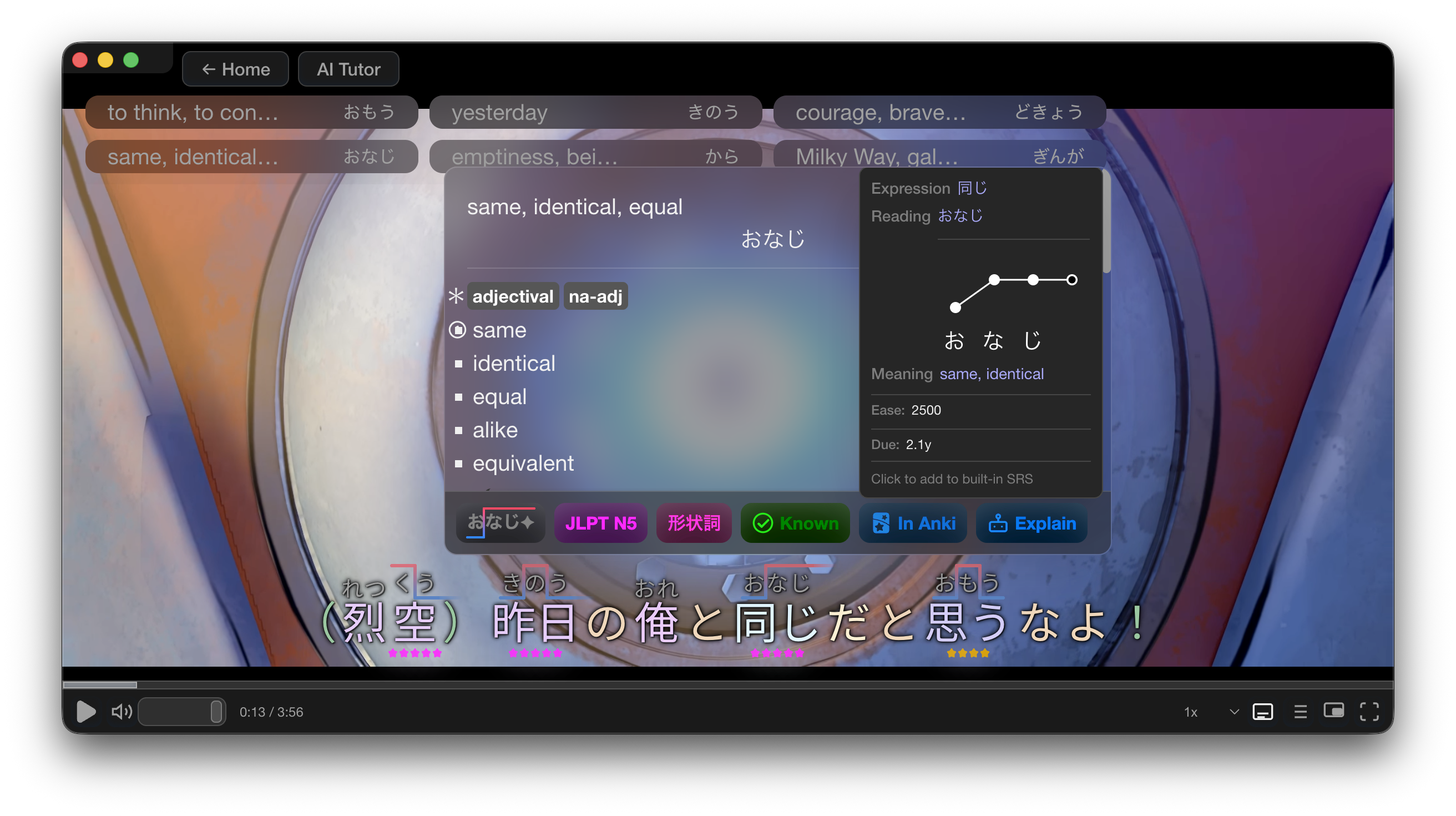
| **Video Immersion** | Drag & drop videos or stream URLs (`.m3u8`, `.mp4`). Color-coded subtitle overlay with instant word lookup. One-click flashcard creation with video screenshots. |
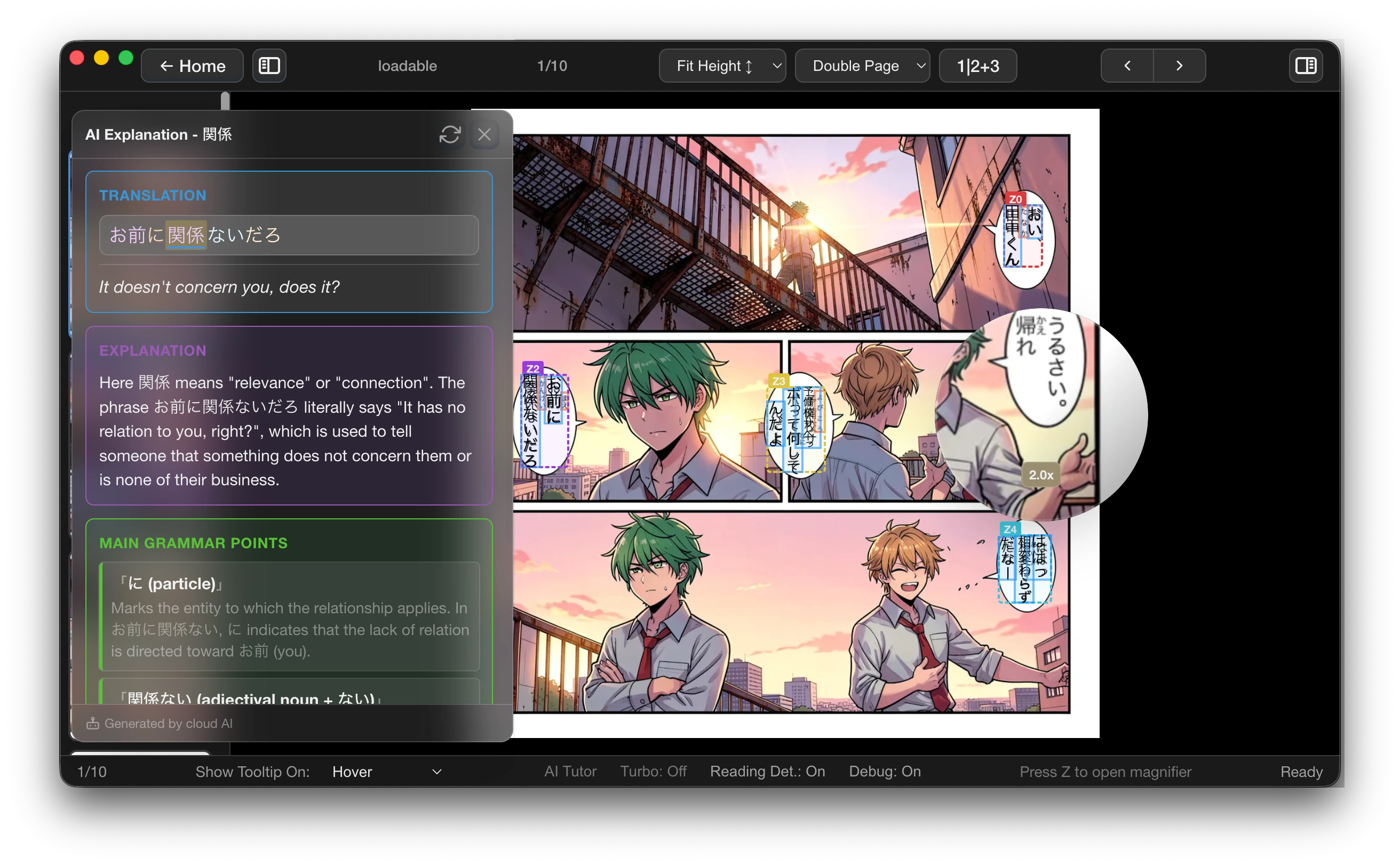
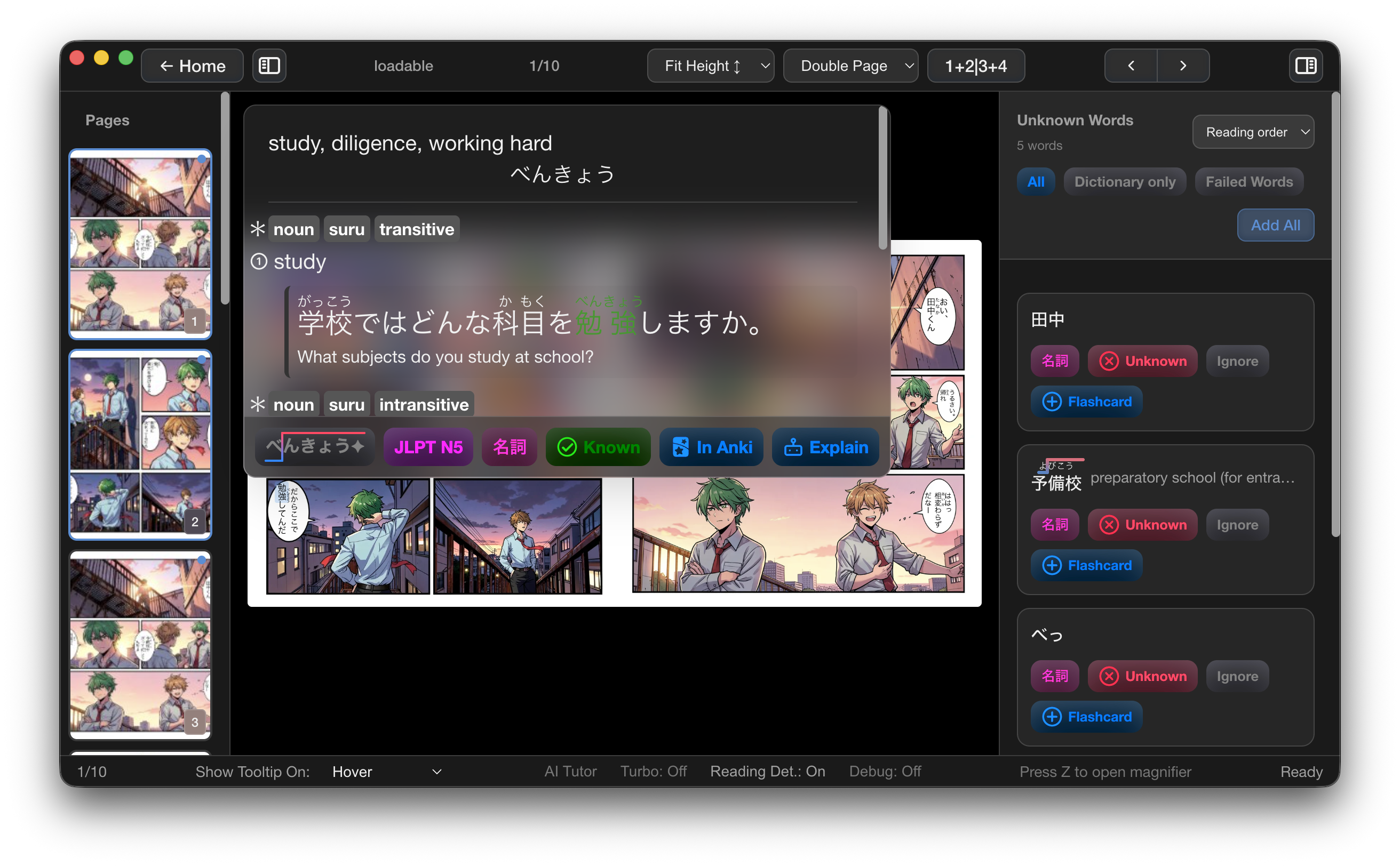
| **Reader / OCR** | Open image folders or PDFs with real-time OCR (RapidOCR, PaddleOCR, MangaOCR). Click any text for instant lookup. Double-page spread mode, furigana toggle, magnifying glass. |
| **AI Conversation Agent** | Full AI tutor with voice chat. Built-in Qwen3-4B (runs offline), Ollama, or Cloud LLM. Corrects mistakes, creates quizzes, adapts to your level. |
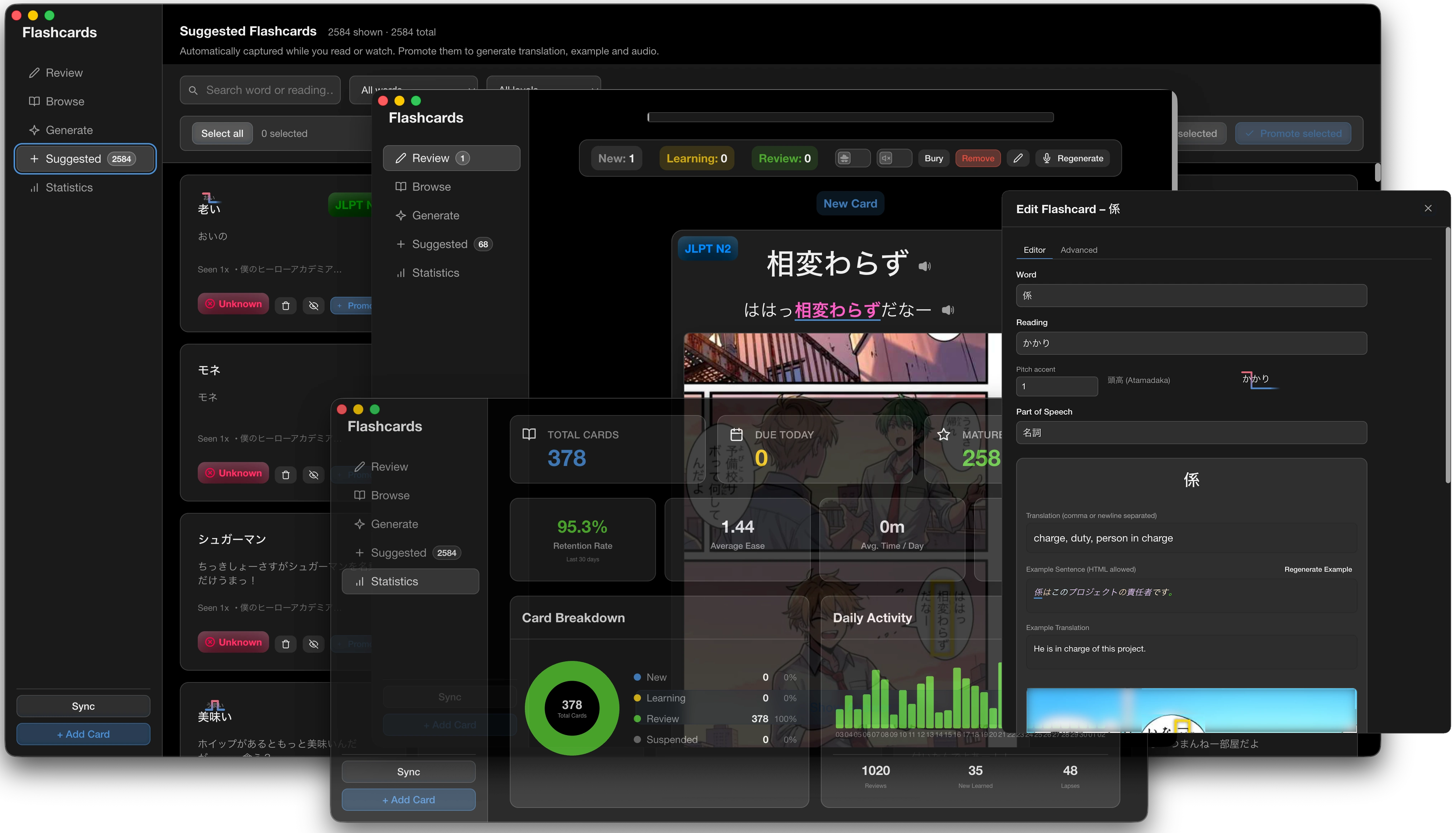
| **SRS Flashcards** | Anki-like spaced repetition with 5 tabs: Review, Browse, Generate, Suggested, Statistics. Bulk TTS generation, LLM example sentences, pitch accent display. |
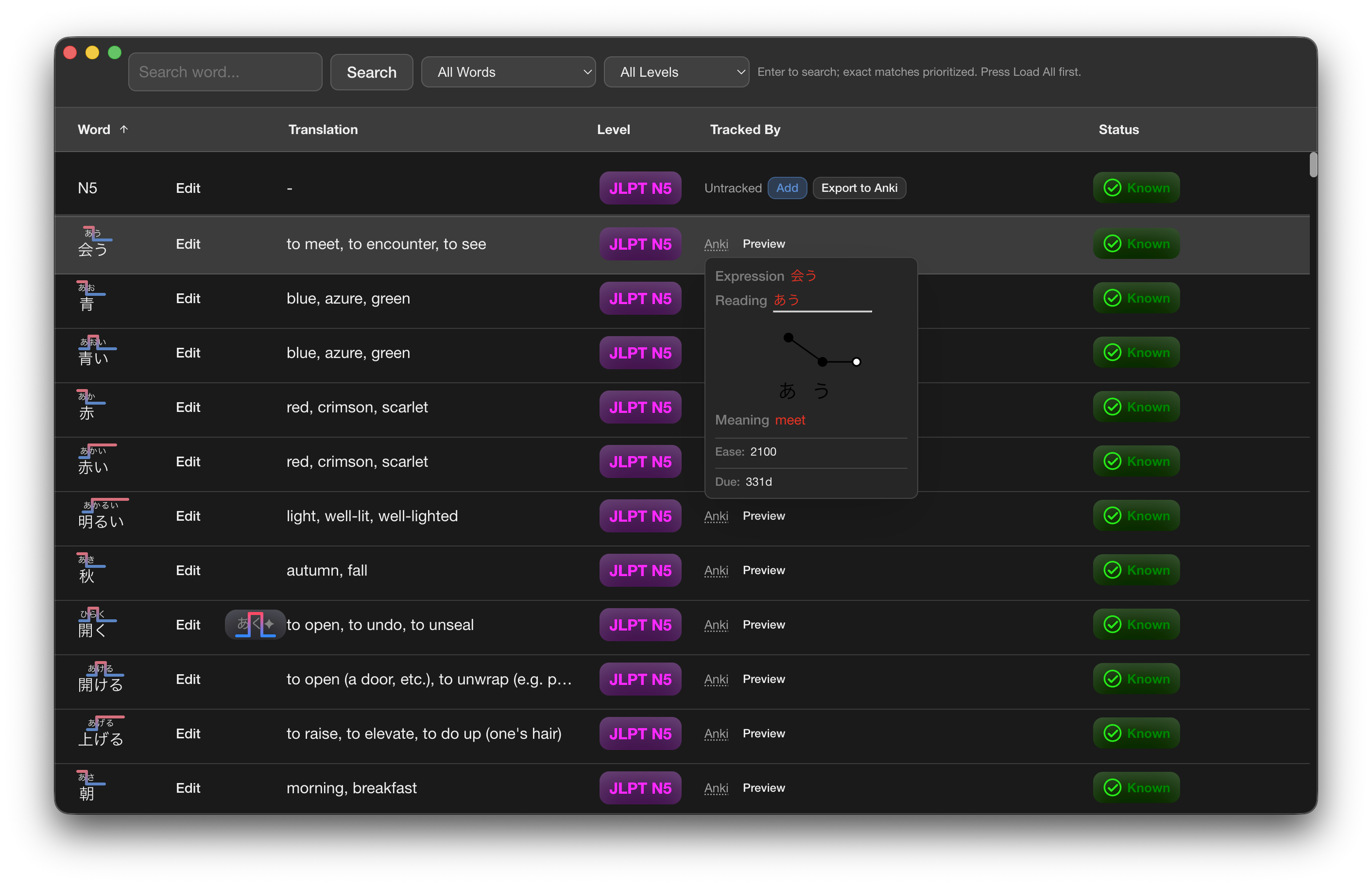
| **Word Passive Tracking** | Auto-tracks every word you see/hover across all media. Failed words feed into your SRS queue automatically. |
| **Word Sync** | Intelligent vocabulary assessment with kanji-boosted weighted sampling. Efficiently tests what you actually don't know. |
### Social & Sync
| Feature | Description |
|---------|-------------|
| **Watch Together** | Sync video playback across devices. Local network or cloud rooms with cloud-synced playback. |
| **Between-Devices Sync** | Desktop ↔ Mobile sync via tethered mode (local network) or cloud. Bidirectional settings + flashcard sync. |
| **Cloud Flashcard Sync** | Share flashcards instantly via QR code through the cloud. |
### AI & Voice
| Feature | Description |
|---------|-------------|
| **Text-to-Speech** | Kokoro (82M), Qwen3-TTS (1.7B), System TTS, or remote. Voice cloning with custom samples. |
| **Speech-to-Text** | Whisper-small via faster-whisper with Silero VAD. Voice activity detection or push-to-talk modes. |
| **LLM Word Explainer** | Instant AI explanations for any word with 500-entry cache. |
| **Bulk AI Generation** | Generate example sentences and audio for hundreds of cards at once. |
### Visual & Customization
| Feature | Description |
|---------|-------------|
| **Video Overlay** | Transparent always-on-top subtitle window for **any video player**. Syncs with the browser extension for streaming sites. Auto-positioning, geometry locking, drag & drop subtitles. |
| **Text Overlay** | Full-screen overlay for **web browsing**. Click any text on a webpage to look up words instantly without leaving the page. |
| **Browser Extension** | Chrome/Firefox extension that brings mLearn's subtitle overlay to any streaming website. |
| **Statistics Dashboard** | Heatmaps, streaks, immersion tracking, review activity, level breakdowns, word acquisition analytics. |
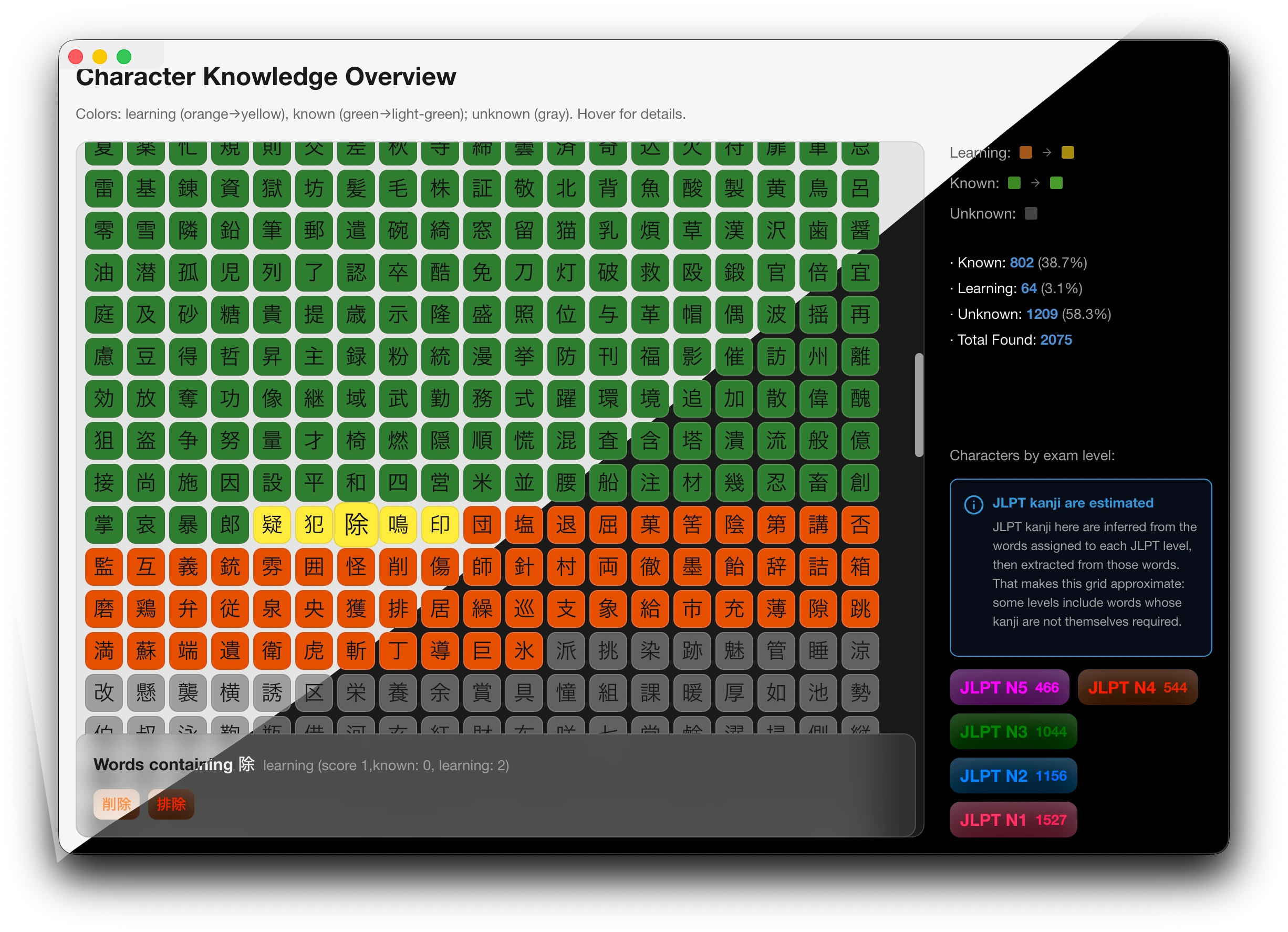
| **Kanji Grid** | Visual knowledge map of all kanji colored by status with level filtering. |
| **7 Themes** | Light, Dark, Darker, Light High Contrast, Dark High Contrast, Glass Light, Glass Dark. |
| **Plugin System** | Extensible plugin architecture for custom learning tools. |
### Mobile
| Feature | Description |
|---------|-------------|
| **iOS & Android** | 🚧 Coming Soon. Full mobile app via Capacitor. Reuses desktop routes with mobile-optimized layout. Tethered mode connects to desktop backend. |
| **Flashcards PWA** | ✅ [mlearn-app.kikan.net](https://mlearn-app.kikan.net/) — Progressive Web App for flashcard review. Syncs with desktop via cloud or tethered mode. Use it on any device with a browser while waiting for native apps. [Source](https://github.com/adrianvla/mlearn-mobile-app) |
---
## What's New in v2.0
v2.0 is a complete rewrite in **TypeScript + SolidJS** with major new capabilities:
- **AI Conversation Agent** — Full AI tutor with voice chat, tool calling, and memory
- **OCR Reader** — Manga/comic/PDF reader with 3 OCR engines
- **Statistics Dashboard** — Comprehensive analytics with heatmaps and immersion tracking
- **Watch Together** — Synced video watching with cloud playback sync
- **TTS / Voice** — Kokoro, Qwen3-TTS, voice cloning
- **STT / Speech Recognition** — Whisper-based voice input
- **Browser Extension** — Chrome/Firefox extension for streaming sites
- **Video Overlay** — Always-on-top synced subtitles for any video player
- **Text Overlay** — Click-to-lookup word overlay for web browsing
- **Between-Devices Sync** — Mobile ↔ Desktop sync
- **Cloud Backend** — Remote server support in addition to local/tethered
- **Word Passive Tracking** — Auto-tracks word encounters across all media
- **Word Sync** — Smart vocabulary assessment with kanji-boosted sampling
- **Flashcards PWA** — [mlearn-app.kikan.net](https://mlearn-app.kikan.net/) for flashcard review on any device with sync ([source](https://github.com/adrianvla/mlearn-mobile-app))
- **Mobile App** — iOS/Android via Capacitor (coming soon)
- **Plugin System** — Extensible plugin host architecture
- **Kanji Grid** — Visual kanji knowledge map
- **7 Themes** — Including glass themes
- **Bulk AI Generation** — Bulk TTS + example generation
- **Video Clipping** — Auto-clip video segments for flashcards
---
## Platform Support
| Platform | Status |
|----------|--------|
| macOS (Apple Silicon) | ✅ Fully supported |
| macOS (Intel) | ✅ Fully supported |
| Linux (x86_64) | ✅ Fully supported |
| Windows (x86_64) | ✅ Fully supported |
| iOS | 🚧 Coming Soon — [Get notified](https://mlearn.kikan.net) |
| Android | 🚧 Coming Soon — [Get notified](https://mlearn.kikan.net) |
| Web (Flashcards PWA) | ✅ [mlearn-app.kikan.net](https://mlearn-app.kikan.net/) — sync your flashcards and review on any device ([source](https://github.com/adrianvla/mlearn-mobile-app)) |
| Browser Extension | ✅ Chrome / Firefox |
---
## Tech Stack
| Layer | Technology |
|-------|------------|
| **Frontend** | SolidJS (signals-based reactivity), TypeScript |
| **Desktop** | Electron 41, multi-window architecture |
| **Mobile** | Capacitor 8 (iOS/Android) |
| **Backend** | Python FastAPI (port 7752) |
| **Build** | Vite 6 with custom multi-page config |
| **Testing** | Vitest with coverage |
| **Styling** | CSS per component, 7-theme system |
---
## Screenshots
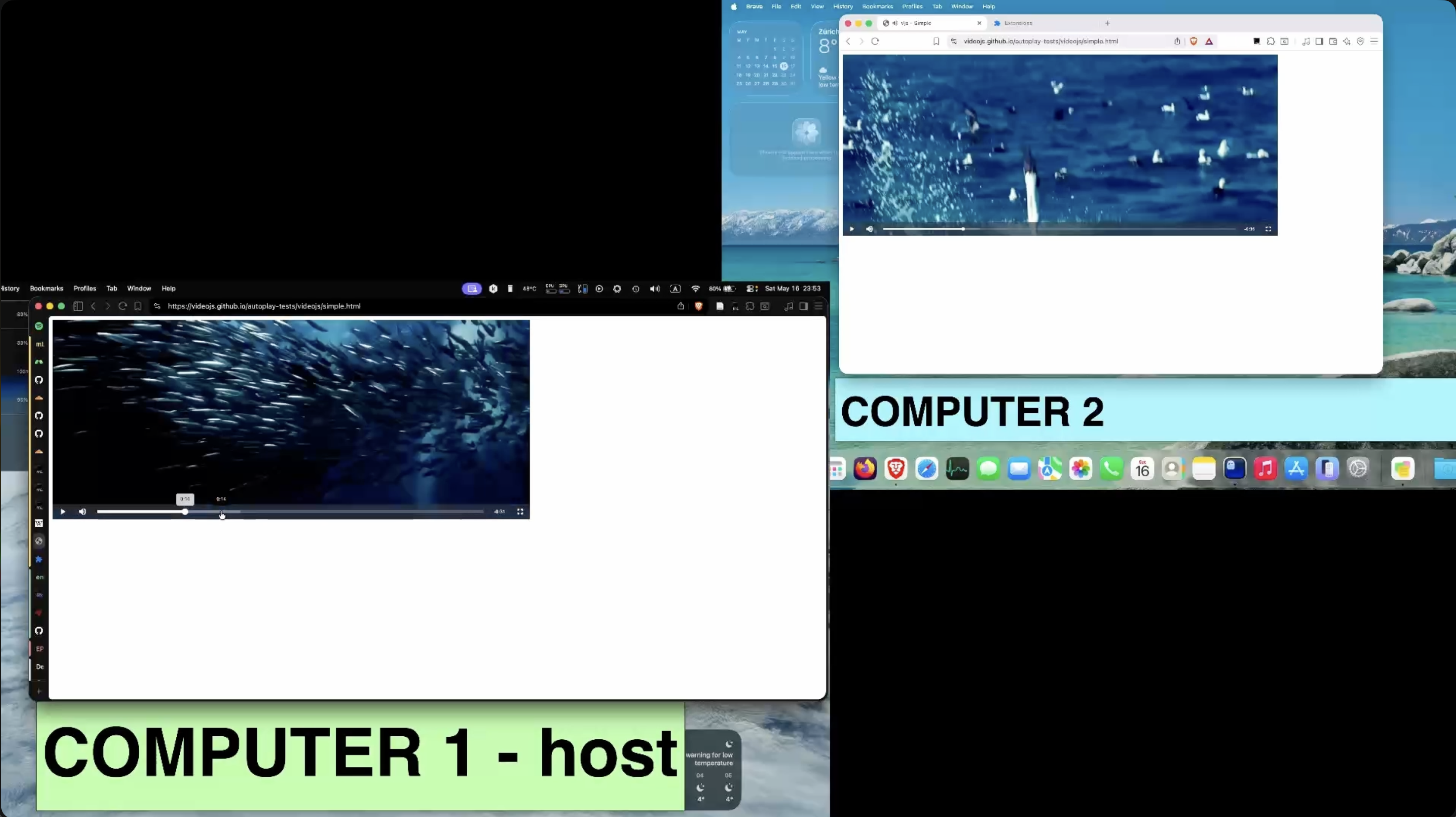
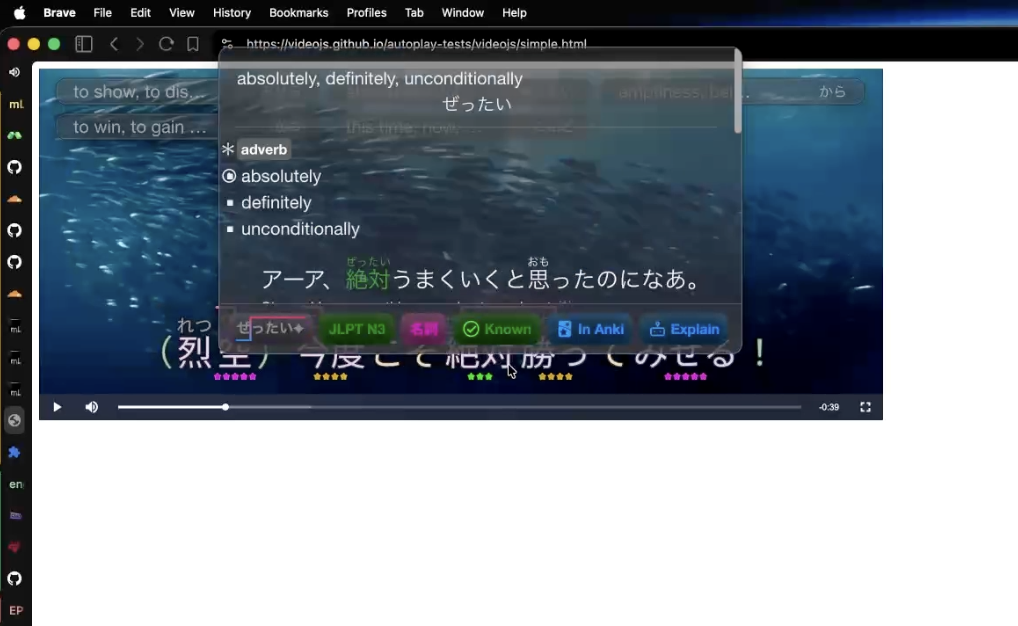
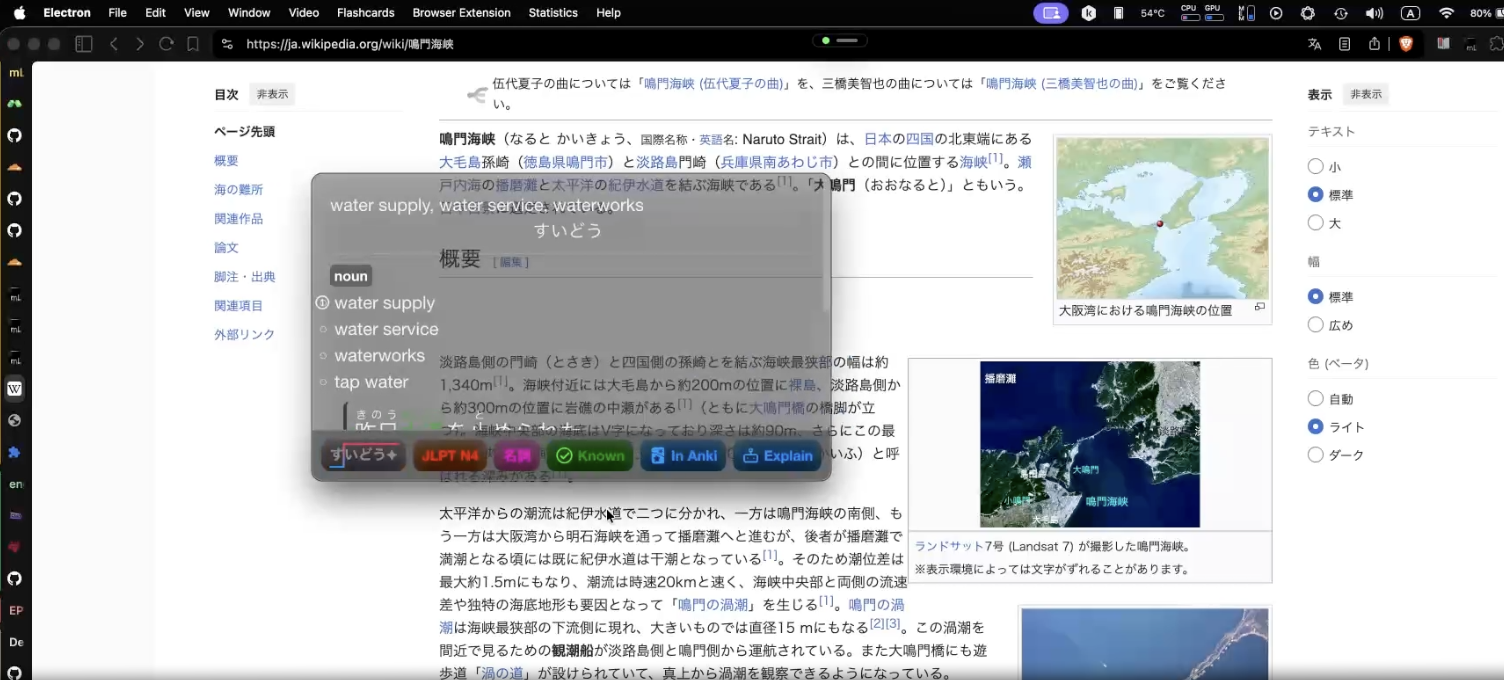
---
## Quick Start
### Download
Get the latest release from the [Releases page](https://github.com/adrianvla/mLearn/releases).
### Run from Source
```bash
# Clone the repository
git clone https://github.com/adrianvla/mLearn.git
cd mLearn
# Install dependencies
npm install
# Download language dictionaries (not included in the repo due to size)
# Japanese: Place Yomitan-format dictionaries in src/root-of-app/dictionaries/jitendex-yomitan/
# The app will build a SQLite cache from them on first run.
# Get compatible dictionaries from the Yomitan project (e.g. Jitendex).
# German: The German dictionary is built automatically from the source data
# when you run `npm run build` (via the `build:german-dict` script).
# Development mode (Vite + Electron)
npm run dev
# Or start the mobile dev server
npm run dev:mobile
```
### Build for Production
```bash
# macOS
npm run dist:mac
# Windows
npm run dist:win
# Linux
npm run dist:linux
# All platforms
npm run dist
```
---
## Architecture Overview
```
Renderer (SolidJS) → getBridge() → Electron IPC | Capacitor local storage
→ getBackend() → Python Backend (port 7752, HTTP)
Electron Main → Web Server (port 7753, tethered mode)
```
The app uses platform abstraction layers so the same renderer code works across Electron, Capacitor, and web:
- **`getBridge()`** — PlatformBridge for IPC/storage (16 sub-interfaces)
- **`getBackend()`** — BackendAdapter for Python API calls (local / tethered / cloud modes)
- **`getPlatform()`** — `'electron' | 'capacitor' | 'web'`
**15 Desktop Windows** (each a separate Vite entry):
Main, Welcome, Video, Reader, Flashcards, Conversation Agent, Statistics, Settings, Kanji Grid, Word Definition, Word DB Editor, Word Sync, Connect QR, Plugin Host, Licenses, **Overlay**
**Mobile** (in development): Single `mobile.html` with HashRouter, reuses desktop routes wrapped in `MobileLayout` + `BottomTabBar`.
---
## How to Add Your Own Language
Language modules consist of a Python tokenizer + a JSON config. Place them in `src/root-of-app/languages/`.
### Required Python functions:
```python
def LANGUAGE_TOKENIZE(text):
"""Return list of tokens with word, actual_word, and type fields."""
return [
{"word": "run", "actual_word": "run", "type": "verb"},
# ...
]
def LOAD_MODULE(folder):
"""Called on module load. Use for caching dictionaries."""
pass
def LANGUAGE_TRANSLATE(word):
"""Return {"data": [{"reading": "...", "definitions": "..."}, ...]}."""
return {"data": []}
```
### Required JSON config:
```json
{
"name": "Your Language",
"name_translated": "...",
"translatable": ["noun", "verb", "adjective"],
"colour_codes": {
"noun": "#ebccfd",
"verb": "#d6cefd"
},
"fixed_settings": {},
"freq": [["level1", "word1"], ["level1", "word2"]],
"freq_level_names": {"1": "Beginner", "2": "Intermediate"}
}
```
See `src/root-of-app/languages/ja/` and `src/root-of-app/languages/de/` for complete examples.
---
## FAQ
### Which languages are supported?
mLearn ships with complete **German** and **Japanese** support. You can add your own language by following the guide above.
### Can the app work offline?
Yes! The Japanese dictionary works fully offline. German requires online access (no free open-source German dictionary was available). The built-in AI tutor (Qwen3-4B) also runs completely offline.
### Can the app work without Anki?
Yes. Anki integration is optional and can be disabled in Settings.
### Is it free?
mLearn is free to use and **source-available**. It is licensed under the [Sustainable Use License v1.0](LICENSE).
> **Why source-available?** This project represents thousands of hours of work (around ~1.5 years of development at the time of writing this) across NLP pipelines, OCR engines, AI tutoring systems, and multi-platform architecture. The Sustainable Use License keeps the code transparent and accessible for personal use and non-commercial sharing, while protecting against resale or exploitation — so the app can remain free for learners without being stripped for parts.
### How do I stream a video?
Paste a link to a streaming playlist (e.g., ending in `.m3u8` or `.mp4`) into the video player, or drag & drop a local video file.
### How do I add subtitles?
Drag & drop subtitle files (`.srt`, `.vtt`, `.ass`) onto the video player or overlay window.
### How does the overlay work?
**Video Overlay** — Open it from the video player's context menu or via the browser extension. It's a transparent, always-on-top window that syncs with the video and lets you look up words without leaving your content.
**Text Overlay** — Activate text mode from the browser extension or overlay controls. The window becomes fullscreen and click-through: click any text on a webpage to get an instant word lookup popup.
### I opened Anki, but mLearn cannot see it
Install the [AnkiConnect](https://ankiweb.net/shared/info/2055492159) plugin.
### Why does Japanese use so much RAM?
The Japanese dictionary is loaded into RAM for instant word access (no internet requests per word). This trades RAM for speed and power efficiency.
### How do I use the browser extension?
Build it with `npm run build:extension`, then load the `extension/dist/` folder as an unpacked extension in Chrome/Edge/Firefox. It will communicate with the running mLearn desktop app.
### I found a bug!
Please open a [GitHub issue](https://github.com/adrianvla/mLearn/issues).
---
## Development
### Commands
```bash
npm run dev # Vite (3000) + Electron concurrent
npm run typecheck # CRITICAL: both tsconfigs before commit
npm run build # Production build
npm run test # Vitest (all 3 projects)
npm run test:coverage # Vitest with coverage
npm run dev:mobile # Capacitor watch mode
npm run build:mobile # Capacitor build → dist-mobile/
npm run build:extension # Build browser extension
```
### Project Structure
```
src/
├── electron/ # Main process (CommonJS). IPC, window management, services
├── renderer/ # SolidJS UI. Components, windows, hooks, contexts
├── shared/ # Types, constants, platform bridges/backends
├── root-of-app/ # Python FastAPI backend. NLP, translation, OCR, TTS
└── html/ # Electron window entries + mobile.html
extension/ # Chrome/Firefox browser extension
android/, ios/ # Capacitor native projects
examples/plugins/ # Plugin templates
```
### Before Committing
1. `npm run typecheck` — validates both tsconfigs
2. New IPC → add to `IPC_CHANNELS`, implement in both bridges
3. Settings changes → update `Settings` interface + `DEFAULT_SETTINGS`
4. New renderer code → use `getBridge()`/`getBackend()`, never direct IPC
---
## Legal
- End User License Agreement: [EULA.md](EULA.md)
- Terms of Service: [TERMS_OF_SERVICE.md](TERMS_OF_SERVICE.md)
- Privacy Policy: [PRIVACY_POLICY.md](PRIVACY_POLICY.md)
- School Deployment Guide: [SCHOOL_DEPLOYMENT.md](SCHOOL_DEPLOYMENT.md)
Web versions of these documents are available at [mlearn.kikan.net](https://mlearn.kikan.net).
---
## License
This software is licensed under the **Sustainable Use License v1.0**. See the [LICENSE](LICENSE) file for the full text.
```
Copyright (C) 2024-2026 Adrian Vlasov
Sustainable Use License — Version 1.0
By using the software, you agree to all of the terms and conditions below.
The licensor grants you a non-exclusive, royalty-free, worldwide,
non-sublicensable, non-transferable license to use, copy,
distribute, make available, and prepare derivative works of
the software, in each case subject to the limitations below.
You may use or modify the software only for your own internal
business purposes or for non-commercial or personal use. You
may distribute the software or provide it to others only if
you do so free of charge for non-commercial purposes.
```
Additional licenses for third-party libraries may be found in the **Settings → About** section of the app.
---
Made with ❤