https://github.com/aelithron/booklink
An aesthetically-pleasing tool for ethically linking to books.
https://github.com/aelithron/booklink
aesthetic books dynamic link nextjs
Last synced: about 1 month ago
JSON representation
An aesthetically-pleasing tool for ethically linking to books.
- Host: GitHub
- URL: https://github.com/aelithron/booklink
- Owner: aelithron
- License: mit
- Created: 2025-07-08T09:38:15.000Z (about 1 year ago)
- Default Branch: main
- Last Pushed: 2026-05-13T01:14:32.000Z (2 months ago)
- Last Synced: 2026-05-28T00:28:05.961Z (about 2 months ago)
- Topics: aesthetic, books, dynamic, link, nextjs
- Language: TypeScript
- Homepage: https://booklnk.me
- Size: 851 KB
- Stars: 1
- Watchers: 0
- Forks: 0
- Open Issues: 0
-
Metadata Files:
- Readme: README.md
- License: LICENSE
Awesome Lists containing this project
README
# Book Link
An aesthetically-pleasing tool for ethically linking to books.

## The Problem
I saw this interesting viewpoint from [Richard Stallman's website](https://stallman.org/amazon.html):
> "If you want to use a URL to identify a book, please don't use an Amazon page! Doing so promotes Amazon."
Personally, I agree with this viewpoint. Who wants to promote big tech and billionaires when sharing links to books?
However, most people wouldn't take the time to find another way.
## The Solution
A simple, aesthetically-pleasing way to share books that promotes ethical and small booksellers over billion-dollar megacorps.
This is a Next.JS based website for doing just that.
## Using
This app is quite easy-to-use! Just go to [booklnk.me](https://booklnk.me) and type in the name of a book. It will create a page with all of the book's information, as well as links to buy it. The shortlink it gives you can be easily shared to others, allowing for a convienent, aesthetic, and ethical way to share books!
### Self-hosting
You'll need a PostgreSQL database to run this app.
1. Environment Variables \
In your installation method, add the following environment variables:
- `NEXT_PUBLIC_DMCA_EMAIL`: An email address for people to send DMCA complaints, as required by Google Books to use their API.
- `GOOGLE_BOOKS_KEY`: An API key for Google Books (not an OAuth token). You can get one from Google Cloud at [this Google Cloud link](https://console.cloud.google.com/apis/credentials) (you may need to create a project in the Google Cloud interface).
- `GOOGLE_BOOKS_LANG`: The language of books in searches, as a two-letter ISO-639-1 code (such as `"en"` or `"fr"`). Defaults to English (`"en"`) if not included.
- `NYT_KEY`: An API key for the New York Times (not the secret). This needs access to the Books API and can be created at https://developer.nytimes.com.
- `DATABASE_URL`: A PostgreSQL connection string in the format of `postgres://:@:/`.
(more info to come soon)
- `OPENGRAPH_ROOT`: The root of your domain, which is used for metadata, in the format of `https://.` (no trailing slash). You can also add a subdomain if applicable.
2. You can install with Docker, or using another method. I can't provide configs for other environments, but I may be able to help you if you hit a roadblock (just DM @aelithron on Discord). I provided a Docker Compose file below, and the Docker image can be found on the Packages tab or simply pulled as `ghcr.io/aelithron/booklink:latest`.
**Make sure to fill in the empty quotation marks as explained in step 1!**
```yaml
services:
booklink:
image: ghcr.io/aelithron/booklink:latest
container_name: booklink
restart: always
environment:
NEXT_PUBLIC_DMCA_EMAIL: ""
GOOGLE_BOOKS_KEY: ""
GOOGLE_BOOKS_LANG: ""
NYT_KEY: ""
DATABASE_URL: ""
OPENGRAPH_ROOT: ""
ports:
- 3000:3000
```
3. There have been some issues with database migration! If you happen to get one in your console, or if the app errors with missing tables, do the following:
- Clone the source code (this GitHub repo) to your computer
- Create a file called `.env` containing `DATABASE_URL="postgres://:@:/"`, filling in the blanks.
- Open a terminal and run the commands `npm install` and `npx drizzle-kit push`. You should be good now, and this should be a one time thing.
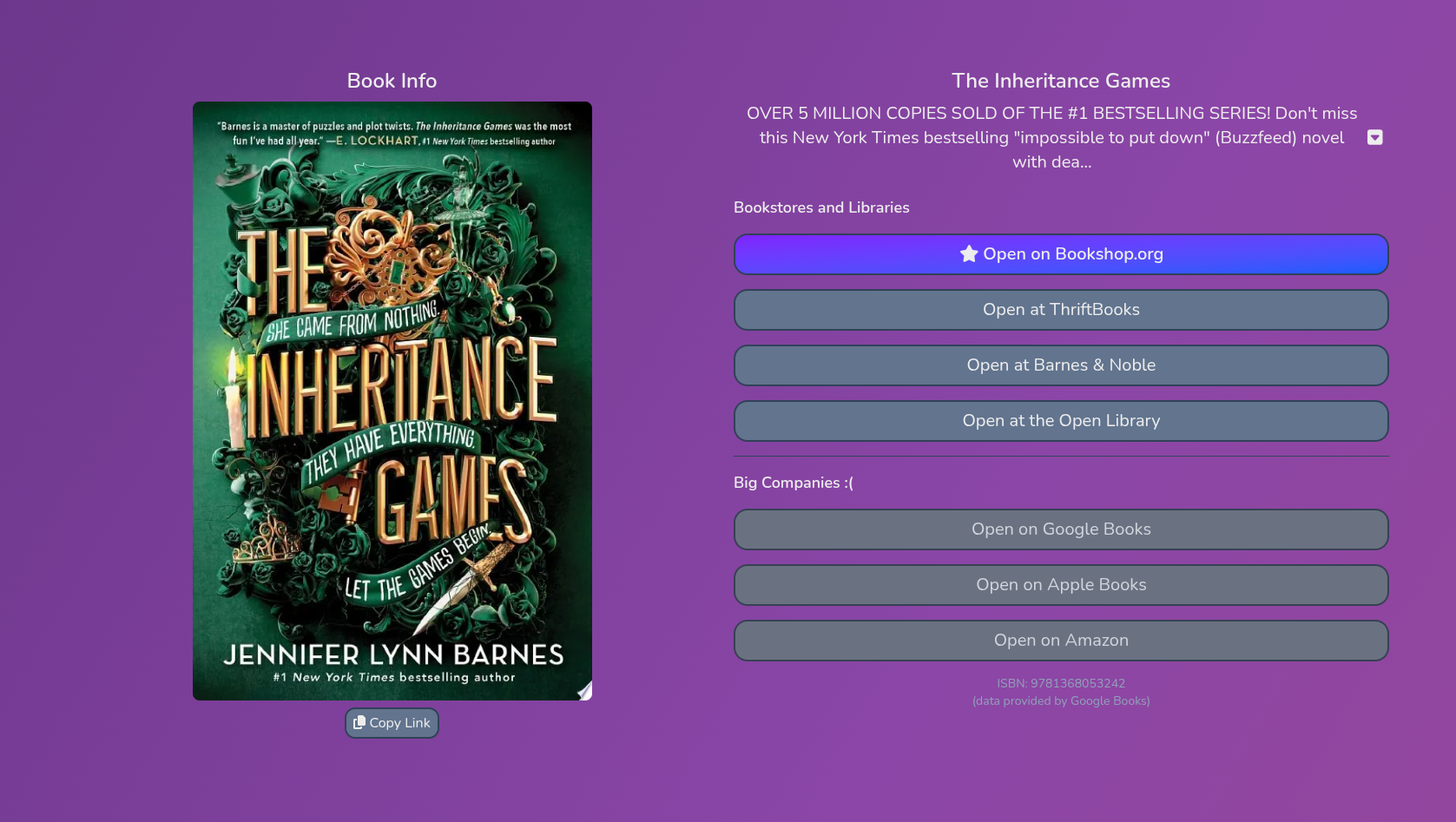
## Screenshot
## Extra Notes
- Hit any roadblocks in setting up or using this app? Feel free to DM @aelithron on Discord, and I may be able to help :3
- I hope to move to the Open Library API in the future (currently it is used in a part of the backend for getting Open Library IDs), as it's slightly hypocritical to take such an anti-big-company stance and then use a Google API. However, that API is the definition of spaghetti code and I didn't want to spend ten years debugging.
- The current links provided for books, as ordered in the UI, are:
- Bookshop.org (preferred)
- ThriftBooks
- Barnes & Noble
- The Open Library
- Google Books
- Apple Books
- Amazon