https://github.com/aetherinox/traefik-api-token-middleware
Traefik v3 plugin which allows you to pass an API-TOKEN in the header request of the targeted service. Supports whitelisted IP blocks. Logging for each connection.
https://github.com/aetherinox/traefik-api-token-middleware
traefik traefik-docker traefik-plugin traefik-plugins-catalog
Last synced: 10 months ago
JSON representation
Traefik v3 plugin which allows you to pass an API-TOKEN in the header request of the targeted service. Supports whitelisted IP blocks. Logging for each connection.
- Host: GitHub
- URL: https://github.com/aetherinox/traefik-api-token-middleware
- Owner: aetherinox
- License: mit
- Created: 2024-09-27T03:55:25.000Z (almost 2 years ago)
- Default Branch: main
- Last Pushed: 2025-06-25T09:24:13.000Z (about 1 year ago)
- Last Synced: 2025-06-25T10:34:16.825Z (about 1 year ago)
- Topics: traefik, traefik-docker, traefik-plugin, traefik-plugins-catalog
- Language: Go
- Homepage: https://plugins.traefik.io/plugins/66f6ac697dd5a6c3095befd3/api-key-and-token-middleware
- Size: 1.46 MB
- Stars: 10
- Watchers: 1
- Forks: 3
- Open Issues: 2
-
Metadata Files:
- Readme: README.md
- Changelog: CHANGELOG.md
- Contributing: CONTRIBUTING.md
- License: LICENSE
Awesome Lists containing this project
README
Traefik v3 middleware which allows for you to protect certain aspects of your site with an API token.
♾️ Traefik API Key & Token Middleware ♾️
This Traefik middleware allows you to secure certain routes behind a request header API token. Users who have not successfully authenticated will be greeted with a **403 Forbidden Error**. Also displays information about each connection including IP address and URL that the user is trying to access.
[![Version][github-version-img]][github-version-uri]
[![Downloads][github-downloads-img]][github-downloads-uri]
[![Build Status][github-build-img]][github-build-uri]
[![Size][github-size-img]][github-size-img]
[![Last Commit][github-commit-img]][github-commit-img]
[![Contributors][contribs-all-img]](#contributors-)
[](https://aetherinox.github.io/traefik-api-token-middleware/)
---
- [How It Works](#how-it-works)
- [Configuration](#configuration)
- [Static File](#static-file)
- [File (YAML)](#file-yaml)
- [File (TOML)](#file-toml)
- [CLI](#cli)
- [Dynamic File](#dynamic-file)
- [File (YAML)](#file-yaml-1)
- [File (TOML)](#file-toml-1)
- [Kubernetes Custom Resource Definition](#kubernetes-custom-resource-definition)
- [Parameters](#parameters)
- [authenticationHeader](#authenticationheader)
- [authenticationErrorMsg](#authenticationerrormsg)
- [bearerHeader](#bearerheader)
- [tokens](#tokens)
- [removeHeadersOnSuccess](#removeheadersonsuccess)
- [removeTokenNameOnFailure](#removetokennameonfailure)
- [timestampUnix](#timestampunix)
- [whitelistIPs](#whitelistips)
- [agentDeny](#agentdeny)
- [agentAllow](#agentallow)
- [permissiveMode](#permissivemode)
- [debugLogs](#debuglogs)
- [Full Examples](#full-examples)
- [Browser Plugins](#browser-plugins)
- [Firefox](#firefox)
- [Extension: Header Editor](#extension-header-editor)
- [Extension: Modify Header Value](#extension-modify-header-value)
- [Verifying Modified Headers](#verifying-modified-headers)
- [Local Install](#local-install)
- [Static File](#static-file-1)
- [File (YAML)](#file-yaml-2)
- [File (TOML)](#file-toml-2)
- [Dynamic File](#dynamic-file-1)
- [File (YAML)](#file-yaml-3)
- [File (TOML)](#file-toml-3)
- [Contributors ✨](#contributors-)
---
## How It Works
This middleware offers you the ability to restrict certain containers being routed through Traefik. You can restrict a container to be inaccessible unless a user does one of the following:
- Has a whitelisted IP address
- Provides a valid request header value: `X-API-TOKEN`
- Uses a valid useragent when accessing that container through their browser.
When enabling multiple ways to access the container, remember that the options are _**One OR the other**_.
This means that if you whitelist a user's IP address, and also specify a useragent which is allowed to access your container; the user does NOT need to satisfy both requirements.
They either need to be using a whitelisted IP when making their connection, OR their useragent must be a particular value.
In other words, meeting one of multiple provided options, satisfies ALL options and grants the user permission to the container.
This ensures that if you have a vital container behind your security measures and you have an incident where your whitelisted IP address changes; you have a backup method to re-gain access.
If you opt to require a request header for `X-API-TOKEN`, you should change the default header name to something else and not the default value. This ensures that outside users cannot start guessing your token.
```yml
authenticationHeaderName: X-CUSTOM-TOKEN-NAME
```
---
## Configuration
The following provides examples for usage scenarios.
### Static File
If you are utilizing a Traefik **Static File**, review the following examples:
#### File (YAML)
```yaml
## Static configuration
experimental:
plugins:
traefik-api-token-middleware:
moduleName: "github.com/Aetherinox/traefik-api-token-middleware"
version: "v0.1.4"
```
#### File (TOML)
```toml
## Static configuration
[experimental.plugins.traefik-api-token-middleware]
moduleName = "github.com/Aetherinox/traefik-api-token-middleware"
version = "v0.1.4"
```
#### CLI
```bash
## Static configuration
--experimental.plugins.traefik-api-token-middleware.modulename=github.com/Aetherinox/traefik-api-token-middleware
--experimental.plugins.traefik-api-token-middleware.version=v0.1.4
```
### Dynamic File
If you are utilizing a Traefik **Dynamic File**, review the following examples:
#### File (YAML)
```yaml
# Dynamic configuration
http:
middlewares:
api-token:
plugin:
traefik-api-token-middleware:
authenticationHeader: true
authenticationHeaderName: X-API-TOKEN
authenticationErrorMsg: "Invalid token"
bearerHeader: true
bearerHeaderName: Authorization
removeHeadersOnSuccess: true
removeTokenNameOnFailure: false
timestampUnix: false
permissiveMode: false
debugLogs: false
agentDeny:
- '\buseragent1\b'
agentAllow:
- '\buseragent2\b'
tokens:
- your-api-token
whitelistIPs:
- '66.85.101.2'
- '10.10.0.7/32'
```
#### File (TOML)
```toml
# Dynamic configuration
[http]
[http.middlewares]
[http.middlewares.api-token]
[http.middlewares.api-token.plugin]
[http.middlewares.api-token.plugin.traefik-api-token-middleware]
authenticationHeader = true
authenticationHeaderName = "X-API-TOKEN"
authenticationErrorMsg = "Invalid token"
bearerHeader = true
bearerHeaderName = "Authorization"
removeHeadersOnSuccess = true
removeTokenNameOnFailure = false
timestampUnix = false
permissiveMode = false
debugLogs = false
agentDeny = ["\buseragent1\b"]
agentAllow = ["\buseragent2\b"]
tokens = ["your-api-token"]
whitelistIPs = ["66.85.101.2", "10.10.0.7/32"]
```
#### Kubernetes Custom Resource Definition
```yaml
# Dynamic configuration
apiVersion: traefik.containo.us/v1alpha1
kind: Middleware
metadata:
name: api-token
spec:
plugin:
traefik-api-token-middleware:
authenticationHeader: true
authenticationHeaderName: X-API-TOKEN
authenticationErrorMsg: "Invalid token"
bearerHeader: true
bearerHeaderName: Authorization
removeHeadersOnSuccess: true
removeTokenNameOnFailure: false
timestampUnix: false
permissiveMode: false
debugLogs: false
agentDeny:
- '\buseragent1\b'
agentAllow:
- '\buseragent2\b'
tokens:
- your-api-token
```
---
## Parameters
This plugin accepts the following parameters:
| Parameter | Description | Default | Type | Required |
| --- | --- | --- | --- | --- |
| `authenticationHeader` | Pass token using Authentication Header | true | bool | ⚠️ Note |
| `authenticationHeaderName` | Authentication header name | 'X-API-TOKEN' | string | ⭕ Optional |
| `authenticationErrorMsg` | Error message to display on unsuccessful authentication | 'Access Denied' | string | ⭕ Optional |
| `bearerHeader` | Pass token using Authentication Header Bearer Key | true | bool | ⚠️ Note |
| `bearerHeaderName` | Authentication bearer header name | 'Authorization' | string | ⭕ Optional |
| `tokens` | List of API tokens | [] | []string | ✔️ Required |
| `removeHeadersOnSuccess` | If `true`; remove header on successful authentication | true | bool | ⭕ Optional |
| `removeTokenNameOnFailure` | Don't display name of token in unsuccessful error message | false | bool | ⭕ Optional |
| `timestampUnix` | Display datetime in Unix timestamp instead of UnixDate | false | bool | ⭕ Optional |
| `whitelistIPs` | A list of IP blocks that will bypass the api-token check | [] | []string | ⭕ Optional |
| `agentDeny` | Blacklist list of useragents from accessing routes
Stacks on top of the authorization token | [] | []string | ⭕ Optional |
| `agentAllow` | Whitelist list of useragents to access routes
Stacks on top of the authorization token | [] | []string | ⭕ Optional |
| `permissiveMode` | Execute a dry-run, allows access even if a token is invalid | false | bool | ⭕ Optional |
| `debugLogs` | Shows debug logs in console | false | bool | ⭕ Optional |
- ⚠️: Plugin requires that you enable either `authenticationHeader` OR `bearerHeader`. One of the two **MUST** be enabled.
### authenticationHeader
If enabled, will use an **Authentication Header** to pass a token. If you set this to `true`, you must ensure the following are also configured:
- `authenticationHeaderName`
- `tokens`
If you do not wish to use the authentication header, you can alternatively use the [bearerHeader](#bearerheader).
### authenticationErrorMsg
This setting changes the text at the beginning of an error message when an invalid token is specified.
`authenticationErrorMsg: `
```json
{
"message": "Access Denied. Provide a valid API Token header using either X-API-TOKEN: $token or Authorization: Bearer $token",
"status_code": 403,
"user-agent": "Mozilla/5.0 (Windows NT 10.0; Win64; x64; rv:130.0) Gecko/20100101 Firefox/130.0",
"ip": "XX.XX.XX.XX",
"host": "sub.domain.lan",
"uri": "/",
"timestamp": "Fri Sep 27 03:24:27 UTC 2024"
}
```
`authenticationErrorMsg: "You cannot access this API"`
```json
{
"message": "You cannot access this API. Provide a valid API Token header using either X-API-TOKEN: $token or Authorization: Bearer $token",
"status_code": 403,
"user-agent": "Mozilla/5.0 (Windows NT 10.0; Win64; x64; rv:130.0) Gecko/20100101 Firefox/130.0",
"ip": "XX.XX.XX.XX",
"host": "sub.domain.lan",
"uri": "/",
"timestamp": "Fri Sep 27 03:24:27 UTC 2024"
}
```
### bearerHeader
If enabled, will use an **Bearer Header** to pass a token. If you set this to `true`, you must ensure the following are also configured:
- `bearerHeaderName`
- `tokens`
If you do not wish to use the authentication header, you can alternatively use the [authenticationHeader](#authenticationHeader).
### tokens
A list of tokens that will accepted for each authentication.
```yml
# Dynamic configuration
http:
middlewares:
api-token:
plugin:
traefik-api-token-middleware:
authenticationHeader: true
authenticationHeaderName: X-API-TOKEN
tokens:
- your-api-token
- second-api-token
```
### removeHeadersOnSuccess
If set `true`, the authentication / bearer header will be removed upon successful authentication. Works with both the [authenticationHeader](#authenticationHeader) and [bearerHeader](#bearerHeader).
### removeTokenNameOnFailure
This setting changes how error messages are displayed to a user who doesn't provide a correct token. If `enabled`, it will keep the name of your token private.
`removeTokenNameOnFailure: true`
```json
{
"message": "Access Denied. Provide a valid API Token header using either X-API-TOKEN: $token or Authorization: Bearer $token",
"status_code": 403,
"user-agent": "Mozilla/5.0 (Windows NT 10.0; Win64; x64; rv:130.0) Gecko/20100101 Firefox/130.0",
"ip": "XX.XX.XX.XX",
"host": "sub.domain.lan",
"uri": "/",
"timestamp": "1727432498"
}
```
`removeTokenNameOnFailure: false`
```json
{
"message": "Access Denied.",
"status_code": 403,
"user-agent": "Mozilla/5.0 (Windows NT 10.0; Win64; x64; rv:130.0) Gecko/20100101 Firefox/130.0",
"ip": "XX.XX.XX.XX",
"host": "sub.domain.lan",
"uri": "/",
"timestamp": "1727432498"
}
```
### timestampUnix
This setting changes how the date / time will be displayed in your API callback / output.
`timestampUnix: true`
```json
{
"message": "Access Denied. Provide a valid API Token header using either X-API-TOKEN: $token or Authorization: Bearer $token",
"status_code": 403,
"user-agent": "Mozilla/5.0 (Windows NT 10.0; Win64; x64; rv:130.0) Gecko/20100101 Firefox/130.0",
"ip": "XX.XX.XX.XX",
"host": "sub.domain.lan",
"uri": "/",
"timestamp": "1727432498"
}
```
`timestampUnix: false`
```json
{
"message": "Access Denied. Provide a valid API Token header using either X-API-TOKEN: $token or Authorization: Bearer $token",
"status_code": 403,
"user-agent": "Mozilla/5.0 (Windows NT 10.0; Win64; x64; rv:130.0) Gecko/20100101 Firefox/130.0",
"ip": "XX.XX.XX.XX",
"host": "sub.domain.lan",
"uri": "/",
"timestamp": "Fri Sep 27 03:24:27 UTC 2024"
}
```
### whitelistIPs
Allows you to specify a list of whitelisted IP addresses that will not have the API-token checked.
```yml
# Dynamic configuration
http:
middlewares:
api-token:
plugin:
traefik-api-token-middleware:
authenticationHeader: true
authenticationHeaderName: X-API-TOKEN
authenticationErrorMsg: 'Invalid token'
tokens:
- your-api-token
whitelistIPs:
- '66.85.101.2'
- '10.10.0.7/32'
```
### agentDeny
Specifies a list of useragents that are **NOT** allowed to access your protected routes. This setting stacks on top of the `Authentication` or `Bearer Token`. If the user has the correct token, but is listed in this deny list; they will be blocked from accessing anything. Utilizes Golang regex rules.
```yml
# Dynamic configuration
http:
middlewares:
api-token:
plugin:
traefik-api-token-middleware:
authenticationHeader: true
authenticationHeaderName: X-API-TOKEN
agentDeny:
- '\buseragent1\b'
```
### agentAllow
Specifies a list of useragents that are allowed to access your protected routes. This setting stacks on top of the `Authentication` or `Bearer Token`. If the user has the correct token, but is not in this allow list; they will be blocked from accessing anything. Utilizes Golang regex rules.
```yml
# Dynamic configuration
http:
middlewares:
api-token:
plugin:
traefik-api-token-middleware:
authenticationHeader: true
authenticationHeaderName: X-API-TOKEN
agentAllow:
- '\buseragent2\b'
```
### permissiveMode
Allows to execute a dry-run on a request. The request will pass successfully even if the API token is invalid. Used for testing.
```yml
# Dynamic configuration
http:
middlewares:
api-token:
plugin:
traefik-api-token-middleware:
authenticationHeader: true
authenticationHeaderName: X-API-TOKEN
permissiveMode: true
```
### debugLogs
If set `true`, gives you a more detailed outline of what is going on behind the scenes in your console.
---
## Full Examples
A few extra examples have been provided.
```yml
http:
middlewares:
api-token:
plugin:
traefik-api-token-middleware:
authenticationHeader: true
authenticationHeaderName: X-API-TOKEN
authenticationErrorMsg: "Invalid token"
bearerHeader: true
bearerHeaderName: Authorization
removeHeadersOnSuccess: true
removeTokenNameOnFailure: false
timestampUnix: false
permissiveMode: false
debugLogs: true
tokens:
- your-api-token
routers:
traefik-http:
service: "traefik"
rule: "Host(`yourdomain.com`)"
entryPoints:
- http
middlewares:
- https-redirect@file
traefik-https:
service: "traefik"
rule: "Host(`yourdomain.com`)"
entryPoints:
- https
middlewares:
- api-token@file
tls:
certResolver: cloudflare
domains:
- main: "yourdomain.com"
sans:
- "*.yourdomain.com"
```
---
## Browser Plugins
If you do not want to specify an API token using conventional means (such as by using `curl`), you can utilize a front-end browser extension. This allows you to supply a modified request header with your specific API token which will grant you access to your desired location.
### Firefox
If you are using Firefox, install the plugin(s) below. ( Pick **One** ):
- [Extension: Header Editor](#extension-header-editor)
- [Extension: Modify Header Value](#modify-header-value)
#### Extension: Header Editor
With this extension, you can modify the request header and response header, cancel a request and redirect a request.
**Please do not write regular expressions that begin with `(. *), (. *?), (. +)`, such regular expressions may cause problems with Firefox**
Once you install the browser extension above, open the **settings**.

Create a new rule
- Name: `API Token`
- Rule Type: `Modify request header`
- Match Type: `Domain`
- Match Rules: `subdomain.domain.com`
- Exclude Rule: `none`
- Execute Type: `normal`
- Header Name: `x-api-token`
- Header Value: `your-api-token`
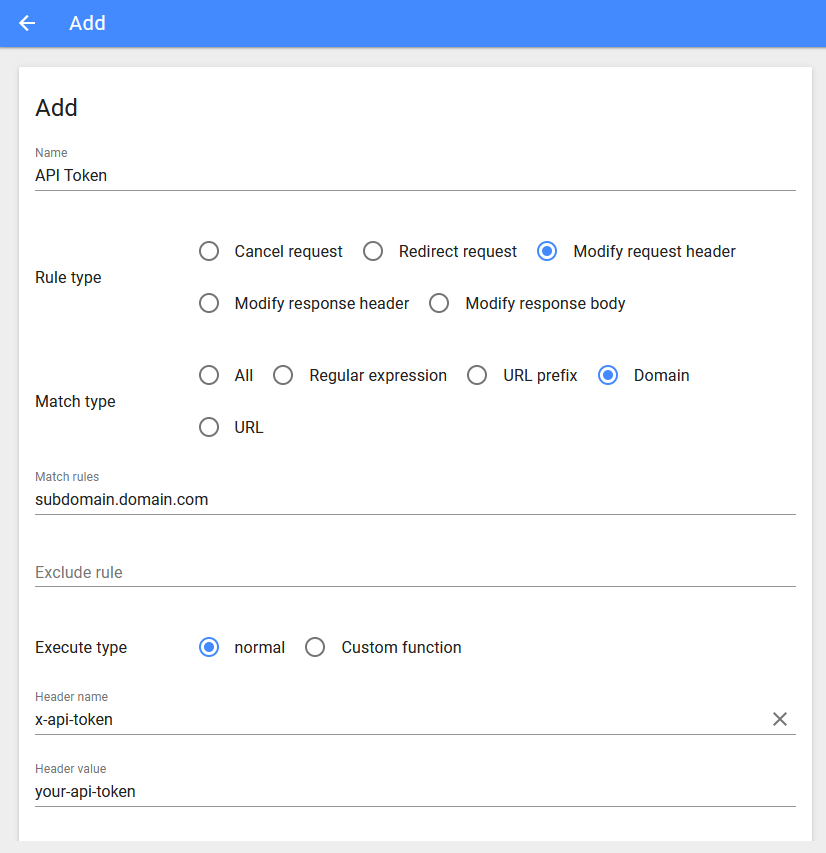
Once you have your modified header added to the browser extension, verify it by reading the section [Verifying Modified Headers](#verifying-modified-headers).
#### Extension: Modify Header Value
[Modify Header Value](https://prod.outgoing.prod.webservices.mozgcp.net/v1/6eb6158dedc247c12e9010ccc61bb16738f844da3ac6765a5f43f7eb5ebace6f/https%3A//mybrowseraddon.com/modify-header-value.html) can add, modify or remove an HTTP-request-header for all requests on a desired website or URL. This Firefox add-on is very useful if you are an App developer, website designer, or if you want to test a particular header for a request on a website.
Once you install the browser extension above, open the **settings**.

You need to add a new rule which injects your modified header into the specified domain.

Once you have your modified header added to the browser extension, verify it by reading the section [Verifying Modified Headers](#verifying-modified-headers).
---
## Verifying Modified Headers
This section explains how you can verify that your modified request header is being received by your server.
Access the subdomain where you have applied an API-TOKEN. Once the page loads, open the **Developer Console**.
- Firefox: `SHIFT + CTRL + I`
- Chrome: `SHIFT + CTRL + I`
- Safari: `Option + ⌘ + C`
A box should appear either on the right or bottom. Within the **Console** tab, ensure you have `Errors`, `Warnings`, `Logs`, `Info`, and `Debug` selected. They will have lines under them when enabled.

Next, refresh your browser's page.
- Firefox: `SHIFT + F5`
- Chrome: `SHIFT + F5`
- Safari: `OPTION + ⌘ + E`
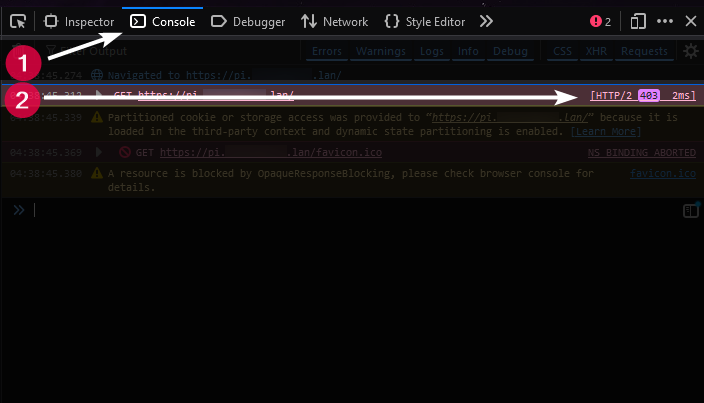
In the bottom box, you should see a list of actions, which display your domain name, a status code, and the number of milliseconds it took to perform the action.
```
01:00:25.139 GET https://sub.yourdomain.com [HTTP/2 403 1ms]
```
- `403` status: API-TOKEN was not accepted.
- `200` status: API-TOKEN was accepted. (along with being able to actually see your site)
Typically with a `403` status, you can click the box that contains the status code with your domain, which will expand a box and show you the headers that were passed to the site, including your `API-TOKEN`.
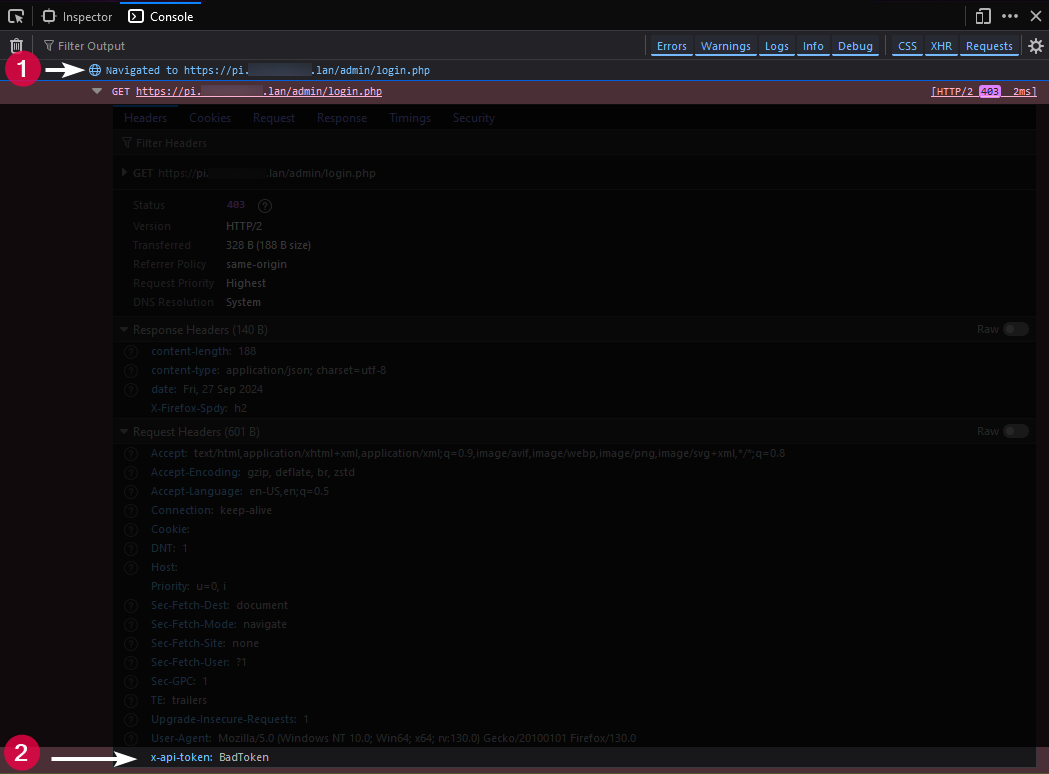
In the example above, we've passed `BadToken` which can be seen in the header response.
---
## Local Install
Traefik comes with the ability to install this plugin locally without fetching it from Github.
Download a local copy of this plugin to your server within your Traefik installation folder.
```shell
git clone https://github.com/Aetherinox/traefik-api-token-middleware.git
```
If you are running **Docker**, you need to mount a new volume:
> [!WARNING]
> The path to the plugin is **case sensitive**, do not change the casing of the folders, or the plugin will fail to load.
```yml
services:
traefik:
container_name: traefik
image: traefik:latest
restart: unless-stopped
volumes:
- ./traefik-api-token-middleware:/plugins-local/src/github.com/Aetherinox/traefik-api-token-middleware/
```
### Static File
Open your **Traefik Static File** and change `plugins` to `localPlugins`.
#### File (YAML)
```yaml
# Static configuration
experimental:
localPlugins:
traefik-api-token-middleware:
moduleName: "github.com/Aetherinox/traefik-api-token-middleware"
version: "v0.1.4"
```
#### File (TOML)
```toml
# Static configuration
[experimental.localPlugins.traefik-api-token-middleware]
moduleName = "github.com/Aetherinox/traefik-api-token-middleware"
version = "v0.1.4"
```
### Dynamic File
For local installation, your dynamic file will contain the same contents as it would if you installed the plugin normally.
#### File (YAML)
```yaml
# Dynamic configuration
http:
middlewares:
api-token:
plugin:
traefik-api-token-middleware:
authenticationHeader: true
authenticationHeaderName: X-API-TOKEN
authenticationErrorMsg: "Invalid token"
bearerHeader: true
bearerHeaderName: Authorization
removeHeadersOnSuccess: true
removeTokenNameOnFailure: false
timestampUnix: false
tokens:
- your-api-token
```
#### File (TOML)
```toml
# Dynamic configuration
[http]
[http.middlewares]
[http.middlewares.api-token]
[http.middlewares.api-token.plugin]
[http.middlewares.api-token.plugin.traefik-api-token-middleware]
authenticationHeader = true
authenticationHeaderName = "X-API-TOKEN"
authenticationErrorMsg = "Invalid token"
bearerHeader = true
bearerHeaderName = "Authorization"
removeHeadersOnSuccess = true
removeTokenNameOnFailure = false
timestampUnix = false
tokens = ["your-api-token"]
```
---
## Contributors ✨
We are always looking for contributors. If you feel that you can provide something useful to Gistr, then we'd love to review your suggestion. Before submitting your contribution, please review the following resources:
- [Pull Request Procedure](.github/PULL_REQUEST_TEMPLATE.md)
- [Contributor Policy](CONTRIBUTING.md)
Want to help but can't write code?
- Review [active questions by our community](https://github.com/Aetherinox/traefik-api-token-middleware/labels/help%20wanted) and answer the ones you know.
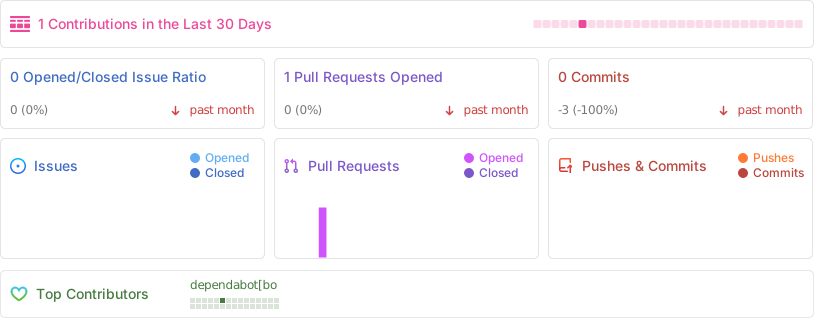
The following people have helped get this project going:
[![Contributors][contribs-all-img]](#contributors-)
[general-npmjs-uri]: https://npmjs.com
[general-nodejs-uri]: https://nodejs.org
[general-npmtrends-uri]: http://npmtrends.com/traefik-api-token-middleware
[github-version-img]: https://img.shields.io/github/v/tag/Aetherinox/traefik-api-token-middleware?logo=GitHub&label=Version&color=ba5225
[github-version-uri]: https://github.com/Aetherinox/traefik-api-token-middleware/releases
[npm-version-img]: https://img.shields.io/npm/v/traefik-api-token-middleware?logo=npm&label=Version&color=ba5225
[npm-version-uri]: https://npmjs.com/package/traefik-api-token-middleware
[pypi-version-img]: https://img.shields.io/pypi/v/traefik-api-token-middleware-plugin
[pypi-version-uri]: https://pypi.org/project/traefik-api-token-middleware-plugin/
[license-mit-img]: https://img.shields.io/badge/MIT-FFF?logo=creativecommons&logoColor=FFFFFF&label=License&color=9d29a0
[license-mit-uri]: https://github.com/Aetherinox/traefik-api-token-middleware/blob/main/LICENSE
[github-downloads-img]: https://img.shields.io/github/downloads/Aetherinox/traefik-api-token-middleware/total?logo=github&logoColor=FFFFFF&label=Downloads&color=376892
[github-downloads-uri]: https://github.com/Aetherinox/traefik-api-token-middleware/releases
[npmjs-downloads-img]: https://img.shields.io/npm/dw/%40aetherinox%2Ftraefik-api-token-middleware?logo=npm&&label=Downloads&color=376892
[npmjs-downloads-uri]: https://npmjs.com/package/traefik-api-token-middleware
[github-size-img]: https://img.shields.io/github/repo-size/Aetherinox/traefik-api-token-middleware?logo=github&label=Size&color=59702a
[github-size-uri]: https://github.com/Aetherinox/traefik-api-token-middleware/releases
[npmjs-size-img]: https://img.shields.io/npm/unpacked-size/traefik-api-token-middleware/latest?logo=npm&label=Size&color=59702a
[npmjs-size-uri]: https://npmjs.com/package/traefik-api-token-middleware
[codecov-coverage-img]: https://img.shields.io/codecov/c/github/Aetherinox/traefik-api-token-middleware?token=MPAVASGIOG&logo=codecov&logoColor=FFFFFF&label=Coverage&color=354b9e
[codecov-coverage-uri]: https://codecov.io/github/Aetherinox/traefik-api-token-middleware
[contribs-all-img]: https://img.shields.io/github/all-contributors/Aetherinox/traefik-api-token-middleware?logo=contributorcovenant&color=de1f6f&label=contributors
[contribs-all-uri]: https://github.com/all-contributors/all-contributors
[github-build-img]: https://img.shields.io/github/actions/workflow/status/Aetherinox/traefik-api-token-middleware/release.yml?logo=github&logoColor=FFFFFF&label=Build&color=%23278b30
[github-build-uri]: https://github.com/Aetherinox/traefik-api-token-middleware/actions/workflows/release.yml
[github-build-pypi-img]: https://img.shields.io/github/actions/workflow/status/Aetherinox/traefik-api-token-middleware/release-pypi.yml?logo=github&logoColor=FFFFFF&label=Build&color=%23278b30
[github-build-pypi-uri]: https://github.com/Aetherinox/traefik-api-token-middleware/actions/workflows/pypi-release.yml
[github-tests-img]: https://img.shields.io/github/actions/workflow/status/Aetherinox/traefik-api-token-middleware/tests.yml?logo=github&label=Tests&color=2c6488
[github-tests-uri]: https://github.com/Aetherinox/traefik-api-token-middleware/actions/workflows/tests.yml
[github-commit-img]: https://img.shields.io/github/last-commit/Aetherinox/traefik-api-token-middleware?logo=conventionalcommits&logoColor=FFFFFF&label=Last%20Commit&color=313131
[github-commit-uri]: https://github.com/Aetherinox/traefik-api-token-middleware/commits/main/
